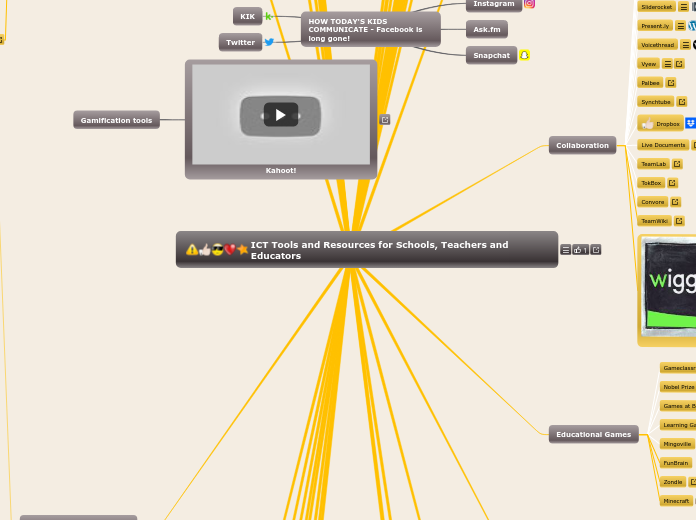
This is a collection of usefull web 2.0 and social media applications for anyone in education. I have tried them all and I have seen the potential in them. Now it is up to you and your imagination to use them in your teaching or when studying! I add new tools often so check back for new additions to this ever growing map of what the web has to offer. Follow me on http://twitter.com/elearningjzpr Jesper
Flickr. Vuvox. Animoto. Photopeach. Picasa. Yodio. Glogster.
Audacity is a free audio editor which works very well for a lot of things. From recording and editing podcasts to more advanced recording and audio editing. It is light and easy to use and an excellent choice for both teachers and students. Great for: - creating podcasts - creadting and editing your own audio lessons - creating radio shows
Myna is a fresh new online audio editor under the excellent application set Aviary (for image editing and handling). While it works similar as Audacity in some ways, Myna is more of a music editor where you can compose and mix your own tracks and songs. You can either import files and samples or use the samples in Myna's own sample library. Great for: - music making - music classes - as an introduction to computerized music making - podcasts
Voicethread is an extremely useful tool in a classroom situation, or perhaps rather in an outside classroom situation, when students work from home. Basically Voicethread works as a communication hub where people can meet and discuss around a topic (a video, images etc). There are five ways you can interact with the rest of the attandees: microphone, webcam, typing, mobile phone or by drawing. Great for: - homework - language learning - collaboration - history and science teaching - distance learning
Video editing. Video Sharing. Educational. Web cam software and tools. Video collaboration and presentation. Live broadcasting. Windows Movie Maker. WMM is one of the most commonly used free video editing tools, although I have a feeling that Microsoft more or less have put it to sleep. The "new" version in the Live series is not a satisfactory upgrade, if you ask me. I would stick with 2.1. And I would use VideoSpin instead of WMM.. VideoSpin. Here's what Windows Movie Maker could have been if Microsoft put some effort into its free video editing software. Instead it is Pinnacle that brings an excelent free editing tool that is perfectly suited for basic video editing.. Buzznet. Vimeo. Youtube. Metacafe. CosmoLearning. TED. Teachers.tv. Edoboard. Voicethread. Discovery Education. Teacher Tube. Woopid. Vocab Videos. Movieclips. Camstudio. Edoboard. Voicethread. Synchtube. Wetoku. Great tool for interviewing using webcam and microphone. Embed everywhere. High quality video and audio.. Kyte.tv. Ustream. Bambuser. Livestream. Stickam. Justin.TV. make.tv.
Xtranormal. GoAnimate. Animasher. Dvolver. Doink.com. Moovl. Muvizu.
MSN Messenger. MSN Messenger, or Live Messenger, is probably the most popular IM client.. ICQ. Skype. Skype has for long been the no.1 VoIP service but lately it is being challenged by many new actors on the market. However, Skype is competent, trustworthy and brings great quality.. Google Voice. At the moment only avaliable in North America. A great competitor and threat towards Skype. Can be huge when it is opened to the rest of the world.. Twitter. World's most popular micro-blogging service might not be impressive at the beginning, but once you learn how to use it and how to get the most of it, it is a great tool. Great for research, searching, communication, networking, news reading and link sharing.. Present.ly. DimDim. UPDATE: Dimdim has been aquired by big ugly company. Discontinued. A shame, really. Dimdim has huge potential! Use it for group communication, web meetings and collaboration. Also check out the new Dimdim Virtual Classroom product!. Vyew. Edoboard. 6 Rounds. 6rounds is a live meeting point. It's a truly unique, exciting and interactive online environment, offering users a variety of experiences that they enjoy together. Using a combination of webcams, real-time games, social activities and media engagements, we present a wide range of opportunities: from watching videos, playing real-time games, listening to music, facebooking and youtubing, to shopping together and beyond. 6rounds users meet their friends and friends to be, by inviting each other to 1 on 1 Rounds or by joining timed Rounds, where they are matched with other interesting new people based on common interests and share experiences together. 6rounds is free for everyone to join and offers a safe place to have fun with friends and to meet new like-minded people. - 6rounds.com. Palbee. Wetoku. Great tool for interviewing using webcam and microphone. Embed everywhere. High quality video and audio.. Convore.
Toondoo.
Yola. Wix. DevHub. Wordpress.com. Project ROME. Every now and then you find things that puts that dreamy smile on your face. Adobe just gave me that smile with the new content creation and publishing tool Project ROME. I am indeed totally blown away by the possibilities this neat tool could give me as a publisher, teacher and geek. What does it do? Well, what doesn't it do. It does everything I want it to do. It lets me create presentations, websites, interactive lessons, showcases, portfolios and more. This right in the web app or in a desktop app (Adobe AIR). I can insert media, video, images, buttons, interactive objects, maps and decide myself what will happen when I click, hover my mouse over an object or...or...or... Well, think about software such as Dreamweaver or Flash, but so much easier. A couple of years ago I did my best to learn how to code HTML and Flash in Dreamweaver and it so complicated I gave up pretty soon. Today Adobe has opened up the door to a totally new and modern way of coding without knowing a single piece of code. And it's good. It's so darn good I can't stop smiling. Project ROME as you will see it now, is some kind of a preview version, but I can't see any restrictions or anything that would limit you from producing quality content right away. Export your work to Flash, html, pdf or whatever you like and you are on your way. What I like the best is the fact that Project ROME comes in an Education version with close Google Apps and Moodle integration. Give it a spin, play around and discover the new way of content creation and publishing - it just got easy! READ MORE AT http://swedteach.blogspot.com/. BuildorPro. Project ROME. Every now and then you find things that puts that dreamy smile on your face. Adobe just gave me that smile with the new content creation and publishing tool Project ROME. I am indeed totally blown away by the possibilities this neat tool could give me as a publisher, teacher and geek. What does it do? Well, what doesn't it do. It does everything I want it to do. It lets me create presentations, websites, interactive lessons, showcases, portfolios and more. This right in the web app or in a desktop app (Adobe AIR). I can insert media, video, images, buttons, interactive objects, maps and decide myself what will happen when I click, hover my mouse over an object or...or...or... Well, think about software such as Dreamweaver or Flash, but so much easier. A couple of years ago I did my best to learn how to code HTML and Flash in Dreamweaver and it so complicated I gave up pretty soon. Today Adobe has opened up the door to a totally new and modern way of coding without knowing a single piece of code. And it's good. It's so darn good I can't stop smiling. Project ROME as you will see it now, is some kind of a preview version, but I can't see any restrictions or anything that would limit you from producing quality content right away. Export your work to Flash, html, pdf or whatever you like and you are on your way. What I like the best is the fact that Project ROME comes in an Education version with close Google Apps and Moodle integration. Give it a spin, play around and discover the new way of content creation and publishing - it just got easy! READ MORE AT http://swedteach.blogspot.com/.
Facebook. Myspace. Ning. LifeBlob. Buzznet. Quora. Google+.
BetterLesson.org. Softschool. Sparknotes. LessonWriter. Qwiki. Gapminder. LearnBoost.
Wordpress. The most used blogging platform Wordpress, comes in two versions - either hosted or self-hosted. The self-hosted version is extremely powerful and yet easy to install and manage. Thousands of themes and plugins makes Wordpress the No.1 platform for blogging and also lately CMS. Great for: - blogging - content management system - class blogging - school website. Wordpress MU. Wordpress MU is Wordpress on steroids. This is the tool to use if you want to host more than one blog on one server. Why not give each of your student their own Wordpress blog? You can with Wordpress MU! Great for: - student blogs - multiple blogs. Blogger. Blogger (same as Blogspot) is Google's own blogging tool. Easy to use, comes in many languages and very competent. Great for: - blogging. Blogg.se. Blogg.se is a Swedish blog platform similar to Blogger.. Squarespace. This is a favourite of mine due to great looking themes and templates. However it is not free and you can choose between a number of nice looking temlplates. Great support and many features makes Squarespace an underdog in the blog-o-sphere. Great for: - blogging - websites. Posterous. This is blogging made easy. And I mean really easy. The main idea behind Posterous is to let bloggers blog using email. Simply email your articles to Posterous and they do the rest. If you insert image or video links, they will show up as embedded! The simplicity makes Posterous the best blogging service today. Great for: - blogging - photo sharing - cross-posting. Tumblr. Tumblr is another easy blogging tool with plenty of nice looking themes.. Twitter. Twitter has reveloutionized the social web only the last couple of months. It grows rapidly and it is on the way to become the new way of reading news online. Many users have more or less ditched their RSS readers in favour of Twitter. It may look simple and it is simple, but there is also an entire science behind Twitter in order to get the most out of it. When you get the hang out of Twitter it could become as useful as the Internet itself. Great for: - communication - reading and getting news - staying up to date - keeping contact with friends and collegues - researching.
280 Slides. Prezi. Vuvox. Mindomo. Google Docs. Zoho. Sliderocket. Voicethread. Vyew. Yodio. Glogster. Wordle. Toondoo. Edoboard. Slideshare. Xerte. Gapminder. Mind42. XMind. Spicynodes. Weblist. Tagul. Tagxedo.
Schooltraq.
Scribblemaps. Google Maps. Bing Maps (beta). Gapminder.
Noteflight. Absolutely brilliant music tool to play and compose music scores.. BoJam. JoyTunes. uJam. Audiotool. Audiotool is an awesome flash based online music creation tool that lets you create music using samples and effects. Easy to learn with great audio quality. There's a nice social aspect and an active community as well..
Google Docs. Google Docs is extremely useful in many ways and in combination with Google Apps for Education it simply becomes a better choice of an Office suite than any other, mostly because everything is more or less happening online. I could write books on how Google Docs helped me as a teacher, but for now I will only give you my suggestions on use Great for: - portfolio - writing essays etc. - collaboration between students and students but also between students and teacher - creating, correcting and marking online tests (watch my screencast: http//bit.ly/3kI73y -. Google Wave. Google Wave is a feature rich collaboration tool developed with businesses in mind, but it has potential to be a great tool even within education. Might not be suitable for primary school, but I can see it be very handy when using it together with older students. Great for: - collaboration around specific topics - staff collaboration - as an intranet for school staff or other institutions Google Wave is under heavy development and I am sure the upcoming public releases will contain a lot more features useful in education.. 6 Rounds. 6rounds is a live meeting point. It's a truly unique, exciting and interactive online environment, offering users a variety of experiences that they enjoy together. Using a combination of webcams, real-time games, social activities and media engagements, we present a wide range of opportunities: from watching videos, playing real-time games, listening to music, facebooking and youtubing, to shopping together and beyond. 6rounds users meet their friends and friends to be, by inviting each other to 1 on 1 Rounds or by joining timed Rounds, where they are matched with other interesting new people based on common interests and share experiences together. 6rounds is free for everyone to join and offers a safe place to have fun with friends and to meet new like-minded people. - 6rounds.com. Sliderocket. Share, create, store and upload your presentations with the rest of the world. Great for: - finding presentations for your own use - sharing your own presentations - photo slides. Present.ly. Present.ly is a real-time collaboration tool working much like Twitter, Google Wave and Friendfeed combined. Great for: - collaboration - micro blogging. Voicethread. Voicethread is an extremely useful tool in a classroom situation, or perhaps rather in an outside classroom situation, when students work from home. Basically Voicethread works as a communication hub where people can meet and discuss around a topic (a video, images etc). There are five ways you can interact with the rest of the attandees: microphone, webcam, typing, mobile phone or by drawing. Great for: - homework - language learning - collaboration - history and science teaching - distance learning. Vyew. Live-conferencing, presentation and communication tool.. Palbee. Synchtube. Dropbox. Live Documents. TeamLab. TokBox. Convore. TeamWiki.
Gameclassroom. Nobel Prize Game suggestions. Games at BBC. Learning Games for Kids. Mingoville. FunBrain.
Joomla. Mambo. Moodle. Schoology.
Location. Augmented Reality. Reference. File Sharing. E-books. Study tools. Foursquare. Gowalla. Loopt. Trip-Journal. On Location. Dropl.at. For article on Dropl.at: http://www.jzpr.se/elearning/2011/02/dropl-at-can-make-a-difference-in-mlearning-and-education/. Layar. Wikitude. Google Sky Map. Aldiko book reader. Wapedia. Dictionairy.com. Urban Dictionairy. Wolfram Alpha Course Assitants. Dropl.at. For article on Dropl.at: http://www.jzpr.se/elearning/2011/02/dropl-at-can-make-a-difference-in-mlearning-and-education/. Kno.com. Bento (iPad/Apple). Toodledo (iPad/Apple).
Myleaningspace. http://www.mylearningspace.com.au/. Datruss (David Truss). http://pairadimes.davidtruss.com/. ShellTerrell. etalbert. http://talbertstechtalk.blogspot.com/. TeachaKidd. http://www.macmomma.blogspot.com/. rmbyrne. http://freetech4teachers.com/. web20classroom (Steven W. Anderson). http://web20classroom.blogspot.com/. Tombarrett. http://edte.ch/. CathyLAndersson. http://cathyandersonblog.com/. c4lpt (Jane Hart). http://www.c4lpt.co.uk/. Swedishteacher.
Office tools online such as Google Docs and other web based office suites.
Google Docs. Zoho. OpenOffice. ThinkFree. Peepel. Live Documents. MS Office Live.
Tools for capturing screenshots or creating screen casts.
Screenr. CamStudio. Screentoaster. Edoboard. Graabr.
CosmoLearning. Gameclassroom. WiZiQ.
PBWiki. Media wiki. Wikispaces. Wetpaint.
Edmodo. Elgg. Woopid. CosmoLearning. Eduslide. Vocab Videos. Mingoville. Wiziq. Edu 2.0. LessonWriter. Teach Parents Tech. The Polyglot Project.
Evernote. Quickylyst.
Qwiki. Qwiki answers to a need I have been looking for for quite some time. In short, Qwiki takes text and images of the Internet (from Wikipedia) and turns it into an automated slide with a computer generated voice-over. This alone is a bit of genius, but in an educational use this could be even more genius. I am talking about using Qwiki as a teaching tool for students with learning disabilities such as dyslexia. People with dyslexia are often dependent on both visual and auditory input in order to understand text fully, especially young students in school. With Qwiki you get images and text combined with a voice (voice synthesis)that reads the text. Qwiki is in Alpha stage at the moment and I believe there are still features to be added. I am very much looking forward to see where the Qwiki team will take their product next. I am not sure they have thought about the educational aspect of their service, but I hope they do now. Teachers who work with students with learning disabilities have been looking for ages for an easy-to-use tool that lets them create animated slides with both images, text and voice and then have it published on the Internet. Qwiki could be this one tool that answers our prayers. However, there are a couple of features I would like in order to make Qwiki really useful for this purpose: - a feature to control speed of voice and the rolling text - being able to use your own text - a track bar for rewind/forward within the slide - personal accounts where you can favorite presentations/slides - a voice synthesis for other languages as well as English. Teach Parents Tech. Schooltraq. Jux. http://www.socrative.com.
Office suites. Office tools online such as Google Docs and other web based office suites.. Digital Publishing. Mobile and tablet applications. Research tools. Presentation. Educational Games. Studying aid. Google Docs. Zoho. OpenOffice. ThinkFree. Peepel. Live Documents. MS Office Live. Joomag. Issuu. Location. Augmented Reality. Reference. File Sharing. E-books. Study tools. Wolfram Alpha. Wikipedia. Woopid. Sparknotes. Qwiki. Gapminder. Show/World. Space.com. Fotopedia. 280 Slides. Prezi. Vuvox. Mindomo. Google Docs. Zoho. Sliderocket. Voicethread. Vyew. Yodio. Glogster. Wordle. Toondoo. Edoboard. Slideshare. Xerte. Gapminder. Mind42. XMind. Spicynodes. Weblist. Tagul. Tagxedo. Gameclassroom. Nobel Prize Game suggestions. Games at BBC. Learning Games for Kids. Mingoville. FunBrain. Schooltraq. Schoology. Foursquare. Gowalla. Loopt. Trip-Journal. On Location. Layar. Wikitude. Google Sky Map. Aldiko book reader. Wapedia. Dictionairy.com. Urban Dictionairy. Wolfram Alpha Course Assitants. Dropl.at. For article on Dropl.at: http://www.jzpr.se/elearning/2011/02/dropl-at-can-make-a-difference-in-mlearning-and-education/. Kno.com. Bento (iPad/Apple). Toodledo (iPad/Apple).
Diigo. Del.ico.us. Twine. Digg. Stumbleupon.
Second Life. Edusim. Mingoville.
Wolfram Alpha. Wikipedia. Woopid. Sparknotes. Qwiki. Gapminder. Show/World. Space.com. Fotopedia.
Mingoville. LiveMocha. Google Translate. Digital Dialects. LessonWriter.
Gapminder. Mindomo. Prezi. XMind. Mind42. Xerte.
Scribd. Issuu. Slideshare. Calameo. Sparknotes.
Youtube. Hugosite (ENG). Mr Duncan in England (ENG). EngVid (ENG). English with Jennifer (ENG). EF podEnglish (ENG). TeacherTube.
Joomag. Issuu.
CollaborizeClassroom. Schoology. Edmodo. Edu 2.0. Schooltraq.
The Polyglot Project.
http://www.facebook.com/teacherchronicles.