Logiciel de cartes mentales avec synchronisation et collaboration en ligne
Mindomo est votre logiciel de cartes mentales qui combine de manière unique le travail hors ligne avec la modification et la collaboration en ligne.
Logiciel de cartes mentales autonome, facile à utiliser.
Avec son interface facile à utiliser, Mindomo rend votre expérience avec les cartes mentales aussi agréable que possible. De nouvelles idées vous traversent constamment l'esprit. Pour en profiter au mieux, vous pouvez accéder à Mindomo partout, à partir d’un smartphone, d’une tablette, d’un PC ou d’un ordinateur portable. Les possibilités sont illimitées, tout comme votre imagination. Utilisez Mindomo pour organiser et structurer vos pensées. Soyez plus créatif et générez de nouvelles idées en utilisant toutes les fonctionnalités disponibles !

Encadrez vos idées dans divers formats visuels pour les rendre plus visibles.

Enrichissez vos cartes mentales en utilisant une grande variété de styles de formatage et de thème.

Créez des cartes mentales sur Mac, Windows, et Linux, et bénéficiez des fonctionnalités avancées de Mindomo.

Synchronisez vos cartes mentales hors ligne et en ligne pour partager des informations et créer un consensus sur des idées et des projets.
Faites passer votre expérience hors ligne au niveau supérieur en utilisant les avantages en ligne basés sur le cloud.
Profitez de la même interface conviviale de la version hors ligne de Mindomo avec des avantages supplémentaires. Inscrivez-vous et explorez tous ces avantages en ligne: de multiples intégrations avec vos applications préférées, une collaboration en temps réel avec votre équipe, un stockage cloud pour vos cartes et plus encore. Profitez de la flexibilité et choisissez votre plateforme préférée. Travaillez sur vos cartes n'importe où, n'importe quand !

Simplifiez votre travail et tirez le meilleur parti de celui-ci en intégrant Mindomo à vos applications préférées: Google Drive, Microsoft Teams, Office365 et plus encore…

Faites passer vos compétences en travail d'équipe au niveau supérieur. Travaillez avec les membres de votre équipe et modifiez vos cartes mentales en ligne en temps réel.

Capturez des idées de la manière la plus efficace. Trouvez l'inspiration et des astuces dans notre large gamme de modèles disponibles. 100% personnalisable.

Choisissez votre type de compte préféré: Éducation (élève ou enseignant), Travail ou Personnel et commencez avec un abonnement gratuit.
De belles structures
Personnalisez la carte mentale et transformez-la en carte conceptuelle ou en liste si cela vous convient mieux. Organisez-la comme vous l'imaginez avec un seul clic ou avec la fonction glisser-déposer.
Lorsque les gens comprennent soudainement quelque chose, ils disent "Oh, je vois!"
Voir les choses permet de les comprendre d'un coup d'œil. Imaginez que quelqu'un vous donne une description écrite d'un carrefour routier très fréquenté. Il serait difficile de se faire une idée précise de ce qui se passe.
Il n'y aura pas deux personnes qui auront la même interprétation. Mais si l'on vous montrait plutôt une photo du carrefour, vous sauriez immédiatement s'il s'agit d'une conception efficace ou d'un affreux désordre. Il ne vous faudrait que quelques secondes de plus pour repérer les dangers, voir ce qui se passe et anticiper ce qui est sur le point de se produire. Votre esprit est plus rapide et plus apte à interpréter des scènes visuelles qu'à traiter des textes compliqués.
Mindomo peut vous aider à faire du brainstorming, à développer et à communiquer vos idées à l'aide de différents types de visualisation, y compris les cartes mentales. Tout commence par une session de brainstorming et peut se poursuivre.
Les cartes mentales numériques et autres formes de diagrammes en arborescence ont une propriété unique et puissante: elles permettent d'ajouter un nombre pratiquement illimité de détails. Si vous avez besoin de décrire quelque chose de manière plus détaillée, il vous suffit de le diviser en plusieurs ramifications.
La cartographie mentale est parfaite pour les choses qui semblent simples au départ mais qui deviennent plus détaillées au fur et à mesure que vous commencez à mieux les comprendre. Mindomo se charge de réorganiser le diagramme afin que les informations ne se chevauchent pas, qu'elles restent belles et qu'il soit facile de naviguer.
Nous pouvons qualifier un diagramme de beau lorsque sa présentation reflète élégamment l'essence d'une situation. La carte mentale devient une partie de votre pensée, changeant vos perceptions et mettant en évidence les points nécessitant plus d'attention. Elle vous offre des moments de "Je vois!" qu'il est difficile d'atteindre en pensant avec des mots et des phrases.
-
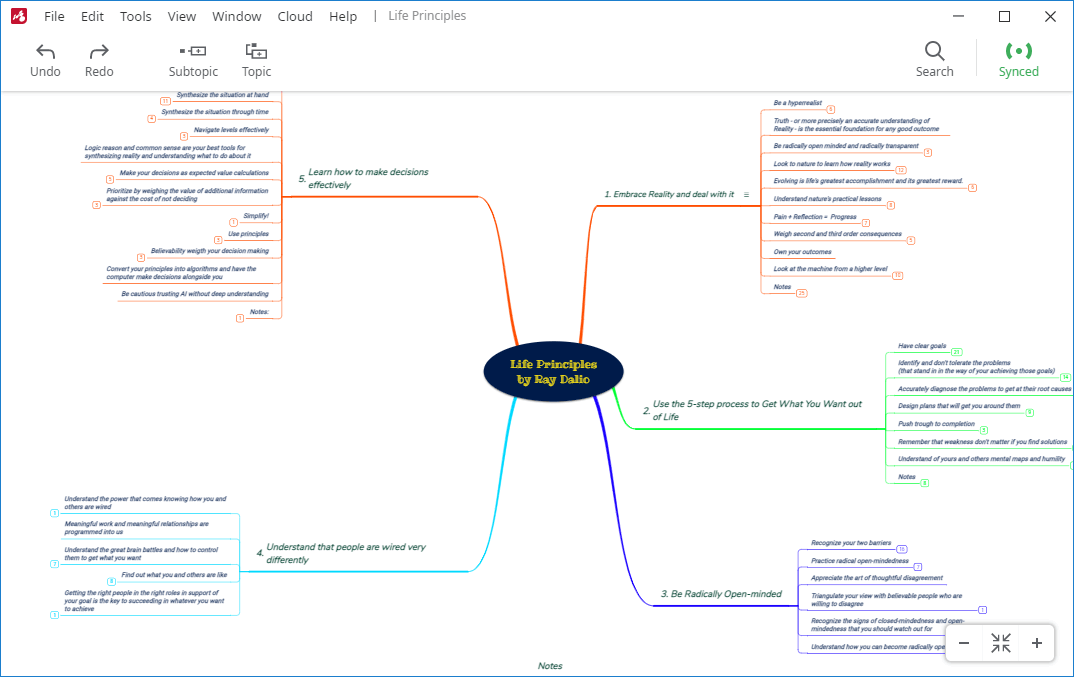
Cartes mentales
Choisissez des thèmes et des images dans des galeries prédéfinies, réorganisez le tout grâce à la fonction glisser-déposer, puis enregistrez votre carte au format souhaité.
-
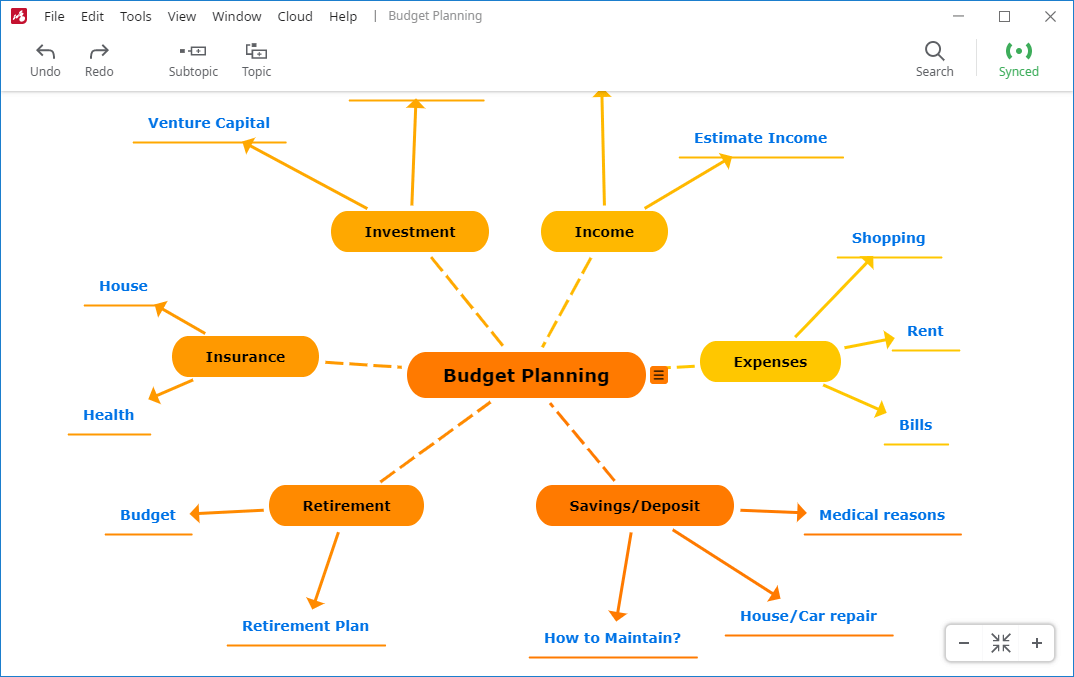
Cartes conceptuelles
Bénéficiez d'une structure plus flexible, de descriptions sur les branches ainsi que de multiples branches entre les sujets.
-
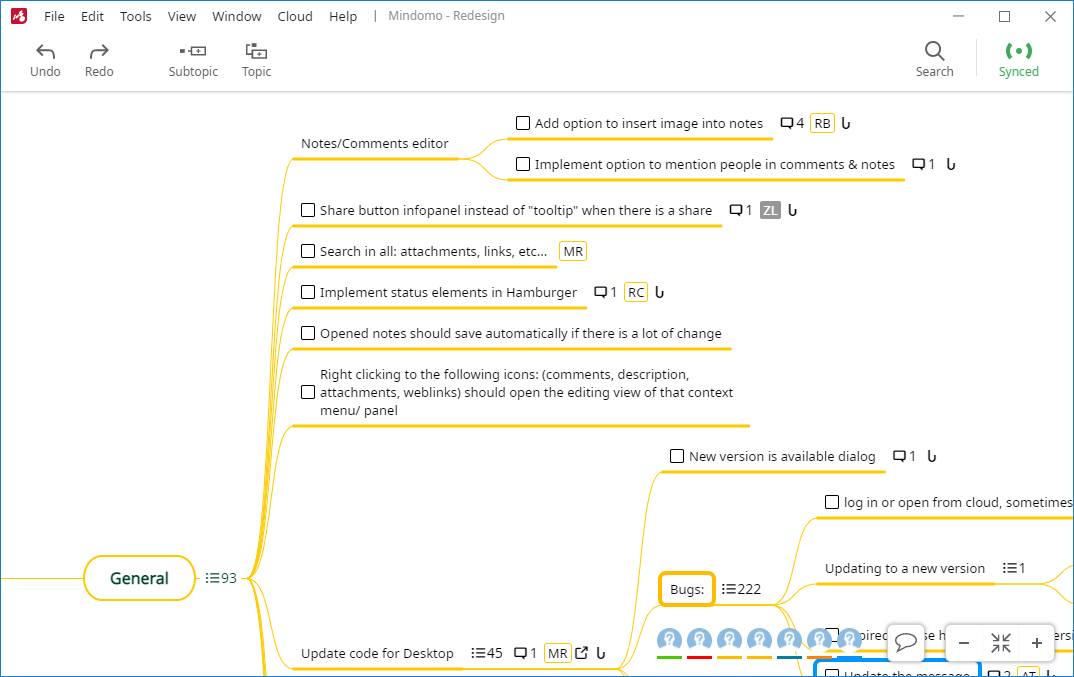
Cartes de tâches
Organisez et surveillez votre travail: listes de tâches faciles à réorganiser, vue d'ensemble hiérarchique, mécanisme d’échéance, etc.
-
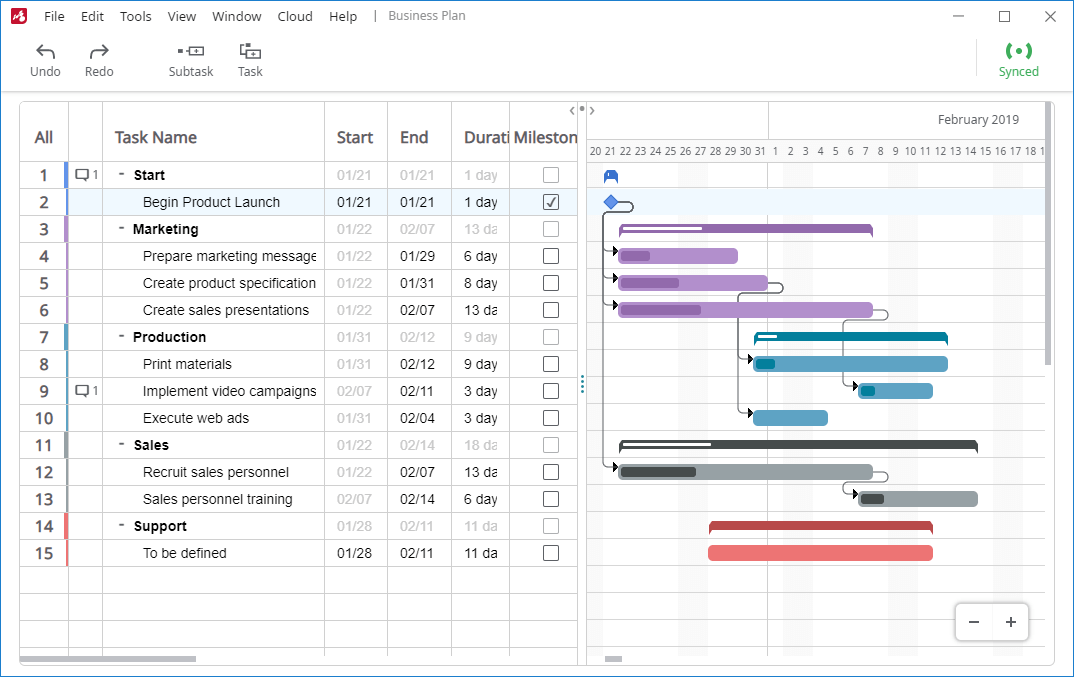
Diagrammes de Gantt
Voyez les dates de début et d'échéance des tâches, leurs interdépendances et les étapes suivantes.
-
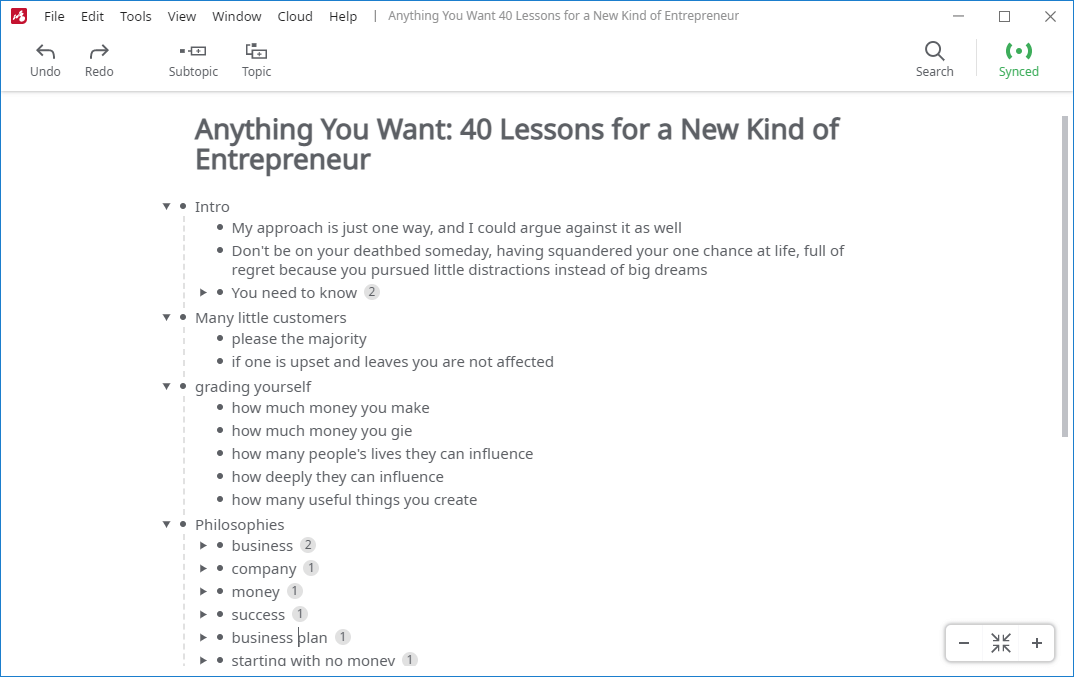
Listes
Créez des listes à partir de zéro ou passez d'une vue de carte mentale à une vue de liste en un seul clic.
-
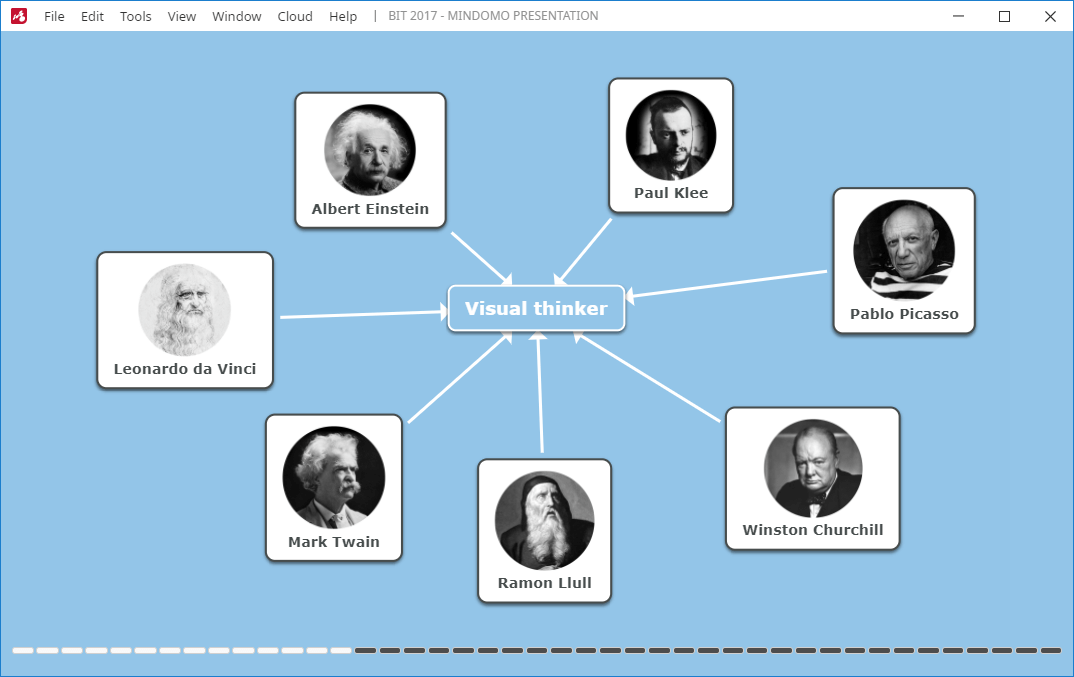
Présentations
Présentez votre travail et transformez vos cartes en présentations aux diapositives.
-
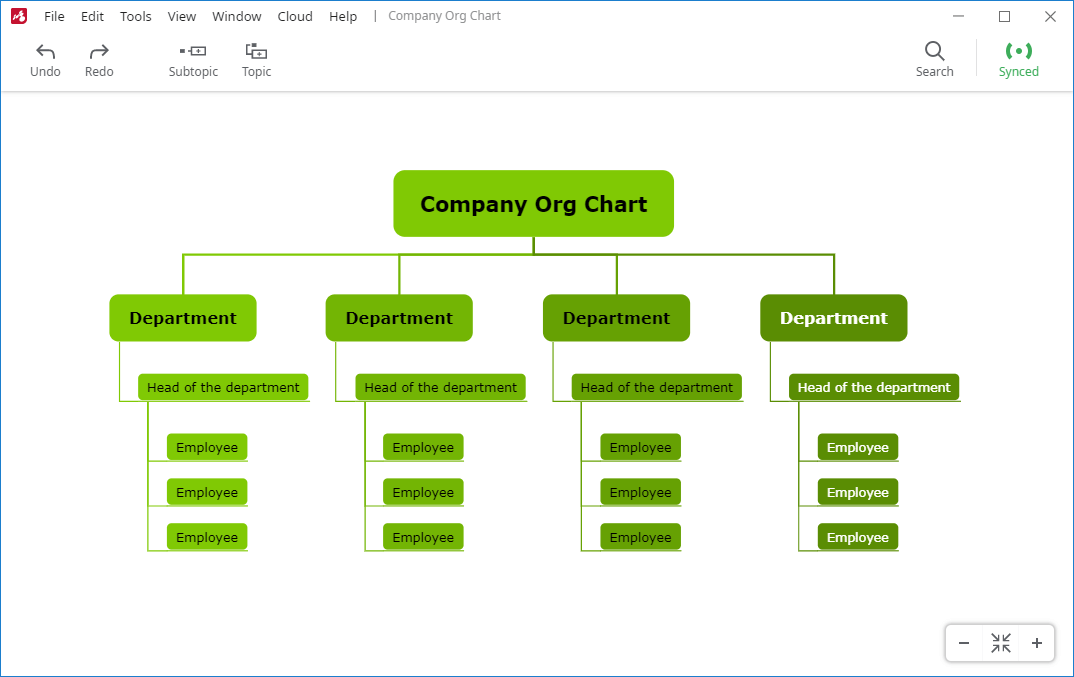
Organigrammes
Affichez différentes structures et les relations entre leurs éléments en créant des organigrammes horizontaux, à gauche, à droite ou hiérarchiques.


Une carte mentale vous montre les grandes idées et l'emplacement de tous les détails. Une carte conceptuelle vous montre comment les choses s'influencent mutuellement. Un diagramme de Gantt vous montre ce qui se passe et dans quel ordre. Le schéma d'un texte vous aide à réfléchir au flux d'un document linéaire. Toutes ces choses peuvent être vues en quelques secondes avec le bon type d'outil de visualisation. Mindomo crée sans effort tous ces types de diagrammes.
Thèmes prédéfinis et formatage personnalisable
Chaque image raconte une histoire et la première impression compte. Une carte mentale propre et ordonnée, au design accrocheur, raconte sa propre histoire, avant même que vous ne commenciez à lire les idées. Elle indique que l'auteur se soucie du contenu du diagramme et de la façon dont les autres y réagiront. Même si vous travaillez seul, cet aspect est important.
De petites choses peuvent vous distraire de votre meilleur travail. Mindomo est un outil de cartographie qui en est conscient et qui inclut une série de fonctionnalités pour vous aider à créer de beaux diagrammes. Vous pouvez contrôler le style exact, la police, la forme et la couleur des sujets individuels, ou vous pouvez utiliser un thème qui assure automatiquement la cohérence de l'ensemble.
Exprimez-vous à l'aide de cartes mentales en personnalisant tout ou en choisissant parmi nos divers thèmes de cartes et styles de sujets.
Améliorez vos cartes mentales en utilisant des fonctions créatives telles que:
Thèmes de cartes mentales
Apportez du style aux cartes avec l'un des thèmes prédéfinis créés par nos designers ou créez vos propres thèmes personnalisés.

Thèmes des sujets
Choisissez un thème de sujet comportant des couleurs, marges intérieures, bordures et nuances personnalisées.

Branches aux couleurs multiples
Choisissez l'une des 6 palettes de couleurs pour rendre les cartes mentales plus vives avec leurs branches colorées.

Un texte riche dans les sujets
Le texte de tout sujet peut être personnalisé par la taille, les effets (gras, italique, souligné, barré), la couleur et la famille de polices.

Connexions personnalisables
Définissez l'épaisseur, la couleur, la distance par rapport aux sujets supérieur/inférieur/latéral et le point d'ancrage des branches.

Types et formes de branches
Une multitude de types de branches et formes de sujets à choisir: droite, arquée, rugueuse, courbée, coude, angle, rectangle, cercle, ovale, ligne, capsule, etc.

Personnalisez le diagramme exactement comme vous le préférez. Choisissez les couleurs, formes, tailles, polices que vous aimez. Mindomo vous propose une grande variété afin d’avoir la meilleure représentation visuelle. Il est plus facile de se souvenir et de comprendre les informations quand vous les voyez clairement et que vous pouvez structurer et différencier les niveaux.
Mindomo offre une grande variété d'outils de ce type car ils sont cruciaux lorsqu'il s'agit de représentations visuelles. Ils permettent de voir clair, de différencier les niveaux et de structurer plus efficacement. Ainsi, il est plus facile de se souvenir et de comprendre l'information. En outre, ils facilitent les séances de brainstorming et permettent de générer des idées.
Les outils de cartes mentales sont conçus pour stimuler votre esprit et vous permettre d'être plus créatif, de découvrir de nouvelles idées et de nouveaux liens, de comprendre et de mémoriser des informations et de vous organiser.

Mindomo fonctionne sur tous les systèmes d'exploitation disponibles et est doté d'une gamme de fonctionnalités pour renforcer vos capacités de réflexion.
La flexibilité est un grand avantage. Mindomo n'est donc pas limité à une seule plateforme. Vous pouvez choisir votre plateforme préférée pour travailler de manière accessible.
Si vous travaillez sur Mac, Windows ou Linux, Mindomo fonctionne parfaitement bien sur toutes ces plateformes. Puis, il y a bien plus que la version Desktop. Vous pouvez créer les meilleures cartes mentales à partir de votre téléphone, tablette ou même la version cloud. Emportez votre galerie de cartes mentales partout avec vous.
Le meilleur logiciel de cartographie mentale est un outil de cartographie mentale accessible à tout moment et en tout lieu.

Indépendant de la plateforme
Installez Mindomo facilement sur tous les systèmes d'exploitation: Windows, Mac OS X, et Linux.

Une plus grande portée
Plus il y a de plateformes compatibles avec Mindomo, plus le nombre de personnes que nous pouvons atteindre est grand.

Aspect et fonctionnement uniformes
Préservez la cohérence de l’aspect et des fonctionnalités sur différents appareils.

Maintenance facile
Les mises à jour de l’application sont synchronisées immédiatement sur toutes les plateformes et tous les appareils.
Fonctionnalités qui font de Mindomo une solution fiable pour créer et partager des cartes mentales structurées par contenu et riches en styles:
Fonctionnalité d'exportation PDF qui convertit vos cartes en fichiers PDF avec le plus haut degré de précision.
Importation de cartes d'autres logiciels de cartes mentales: MindManager, Freemind, Mindmeister, XMind, et Bubbl.us.
Importation d’archives TXT, OPML, XLSX et XLS de votre ordinateur et leur transformation en cartes mentales.
Exportez des cartes mentales vers des formats divers: Freemind, MindManager, PDF, DOCX, PPTX, TXT, OPML, XML, ZIP, PNG, et XLSX.
Imprimez des cartes mentales comme archives PDF avec les dimensions suivantes: A2, A3, A4, Grand Livre, Lettre, et Original.
Avec le mode Présenter, vous pouvez créer une présentation sans utiliser une application tierce, ce qui la rend aussi efficace que possible.
Ajoutez des notes, des liens, des icônes, des fichiers multimédia (images, vidéos, fichiers audio) depuis votre ordinateur, votre application de stockage en cloud ou en les recherchant directement en ligne.
Trouvez des mots ou expressions dans toutes les cartes mentales en utilisant la fonction de recherche de texte.
Travaillez simultanément sur vos cartes grâce à la fonctionnalité d’utilisation en simultané.
Collaboration en temps réel et synchronisation automatique de vos cartes mentales entre les appareils.
Synchronisation hors ligne ou en ligne et partage de fichiers locaux
Mindomo permet le travail hors ligne si vous n’avez pas de connexion Internet ou quand vous travaillez à distance. Enregistrez vos modifications rapidement et synchronisez-les ensuite !

Intégrations
L'une des caractéristiques les plus importantes du meilleur logiciel de cartographie mentale est représentée par les intégrations disponibles. Que vous utilisiez cet outil pour le travail, l’apprentissage ou la croissance personnelle, il existe des applications, des services de stockage cloud ou des systèmes de gestion de l'apprentissage que vous pouvez utiliser fréquemment.
Importer / Exporter
Personnalisez vos cartes en téléchargeant des fichiers depuis votre service de stockage cloud préféré (Google Drive, Dropbox, OneDrive). Vous pouvez importer des images, des vidéos, des fichiers audio, etc. Vous pouvez également exporter votre carte dans plusieurs formats tels que Microsoft Office (Word, PowerPoint, Excel), Microsoft Project, etc.
LMS
Avec Mindomo, vous pouvez facilement utiliser la cartographie mentale pour l'éducation, en particulier lorsque vous l'intégrez à des systèmes de gestion de l'apprentissage. Vous pouvez l'intégrer avec: Moodle, Blackboard, Canvas, Desire2Learn, itslearning, etc. De plus, il existe un mécanisme d'inscription personnalisé pour les licences scolaires. En d'autres termes, les utilisateurs qui s'inscrivent à Mindomo à l'aide des adresses mail du domaine scolaire seront automatiquement ajoutées à cette licence. Ils recevront également des comptes premium sans saisir manuellement leurs informations.
De plus, il existe un mécanisme d'inscription personnalisé pour les licences scolaires. En d'autres termes, les personnes qui s'inscrivent à Mindomo en utilisant les courriels du domaine de l'école seront automatiquement ajoutées à cette licence. Ils recevront également des comptes premium (deviendront des utilisateurs premium) sans avoir à saisir manuellement leurs informations.
Inscription
Créez un compte Mindomo instantanément en utilisant un fournisseur d'identité de votre choix. Par exemple, vous pouvez vous inscrire avec Google, Facebook, Yahoo, Office 365, Windows live et plus encore. Simple et rapide.
Ensuite, votre fournisseur de compte approuvera en toute sécurité votre connexion à Mindomo sans partager aucune information sur votre mot de passe.
Applis
G Suite, Office 365, Microsoft Teams ou Evernote peuvent être intégrées à Mindomo et simplifier votre travail. Ce faisant, vous pouvez facilement créer une carte mentale et connecter vos applications préférées.
Les images, les vidéos et les fichiers audio peuvent être importés dans vos cartes mentales directement à partir d'outils de stockage en nuage tels que Google Drive, Dropbox et OneDrive de Microsoft. Vous pouvez également connecter votre compte Evernote et accéder à vos notes à partir d'une carte mentale Mindomo, créant ainsi une visualisation puissante des ressources existantes.
Mindomo est l'un des outils conviviaux de cartographie mentale qui peut être ajouté à vos applications G Suite, permettant à vos utilisateurs G Suite de créer et de visualiser des diagrammes Mindomo.
Avec un compte personnel / professionnel, vous pouvez créer et visualiser des diagrammes Mindomo dans Microsoft Teams avec l'application "Mindomo for Teams" du catalogue App Source.

Éditeur collaboratif
Il est dit que « plus d'esprits valent mieux qu'un ». Générez et organisez des idées avec votre équipe à l'aide d'un logiciel collaboratif en temps réel.
En tant qu'individu, capturer vos idées à l'aide d'un outil comme Mindomo est un processus très productif. Au fur et à mesure que vous développez et étendez votre diagramme, il vous donne un retour d'information direct, ce qui vous permet de mieux comprendre et d'avoir de nouvelles idées. Vous découvrez que vous en savez plus que vous ne le pensiez.
Le fait d'expliquer vos idées vous aide à voir des liens et des modèles auxquels vous n'aviez pas pensé auparavant. C'est le même effet que de décrire un problème à quelqu'un d'autre. Lorsque vous commencez à expliquer, vous vous rendez compte au milieu de la phrase que vous connaissez probablement déjà la réponse. Expliquer le problème permet de mieux le comprendre.
Lorsque vous faites cela dans un environnement de travail, les effets sont encore plus puissants. Travailler en collaboration sur un projet avec d'autres personnes crée bien plus que la somme des parties - cela crée une compréhension commune. Un véritable alignement de l'équipe peut transformer un projet. La construction commune d'une image permet de résoudre les hypothèses et les malentendus d'une manière que les courriels ou les réunions formelles ne pourront jamais faire.
Une carte mentale Mindomo ou tout autre type de diagramme est plus que de simples mots; elle capture le contexte, le sens et l'intention. Tous ceux qui travaillent ensemble sur un diagramme ont une meilleure compréhension des problèmes et des perspectives de leurs collègues.

Collaboration en temps réel
Visualisez tous les changements instantanément et travaillez simultanément sur votre carte mentale. La cartographie mentale en ligne vous permet de vous connecter avec toute votre équipe. La distance n'est plus un problème, vous pouvez modifier les cartes où que vous soyez.

Chat en direct
Chaque carte mentale possède un chat visible pour toutes les personnes qui la modifient. Grâce à la messagerie instantanée, vous pouvez communiquer facilement et rapidement. De plus, vous gagnez un temps précieux sans avoir à utiliser d'application de messagerie tierce ou à communiquer par e-mail, et c'est bien plus pratique.

Notifications par e-mail
Vous pouvez choisir de recevoir des notifications ou des rappels de tâches sur votre adresse e-mail. Par exemple, vous pouvez choisir d'être averti lorsque des tâches sont attribuées, arrivent à échéance, en retard ou terminées, quand il y a de nouveaux commentaires ou mises à jour de tâches, des dates d'échéance sont définies, etc.

Partager
Vous pouvez garder votre carte mentale privée ou la partager instantanément avec d'autres utilisateurs. Choisissez l'action que vous autorisez l'autre personne à effectuer: modifier, afficher uniquement ou afficher et copier. Les autres utilisateurs peuvent recevoir une notification par e-mail ou vous pouvez leur envoyer un lien pour y accéder. De plus, pour plus de sécurité, vous pouvez définir un mot de passe pour accéder à la carte.

Attribution de tâches
Pour une meilleure gestion des tâches et une vue d'ensemble du travail d'équipe, vous pouvez attribuer la tâche. Vous pouvez voir qui doit s'occuper de chaque tâche et chaque personne peut être avertie lorsqu'elle reçoit une notification. Vous pouvez également être informé de la progression si vous le souhaitez.

Historique complet des changements
Lorsque plusieurs utilisateurs modifient et organisent visuellement les informations, cela peut prêter à confusion. Cependant, grâce à cette fonctionnalité, ce n'est pas le cas. L'historique complet des modifications vous permet de voir la contribution de chaque membre.
Une grande variété de modèles
Créer des cartes mentales à partir de zéro est un excellent moyen de le faire, mais il est préférable d'utiliser un modèle. Cela aide beaucoup, surtout lorsque vous ne savez pas par où commencer ou que vous avez besoin d'un peu d'inspiration ou de conseils.
Parcourez la galerie de modèles de Mindomo et personnalisez celui dont vous avez besoin. Vous en trouverez une grande variété, de la gestion de projet à la prise de décision, en passant par les plans de voyage ou la préparation d'un entretien. Voici quelques-uns des modèles les plus populaires:
Parcourez la galerie de modèles de Mindomo et personnalisez celui dont vous avez besoin. Vous trouverez une grande variété de modèles, allant du brainstorming à la gestion de projet, en passant par la prise de décision, les plans de voyage ou la préparation d'un entretien. Voici quelques-uns des modèles les plus populaires:
Mindomo Team
Boîte à outils brainstorming
Mindomo Team
Maîtriser un sujet
Mindomo Team
Curriculum Vitae
Mindomo Team
Agenda par semaine
Mindomo Team
Résolution de problèmes
Mindomo Team
Plan d'action marketing
Vous pouvez accéder aux modèles en ligne à partir de la version Web et également hors ligne à partir de votre appareil mobile ou de votre ordinateur.
De plus, une fois terminé, utilisez le mode présentation pour transformer votre carte en présentation en quelques minutes. Soyez plus organisé et ayez toujours le message principal en vue. En le montrant dans cette disposition, votre public verra où vous vous dirigez ou où vous avez été. De cette façon, vous avez une présentation complète à partir d'un modèle.
Le modèle vous oriente dans la bonne direction et vous propose une mise en page de base, des titres et des éléments de réflexion. Vous pouvez utiliser ces idées, les modifier et ajouter les vôtres.
De plus, une fois que c'est fait, utilisez le mode présentation pour transformer vos diagrammes en présentations de diapositives en quelques minutes. Mindomo est plus que l'un des outils de mind mapping les plus conviviaux. Il vise à être le meilleur logiciel de mind mapping et il est livré avec une large gamme de fonctionnalités, y compris les présentations de diapositives.
Soyez plus organisé et ayez toujours le message principal en vue. En le présentant sous cette forme, votre public verra où vous allez ou où vous avez été. Vous disposez ainsi d'une présentation complète à partir d'un modèle. La fonction de collaboration est également disponible pour modifier les présentations en temps réel. Téléchargez la présentation ou présentez-la directement depuis Mindomo.

Compte gratuit - pas seulement un essai gratuit
Mindomo possède 3 catégories de comptes pour répondre à vos besoins: Élève, Enseignant, Travail/Personnel. Chacun d'eux contient des modèles spécialement conçus pour vous aider à tirer le meilleur parti de l'outil.
Lorsque vous recherchez le meilleur logiciel de mind mapping, vous pouvez imaginer qu'il coûte cher. Loin de là. Vous avez la possibilité de créer un compte entièrement gratuit et de commencer votre voyage de cartographie mentale gratuitement. Habituellement, les outils de création de diagrammes proposent un essai (de 30 jours), mais Mindomo vous permet d'utiliser votre compte gratuit aussi longtemps que vous le souhaitez. Commencer:
Lorsque vous recherchez le meilleur outil de cartographie mentale, vous pensez peut-être qu'il est coûteux et qu'il n'offre qu'une version d'essai gratuite. Mais ce n'est pas le cas. Vous avez la possibilité de créer une version entièrement gratuite de votre compte et de commencer votre voyage vers un logiciel de carte mentale gratuit.
Habituellement, les outils de création de diagrammes n'offrent qu'une période d'essai gratuite (30 jours), mais Mindomo vous permet d'utiliser votre compte gratuit aussi longtemps que vous le souhaitez.
Vous pouvez continuer à utiliser les outils de cartes mentales gratuits pour toujours ou les mettre à jour à tout moment pour débloquer des fonctionnalités supplémentaires. Commencez:


Vous pouvez commencer en tant qu'utilisateur unique ou avec une licence d'équipe disposant d'au moins 5 comptes.

"J’ai eu la chance de découvrir la cartographie mentale de Mindomo et j'ai été vraiment surpris de la facilité d'utilisation et de la puissance de cette derniere."
Associé principal

"Mindomo est un outil excellent et polyvalent. Nous l'utilisons pour tout, de la planification au brainstorming, des simples graphiques aux documents stratégiques importants. Fortement recommandé!"
PDG

"J'ai testé tous les outils de cartographie mentale disponibles, et j'ai trouvé que Mindomo est le plus simple, le plus riche en fonctionnalités et le plus abordable de tous."
Consultant en Marketing Digital
Télécharger Mindomo Desktop
Disponible en : anglais, français, allemand, italien, espagnol, portugais, finlandais, danois, néerlandais, suédois, japonais, chinois, russe.
Vous pouvez télécharger le logiciel de cartographie mentale gratuit ou obtenir la version premium pour bénéficier de fonctions de cartographie supplémentaires.
Mindomo pour Windows
Mindomo pour Mac (Intel)
Mindomo pour Linux
Installation
Télécharger
Voulez-vous télécharger une ancienne version?
Tirez le meilleur parti de Mindomo en regardant nos tutoriels. Trouvez plus de vidéos comme celle-ci sur notre chaîne YouTube:
Parlez de Mindomo autour de vous!


Copyright © Expert Software Applications srl. Tous droits réservés.