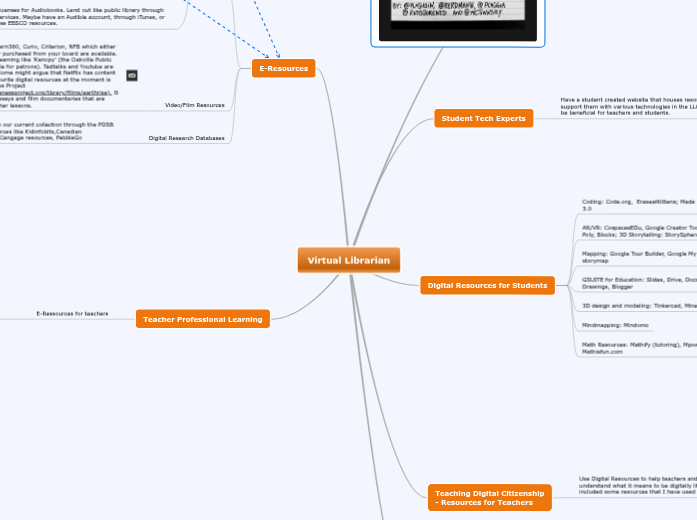
Virtual Librarian
Video Conferencing Centre
- Can all be housed on a website
Google Hangouts
Connect with other classrooms across school board or globe
Flipgrid
Self-Assessment (Self Reflections)
Used for Formative Assessment
Used for Summative Assessment
Connect with Experts
Skype a Scientist
Google Hangouts
Digital Human Library
Student Tech Experts
Have a student created website that houses resources that support them with various technologies in the LLC which could be beneficial for teachers and students.
They can create how to videos on:
Coding (Blockly, Scratch, Swift)
3D modelling and 3D priniting (Tinkercad, Morphi)
AR/VR creation (Minecraft, CoSpaces, Makrkit)
Audio Engineering (Audacity, GarageBand)
Film Creation and Editing (iMovie, Adobe Premiere 7
Robotics (Lego, Vex, Ozobot, Dash and Dot, Makey Makey)
Makerspace/Makered (Cardboard automata, Rube Goldberg Machines)
Digital Resources for Students
GSUITE for Education: Slides, Drive, Docs, Hangouts, Drawings, Blogger
3D design and modeling: Tinkercad, MinecraftEDU
Mindmapping: Mindomo
Teaching Digital Citizenship
- Resources for Teachers
Use Digital Resources to help teachers and students understand what it means to be digitally literate. I have included some resources that I have used in the past
Information Fluency - Teaching students to understand the tidal wave of information given to them, infowhelm (Crockett, Jukes, and Churches 2011). When looking at information they need to use this approack: Ask good questions, Acquire the knowledge, Analyze the information, and Apply their knowledge by creating something that makes meaning or solves a problem (Crockett, Jukes, and Churches 2011)
Focus on Nine Elements of Digital Citizenship (Ribble 2013 specifically Digital Literacy, "process of teaching and learning about technology and the use of technology."
Commonsense Media lessons on Information Literacy would be beneficial for students. Some lessons are on fair use, credible sources, and digital identity.
Mediasmarts.ca also has useful lesson on Media and Digital Literacy. REality Check is a game that helps you understand what;s real and what's fake, and how to analyze information online critically.
The NMC Horizon Report 2017 discuss the importance of students becoming critical consumer of information, innovative creators and empowering themselves through this process.
Tech Bar
Virtual sign out for a variety of technological resources
iPad
Chromebooks
Macbooks
Windows Laptops
Areas to charge personal devices to use in the LLC.
Have a "Digital Cafe' feel to it where personal devices are allowed to be used for academic purposes.
E-Resources
E-Books
Digital Subscriptions to periodicals (comics, magazines) through services like Marvel Unlimited or Comixology.
Read on an ePub reader or iPad. There is a lot of course material that is published for students through iTunes, some middle school and secondary content. The 'Everyone Can Create' for iPad is good for all levels of learners (https://www.apple.com/ca/education/everyone-can-create/)
Digital book services like Tumblebooks, BookFlix, Project Gutenberg (https://www.gutenberg.org/), Wattpad (maybe controversial because of content for elementary, but it's a great tool for young writers to share their stories).
Licenses for Audiobooks. Lend out like public library through services. Maybe have an Audible account, through iTunes, or use EBSCO resources.
Video/Film Resources
Video resources like Learn360, Curio, Criterion, NFB which either are ministry licensed or purchased from your board are available. Or use out of board streaming like 'Kanopy' (the Oakville Public Library has this available for patrons). Tedtalks and Youtube are also credible sources. Some might argue that Netflix has content as well. One of my favourite digital resources at the moment is from the Global Oneness Project (https://www.globalonenessproject.org/library/films/earthrise). It has a series of photo essays and film documentaries that are accompanied with teacher lessons.
Digital Research Databases
I would connect with our current collection through the PDSB Portal and use resources like Kidinfobits,Canadian Encycolpedia, GALE Cengage resources, PebbleGo
Teacher Professional Learning
E-Ressources for teachers
Link to resources provided by PDSB such as Brock University Professional Library, PDSB professional library, Gale's Professional Development Resources, Naxos Music Library, Ebsco Audiobooks