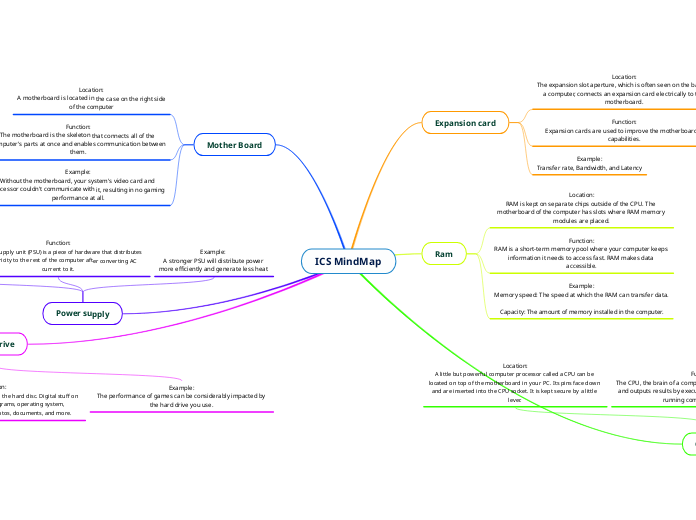
Location:
The expansion slot aperture, which is often seen on the back of a computer, connects an expansion card electrically to the motherboard.
Function:
Expansion cards are used to improve the motherboard's capabilities.
Example:
Transfer rate, Bandwidth, and Latency
Location:
RAM is kept on separate chips outside of the CPU. The motherboard of the computer has slots where RAM memory modules are placed.
Function:
RAM is a short-term memory pool where your computer keeps information it needs to access fast. RAM makes data accessible.
Example:
Memory speed: The speed at which the RAM can transfer data.
Capacity: The amount of memory installed in the computer.
Location:
A little but powerful computer processor called a CPU can be located on top of the motherboard in your PC. Its pins face down and are inserted into the CPU socket. It is kept secure by a little lever.
Function:
The CPU, the brain of a computer, processes input, stores data and outputs results by executing programs. It is essential for running computer programs.
Example:
Clock Speed: Measured in GHz, it determines how many clock cycles a CPU can perform per second.
Core Count: The number of processing cores in a CPU, which affects the amount of tasks it can perform simultaneously.
Location:
A motherboard is located in the case on the right side
of the computer
Function:
The motherboard is the skeleton that connects all of the computer's parts at once and enables communication between them.
Example:
Without the motherboard, your system's video card and processor couldn't communicate with it, resulting in no gaming performance at all.
Location:
Back of the computer,
often near the top
Function:
A power supply unit (PSU) is a piece of hardware that distributes DC electricity to the rest of the computer after converting AC current to it.
Example:
A stronger PSU will distribute power
more efficiently and generate less heat
Location:
The motherboard and PSU are connected to the hard drive, which is housed in the drive bay.
Function:
Your whole digital library is kept on the hard disc. Digital stuff on a hard disc includes your programs, operating system, photographs, music, videos, photos, documents, and more.
Example:
The performance of games can be considerably impacted by the hard drive you use.