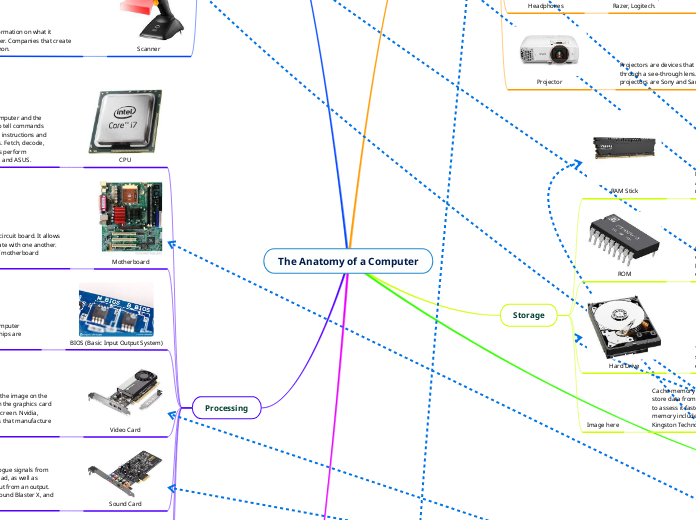
The Anatomy of a Computer
Output
Monitor
The monitor is able to output/display text, programs
and images by using tiny pixels consisting of the colours red green and blue. Companies that make monitors are Dell, ASUS, and Acer.
Speaker
Speakers output audio/sounds. Examples of
companies that produce speakers is Sony,
Google and Apple.
Printer
Printers are able to print out copies of pictures and
text on a paper format. Examples of companies that produce
printers are Brother, HP, and Canon.
Headphones
Headphones are an output devices that projects
sound signals into sound waves when plugged into the sound card. Some companies that create headphones are Apple, Razer, Logitech.
Projector
Projectors are devices that project images by shining a light through a see-through lens. Examples of companies that make projectors are Sony and Samsung.
Storage
RAM Stick
RAM is used to store data for a short term, and it will work with a hard drive to store data in the long term. RAM is manufactured by firms such as Corsair, AOpen, and Fujitsu.
ROM
ROM is used to save a computer's starting function so that the contents are not lost when the machine is switched off. Macronix, Renesas Electronics, and AMIC Technologies are examples of ROM manufacturers.
Hard Drive
The hard drive can store data long-term. It retrieves and stores data on a magnetic disc. Companies that make hard drive HP, Kingston Technology, Seagate.
Image here
Cache memory is a more powerful and faster type used to store data from recently accessed programme files by the CPU to assess it faster. Companies that manufacture cache memory include Staktek Holdings, Viking Technology, and Kingston Technology.
Buses
HTML Cable
HDMI cables are used to link a monitor to the CPU so that the video and audio from the CPU may be shown.
PCIE
The PCIe is used for many interfaces like sound cards, network cards, GPU mostly within the processing for the computer.
RAM Slots
Your able to put RAM sticks into the slots allowing the motherboard to gain RAM
SATA
Sata is a connector and data transmission standard used to connect and transport data from hard disc drives to computer systems.
USB Port
USB (Universal Serial Bus). USB's are used to connect to many devices. For example input devices mouse, keyboard, and microphone.
Digital Audio RCA Port
Audio output devices such as headphones and speakers are connected to digital audio RCA connectors.
USB Cable
USB cables are used so peripheral devices can have a connection. For example
Input
Keyboards
Keyboards are devices that send signals to the CPU
depending on the keys pressed is what will appear on your monitor. Examples of companies that produce keyboards is Logitech and Razer.
Mouse
A mouse is a device that transmits commands and data to the CPU by moving the mouse or clicking the mouse. Examples for manufacturing mice are Logitech, Apple, and ASUS.
Microphone
A microphone is a device that takes in sounds and creates
electrical current is sent to the CPU for it to read and output it into an application. Examples of companies that produce microphones is Akai, Sony, and Earthworks
Camera
Cameras are devices that capture live photos
in front of you. Companies that make cameras are Nikon, Canon, and Sony.
Scanner
Scanners are devices that take information on what it
is scanned and input it into computer. Companies that create cameras are Acer Brother, and Canon.
Processing
CPU
A CPU is the main processing unit of the computer and the brain. As the CPU its main operations are to tell commands and execute them. The CPU performs basic instructions and turns them into more advanced instructions. Fetch, decode, and execute are the functions that the CPUs perform Companies that make CPUs are Intel, AMD, and ASUS.
Motherboard
A motherboard is the computer's main circuit board. It allows each piece of a computer to communicate with one another. Asus, Biostar, and Intel are examples of motherboard manufacturers.
BIOS (Basic Input Output System)
BIOS controls the transfer of the data between computer components. Some companies that create BIOS chips are ASUS, Dell, and MBI.
Video Card
The video card works with the CPU to show the image on the monitor using the pixels of the monitor then the graphics card decides how many pixels will be shown on screen. Nvidia, ASUS, and Intel are examples of companies that manufacture video cards.
Sound Card
The sound card is in charge of turning analogue signals from an input into something that the CPU can read, as well as converting signals back and playing them out from an output.
Sound card manufacturers include ASUS, Sound Blaster X, and HyperX.
Network Card
The network interface card allows the computer to connect to the internet. Allied Telesis, Cisco, and Intel are examples of companies that make network cards.
Power Supply
The power supply provides electricity to the computer for use. Manufacturers for a power supply include XP Power, Corsair, and XPG.
Software Run
Paragraph
Booting up a Computer
There are 5 steps to booting your computer. Step 1, using the power button the CPU starts up the BIOS within the motherboard. Step 2, after the BIOS are running, a process called POST (Power-ON Self-Test) its tests that all the hardware has no issues, if there is a issue the booting process stops and the computer dose not turn on. Step 3, if POST works the BIOS load the MBR (Master Boot Record) to gain access to RAM. Step 4, after the MBR to RAM is now back to BIOS. BIOS gets the first instruction from the MBR by loading the boot loader. The boot loader is the program that loads the operating system into RAM. Step 5, finally the OS begins to start after it is loaded into memory. Moreover, the operating system initiates its own startup (which includes loading device drivers, setting up libraries, etc). When the OS startup is complete, the System launches a shell that shows a login prompt for the user to input there username and password.