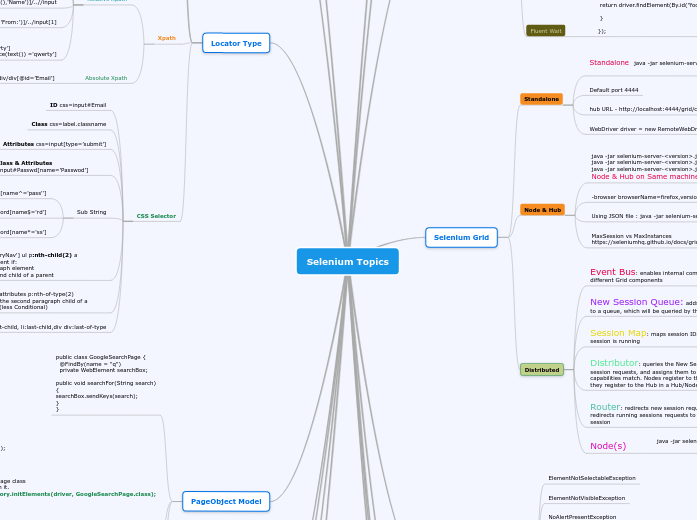
Selenium Topics
ChromeOptions and FireFox Profile
https://sites.google.com/a/chromium.org/chromedriver/capabilities
Map chromeOptions = new Map();
chromeOptions.put("binary", "/usr/lib/chromium-browser/chromium-browser");
DesiredCapabilities capabilities = DesiredCapabilities.chrome();
capabilities.setCapability(ChromeOptions.CAPABILITY, chromeOptions);
WebDriver driver = new ChromeDriver(capabilities);
Add extension in the browser
ChromeOptions options = new ChromeOptions();
options.addExtensions(new File("/path/to/extension.crx"));
ChromeDriver driver = new ChromeDriver(options);
Turn Off/On Native Events
profile.setPreference("general.useragent.override", "Mozilla/5.0 Phone user agent");
driver.manage().window().setPosition(new Point(0, 0));
driver.manage().window().setSize(new Dimension(414,736));
FirefoxProfile profile = new FirefoxProfile();
profile.setEnableNativeEvents(true);
FirefoxDriver driver = new FirefoxDriver(profile);
JavaScripExecutor
((JavascriptExecutor) driver).executeScript("window.scrollTo(0,"+element.getLocation().y+")");
Alerts/Popup
Web based alert pop ups
driver.switchTo().alert().accept(); driver.switchTo().alert().dismiss();driver.switchTo().alert().sendKeys("Testing!!!");
driver.switchTo().alert().getText()
Windows based pop-ups
AutoIt,Robot class
PageObject Model
Annotations - PageFactory
@FindBys(value = { @FindBy(css = "select.availableOptions>option") })
private List elementList;
@FindBy(id="idofelement")
@FindBy(xpath="//div[@id='abc']")
@FindBy( how=How.ID,using='idofelement')
public class UsingGoogleSearchPage {
public static void main(String[] args) {
// Create a new instance of a driver
WebDriver driver = new HtmlUnitDriver();
// Navigate to the right place
driver.get("http://www.google.com/";);
// Create a new instance of the search page class
// and initialise any WebElement fields in it.
GoogleSearchPage page = PageFactory.initElements(driver, GoogleSearchPage.class);
// And now do the search.
page.searchFor("Cheese");
}
}
public class GoogleSearchPage {
@FindBy(name = "q")
private WebElement searchBox;
public void searchFor(String search)
{
searchBox.sendKeys(search);
}
}
Locator Type
CSS Selector
li:first-child, li:last-child,div div:last-of-type
select.attributes p:nth-of-type(2) Select the second paragraph child of a parent(less Conditional)
nav[id='primaryNav'] ul p:nth-child(2) a select an element if:
*It is a paragraph element
*It is the second child of a parent
Sub String
Contains/Sub-String css=input#Password[name*='ss']
ends with/suffix css=input#Password[name$='rd']
prefix css=input#Password[name^='pass'']
ID/Class & Attributes css=input#Passwd[name=’Passwod’]
Attributes css=input[type=’submit’]
Class css=label.classname
ID css=input#Email
Xpath
Absolute Xpath
Example : /html/body/div/div[@id=’Email’]
Relative Xpath
Searching by Class and Text
//span[contains(@class,'myclass') and text() = 'qwerty']
//span[conatins(@class,'myclass') and normalize-space(text()) ='qwerty']
//div[contains(text(),'From:')]/../input[1]
//table//tbody//tr//td[contains(text(),'Name')]/..//input
//*[@id='link-forgot-passwd']
//a[contains(text(),'Create an account')]
//span[@class=’Email’]
Link Text and Partial Linktext
Name
Class name
ID
JsonWireProtocol(OLD)/Webdriver Protocol
GET /session/:sessionId Retrieve the capabilities of the specified session.
POST /session/:sessionId/element/:id/click Click on an element.
GET /status Query the server's current status.
POST /session Create a new session.
WebDriver :: https://www.w3.org/TR/webdriver/
Langauge bindings
JavaScript
Python
Ruby
C#
JAVA
Jenkin
ANT
Maven
Surefire Plugin
org.seleniumhq.selenium
selenium-java
4.27.0
TestNG
Listeners
IAlterSuiteListener
IAnnotationTransformer
IConfigurationListener
IDataProviderListener
IExecutionListener
IExecutionVisualiser
IHookable
IConfigurable
IInvokedMethodListener
IClassListener
IMethodInterceptor
IDataProviderInterceptor
IReporter
ISuiteListener
ITestListener
groups
dataprovider
annotations
@BeforeSuite
@AfterSuite
@BeforeTest
@AfterTest
@BeforeGroups
@AfterGroups
@BeforeClass
@AfterClass
@BeforeMethod
@AfterMethod
testng.xml
Eclipse
Selenium 4
Selenium Manager -Selenium Manager is a command-line tool implemented in Rust that provides automated driver and browser management for Selenium
Browser Engine
(layout engine or rendering engine)
Gecko - Mozillla Firefox
EdgeHTML - A Fork of Trident - Microsoft Edge
Trident - Internet Explorer
Blink -a fork of WebKit -- Opera & Current version of Chrome
WebKit - Safari & Chrome
Advance User Interaction
Actions builder = new Actions(driver);
Action dragAndDrop = builder.clickAndHold(someElement)
.moveToElement(otherElement)
.release(otherElement)
.build();
dragAndDrop.perform();
ButtonReleaseAction - Releasing a held mouse button.
ClickAction - Equivalent to WebElement.click()
ClickAndHoldAction - Holding down the left mouse button.
ContextClickAction - Clicking the mouse button that (usually) brings up the contextual menu.
DoubleClickAction - double-clicking an element.
KeyDownAction - Holding down a modifier key.
KeyUpAction - Releasing a modifier key.
MoveMouseAction - Moving the mouse from its current location to another element.
MoveToOffsetAction - Moving the mouse to an offset from an element (The offset could be negative and the element could be the same element that the mouse has just moved to).
SendKeysAction - Equivalent to WebElement.sendKey(...)
WebDriverListener
public class DriverListener implements WebDriverEventListener
beforeFindBy()
afterClickOn()
beforeChangeValueOf()
beforeClickOn()
onException()
EventFiringWebDriver eventDriver = new EventFiringWebDriver(remotWebdriver);
eventDriver.register(new DriverListener());
Common Exceptions
java.lang.IllegalStateException: The path to the driver executable must be set by the webdriver.ie.driver system property
UnexpectedAlertPresentException
TimeoutException
StaleElementReferenceException
NoSuchWindowException
NoSuchFrameException
NoSuchElementException
NoAlertPresentException
ElementNotVisibleException
ElementNotSelectableException
Selenium Grid
Distributed
Node(s)
java -jar selenium-server-.jar node --publish-events tcp://:4442 --subscribe-events tcp://:4443
Router: redirects new session requests to the queue, and redirects running sessions requests to the Node running that session
java -jar selenium-server-.jar router --sessions http://:5556 --distributor http://:5553 --sessionqueue http://:5559 --port 4444
Distributor: queries the New Session Queue for new session requests, and assigns them to a Node when the capabilities match. Nodes register to the Distributor the way they register to the Hub in a Hub/Node Grid.
java -jar selenium-server-.jar distributor --publish-events tcp://:4442 --subscribe-events tcp://:4443 --sessions http://:5556 --sessionqueue http://:5559 --port 5553 --bind-bus false
Session Map: maps session IDs to the Node where the session is running
java -jar selenium-server-.jar sessions --publish-events tcp://:4442 --subscribe-events tcp://:4443 --port 5556
New Session Queue: adds new session requests to a queue, which will be queried by the Distributor
java -jar selenium-server-.jar sessionqueue --port 5559
Event Bus: enables internal communication between different Grid components
java -jar selenium-server-.jar event-bus --publish-events tcp://:4442 --subscribe-events tcp://:4443 --port 5557
Node & Hub
MaxSession vs MaxInstances
https://seleniumhq.github.io/docs/grid.html
Using JSON file : java -jar selenium-server-standalone.jar -role node -nodeConfig nodeconfig.json
-browser browserName=firefox,version=3.6,maxInstances=5,platform=LINUX
java -jar selenium-server-.jar hub
java -jar selenium-server-.jar node
java -jar selenium-server-.jar node --port 5555
Node & Hub on Same machine
Standalone
WebDriver driver = new RemoteWebDriver(new URL("http://localhost:4444/wd/hub";), capability);
hub URL - http://localhost:4444/grid/console
Default port 4444
Standalone java -jar selenium-server-.jar standalone
Webdriver Wait
Fluent Wait
Wait wait = new FluentWait(driver).withTimeout(30, SECONDS).pollingEvery(5, SECONDS).ignoring(NoSuchElementException.class);
WebElement foo = wait.until(new Function() {
public WebElement apply(WebDriver driver) {
return driver.findElement(By.id("foo"));
}
});
Explicit Wait
ExpectedConditions
frameToBeAvailableAndSwitchToIt()
titleIs()
alertIsPresent()
textToBePresentInElement()
elementToBeClickable()
WebDriverWait wait = new WebDriverWait(driver,30);
WebElement element =wait.until(ExpectedConditions.visibilityOfElementLocated(By.xpath("//div[contains(text(),'COMPOSE')]")));
Implicit Wait
driver.manage().timeouts().implicitlyWait(10,TimeUnit.SECONDS);
Browser Tools
Internet Explorer
Developer Tool
Chrome
Console
To Evaluate the xpath and Css in Chrome
For Xpath -- $x('//input[@id='test']')
For Css -- $$('.classname')
F12 Developer Tool
Firefox
Selenium IDE
FireBug
FirePath
Selenium Webdriver
RemoteWebdriver
Augmenter
Augmenter augumenter = new Augmenter();
File scrFile = ((TakesScreenshot) augumenter.augment(driver)).getScreenshotAs(OutputType.FILE);
DesiredCapabilities
DesiredCapabilities dc = new DesiredCapabilities();
dc.setCapability("nativeEvents", false);
WebDriver driver = new FirefoxDriver(dc);
Microsoft Webdriver for Edge
System.setProperty("webdriver.edge.driver","C:\\MicrosoftWebDriver.exe")
IE Webdriver
*'Unexpected error launching Internet Explorer' below, You have to set 'Enable protected mode' option in all levels with same value.
*DesiredCapabilities capabilities = DesiredCapabilities.internetExplorer();
capabilities.setCapability(InternetExplorerDriver.INTRODUCE_FLAKINESS_BY_IGNORING_SECURITY_DOMAINS,true);
*IE browser zoom level is set to 100%
System.setProperty("webdriver.ie.driver","C:\iedriver.exe")
Chrome Webdriver
Language binding --> Chrome driver --> Chrome browser
System.setProperty("webdriver.chrome.driver","C:\chromedriver.exe")
Firefox Webdriver
Language Binding --> Gecko Driver --> Marionette
( -marionette It will start server inside firefox listening by default at 2828 port) :: Firefox
If want to use the legacy driver
FirefoxOptions options = new FirefoxOptions().setLegacy(true);
WebDriver driver = new FirefoxDriver(options);
----------------------------------------------------
cap.setCapability("marionette",false);
-----------Remote----------
= new RemoteWebDriver(remoteUrl,options.toCapabilities();
System.setProperty("webdriver.gecko.driver","C:\gecodriver.exe")