製品
Mind Mapping Software
Outlining Software
ガントチャートソフトウェア
用途
教育向けマインドマップ
Mind maps for Business
個人的な開発のためのマインドマップ
マインドマッピングの利点
リソース
特徴
教育
個人と仕事
デスクトップ
Video Tutorials
Watch tips and tricks about using Mindomo.
Help Center
Detailed help guide on configuring and using Mindomo.
記事
マインドマッピングとは何ですか?
How to Mind Map?
How to Take Notes with Mind Maps?
How to Prioritize Tasks with Mind Maps?
What is a Concept Map?
Top 29 Mind Map Examples
価格
ログイン
登録
製品
Mind Mapping Software
Outlining Software
ガントチャートソフトウェア
用途
教育向けマインドマップ
Mind maps for Business
個人的な開発のためのマインドマップ
マインドマッピングの利点
記事
マインドマッピングとは何ですか?
How to Mind Map?
How to Take Notes with Mind Maps?
How to Prioritize Tasks with Mind Maps?
What is a Concept Map?
Top 29 Mind Map Examples
特徴
教育
個人と仕事
デスクトップ
ヘルプ
Video Tutorials
Help Center
価格
登録
ログイン
カテゴリー
全て
-
follow-up
-
documents
-
submission
-
payment
によって
Маргарита Быкова
12か月前.
132
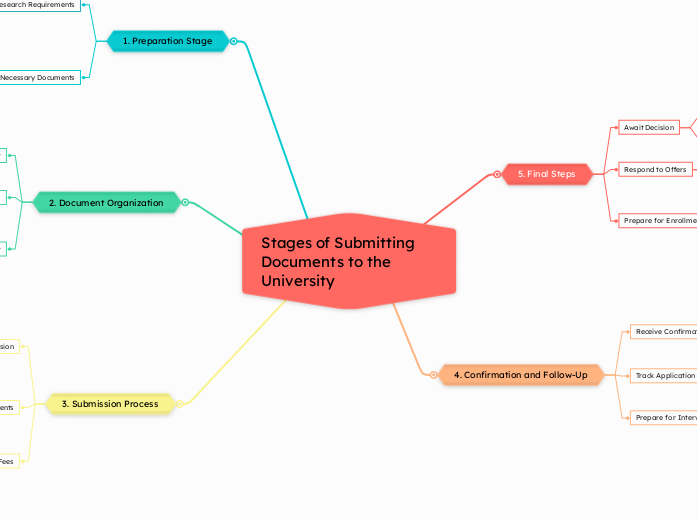
Stages of Submitting Documents to the University
開く
もっと見る
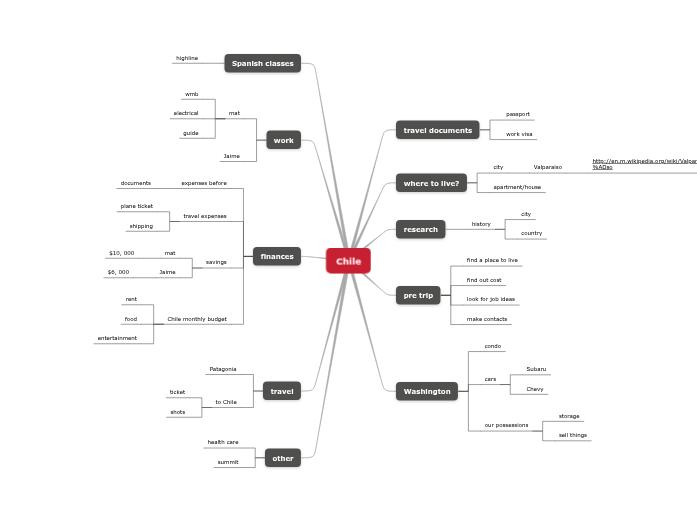
Chile
Mathew KASPERにより
DTU Process
Shaun Riffeにより
execom July 16
Eowmy Loisにより
CA School Dashboard (updated 091317) Proposed Intermediate
Gina Bosterにより
Stages of Submitting Documents to the University
3. Submission Process
Payment of Fees
Make payment through the university’s payment portal
Verify application fees
Choose a reliable mailing service
Prepare envelopes and labels
Print physical copies of documents
Online Submission
Upload documents as per requirements
Fill out application forms
Create an account on the university portal
2. Document Organization
Proofread and Edit
Seek feedback from peers or mentors
Ensure clarity and coherence
Check for grammatical errors
Format Documents
Convert to required file types (PDF, DOCX)
Ensure proper formatting (font, spacing, margins)
Create a Checklist
Mark completed items
List all required documents
1. Preparation Stage
Gather Necessary Documents
Proof of language proficiency
Test scores
Personal statement or essay
Letters of recommendation
Academic transcripts
Research Requirements
Understand specific program requirements
Check university website for document requirements
4. Confirmation and Follow-Up
Prepare for Interviews or Additional Requirements
Submit any additional documents if requested
Track Application Status
Contact admissions office for any inquiries
Regularly check the university portal for updates
Receive Confirmation
Save confirmation receipts for records
Check for confirmation email or notification on the portal
5. Final Steps
Prepare for Enrollment
Attend orientation sessions
Arrange housing and financial aid
Complete enrollment forms
Respond to Offers
Confirm acceptance or decline offers
Review acceptance letters
Await Decision
Stay patient while waiting
Understand the timeline for decisions