Products
Mind Mapping Software
Outlining Software
甘特图软件
Uses
Mind Maps for Education
Mind maps for Business
用于个人发展的思维导图
思维导图的好处
資源
特点
教育
个人和工作
台式电脑
Video Tutorials
Watch tips and tricks about using Mindomo.
Help Center
Detailed help guide on configuring and using Mindomo.
文章
甚麼是思維導圖?
How to Mind Map?
How to Take Notes with Mind Maps?
How to Prioritize Tasks with Mind Maps?
What is a Concept Map?
Top 29 Mind Map Examples
定价
登入
注册
Products
Mind Mapping Software
Outlining Software
甘特图软件
Uses
Mind Maps for Education
Mind maps for Business
用于个人发展的思维导图
思维导图的好处
文章
甚麼是思維導圖?
How to Mind Map?
How to Take Notes with Mind Maps?
How to Prioritize Tasks with Mind Maps?
What is a Concept Map?
Top 29 Mind Map Examples
特点
教育
个人和工作
台式电脑
說明
Video Tutorials
Help Center
定价
注册
登入
类别
全部
-
excel
-
insertar
-
argumentos
-
operadores
作者:
alejandro garcia
6 年以前
281
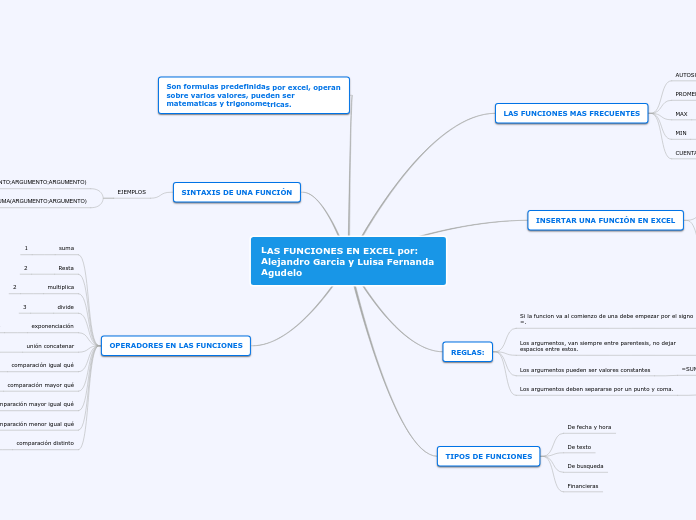
LAS FUNCIONES EN EXCEL por: Alejandro Garcia y Luisa Fernanda Agudelo
開啟
更多类似内容
TIPO DE FUNCIONES
由Juan Cueva
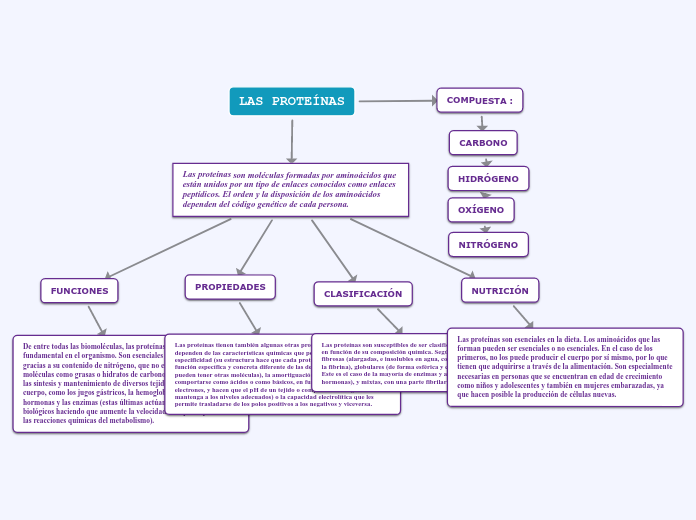
LAS PROTEÍNAS
由ANGIE QUEZADA
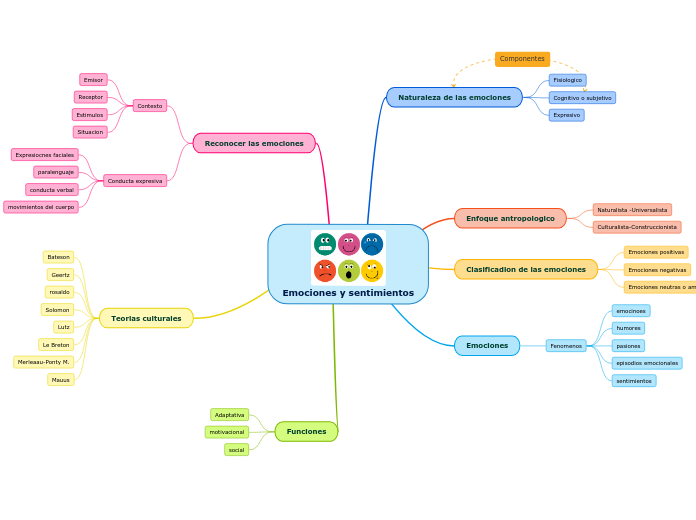
Emociones y sentimientos
由f haydar
ACIDOS NUCLEICOS
由Lisbeth Garcia
LAS FUNCIONES EN EXCEL por: Alejandro Garcia y Luisa Fernanda Agudelo
OPERADORES EN LAS FUNCIONES
comparación distinto
comparación menor igual qué
comparación mayor igual qué
comparación mayor qué
comparación igual qué
5
unión concatenar
4
exponenciación
divide
3
multiplica
Resta
2
suma
1
SINTAXIS DE UNA FUNCIÓN
EJEMPLOS
=SUMA(ARGUMENTO;ARGUMENTO)
=PROMEDIO(ARGUMENTO;ARGUMENTO;ARGUMENTO)
Son formulas predefinidas por excel, operan sobre varios valores, pueden ser matematicas y trigonometricas.
TIPOS DE FUNCIONES
Financieras
De busqueda
De texto
De fecha y hora
REGLAS:
Los argumentos deben separarse por un punto y coma.
=SUMA(A1;B1)
Los argumentos pueden ser valores constantes
=SUMA(A1;B1;C1;D1)
Los argumentos, van siempre entre parentesis, no dejar espacios entre estos.
=SUMA(A1;A7;D9)
Si la funcion va al comienzo de una debe empezar por el signo =.
=SUMA(A1:C8)
INSERTAR UNA FUNCIÓN EN EXCEL
o hacer clic sobre el botón fx y sale un diálogo Insertar Función
Situarse en la celda donde queremos introducir la función
elegir la opción insertar función
hacer clic en la pestaña formulas
LAS FUNCIONES MAS FRECUENTES
CUENTA
Cuenta valores
MIN
Obtiene el valor minimo
MAX
Obtiene el valor máximo
PROMEDIO
Nos permite calcular la media aritmética
AUTOSUMA
Nos permite realizar la SUMA de forma eficiente