Mind mapping software with online synchronization and collaboration
Mindomo is your mind mapping software that uniquely combines working offline with editing and collaborating online.
An easy-to-use, stand-alone mind mapping software.
Mindomo is a mind mapping tool with a user-friendly interface to make your mind mapping experience as pleasant as possible. New ideas cross your mind all the time. To make the most out of them, you can access Mindomo from anywhere using a mobile device (phone or tablet), PC, or laptop. The possibilities are limitless, and so is your imagination. Organize and structure your thoughts with Mindomo. Unleash your creativity and generate ideas by brainstorming and using all the functionalities available!

Frame your ideas in various visual formats to make it more likely you'll see them in action.

Enrich your mind maps by using a great variety of formatting and theme styles.

Create mind maps on Mac, Windows, and Linux, and take advantage of Mindomo's advanced functionality.

Sync your offline and online mind maps to share information and build consensus for ideas and projects.
Take your offline experience to the next level using the online cloud-based benefits
Enjoy the same user-friendly interface of the offline version of Mindomo with additional benefits on the web version. Sign up and start to mind map online. Explore the additional online advantages of our mind map software: multiple integrations with your favorite apps, real-time collaboration with your team, cloud storage for your diagrams, and more. Take advantage of the flexibility of this mind map software and choose your favorite platform. Work on your diagrams anywhere, anytime!

Simplify your work and get the most out of it by integrating Mindomo with your favorite apps: Google Drive, Microsoft Teams, Office365, and more…

Get your teamwork skills to the next level. Efficient collaboration is the key to success. Work with your team members and edit your online mind maps in real time and get rid of pen and paper notes.

Capture ideas in the most efficient way. Find inspiration and guidance in our big variety of templates. 100% customizable. Create unlimited mind maps, concept maps, outlines, Gantt charts, and more.

Mindomo can be a free mind map software. Choose your favorite account type: Education (Student or Teacher), Work, or Personal, and start with a free version (not only a free trial).
Beautiful Layouts
Personalize the mind map and transform it into concept maps or outlines if the layout suits it better. Arrange it the way you imagine it in your brain with one click and some dragging and dropping.
When people suddenly understand something, they say "Oh, I see!"
Seeing things helps you to understand them at a glance. Imagine that someone gave you a written description of a busy road junction. It would be hard to get a good idea of what is going on.
No two people would have the same interpretation. But if they showed you a picture of the junction instead, you would immediately know whether it is an efficient design or an ugly mess. It would take only a few more seconds to spot hazards, see what is happening and anticipate what is about to happen. Your mind is faster and better at interpreting visual scenes than dealing with complicated text.
Mindomo can help you brainstorming, developing, and communicating your ideas in many different types of visualization, including Mind Maps. Everything starts with the brainstorming session and it can develop further.
Digital Mind Maps and other forms of "tree" diagrams have a unique and powerful property: you can add virtually unlimited amounts of detail. If you need to describe something in more detail, you just break it down into more branches.
Mind Mapping is perfect for things that seem simple at the start but get more detailed as you begin to understand them better. Mindomo takes care of rearranging the diagram so that information does not overlap, stays beautiful, and is easy to navigate.
We can describe a diagram as beautiful when the layout elegantly reflects the essence of a situation. The mind map becomes part of your thinking, changing your perceptions and pinpointing where more attention is needed. It gives you "I see!" moments that are hard to reach by thinking in words and phrases.
-
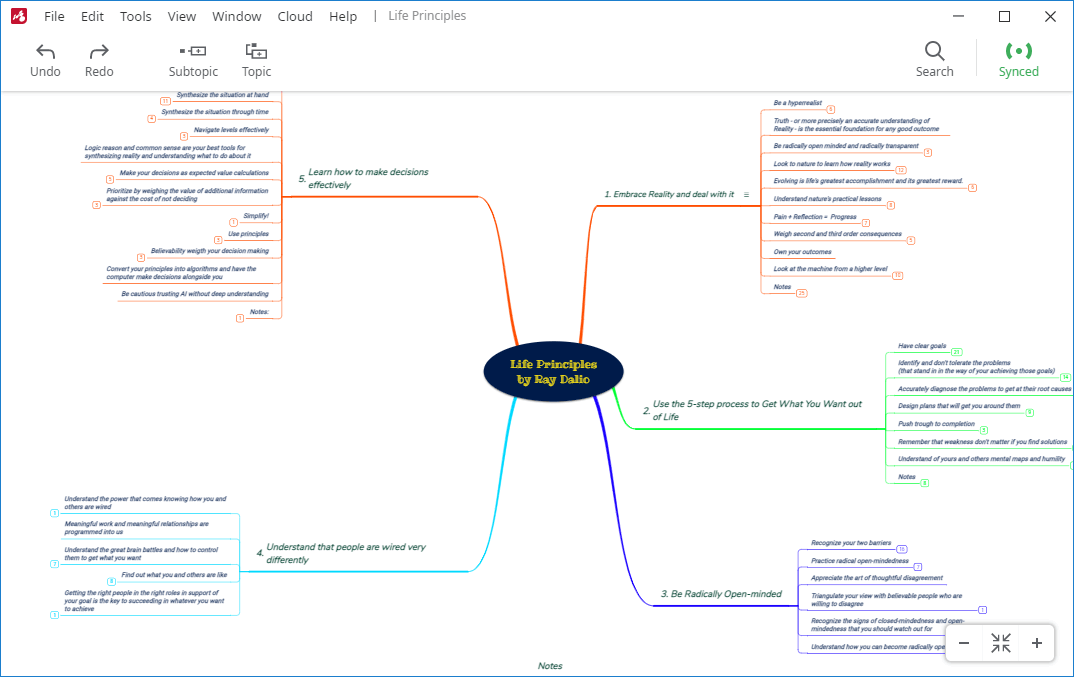
Mind Maps
Create mind maps in seconds. Choose diagram themes from the predefined galleries, rearrange everything with drag and drop, then save your diagram in the desired format.
-
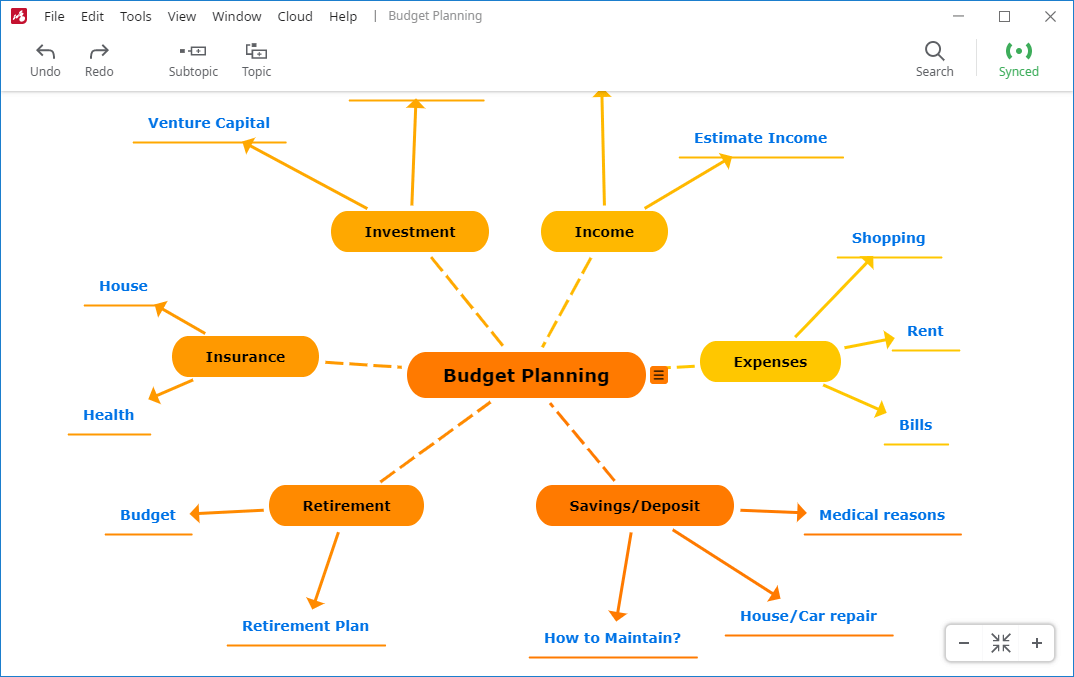
Concept Maps
Take advantage of a more flexible structure, descriptions on the connecting lines, and multiple connections between topics. Start from blank canvas or use templates.
-
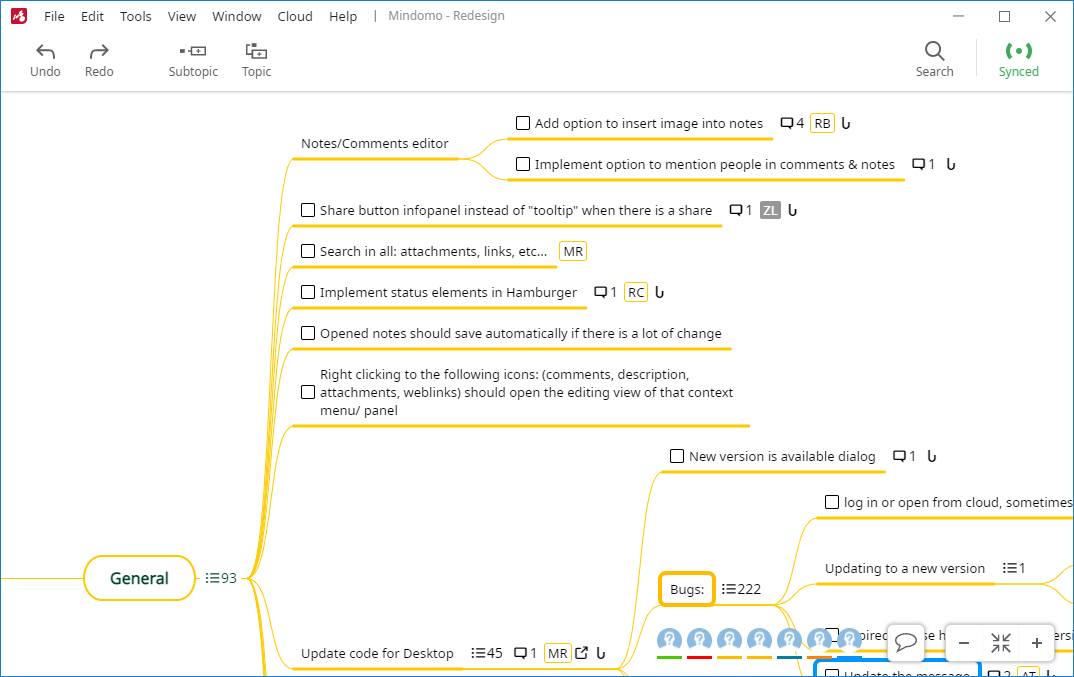
Task Maps
Organize and monitor your work: easy-to-reorganize task lists, hierarchical overview, deadline mechanism, project planning tool, and many more for you and your team members.
-
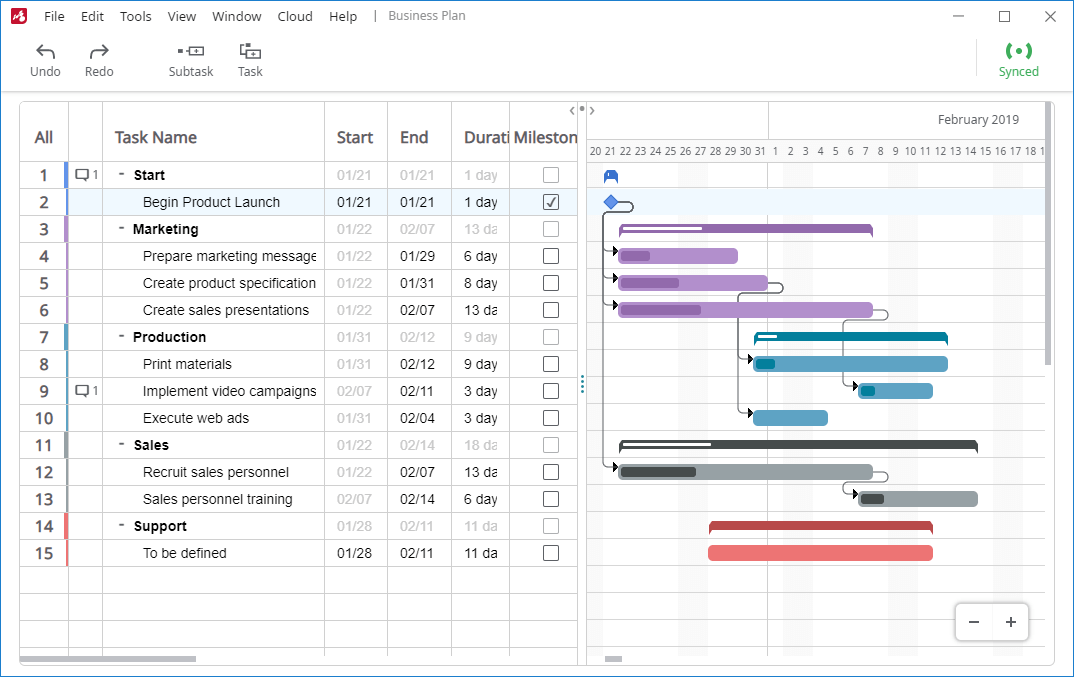
Gantt Charts
See tasks' start and due dates, how they depend on one another, and what milestones will come next. The real time collaboration allows you and your team to be always updated.
-
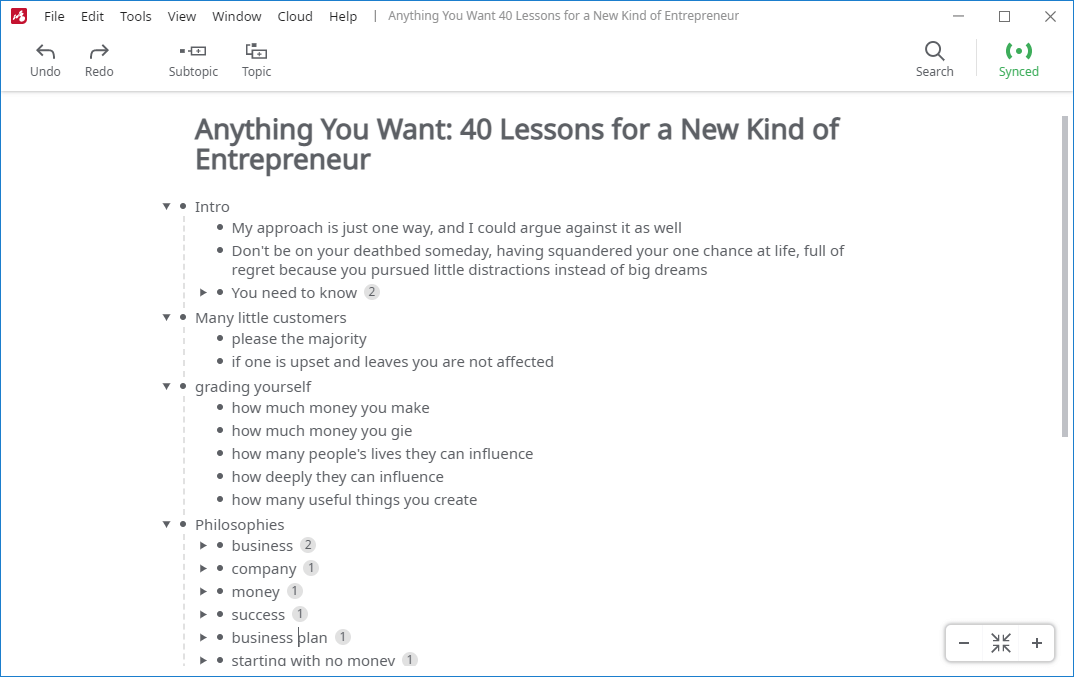
Outlines
Create outlines from scratch or switch from a mind map view to an outline view with just one click. Create visual mind maps starting with an outline. The advanced features of Mindomo give you the freedom to switch the view anytime.
-
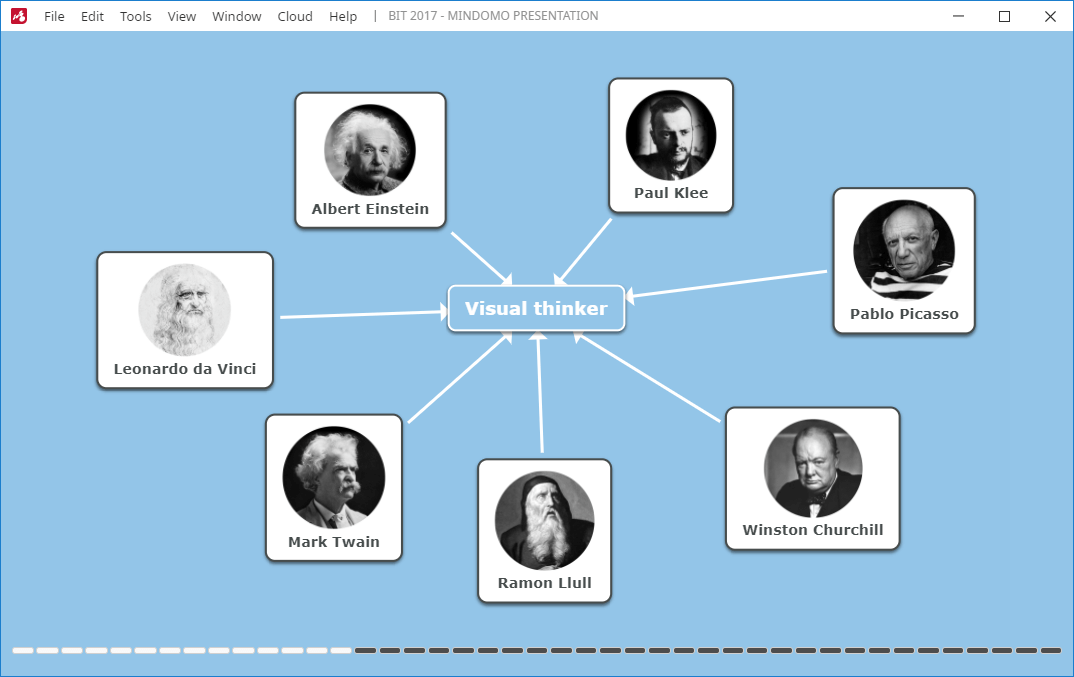
Presentations
Mindomo is more than just a mind map maker. Showcase your work and turn your diagrams into slide-by-slide presentations.
-
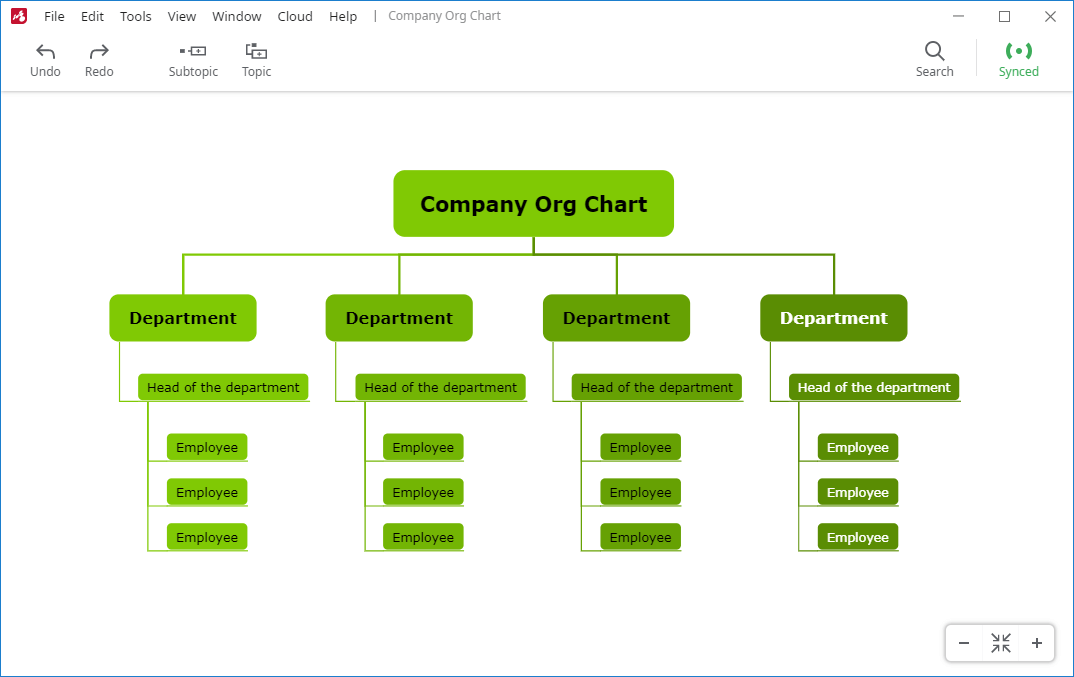
Org Charts
Show various structures and the relationships of their parts by creating horizontal, left-sided, right-sided, or hierarchical org charts.


A Mind Map shows you what the big ideas are, and where all the detail belongs. A Concept Map shows you how things affect each other. A Gantt Chart shows you what is happening and in what order. A Text Outline helps you to think about the flow of a linear document. All these things can be seen in a few seconds with the right type of visualization tool. Mindomo effortlessly creates all these types of diagrams.
Your favorite mind mapping software with ready-made themes
Every picture tells a story, and first impressions count. A clean and tidy mind map with an eye-catching design tells its own story, even before you start to read the ideas. It says that the author cares about what is in the diagram and how others will react to it. Even if you are working alone, this still matters.
Small things can distract you from your best work. Mindomo is a mapping tool that knows this and includes a range of features to help you create great-looking diagrams. You can control the exact style, font, shape, and color of individual topics, or you can use a theme that automatically keeps everything consistent.
Express your ideas through mind maps by customizing everything or by choosing from our diverse diagram themes and topic styles.
Beautify your mind maps using creative features like:
Map themes
Style diagrams with any predefined themes created by our designers, or create your own personalized themes.

Topic themes
Choose a topic theme that comes with custom colors, paddings, borders, and shades.

Multi-branch color
Pick one of the 25 color palettes to make mind maps look more vivid with their branch lines colored differently.

Rich text in topics
All topics support text formatting such as weight, emphasis (bold, italic, underline, strikethrough), color and font family.

Customizable connections
Use our features to customize the connections: set the thickness, color, distance to upper/lower/lateral topics, and anchor point for the connecting lines.

Line types & Shapes
Line types and topic shapes to choose from: straight, arc, rough, curve, elbow, angle, rectangle, circle, oval, line, capsule, etc.

Customize the diagrams (mind maps, flowcharts, organigrams, etc.) exactly how you want them to be using all Mindomo features. Use the keyboard shortcuts to access a feature easily. Best mind mapping tools offer many customization features. Choose the colors, shapes, sizes, and fonts that you like.
Mindomo offers a wide variety of these tools like these because they are crucial when it comes to visual representations. They help you see clearly, differentiate the levels, and structure more efficiently. This way, it's easier to remember and understand the information. In addition, it helps in brainstorming sessions and for generate ideas.
Mind map tools are designed to stimulate your mind to be more creative, discover new ideas and connections, comprehend and memorize information, and organize yourself.

Mindomo runs on all available operating systems and is equipped with a range of features to boost your thinking skills.
Flexibility is an important leverage. This is why Mindomo isn't a mind map software that limits you to only one platform. On the contrary, you have the option to choose your favorite platform to work (for individuals and teams) in an accessible way: web-based mind mapping software/ Desktop version/ mobile mind mapping app.
Whether you use Mac, Windows, or Linux, Mindomo works perfectly. Moreover, the Desktop version of the software is not the only one. You have the possibility to create the best mind maps from your phone, tablet, or even cloud version. You have your gallery of mind maps with you anywhere you go.
The best mind mapping software is an anytime & anywhere accessible mind map tool.

Platform-independent solution
Install Mindomo effortlessly on all operating systems: Windows, Mac OS X, and Linux.

Greater reach
The more platforms Mindomo can run on, the more people it can reach. Mind map from any platform.

Uniform look and feel
Maintain consistency in appearance and function across different devices. Your mind map software has the same user friendly interface and great features on every device.

Easy maintenance
Software updates are synced immediately across all platforms and devices.
10 best mind mapping Features that make Mindomo a reliable mind mapping software (to create and share your mind maps)
High-fidelity PDF export functionality that converts your maps to PDF files with the highest degree of precision (available on the free version as well).
Importing maps from other mind mapping tools: MindManager, Freemind, MindMeister, XMind, Coggle, XMind, and Bubbl.us.
Importing TXT, OPML, XLSX, and XLS files from your computer and turning them into mind maps.
Exporting (download) mind maps in various formats compatible with other tools: Freemind, MindManager, MindMeister, Coggle, XMind, PDF, DOCX, PPTX, TXT, OPML, XML, ZIP, PNG, and XLSX.
Printing mind maps as PDFs in the following sizes: A2, A3, A4, Tabloid, Letter, and Original.
Presentation mode allows you to create a presentation without using a third-party app, making it as efficient as possible.
Adding notes, links, icons, and multimedia files (images, video files, audio files) from your computer, your cloud storage app, or by searching directly on the web.
Finding any word or phrase across all mind maps using the full-text search features.
Using multiple instances to work simultaneously on your mind maps in different Mindomo instances.
Real time collaboration and automatic synchronization of your mind maps between devices.
Offline-online syncing and sharing local files
With Mindomo you can work offline when you don't have an internet connection or you work remotely. Once you have access to the internet, all diagram changes can be saved and synced with just a click! It's one of the best mind map software features for efficient people.

Integrations
One of the most important features of the best mind mapping software is represented by the integrations available. Either you work, learn or simply use the tool for personal growth, there are some apps, cloud storage services or learning management systems you frequently use.
Import/Export
Customize your diagrams by uploading files from your favorite cloud storage service (Google Drive, Dropbox, OneDrive). You can import images, videos, audio files, etc. You can also export (download) your diagram in multiple formats such as Microsoft Office (Word, PowerPoint, Excel), Microsoft Project, and even other tools formats like MindMeister, Xmind, Coggle, MindManager, etc.
LMS
With Mindomo you can use mind mapping for education easily, especially when you integrate it with learning management systems. Our collaboration features allow you to integrate it with Moodle, Blackboard, Canvas, Desire2Learn, itslearning, and more.
Moreover, there is a custom sign up mechanism for school licenses. In other words, people who sign up to Mindomo using the school domain e-mails will be automatically added to that license. They will also receive premium accounts (will become premium users) without manually entering their information.
Sign Up
Everyone already has too many accounts and passwords. To avoid adding yet another one, you can create your Mindomo account with an existing account. If you already have an account with Google, Facebook, Yahoo, Office 365, Windows Live, Clever, Yilan, or Apple, you can use it to create your Mindomo account with just a few clicks.
Then your account provider will securely approve your Mindomo login without sharing any password information.
Apps
Already using collaboration apps? Using Mindomo does not mean that you need to branch out in a new direction. Mindomo tool integrates with market-leading collaboration apps, making it easy to add Mindomo to your existing toolset.
Images, videos, and audio files can be imported into your mind maps directly from cloud storage service tools like Google Drive, Dropbox, and Microsoft's OneDrive. You can also connect your Evernote account and access your notes from within a Mindomo mind map, creating a powerful visualization of existing resources.
Mindomo is one of the user-friendly mind mapping tools that can be added to your G Suite apps, letting your G Suite users create and view Mindomo diagrams.
With a personal / business account, you can create and view Mindomo diagrams in Microsoft Teams with the "Mindomo for Teams" App from the App Source catalog.

Collaborative editor
"More minds are better than one", they said. Generate and organize ideas along with your team members using a real-time collaborative software.
As an individual, capturing your ideas using a tool like Mindomo is a very productive process. As you develop and extend your diagram it gives you direct feedback, leading to a better understanding and new ideas. You discover that you know more than you thought.
Explaining your ideas helps you to see connections and patterns that you had not thought about before. This is the same effect as describing a problem to someone else. As you begin to explain, you realize in mid-sentence that you probably know the answer already. Explaining the problem unlocks a deeper understanding.
When you do this in a work environment, the effects are even more powerful. Working collaboratively on a project with others creates much more than the sum of the parts - it creates a shared understanding. Genuine team alignment can transform a project. Jointly building a picture resolves assumptions and misunderstandings in a way that e-mails or formal meetings never can.
A Mindomo mind map or any other type of diagram is more than just words; it captures context, meaning, and intent. Everyone who works on a diagram together has a deeper understanding of the issues and the perspectives of their colleagues.

Real-time collaboration
See all the changes instantly and work simultaneously on your mind map. Use collaboration features to work on projects with other Mindomo users. Online mind mapping allows you to connect with all your team. The distance is not a problem anymore, you can edit the diagrams anywhere you are. The collaboration feature is one of the top 10 best mind mapping software features for project planning, learning and organizing.

Live chat
Every mind map has a chat visible to all the users who are editing it. Thanks to instant messaging, each user can communicate easily and fast with the rest of the team. In addition, you save precious time by not using a third party messaging app or communicating via e-mail. Moreover, it is more convenient for your team. the chat is in the same window as your mind map, so you can write something and also drag and drop topics on the same screen.

E-mail notifications
You can opt for receiving real time notifications or task reminders on your e-mail address. For example, you can choose to be notified when tasks are assigned, due, overdue, or completed, there are new tasks comments or updates, due dates are set, etc. All users will be up to date in real time. There's no need to keep sticky notes/ pen and paper or create reminders in other apps. Your mind mapping tool will take care of that.

Share
You can keep your diagrams private or share them with other users instantly. Choose the action that you allow the other person to do: edit, view only, or view and copy. They can receive an e-mail notification or you can send them a link to access it. In addition, for more security, you can set a password to access the diagrams. Moreover, you can share your mind maps on social media instantly.

Task assignment
For better task management or project management and an overview of the teamwork, you can assign the task to your team. You can use it for project planning or for tracking the progress of each user by seeing who has to take care of each task of the project. Each user can be notified in real time when you (or someone else) create a new task. You can also be notified of the progress if you want.

Full history of changes
Collaborative mind mapping is organized with Mindomo. When multiple users edit and visually organize the information, it can be confusing. However, thanks to this feature, it's not at all. The full history of changes helps you to see each user's contribution to the mind map. The collaboration features offer freedom, and the history features offer control and are valuable for any project overview, assignment, or any kind of review.
Big variety of Templates
Creating mind maps from scratch is a great way to do it, especially when you're brainstorming ideas. You start from a central idea and then keep adding ideas connected to it. Drag and drop the topics to arrange them and use the keyboard shortcuts to easily customize the mind map.
However, using a mind map template is better. It helps a lot, especially when you don't know how to start or you need a little inspiration or guidance.
Browse through Mindomo's gallery of templates and customize the one that you need. You will find a big variety, starting from brainstorming, and project management to decision making, travel plans or preparing for an interview. Here are some of the most popular templates:
Mindomo Team
Brainstorming toolbox
Mindomo Team
Master a subject
Mindomo Team
Curriculum Vitae
Mindomo Team
Weekly planner
Mindomo Team
Problem solving
Mindomo Team
Marketing action plan
You can access the free mind mapping software templates online from the web-based version and also offline from your mobile device using the mobile mind mapping app or from a PC/ laptop using the Desktop software. Check out our blog article to find the 10 best mind mapping examples.
Mindomo's gallery of templates contains dozens of diagrams on all kinds of subjects - work, brainstorming, personal, learning and teaching. A "template" diagram is not a fixed template where you fill in the blanks and something magic happens. It is a starting point for your own ideas.
The template points you in the right direction and suggests a basic layout, some headings, and things to think about. You can use these ideas, change them and add your own.
Moreover, once it's done, use the presentation mode to turn your diagrams into slide presentations in minutes. Mindomo is more than one of the regular user-friendly mind mapping tools. It aims to be the best mind mapping software and it comes with a big range of features, including slide presentations.
Be more organized and have the main message always in view. Showing it in this layout, your audience will see where you are headed or where you have been. This way you have a full presentation starting from a template. The collaboration feature is available to edit presentations in real time too. Download the presentation or present it directly from Mindomo.

Free Account - not only a free trial
Mindomo has 3 categories of accounts to suit your needs: Student, Teacher, and Work/ Personal. Each of them has specially designed templates to help you get the most out of the tool.
Free mind mapping software offers basic features like collaboration, customization, mind map download, etc.
When you are looking for the best mind mapping tool you may imagine it is expensive and only offers a free trial. However, this is not true. You have the option to create a completely free version of your account and start your free mind map software journey.
Usually, the diagramming tools offer only a free trial (for 30 days), but Mindomo allows you to use your free account for as much as you wish.
You can keep using the free mind map tools forever or upgrade anytime to unlock extra features. Get started:


You can start as a single user or with a team license that has a minimum of 5 accounts.

"I was fortunate to be introduced to Mindomo mind mapping and have really surprised myself how easy and powerful it has been to use."
Senior partner

"Mindomo is an excellent and versatile tool. We use it for everything from planning to brainstorming, from simple charts to important strategic documents. Highly recommended!"
CEO

"I've tested every popular mind mapping tool available, and found Mindomo to be the easiest, most feature rich and affordable of them all."
Digital Marketing Consultant
Download Mindomo Desktop Software
Available in: English, Français, Deutsch, Italiano, Español, Português, Suomi, Dansk, Norsk, Nederlands, Svenska, 日本語, 中文, Русский.
You can download the free mind mapping software or get the premium one to unlock extra mapping features
Do you want to download an older version?
Get the most out of Mindomo by watching our tool tutorials. Learn how to create a mind map and find more videos like this on our YouTube channel:
Spread the word about Mindomo


Copyright © Expert Software Applications srl. All rights reserved.