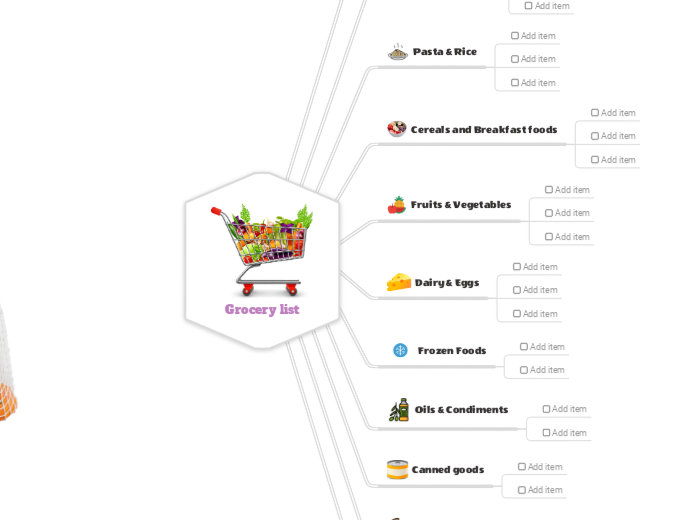
The Grocery list template helps you create a checkable task list for your next stop at the market. Check the box when you're buying it/adding it to the shopping cart, and make sure you always buy everything you need. The Grocery list helps you stay organized from one shopping session to another. Simply add the items you need to buy when you go to the market, and when you're there, check each item you're buying to make sure you do not forget anything. You have a list of categories to help you remember what you need when you fill it out. Use this template to create your grocery list🛒. When you remember you need to buy a specific product when you go to the market, add it to your list and make sure you'll always remember everything. Add an item in this category. Every Mindomo template opens with its structure already in place and a default shape that new topics inherit. Templates on a subject add descriptive topics and guiding notes where people usually get stuck; blank layouts leave the content to you. Edit it in the browser, switch it to a concept map, outline or Gantt chart without redrawing anything, and export it in more than twenty formats. See how mind map templates work, or browse the full gallery by category.Grocery List Template
About this template
Grocery list template
Grocery list
✅Use the check box to check what you buy when doing groceries.Home/Cleaning products
Snacks & Drinks
Canned goods
Oils & Condiments
Frozen Foods
Dairy & Eggs
Fruits & Vegetables
Cereals and Breakfast foods
Pasta & Rice
Bakery & Bread
Meat & Seafood
Add item
✅Check the box when you're buying it/adding it to the shopping cart, and the task of buying it will be closed.Why use a Mindomo mind map template?
-
Products
-
Uses
- General Uses
- Mind Maps for Education
- Mind Maps for Business
- Mind Maps for Personal Development
- Assistive Technology
- Team Collaboration
- Campaign briefs for marketers
- Client discovery workshops for consultants
- Onboarding journeys for HR & L&D
- Knowledge Management
- Team Skills Matrix
- Engagement Library
- Roles
- Marketers
- HR & L&D
- Consultants
- Project Management
- Marketing campaign planning
- Employee training rollouts
- Scope of Work
- Idea Organization
- Issue Trees
- Training Needs Analysis
- Mind Mapping Benefits
-
Solutions
- Guides
- Make Presentations with Mind Maps
- How to Learn with Mind Maps
- Plan and Organize with Mind Maps
- Prioritize Tasks with Mind Maps
- Take Notes with Mind Maps
- Real Customer Stories
- Scaling educational content for 11,000 doctors
- Team workflow: from trial to indispensable in two months
- 10 years without slides: rethinking architecture lectures
- Read all stories
-
Resources
- Learn the basics
- What is a Mind Map?
- How to Mind Map?
- What is a Concept Map?
- Benefits of Mind Mapping
- Guides & Support
- Video tutorials
- Help center
- Forum
- Examples & templates
- Top 29 Mind Map Examples
- Concept Map Templates
- How to Make a Gantt Chart
- Mindomo's Efficiency in Education
- Feature pages
- Education
- Teacher Assignments
- Work & Personal
- Desktop
- The Mindomo blog
- Pricing
- Log In
- Sign Up
- Dashboard
Mind Mapping Benefits
Why visual thinking makes recall and planning easier.
Learn the basics
Guides & Support
Examples & templates
Feature pages
 Blog
The Mindomo blog
Guides, examples and research on visual thinking.
Browse all articles