Every year brings new ideas, as well as new opportunities to improve how people work within Mindomo.
In 2025, our focus was not only on adding new functionality but also on refining the everyday experience of building diagrams. Like the small interactions that make organizing ideas feel natural, smooth, and reliable.
Some changes were highly visible, such as new editing capabilities and interface redesigns. Others happened quietly in the background, improving stability, export reliability, and the way diagrams behave during complex editing.
Taken together, these updates made Mindomo more flexible for learning, planning, collaboration, and visual thinking.
1. ✨ Reorganized context menu

One of the most visible changes this year was the redesigned context menu.
We rebuilt the context menu for faster and easier access.
You’ll notice:
➡️ Cleaner structure: related options grouped intuitively
➡️ Fewer clicks to reach your favorite tools
➡️ Built-in keyboard shortcuts shown directly inside the menu
➡️ Clearer icons for quick recognition
This means less searching and more creating. Exactly how Mindomo is meant to feel.
We also added the ability to select a topic without automatically displaying the topic toolbar. To address this, we added a new checkable option in the “More options” menu called “Always show topic toolbar.” It is enabled by default, but you can now uncheck it if you prefer a cleaner selection experience. When disabled, the toolbar stays hidden until you open the context menu manually with a right-click.
2. 🔵New blue bullets for one-click topic actions
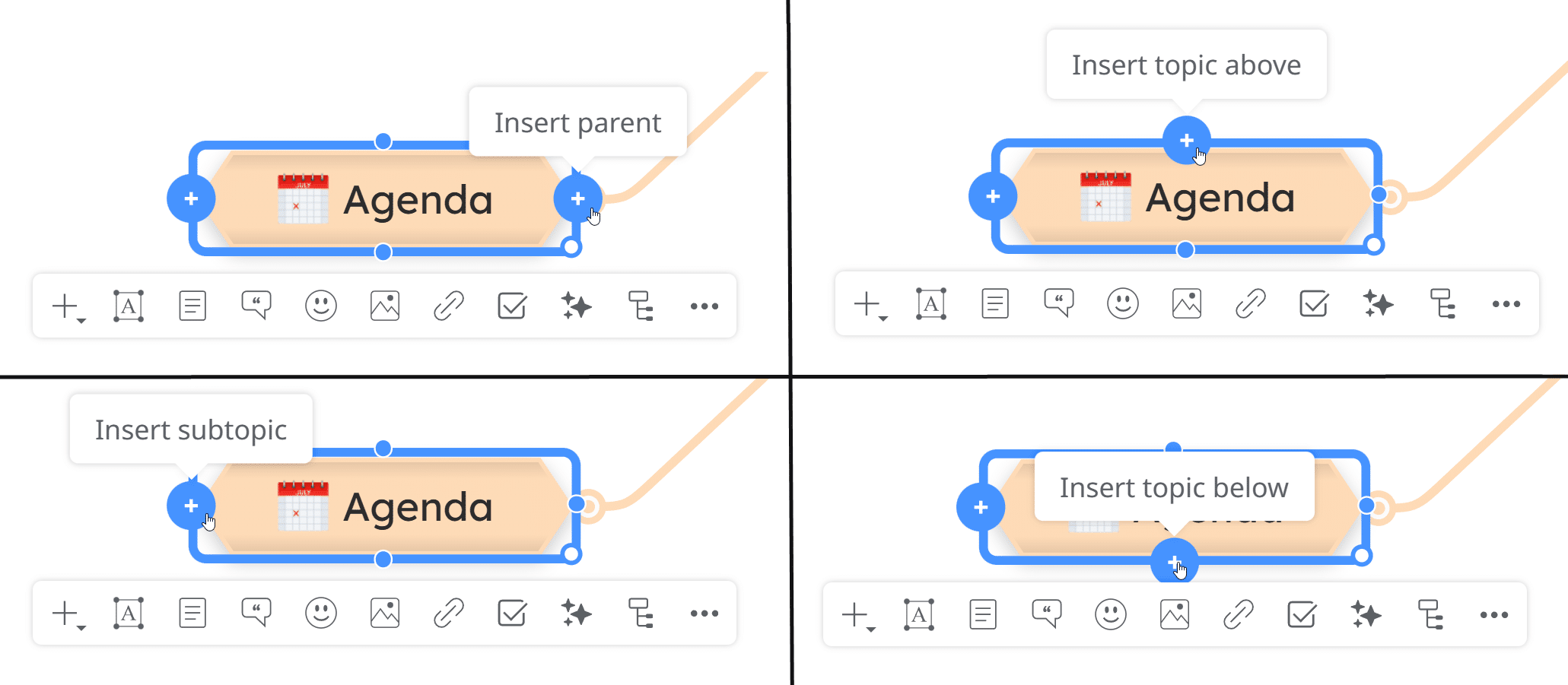
To streamline your diagramming flow, each selected topic now displays blue bullets that let you:
➡️ Add a subtopic
➡️ Add a topic above/below
➡️ Add a parent topic
You can find more information about inserting new topics reading our dedicated help page.
3. ⚪ White corner bullet for topic resizing

Each selected topic now includes a white corner handle.
Drag it to resize your topic instantly. This is especially useful when working with long text or adjusting your layout, giving you more direct visual control over your map’s structure.
4. 🗂️ Task management upgrades
For users who manage tasks in Mindomo, we’ve introduced two major improvements:
We updated and standardized priority icons to internationally recognized color coding:
P0 – Critical (red)
P1 – High (orange)
P2 – Medium (yellow)
P3 – Low (blue)
P4 – Very Low (gray)
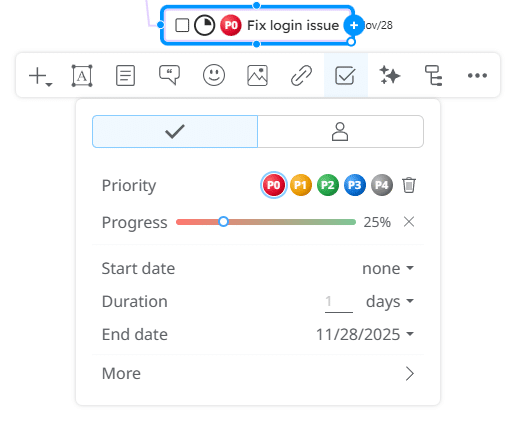
Clearer color-coding means faster scanning and better organization of your project workflows.
You can always filter tasks by priority level using the search button in the top-right corner of the screen.

When this option is activated, the progress of a parent topic is automatically calculated based on the progress of its subtasks.
This gives you accurate, real-time tracking across entire branches.
You will also see a progress indicator icon appear on the parent topic, showing the automatically calculated completion level.

5. ➗ Added mathematical formulas for diagrams
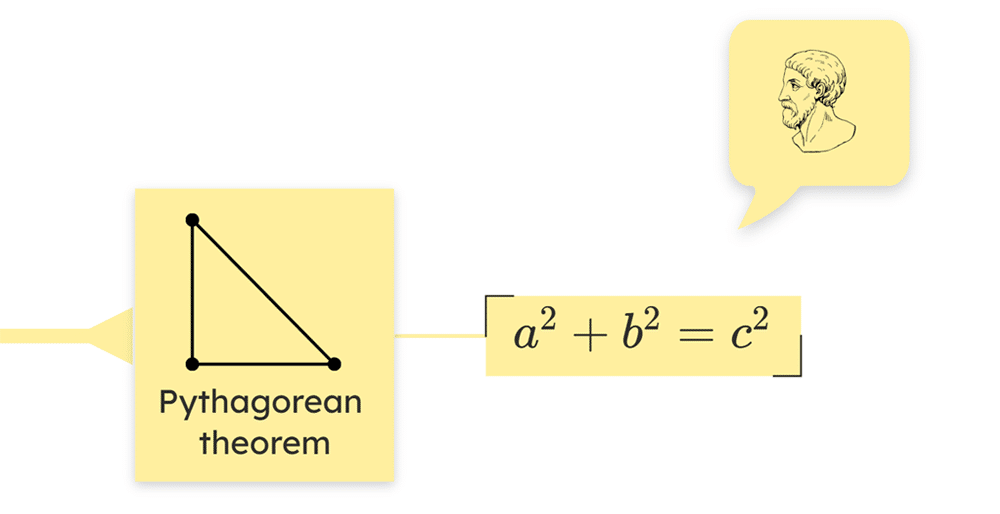
Up to 2025 the math formulas were available only inside the note section. Now, you can use the built-in equation editor, which supports KaTeX syntax to render mathematical expressions directly inside your mind map topics.
You can find more details about how to use this feature on our Math Equations help guide.
6. 📝New editor for notes and comments

We also introduced a new editor for notes and comments, designed to make writing and editing additional information much smoother. Whether you use notes to expand ideas, add explanations, or keep supporting details, the updated editor offers a cleaner experience and improved usability, making it easier to format and manage content without interrupting your workflow.
If you’d like to explore these features in more detail, check out our guides on adding notes and using comments in diagrams in the Help Center.
7. 🔍 Search & filtering enhancements
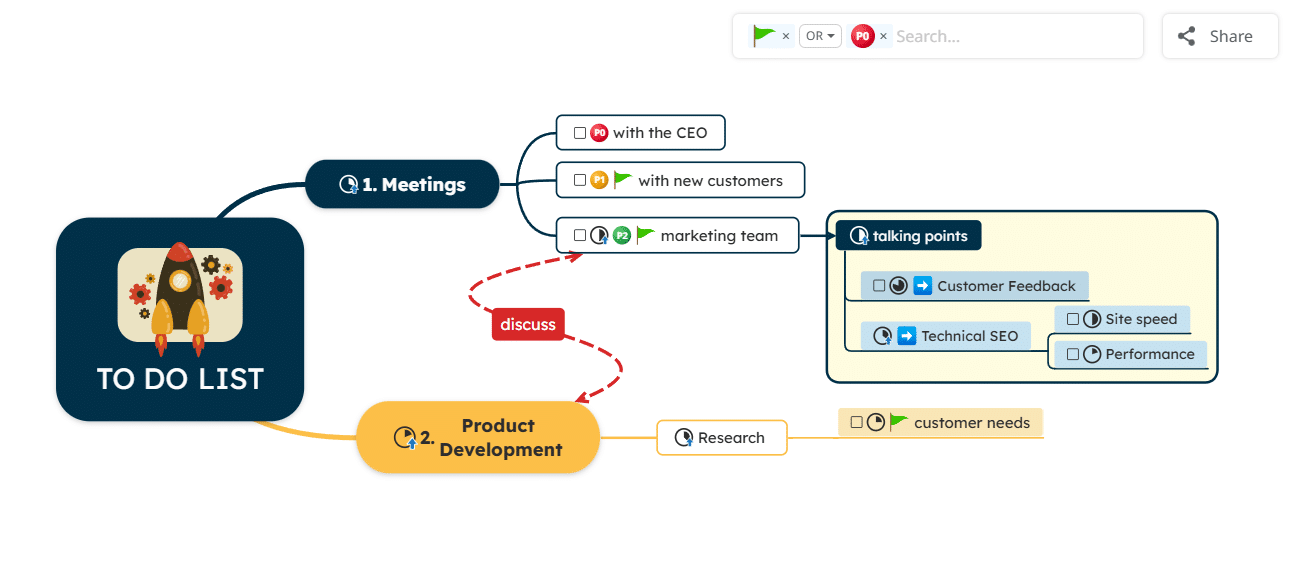
We also improved search by adding the possibility to use flexible AND / OR filtering when filtering topics by icons.
This makes it much easier to work with large diagrams where icons are used to mark priorities, tasks, statuses, or categories.
You can now combine multiple icon filters more precisely, choosing whether topics should match all selected criteria or any of them, which helps you quickly focus on exactly the information you need.
8. ➡️ Bug fixes
Alongside new features, we worked throughout the year on many bug fixes and smaller improvements that make Mindomo more stable and reliable in daily use.
These updates addressed issues related to editing, topic behavior, summaries, exports, and interface interactions, helping diagrams behave more consistently across different workflows. While many of these changes happen quietly in the background, they are essential for keeping the overall experience smooth and dependable.
Committed to improving Mindomo
Year by year, we continue improving Mindomo with the same goal: making it easier for you to organize ideas, plan projects, learn, and collaborate in a way that feels natural and efficient.
Many of the changes we make are inspired directly by user feedback, and we truly value the ideas, suggestions, and observations shared by our community. They help us understand what matters most in real workflows and guide the direction of future improvements.
If you’d like to explore all updates in detail, you can always check the full Mindomo Changelog.
And if you’d like to share feedback, ask questions, or exchange ideas with other users, we invite you to join our community on Mindomo Forum.
Your feedback continues to shape Mindomo, and we’ll keep building it with your needs in mind ✨