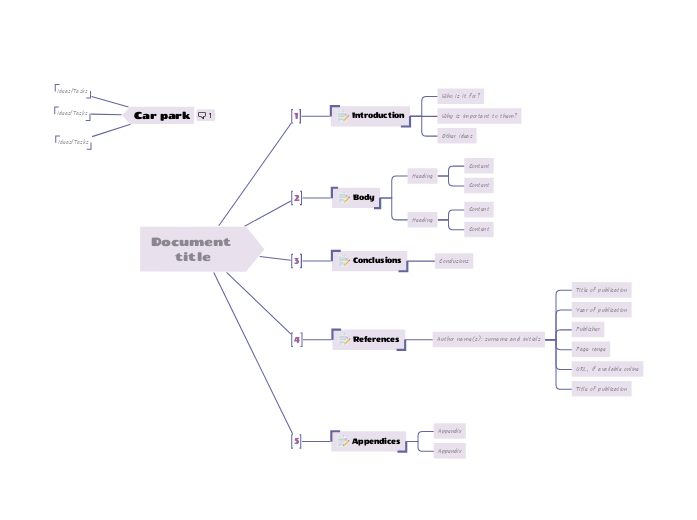
This template helps you to structure and write a document for export to Microsoft Word. Use it to help you prepare essays, reports, proposals, and other documents. This template provides a ready-made outline, allowing you to focus on content rather than format. Simply fill in the designated sections with your customized information, and you'll have a well-organized document in no time. Ideal for reports, proposals, essays, and more, this template helps ensure consistency and clarity in your writing. You can export it in Word document when you're done. Use this 'Car park' floating topic to capture unsorted ideas and tasks during the development of your document. Is excluded from export because it has no "memo" icon. Remember to filter your map by the memo icon before exporting. Type in the title for your document into the Central Topic. Appendices avoid putting large amounts of detail in the body of your document, where the reader may lose track of your logic and start speed reading forwards to the next interesting part. If you rely on external sources, you should reference them so that others can follow up. URL, if available online Page range Publisher Year of publication Title of publication The conclusions bring together the important findings or recommendations from your document. The body of your document will depend on the type of document. The important characteristics are: Content The introduction to your document explains who it is for, and why it is important to them. Miellekarttojen avulla voit ideoida, hahmottaa käsitteiden välisiä suhteita sekä järjestää ja tuottaa ideoita. Miellekarttamallien avulla alkuun pääsee kuitenkin helpommin: ne ovat valmiita runkoja, jotka sisältävät tietoa tietystä aiheesta sekä ohjeita kartan täydentämiseen. Malli antaa rakenteen, joka kokoaa yhteen aiheen kaikki osa-alueet ja toimii lähtökohtana omalle miellekartallesi. Se on käytännöllinen tapa luoda miellekartta tietystä aiheesta niin työelämän kuin opiskelun tarpeisiin. Mindomon älykkäiden miellekarttamallien avulla ajattelet ja toimit vaivattomasti. Voit valita erilaisia miellekarttamalleja Mindomon yritys- ja koulutustileiltä tai luoda omia malleja tyhjästä. Minkä tahansa miellekartan voi muuttaa malliksi lisäämällä sen aiheisiin ohjaavia muistiinpanoja.Word Document Template
Tietoja tästä mallista
How to create a word document
Car park
Ideas for content can be moved into the main map to further develop them.
To hide the Car Park topic from your exported document, click the 'Search...' button and filter the map by the 'memo' icon before exporting.Ideas/Tasks
Document title
The title should reflect the subject and the purpose of the document.
Read more guidance and tips on using Mindomo to create documents.5
Appendices
Typical subjects for appendices include:Appendix
4
References
There are many standards for referencing publications. A typical format is:Author name(s): surname and initials
3
Conclusions
Tip: write the conclusions second, after writing the summary.
Some readers might read just the executive summary and the conclusions, without reading the main body. Conclusions can be longer than the executive summary, as you should mention the important reasons behind your findings or recommendations.2
Body
Heading
1
Introduction
If you assume that your readers need some specific knowledge to be able to read and use the document, mention it here.Other ideas
Why is important to them?
Who is it for?
Miksi käyttää Mindomon miellekarttamallia?
Malleissa on useita toimintoja:
-
Tuotteet
-
Käyttötarkoitukset
- Yleiset käyttötarkoitukset
- Miellekartat koulutukseen
- Miellekartat liiketoimintaan
- Miellekartat henkilökohtaiseen kehitykseen
- Apuvälineteknologia
- Tiimiyhteistyö
- Kampanjabriefit markkinoijille
- Asiakastarpeiden kartoitustyöpajat konsulteille
- Perehdytyspolut HR:lle ja L&D:lle
- Tietämyksenhallinta
- Tiimin osaamismatriisi
- Projektikirjasto
- Roolit
- Markkinoijat
- HR ja L&D
- Konsultit
- Projektinhallinta
- Markkinointikampanjan suunnittelu
- Henkilöstökoulutusten jalkautus
- Työn laajuuden määrittely
- Ideoiden organisointi
- Ongelmapuut
- Koulutustarveanalyysi
- Miellekarttojen hyödyt
-
Ratkaisut
- Oppaat
- Tee esityksiä miellekartoilla
- Opi miellekartoilla
- Suunnittele ja järjestä miellekartoilla
- Priorisoi tehtäviä miellekartoilla
- Tee muistiinpanoja miellekartoilla
- Aitoja asiakastarinoita
- Koulutussisällön skaalaaminen 11 000 lääkärille
- Tiimin työnkulku: kokeilusta korvaamattomaksi kahdessa kuukaudessa
- 10 vuotta ilman dioja: arkkitehtuuriluennot uusiksi
- Lue kaikki tarinat
-
Resurssit
- Perusteet
- Mikä on miellekartta?
- Miten miellekartta tehdään?
- Mikä on käsitekartta?
- Miellekarttaideoita opiskeluun
- Oppaat ja tuki
- Video-oppaat
- Ohjekeskus
- Foorumi
- Esimerkit ja mallit
- 100 miellekarttaideaa
- Miellekartat apuvälineteknologiana
- 29 parasta miellekarttaesimerkkiä
- Ominaisuussivut
- Koulutus
- Opettajan tehtävät
- Työ ja vapaa-aika
- Työpöytäsovellus
- Mindomo-blogi
- Hinnoittelu
- Kirjaudu sisään
- Rekisteröidy
- Hallintapaneeli
Yleiset käyttötarkoitukset
Miellekarttojen hyödyt
Miksi visuaalinen ajattelu helpottaa muistamista ja suunnittelua.
Perusteet
Oppaat ja tuki
Esimerkit ja mallit
Ominaisuussivut
 Blogi
Mindomo-blogi
Oppaita, esimerkkejä ja tutkimusta visuaalisesta ajattelusta.
Selaa kaikkia artikkeleita