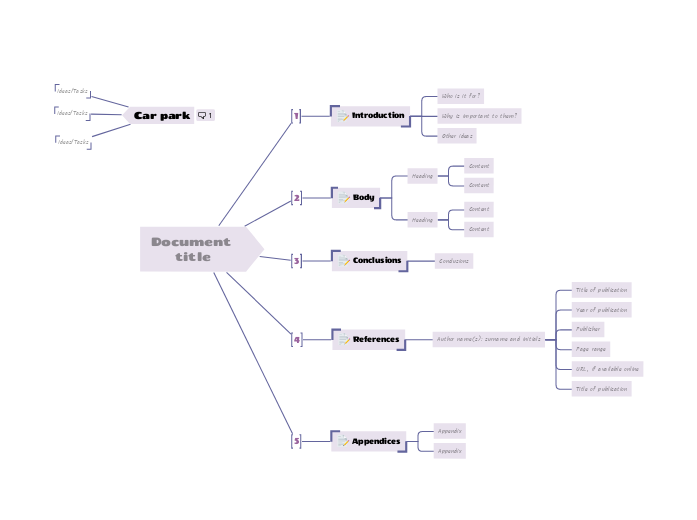
This template provides a ready-made outline, allowing you to focus on content rather than format. Simply fill in the designated sections with your customized information, and you'll have a well-organized document in no time. Ideal for reports, proposals, essays, and more, this template helps ensure consistency and clarity in your writing. You can export it in Word document when you're done. Use this 'Car park' floating topic to capture unsorted ideas and tasks during the development of your document. Is excluded from export because it has no "memo" icon. Remember to filter your map by the memo icon before exporting. Type in the title for your document into the Central Topic. Appendices avoid putting large amounts of detail in the body of your document, where the reader may lose track of your logic and start speed reading forwards to the next interesting part. If you rely on external sources, you should reference them so that others can follow up. URL, if available online Page range Publisher Year of publication Title of publication The conclusions bring together the important findings or recommendations from your document. The body of your document will depend on the type of document. The important characteristics are: Content The introduction to your document explains who it is for, and why it is important to them. 心智圖能幫助您集思廣益、建立概念之間的關聯,並整理與激發想法。 而心智圖範本讓入門更容易,因為範本是已含特定主題資訊與引導說明的架構。換句話說,範本先替您搭好能涵蓋該主題所有要素的結構,可作為您個人心智圖的起點。無論用於商業或教育,心智圖範本都能為特定主題的心智圖提供實用的解決方案。 Mindomo 提供智慧心智圖範本,讓您輕鬆工作、順暢思考。 您可以從 Mindomo 商業版或教育版帳號中挑選各式心智圖範本,也可以從頭建立自己的範本。只要在主題上加入進一步的引導說明,任何心智圖都能變成心智圖範本。關於此範本
How to create a word document
Car park
Ideas for content can be moved into the main map to further develop them.
To hide the Car Park topic from your exported document, click the 'Search...' button and filter the map by the 'memo' icon before exporting.Ideas/Tasks
Document title
The title should reflect the subject and the purpose of the document.
Read more guidance and tips on using Mindomo to create documents.5
Appendices
Typical subjects for appendices include:Appendix
4
References
There are many standards for referencing publications. A typical format is:Author name(s): surname and initials
3
Conclusions
Tip: write the conclusions second, after writing the summary.
Some readers might read just the executive summary and the conclusions, without reading the main body. Conclusions can be longer than the executive summary, as you should mention the important reasons behind your findings or recommendations.2
Body
Heading
1
Introduction
If you assume that your readers need some specific knowledge to be able to read and use the document, mention it here.Other ideas
Why is important to them?
Who is it for?
為什麼要使用 Mindomo 心智圖範本?
範本提供多種功能: