

MindMeister Alternatives: 5 Tools Compared
MindMeister removed team maps on October 14, 2026, as its help center states, and it has no desktop app. The best alternative depends on what you need: Mindomo for mind maps, outlines and Gantt charts in one tool, Xmind for solo desktop mapping, MindManager for complex project plans, Coggle for quick browser maps and Miro for whiteboard teams.
Checked in November 2026 on each vendor’s own pricing, feature and help pages.

On this page
Part 1 · The alternatives
The Best MindMeister Alternatives and Why People Switch
Whatever sends you looking, one of these five has the answer. Every fact about each tool comes straight from its maker’s own site, checked November 2026. Want an even wider field? Browse the best mind mapping software.
Why People Look for a MindMeister Alternative
Most people who leave MindMeister hit one of these limits:
- Team maps are gone. MindMeister removed them on October 14, 2026, as its help center states: each map is now shared person by person, and the free Basic plan’s 3 maps count per person, including maps shared with you. Mindomo keeps team maps on its Team and Business plans (from €6/user/month); Miro puts the whole team on one board.
- No desktop app. Mindomo, Xmind and MindManager run on the desktop; Mindomo also works offline.
- Tasks and classes live elsewhere. MindMeister sends tasks to MeisterTask and has no classes or assignments. Mindomo keeps tasks, classes and assignments in one app, with a Gantt view.
MindMeister and Its Alternatives Side by Side
| Tool | Best for | Free plan | Paid from | Desktop app | AI |
|---|---|---|---|---|---|
| MindMeister | Simple, browser-first mind maps | 3 mind maps per person, shared maps included | €72/user/year, about €6/month | No: web, iOS and Android | Yes, web only; also in Claude (official app) and over MCP (beta) |
| Mindomo | Mind maps, concept maps, outlines and Gantt charts in one tool | 3 diagrams; imports MindMeister files | €6/month; Gantt on Professional (€13.50/month), Team and Business | Windows, macOS and Linux; works offline | Yes, on the web and in the iOS and Android apps; also over MCP |
| Xmind | Solo desktop mapping, with timelines, matrices and Pitch presentations | 10 online maps | $4.92/month | Windows, macOS and Linux | Yes |
| MindManager | Complex project plans | No: a 30-day trial | $99/year, about $8.25/month (web only; $179/year with desktop) | Windows and Mac | None listed |
| Coggle | Quick browser maps | 3 private and unlimited public diagrams | $5/month | No: browser only | None listed |
| Miro | Whiteboard teams | 3 editable boards | $8/member/month | Windows and Mac | Yes, also over MCP |
1. Mindomo: Mind Maps, Outlines and Gantt Charts in One Tool
As an alternative to MindMeister, Mindomo shows one document as a mind map, an outline or a Gantt chart, so a plan and its schedule stay in one file. Teams share folders of maps and edit them together live, with chat and comments; guests need no account. Teachers get classes and assignments, and the apps work offline. The catch: the free plan holds 3 diagrams, like MindMeister’s, and the Gantt view needs Professional (€13.50/month), Team or Business. Part 2 compares the two feature by feature.
2. Xmind: Best for Solo Desktop Mapping
The catch: real-time co-editing needs Premium, the free plan exports PNG only, and Gantt charts are view-only below Premium. Xmind’s AI runs on its own credits: 50 on the free plan, 500 a month on Premium. Mindomo instead: real-time editing with chat and comments on every plan, Free included, and on Professional, Team and Business the same map as an editable Gantt chart. More in alternatives to Xmind.
3. MindManager: Best for Complex Project Plans
The catch: there is no free plan, only a 30-day trial, and the Windows and Mac apps need MindManager’s $179/year plan; the $99/year plan is web only. Mindomo instead: a free plan, desktop apps for Windows, macOS and Linux, Microsoft Teams integration on paid plans and, on Professional, Team and Business, a Gantt view of the same map. More in alternatives to MindManager.
4. Coggle: Best for Quick Browser Maps
The catch: only 3 diagrams can be private on the free plan, it runs in the browser only and it lists no AI. Mindomo instead: desktop and mobile apps that work offline, password-protected diagrams on paid plans and AI that builds a map from a topic, a text or a web page.
5. Miro: Best for Whiteboard Teams
The catch: mind maps are one of Miro’s many uses, only the three most recent boards stay editable on the free plan, and private boards need Starter. Miro’s AI runs on its own credits: 25 per member a month on Starter. Mindomo instead: a tool built for mind maps, concept maps and outlines, with tasks kept in the map itself.
Part 2 · Mindomo vs MindMeister
Mindomo vs MindMeister, Feature by Feature
From here on, the page compares two tools only: MindMeister and the alternative we know best, Mindomo, both launched in 2007. Every MindMeister fact comes from its own help center, pricing page and release notes, checked November 2026. Rows where both tools do the same thing are left out. For Xmind and MindManager in the same detail, see alternatives to Xmind and alternatives to MindManager.
Map Editing and Styling
Map Styling
| Mindomo | MindMeister | |
|---|---|---|
| Topic shape | 64 topic shapes | Shape, border, color and line style per topic |
| Topic style | Hundreds of predefined styles, applied to one topic or to its siblings or descendants | Copy and paste a topic’s style; style several topics at once |
| Topic gradient | 8 gradient and shadow options | No |
| Color | Topics, borders, connections, text, boundaries and background Multicolor palettes |
Topics, borders, connections, text and boundaries No custom background color (only a theme’s) A saved custom palette (Pro and Business) |
| Text formatting | 56 fonts, size, bold, italic, underline, strikethrough and alignment | Font and size; bold, italic and strikethrough typed as Markdown |
| Layout and connections | 9 layouts, set per branch so they can be mixed in one map; adjustable spacing and auto balance 10+ connection types and 17 line formats |
3 layouts: mind map, list and org chart; list and org chart can be combined in one map Auto-layout can be turned off to place topics freely |
| Boundary | 10 shapes, 7 line types and custom colors, around one topic or several | Around one topic and its subtopics |
| Themes | 350+ built-in themes across mind maps, concept maps, org charts, timelines and fishbone diagrams, plus your own, which you can import and export (paid plans) Themes generated with AI from a description of the look you want |
Predefined themes No custom themes (a custom palette instead) |
| Relationships | Label, color, weight, 7 patterns and 13 arrowheads, set separately at each end | Label, color, style and shape; arrows at either end |
| Summary | Yes | No |
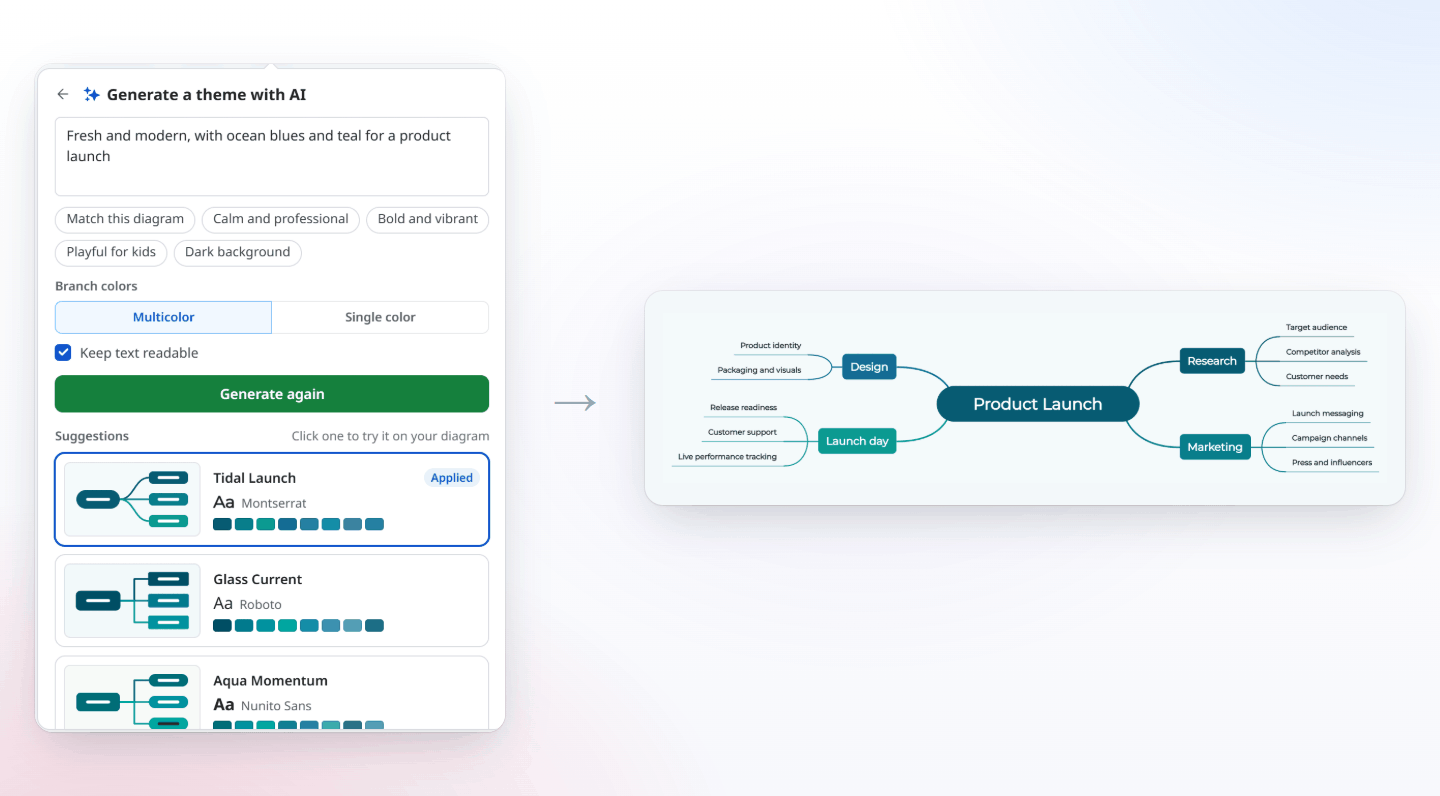
Mindomo has more ways to style a map: more shapes and layouts, gradients, custom themes, background colors, summaries and boundaries around several topics. Describe the look you want, such as “calm and professional”, and Mindomo AI designs custom themes for your map to try. MindMeister keeps styling simpler; of its three layouts, list and org chart can be combined in one map.
File & Multimedia Attachments
| Mindomo | MindMeister | |
|---|---|---|
| Images | From your computer, Google Drive, Dropbox, OneDrive or a URL (paid plans) Web image search and an image gallery (paid plans) Sketches (mobile apps) |
From your computer (paid plans) No web image search |
| Icons and emojis | Icons in categories, with search; priority and completion icons | Icons and emojis, with color, position and size |
| Videos | Upload or link; search YouTube and Vimeo | No web video search |
| Audio files | Upload or record audio | No audio upload or recording |
| Documents | From your computer, Google Drive, Dropbox or OneDrive | From your computer (up to 200 MB each; 2 per map on Personal) or Google Drive No Dropbox or OneDrive |
| Links | URLs, links to topics and to your other diagrams | URLs |
| Notes panel | Rich text with lists, images, videos, links and math formulas; can be maximized | A note on each topic |
| Comments panel | The same rich text, plus attachments, mentions and votes | Markdown formatting and mentions |
Only Mindomo uploads images, videos, audio and documents from Dropbox and OneDrive, and records audio notes straight into a topic. It also searches the web for images and YouTube and Vimeo for videos. MindMeister attaches files from your computer or Google Drive.
Views, Templates and Workspace Tools
| Mindomo | MindMeister | |
|---|---|---|
| Presenter mode | Pick, reorder and duplicate slides, then play them Export as PowerPoint, images or PDF |
Drag topics into slides, reorder and play them Export slides as PDF (paid plans) |
| Templates | Hundreds of templates, guided ones included, sorted by use case and account type | Templates on the Home screen Maps others published to MindMeister Universe |
| History of changes | Every change with date and time; playback and a copy of any version | Last 7 days on Personal, every version on Pro and Business; restore or copy a version |
| Drill down | Yes | No |
| Night mode | Light, dark or auto (follows your system) | No |
| Import | 14 formats, including MindMeister, Xmind, MindManager, FreeMind, OPML, Markdown, Excel and Microsoft Project From your computer, Google Drive, Dropbox or OneDrive |
5 formats: MindMeister, MindManager, FreeMind, Xmind and RTF From your computer only |
| Export | 21 formats, including PDF, image, Word, PowerPoint, Markdown, OPML, HTML, Excel, Microsoft Project, FreeMind and MindManager | 11 formats, including PDF, image, Word and PowerPoint (Pro and Business), Markdown or Mermaid, Xmind, FreeMind and MindManager; bulk export (Business) No OPML, HTML, Excel or Microsoft Project No export on the free plan |
| 8 paper sizes, slides, optional background color | A chosen size and orientation (paid plans) | |
| Filtering | Full-text search across all diagrams, hashtags, filter by icon Task filters: date, assignee, stage, priority, deadline and more |
Search inside a map, and for maps on the dashboard No hashtags, icon or task filters |
| Shortcuts | 120+, searchable | About 40 |
| Cloud storage | 1 GB on Premium, 5 GB on Professional, 15 GB on Team and Business | Files up to 200 MB each; no total listed on its pricing page |
Both turn a map into slides; how to make effective presentations walks through it in Mindomo. Mindomo exports the slides to PowerPoint, images or PDF, where MindMeister’s help describes PDF only. Mindomo also imports 14 formats to MindMeister’s 5.
AI Features
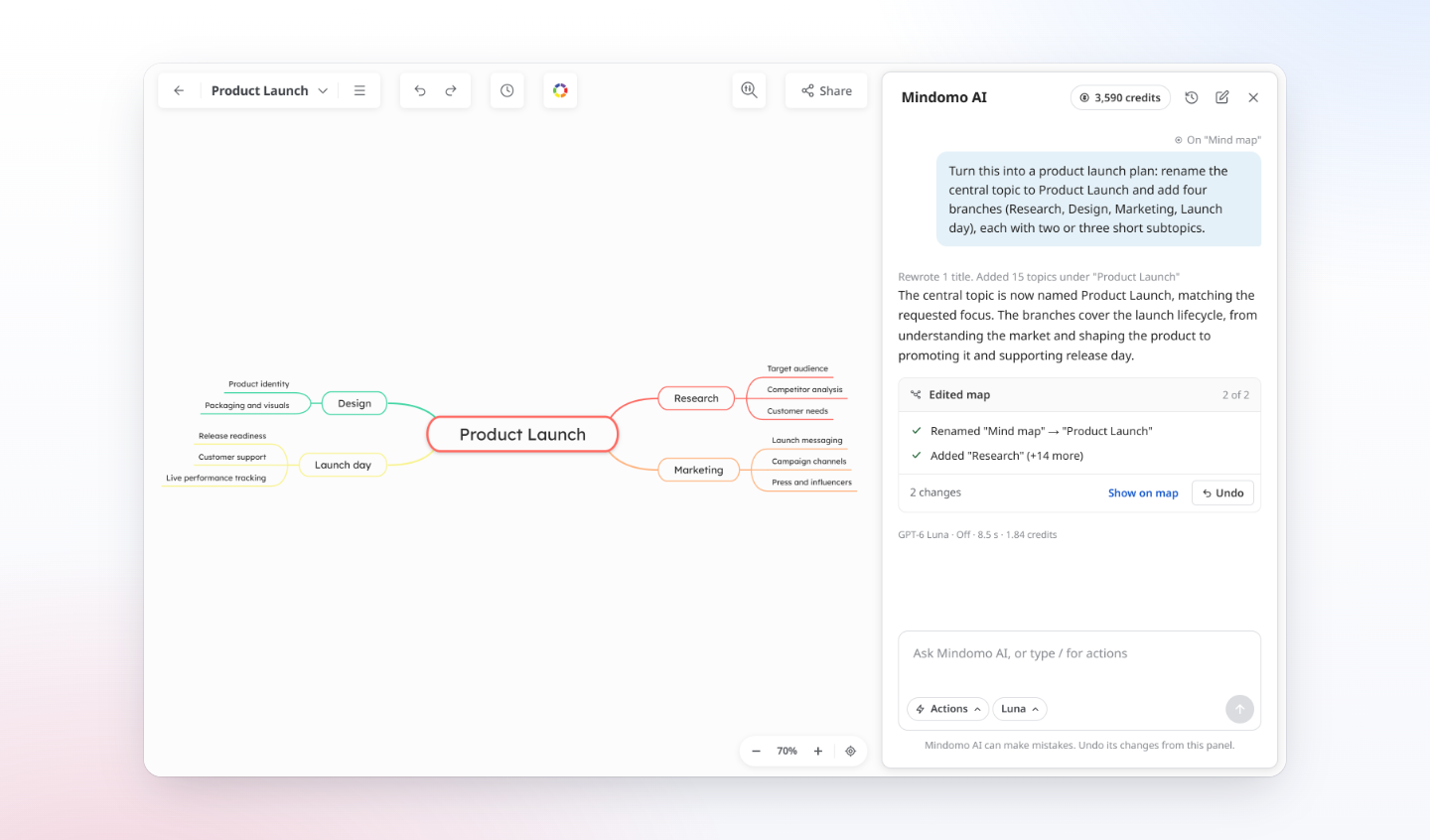
In the browser, Mindomo AI builds a map from a topic, pasted text or a web page, or as a brainstorm, pros-and-cons or SWOT map. It expands any topic with ideas, questions or notes, and translates diagrams into 30+ languages. The AI Assistant is a chat panel in the editor: it edits the open map from plain-text instructions and lists what it changed, so you can undo it. Free includes 1 AI credit, Premium 50 a month and Professional 60. One credit generates about 1,000 words. See the AI mind map generator.
The Mindomo MCP server also connects your account to Claude, ChatGPT, Codex, Cursor and other AI assistants: ask in plain language, and the assistant searches, reads, creates, edits and exports your diagrams. It works on the free plan too.
On iOS and Android, Mindomo AI works in a simpler form: it creates brainstorm, pros-and-cons and SWOT maps and expands topics.
MindMeister’s Meister AI (web app only) generates a map from a prompt or a file and refines existing maps. Each action costs 100 AI credits: 5 actions a month on Free, 20 on Personal, 50 on Pro, unlimited (fair use) on Business. An official app connects it to Claude; its MCP server is in beta. As listed on mindmeister.com, checked November 2026.
Collaboration
| Mindomo | MindMeister | |
|---|---|---|
| Share | With people by email, guests without an account, a team or by link Public, embedded or on social media View, copy or edit rights |
With people by email By link to people without an account: view on Free, view or edit on paid plans No team maps (removed on October 14, 2026) Published maps: public, embedded or on social media Viewer or contributor rights |
| Password-protected diagrams | Yes (paid plans) | No |
| Real-time collaboration | Editing, chat, comments, votes and attachments | Editing, live cursors, comments and attachments No chat |
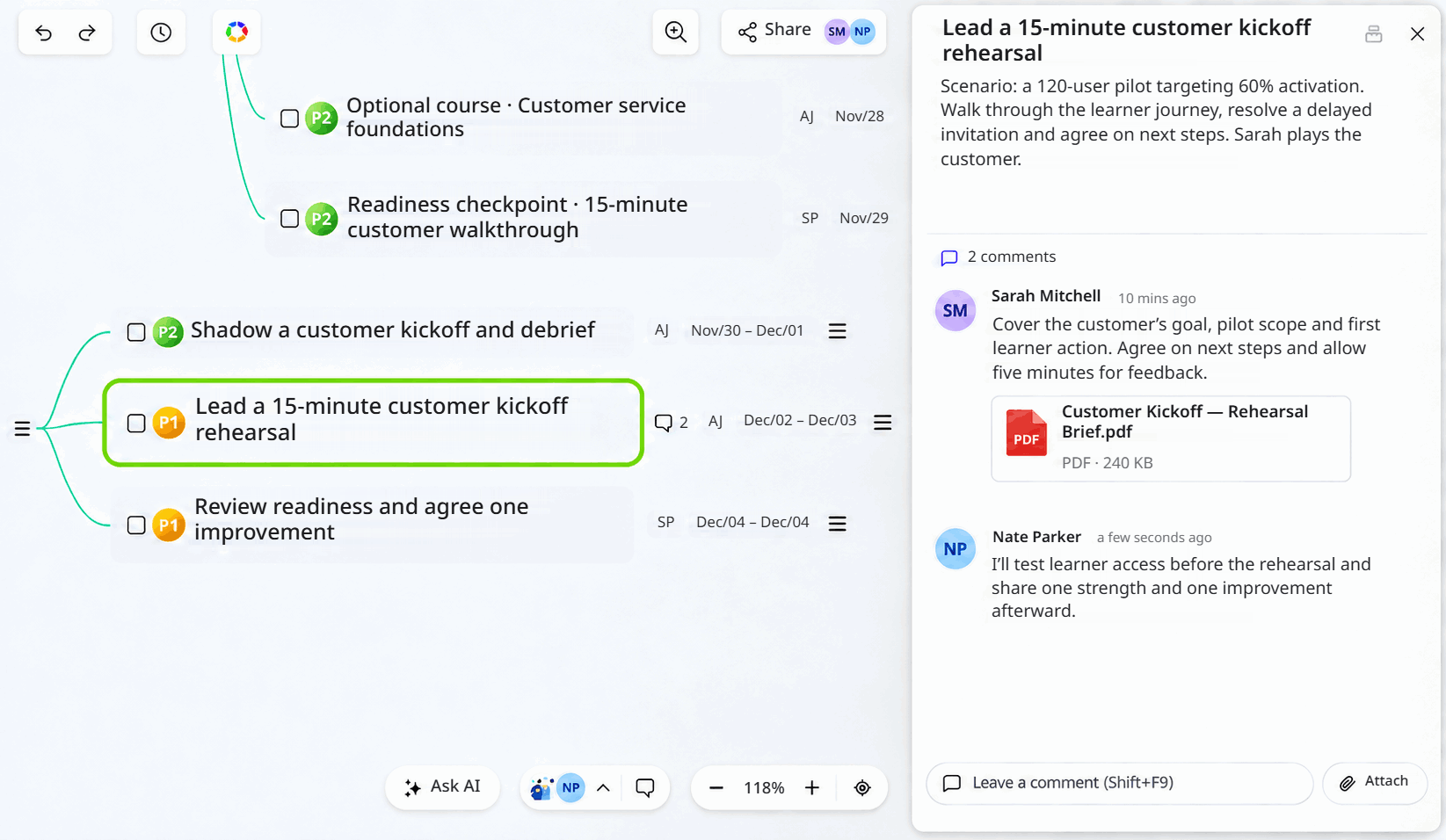
Both are real-time collaborative mind mapping tools. Mindomo adds password-protected diagrams, chat beside the map and team maps (shared folders on the Team and Business plans, from €6/user/month). MindMeister removed team maps in October 2026: a map is now shared with each person directly. On Mindomo Professional, up to 20 guests (5, 10 or 20, depending on the option) can edit your maps with every premium feature, with a free account or none.
Task Management
| Mindomo | MindMeister | |
|---|---|---|
| Tasks | Assignees: collaborators, guest users who can edit without an account, or ghost users: fictive people you add by name, for planning Start and end dates, recurring tasks, priority, progress and comments |
A topic can be sent to MeisterTask as a task, with an assignee and a due date The task is managed in MeisterTask (a separate app), not in the map |
| Reminders | Email notifications | No |
| iCal task feed | Tasks sync with your calendar | No (MeisterTask has one) |
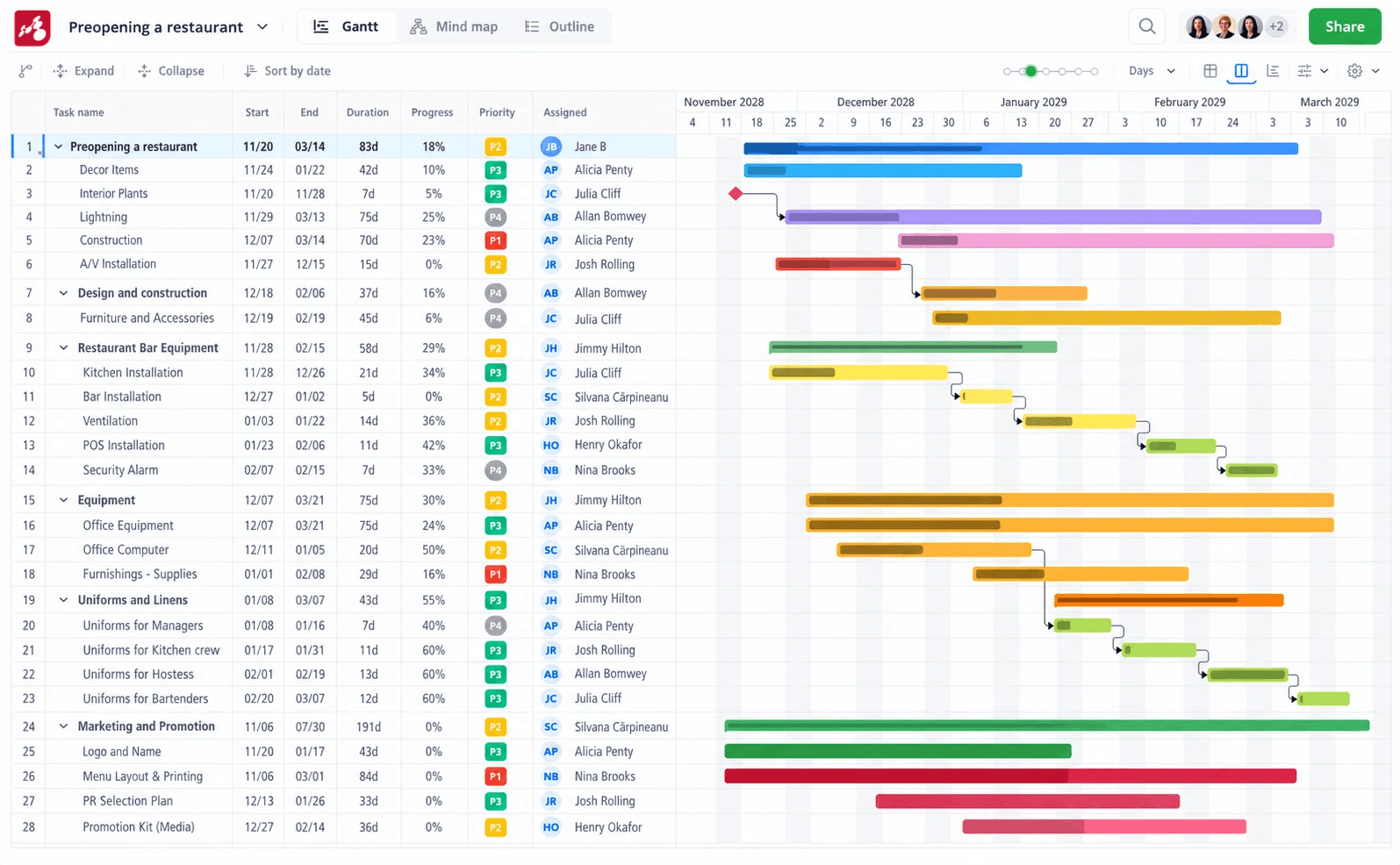
A MindMeister topic can become a task, but the task is then managed in MeisterTask, a separate app. In Mindomo, tasks live in the map. On Professional, Team and Business, the same map opens as a Gantt chart, so the plan and the ideas behind it stay in one file.
Education Features
| Mindomo | MindMeister | |
|---|---|---|
| Organization | Classes and schools | No |
| Assignments | Blank or template, individual or team, with deadline, attachments, progress and playback Students join by email, name and PIN, class, Google Classroom, QR code, link or access code |
No |
| Grading | Private grades, feedback with attachments, grade overview and a downloadable report | No |
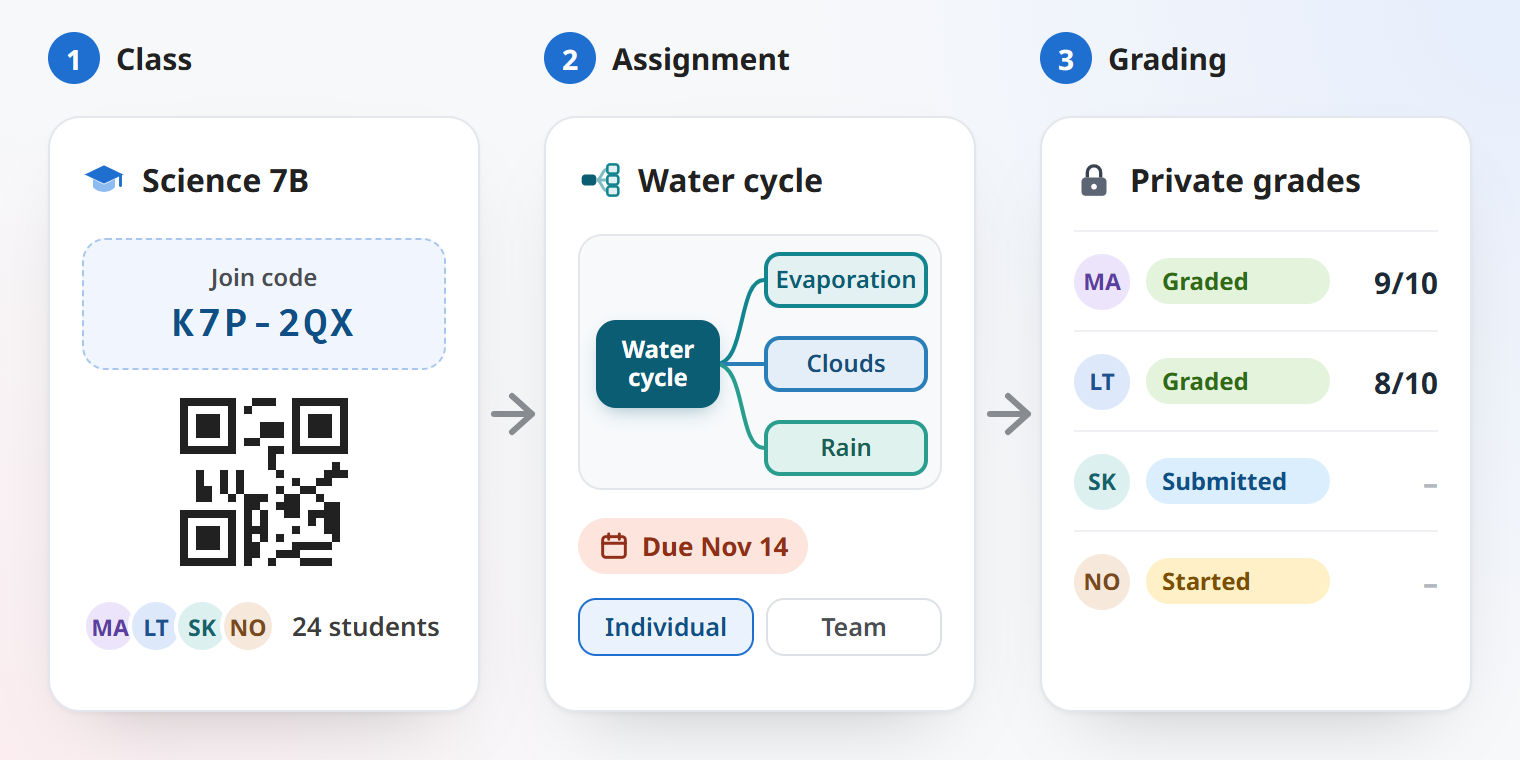
MindMeister has academic pricing for students, educators and institutions, but no classroom features. Mindomo has classes students join with a code, assignments, grading and learning-platform integrations, for schools and homeschooling alike.
Types of Diagrams
| Mindomo | MindMeister | |
|---|---|---|
| Diagrams | Mind map, outline, Gantt chart (Professional, Team and Business), concept map, org chart, tree chart, timeline, logic chart and fishbone | Mind map, outline, org chart and list Whiteboard: sticky notes and emoji stamps on a shared board No Gantt chart, concept map layout, timeline, logic chart or fishbone |
Available Platforms
| Mindomo | MindMeister | |
|---|---|---|
| Platforms | Web Windows, Mac and Linux, offline with sync Android and iOS, offline with sync |
Web No desktop app Android and iOS |
On a computer, MindMeister works only in the browser and needs a connection. Mindomo’s desktop apps work offline, and so do its mobile apps: your changes merge with your colleagues’ when you reconnect.
Integrations
| Mindomo | MindMeister | |
|---|---|---|
| Learning platforms | Canvas, itslearning, Brightspace, Schoology, Moodle, Blackboard and Google Classroom | None |
| Business & personal | Google Drive, Dropbox, OneDrive, Evernote, Google Workspace, Microsoft 365, Microsoft Teams and embedded media | Google Drive, Google Workspace (Pro and Business), Microsoft Teams, MeisterTask and embedded media No Dropbox or OneDrive |
MindMeister lists no learning platform among its integrations, so a class cannot open its maps from Canvas, Moodle or Google Classroom; Mindomo connects to all seven in the table, with classes and assignments. See all Mindomo integrations; MindMeister lists its own on mindmeister.com, checked November 2026.
Backup, Support and Extras
| Mindomo | MindMeister | |
|---|---|---|
| Backup | Dropbox, Google Drive, OneDrive or FTP; bulk download as a ZIP file | Google Drive; bulk download as a ZIP file (Business) No Dropbox, OneDrive or FTP |
| Browser extension | Mindomo - AI Mind Map Maker (Chrome, Firefox and Edge) | No (its Chrome extension is currently unavailable) |
| Phone support | Yes | Business plan only |
Both have two-factor authentication (on Mindomo from Premium), email support, a help center, a community forum and video tutorials.
Pricing and Plans
| Mindomo | MindMeister | |
|---|---|---|
| Account types & prices | Free – free (always), up to 3 diagrams Student – €4/user/month (paid annually) Teacher – €5/user/month (paid annually) School – from €10/month (paid annually), starting with 2 teachers and 80 students Premium – €6/month (paid annually) Professional – €13.50/month (paid annually) for 1 user + 5 guests, with Gantt charts Team – €6/user/month (paid annually), minimum 3 users, with shared folders and Gantt charts Business – €10/user/month (paid annually), minimum 3 users, plus guests, with shared folders and Gantt charts Prices exclude local taxes; 6-month billing costs more. As listed on Mindomo pricing, checked November 2026. |
Basic – free (always), up to 3 mind maps per person, counting maps others share with you Personal – €72/user/year (€6/month) Pro – €120/user/year (€10/month) Business – €180/user/year (€15/month) No monthly billing: plans are paid yearly, or every 6 months at a higher price. Prices exclude VAT and vary by region. As listed on mindmeister.com, checked November 2026. |
Both have a free plan with no time limit and cheaper plans for education. Outside education, the entry-level paid plans cost the same, €72 a year (€6/month); the sections above compare what that price buys. Mindomo’s Gantt view comes with Professional (€13.50/month), Team and Business.
Switching from MindMeister to Mindomo
Mindomo imports MindMeister’s own file format (.mind) on every plan, Free included:
- In MindMeister, export each map you want to keep as a MindMeister (.mind) file.
- In Mindomo, click Import on the Dashboard and choose the file, or drop it onto the import panel.
- To move several maps at once, drag the files onto the panel together. Each becomes its own map.
Open each imported map once to check it: a feature only one tool has can change how a map looks. On the free plan, imported maps count toward the 3-diagram limit.
Part 3 · The verdict
Which Is Better, Mindomo or MindMeister?
Both are easy to use, collaborate in real time and are free to start.
Choose Mindomo if you want one tool for mind maps, concept maps, outlines and Gantt charts (on Professional, Team and Business). It adds tasks with reminders, desktop apps that work offline, and classes and assignments for teaching, with your data on servers in Germany under the GDPR. Choose MindMeister if you want a simple, browser-first mind mapper whose tasks continue in MeisterTask.