
1
1 topicIntroduction
The introduction to your document explains who it is for, and why it is important to them. If you assume that your readers need some specific knowledge to be able to read and use the document, mention it here.
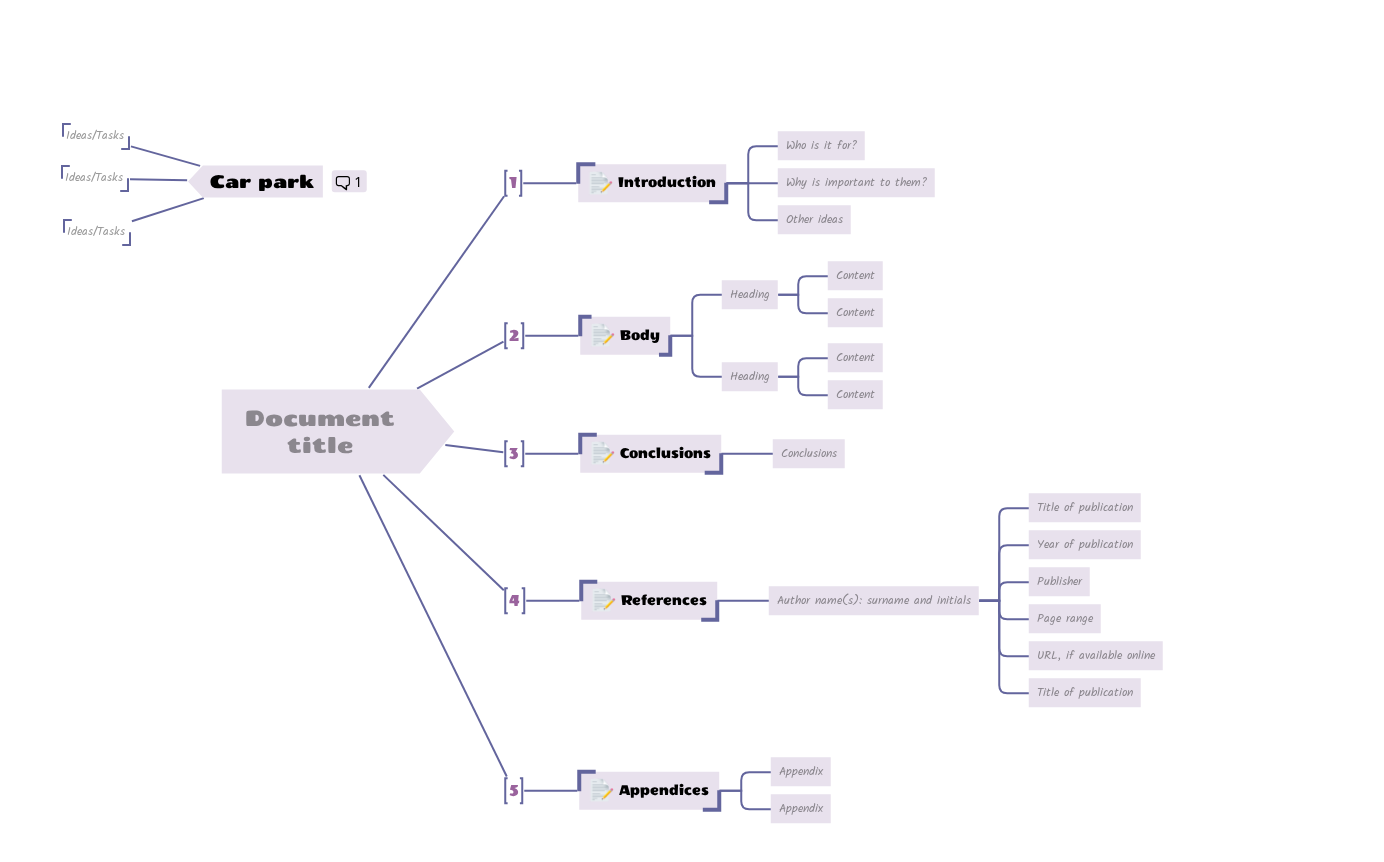
This template helps you to structure and write a document for export to Microsoft Word. Use it to help you prepare essays, reports, proposals, and other documents.
Free with a Mindomo account. Opens your own copy in the editor.
This template provides a ready-made outline, allowing you to focus on content rather than format. Simply fill in the designated sections with your customized information, and you'll have a well-organized document in no time. Ideal for reports, proposals, essays, and more, this template helps ensure consistency and clarity in your writing. You can export it in Word document when you're done.
What’s inside this template
Central topic
Document title
Type in the title for your document into the Central Topic. The title should reflect the subject and the purpose of the document. Read more guidance and tips on using Mindomo to create documents.
The introduction to your document explains who it is for, and why it is important to them. If you assume that your readers need some specific knowledge to be able to read and use the document, mention it here.
The body of your document will depend on the type of document. The important characteristics are: Good signposting with descriptive headings A coherent sequence that builds up step by step Put complicated details and data in the Appendices, and summarise them in the main body
The conclusions bring together the important findings or recommendations from your document. Tip: write the conclusions second, after writing the summary. Some readers might read just the executive summary and the conclusions, without reading the main body. Conclusions can be longer than the executive summary, as you should mention the important reasons behind your findings or recommendations.
If you rely on external sources, you should reference them so that others can follow up. There are many standards for referencing publications. A typical format is: Author name(s): surname and initials Year of publication Title of publication Publisher Page range URL, if available online
Appendices avoid putting large amounts of detail in the body of your document, where the reader may lose track of your logic and start speed reading forwards to the next interesting part. Typical subjects for appendices include: Detailed method and approach Tables of raw data Glossary of terms, especially if you use jargon Detailed technical information
Use this "Car park" floating topic to capture unsorted ideas and tasks during the development of your document. Ideas for content can be moved into the main map to further develop them. To hide the Car Park topic from your exported document, click the "Search..." button and filter the map by the "memo" icon before exporting.
Click “Use this template” and sign in with a free account.
Replace the topics and fill in the notes.
Share, present or export it, or switch it to an outline or Gantt view.
Word Document Template
Free with a Mindomo account. Opens your own copy in the editor.