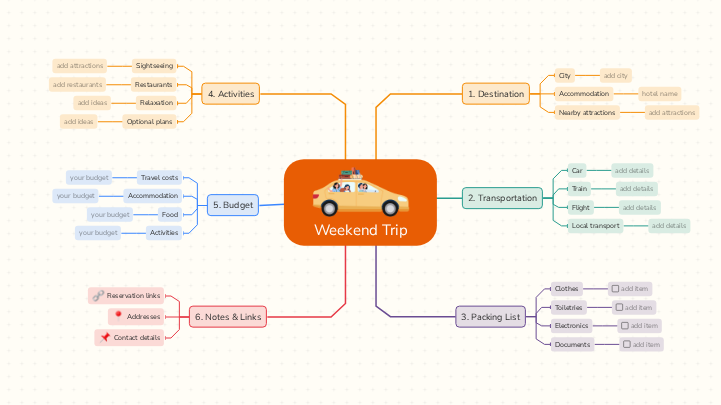
Plan your next getaway with this Weekend Trip Template. Organize your destination, transportation, packing list, activities, and budget. Use guided placeholders, helpful tips, and checkable packing lists to make your weekend trip planning easy and stress-free. Make the most of a short getaway with this weekend trip template. Planning ahead means less time spent organizing on the spot and more time enjoying your destination. Choose where you are going, then plan how you will get there and where you will stay. Add a packing list so you don't forget the essentials, set a budget for transport, accommodation, food and activities, and map out what you want to see and do each day. Keep important details, such as booking confirmations, addresses and contact numbers, in the notes of the map, and share it with the people you are traveling with so everyone knows the plan. Plan your weekend getaway with this guided template. Start by choosing your destination and accommodation, then select the transportation options you will use and delete the ones you do not need. Build your packing checklist using the suggested items and tick each one off as you pack. Add activities and estimated costs, and keep booking links, Google Maps locations, and contact details in the Notes & Links section. Fill in the placeholders throughout the map and customize the example categories to suit your trip. Keep important information in this branch. Use Mindomo's Links feature to attach reservation pages and map locations directly to topics, and Notes to store useful contact details. Avoid putting private credentials or payment information in a shared map. Write in the notes important phone numbers and other contact information, such as: Save places you will visit, such as: Add links to your: Estimate how much your weekend trip will cost. Enter a planned amount for each category using the 'your budget' placeholders, and use the same currency throughout. Check the total against what you can afford; remember that prices are estimates until confirmed. Budget for entrance tickets, guided tours, events and other paid activities. Add the estimated total to 'your budget', keeping free activities separate if helpful. Estimate the total you may spend on meals, drinks and snacks for the whole weekend. You can calculate a daily allowance and multiply it by the number of days, then enter it in 'your budget'. Enter the total accommodation cost for the stay, including taxes or fees where applicable. For example, multiply the nightly price by the number of nights. Add the estimated total in 'your budget'. Enter your estimated round-trip transportation cost, including tickets or fuel, tolls, parking and airport or station transfers where applicable. Use the 'your budget' placeholder for the amount. Plan the activities you would enjoy during your weekend. Add places to see, restaurants and ways to relax; use Optional plans for backup ideas. Attach useful web or map links to individual topics. Add extra ideas for when you have spare time or need an alternative because of weather or availability. Add slower-paced activities such as a park stroll, café break, spa visit or scenic viewpoint. Add restaurants, cafés or local foods you would like to try. Add attractions with the sights you want to visit. Create a packing checklist for your weekend trip. Use the suggested items under each category, add anything else you need and tick each item's checkbox once it is packed. Remove items you will not bring. Add the travel documents and confirmations relevant to your trip. Check off each one when it is ready. Keep sensitive identification details out of shared diagrams. List your electronic devices and their accessories. Add each item as a separate checkable topic and tick it off once packed. Add the toiletries you need for the trip. Use one checkable topic per item and mark it complete when packed. Check airline liquid restrictions if you travel with hand luggage. Choose clothing suited to your destination, the weather and your planned activities. Add each item as a separate checkable topic so you can tick it off when packed. Choose how you will travel to your destination (car, train or flight) and how you will get around locally. Add how you will move around your destination: Keep this branch if you are flying and add: Keep this branch if you will travel by train and add details: Keep this branch if you are traveling by car and add details: Choose where you want to go, where you will stay and which places you may want to visit. Fill in the placeholders under each category. Keep your plans realistic for a weekend trip. Add attractions close to your destination using the placeholder. Include: Add the hotel/Airbnb name. Add your destination Every Mindomo template opens with its structure already in place and a default shape that new topics inherit. Templates on a subject add descriptive topics and guiding notes where people usually get stuck; blank layouts leave the content to you. Edit it in the browser, switch it to a concept map, outline or Gantt chart without redrawing anything, and export it in more than twenty formats. See how mind map templates work, or browse the full gallery by category.Weekend Trip Template
About this template
Weekend trip template
Weekend Trip
6. Notes & Links
Contact details
Avoid saving sensitive personal information in a publicly shared template.Addresses
Find each location in Google Maps, copy its share link, and attach that URL on this topic.
💡 You can create a separate topic for each address if useful.Reservation links
⭐ accommodation
⭐ transport tickets
⭐ restaurant bookings
⭐ activity reservations5. Budget
Activities
Food
Travel costs
your budget
4. Activities
Optional plans
Prioritize only the activities that fit your weekend; the rest can remain optional.Relaxation
Leave room in your schedule to rest between activities.add ideas
Restaurants
Include useful details such as
Attach restaurant websites or Google Maps links to topics.add restaurants
Sightseeing
For each place, you can
add opening hours, expected visit length and ticket information in Notes, plus an official website or map URL.3. Packing List
Documents
Electronics
Toiletries
Clothes
add item
2. Transportation
Keep the transport options you plan to use and delete those that do not apply to your trip.Local transport
Include useful stops, ticket options and routes.
ℹ️ Remove services you do not expect to use.Flight
Attach the booking link if useful.
ℹ️ Delete this branch if you will not fly.Train
Attach ticket or timetable URLs.
ℹ️ Delete this branch if you will not travel by train.Car
ℹ️ Delete this branch if you will not travel by car.add details
1. Destination
Nearby attractions
add attractions
Attach official visitor websites or Google Maps links where useful.Accommodation
hotel name
Add check-in/check-out details in Notes and attach the property's website or booking confirmation.City
add city
Why use a Mindomo mind map template?
-
Products
-
Uses
- General Uses
- Mind Maps for Education
- Mind Maps for Business
- Mind Maps for Personal Development
- Assistive Technology
- Team Collaboration
- Campaign briefs for marketers
- Client discovery workshops for consultants
- Onboarding journeys for HR & L&D
- Knowledge Management
- Team Skills Matrix
- Engagement Library
- Roles
- Marketers
- HR & L&D
- Consultants
- Project Management
- Marketing campaign planning
- Employee training rollouts
- Scope of Work
- Idea Organization
- Issue Trees
- Training Needs Analysis
- Mind Mapping Benefits
-
Solutions
- Guides
- Make Presentations with Mind Maps
- How to Learn with Mind Maps
- Plan and Organize with Mind Maps
- Prioritize Tasks with Mind Maps
- Take Notes with Mind Maps
- Real Customer Stories
- Scaling educational content for 11,000 doctors
- Team workflow: from trial to indispensable in two months
- 10 years without slides: rethinking architecture lectures
- Read all stories
-
Resources
- Learn the basics
- What is a Mind Map?
- How to Mind Map?
- What is a Concept Map?
- Benefits of Mind Mapping
- Guides & Support
- Video tutorials
- Help center
- Forum
- Examples & templates
- Top 29 Mind Map Examples
- Concept Map Templates
- How to Make a Gantt Chart
- Mindomo's Efficiency in Education
- Feature pages
- Education
- Teacher Assignments
- Work & Personal
- Desktop
- The Mindomo blog
- Pricing
- Log In
- Sign Up
- Dashboard
Mind Mapping Benefits
Why visual thinking makes recall and planning easier.
Learn the basics
Guides & Support
Examples & templates
Feature pages
 Blog
The Mindomo blog
Guides, examples and research on visual thinking.
Browse all articles