Checklists are a powerful way to save time and get consistent results when completing complicated tasks. This template helps you categorize your to-dos into personal, work, and other sections for better organization. Simply fill in each category with your tasks and prioritize them according to your needs. Whether you’re managing daily simple tasks, work assignments, or other things you need to do, this checklist ensures you stay organized and focused on what matters most. This mind map contains some example checklists that you can modify or delete. Create your own checklists and add a link to them. Create or attach checklist Create or attach checklist. tasks Add tasks. You can copy this topic to create a new category of checklists. Review a project Use this checklist to review the status of a project and decide on corrective actions. Review Risks Review Issues Review resources Review budget Review schedule Evaluate a quotation Use this checklist to help evaluate a quotation received from a supplier. Reputation Warranty Availability Pricing Requirements Set priorities Use this checklist to help with task prioritisation. Neither important nor urgent Identify tasks that you will defer and may never do. Urgent Identify tasks that are 'urgent' as defined by someone else, but do not contribute to longer term goals. Important Identify tasks that contribute to long term goals, but are not time-sensitive. Important and urgent Identify which tasks are both important (contribute towards long term goals) and time-sensitive. You can copy this topic to create a new category of checklists. Prepare for an online meeting Turn on Focus Assist Spare mouse battery Shut down other apps Check sound and camera Set a backdrop Either tidy up your office, or arrange a green screen and electronic backdrop. Close windows & doors Minimise external noise. Set phones to silent Set mobile and desk phones to silent. Check the meeting link Materials circulated beforehand Monthly plan Review Daily Dashboard Review your Daily Dashboard map to make sure it is helping you to manage your workload effectively. Administrative updates Set training objectives Schedule meetings and reviews Review appointments and deadlines Weekly plan Empty inbox Set 3 major objectives Daily plan Add here your to-dos for the day! task subtask Top 3 actions for today Review appointments Review starred emails Update time sheets A gondolattérképek segítenek az ötletelésben, a fogalmak közötti kapcsolatok kialakításában, a rendszerezésben és az ötletek generálásában. A gondolattérkép-sablonok azonban könnyebb utat kínálnak a kezdéshez, mivel ezek olyan keretek, amelyek egy adott témával kapcsolatos információkat tartalmaznak, irányadó utasításokkal. Lényegében a gondolattérkép minták biztosítják azt a struktúrát, amely egy adott téma összes elemét egyesíti, és kiindulópontként szolgál az Ön személyes gondolattérképjéhez. Forrást jelentenek arra, hogy praktikus megoldást nyújtsanak egy adott témával kapcsolatos gondolattérkép létrehozásához, akár üzleti, akár oktatási céllal. A Mindomo intelligens gondolattérkép-sablonokat kínál, amelyek lehetővé teszik, hogy könnyedén működjön és gondolkodjon. Választhat a Mindomo üzleti vagy oktatási fiókjaiból, vagy létrehozhatja saját gondolattérkép sablonjait a semmiből. Bármilyen gondolattérkép átalakítható gondolattérkép-sablon térképpé, ha az egyik témakörhöz további irányadó jegyzeteket ad hozzá.Checklist Template
This template helps you to create your own map of checklists.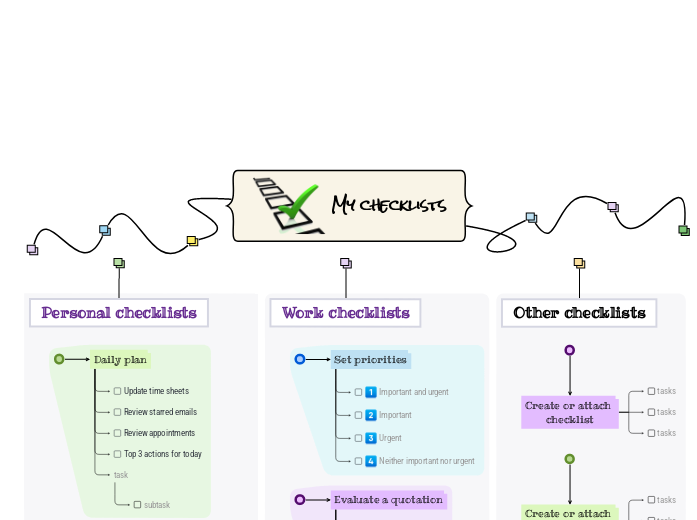
Erről a sablonról
Stay on top of your tasks with the My Checklist template.
My checklists
You can add new checklists OR add new steps to the existing ones.
Read more about how to use checklists in the Mindomo blog.Other checklists
To add a new checklist, press the Insert or TAB key or create a checklist on the spot.Work checklists
To add a new checklist to 'Work checklists', press the Insert key.
To add a new step to Set priorities, press Insert or TAB key.Personal checklists
To add a new checklist to 'Personal checklists', press the Insert or TAB key.
To add a new step to 'Prepare for an
online meeting', press Insert or click the button below.
Press Enter to add another step to 'Prepare for an
online meeting'.
Press Enter to add another step to 'Prepare for an
online meeting'.
Press Enter to add another step to 'Prepare for an
online meeting'.
Press Enter to add another step to 'Prepare for an
online meeting'.
Press Enter to add another step to 'Prepare for an
online meeting'.
Press Enter to add another step to 'Prepare for an
online meeting'.
Press Enter to add another step to 'Prepare for an
online meeting'.
To add a new step to 'Monthly plan', press Insert or Tab key.
Press Enter to add another task.
Press Enter to add another task.
Press Enter to add another task.
Press Enter to add another task.
Press Enter to add another task.
To add a new step to 'Weekly plan', press Insert or Tab key.
Press Enter to add another step to 'Weekly plan'.
Press Enter to add another step to 'Weekly plan'.
Press Enter to add another step to 'Weekly plan'.
To add a new step to 'Daily plan', press Insert or Tab key.
Add notes
Add hyperlink
Press Enter to add another step to 'Daily plan'.
Add notes
Add hyperlink
Press Enter to add another step to 'Daily plan'.
Add notes
Add hyperlink
Press Enter to add another step to 'Daily plan'.
Add notes
Add hyperlink
Press Enter to add another task to 'Daily plan'.Miért érdemes Mindomo gondolattérkép mintát használni?
Egy sablon különböző funkciókkal rendelkezik:
-
Termékek
-
Felhasználás
- Általános felhasználás
- Gondolattérképek az Oktatásban
- Gondolattérképek az Üzleti Életben
- Gondolattérképek a Személyes Életben
- Segítő Technológia
- Csapatmunka
- Kampánybriefek marketingszakembereknek
- Ügyfélfeltáró workshopok tanácsadóknak
- Onboarding folyamatok HR- és L&D-csapatoknak
- Tudásmenedzsment
- Csapat kompetenciamátrix
- Projektkönyvtár
- Szerepek
- Marketingszakemberek
- HR és L&D
- Tanácsadók
- Projektmenedzsment
- Marketingkampány-tervezés
- Munkavállalói képzések bevezetése
- Munkaterjedelem
- Ötletszervezés
- Problémafák
- Képzési igényfelmérés
- Az Gondolattérkép Készítés Előnyei
-
Megoldások
- Útmutatók
- Prezentációk készítése gondolattérképekkel
- Hogyan tanuljunk gondolattérképekkel
- Tervezés és rendszerezés gondolattérképekkel
- Hogyan priorizáljuk a feladatokat gondolattérképekkel
- Jegyzetelés gondolattérképekkel
- Valódi ügyféltörténetek
- Oktatási tartalom skálázása 11 000 orvos számára
- Csapatmunka: két hónap alatt a próbáról a nélkülözhetetlenig
- 10 év diák nélkül: az építészeti előadások újragondolása
- Összes történet elolvasása
-
Erőforrások
- Alapok
- Mi az az Gondolattérkép?
- Hogyan készítsünk Gondolattérképet?
- Útmutatók és Támogatás
- Videós útmutatók
- Súgóközpont
- Fórum
- Példák és sablonok
- A 29 Legjobb Gondolattérkép Példa
- Mi az a Fogalomtérkép?
- Funkcióoldalak
- Oktatás
- Tanári feladatok
- Munka és Személyes
- Asztali
- A Mindomo blog
- Árazás
- Bejelentkezés
- Regisztráció
- Irányítópult
Az Gondolattérkép Készítés Előnyei
Miért könnyíti a vizuális gondolkodás a felidézést és a tervezést.
Útmutatók és Támogatás
Példák és sablonok
Funkcióoldalak
 Blog
A Mindomo blog
Útmutatók, példák és kutatások a vizuális gondolkodásról.
Összes cikk böngészése
Blog
A Mindomo blog
Útmutatók, példák és kutatások a vizuális gondolkodásról.
Összes cikk böngészése