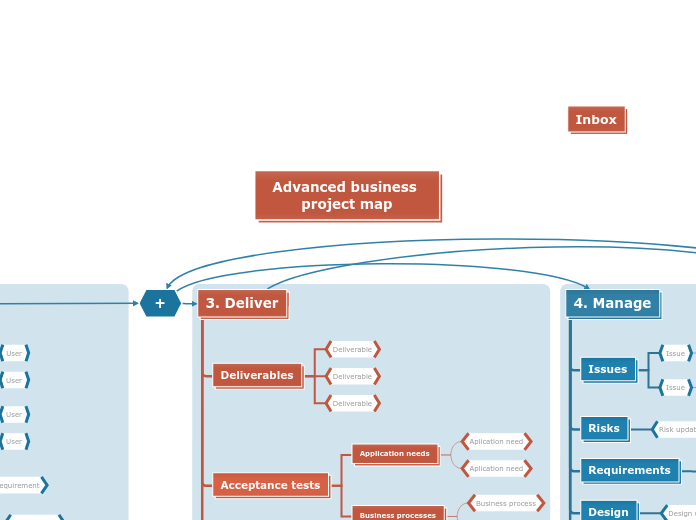
Teamwork increases productivity, so identify the best collaborators that you can rely on, beginning with sponsors and suppliers and getting to your actual team and customer account managers, who you consider are a good fit to sustain this specific project. Make a list of the project requirements and assess the risks and issues that may interfere with the smooth running of the project, as well as the actions you can take to diminish them. The final step is the actual execution of the business project, which includes a timetable and the project tasks that you are considering. Last but not least, developing a communication plan can help focus your message and reach your target audience. You can now Download your mind map and use it to communicate with your stakeholders. Enter your project name Add a project issue and grade its impact by clicking an icon below: Add a project risk and grade its impact by clicking an icon below: Control Add a control action for this risk Type in one or more project activities. Include a project review? Include quality reviews? Include risk and issue reviews? Include stage planning meetings? Include a kick-off meeting? Add a communication/collaboration tool. Specify an exclusion from your project. Add a specific requirement Add a requirements management technique Add other stakeholders Add a partner or supplier. You can add their service or specialty in brackets after their name. Add a team member Add a user or user representative, such as: Add a customer representative. Add an account manager Add a project sponsor Add a strategic reason for this project. Type in a key benefit from this project. Type in an estimated cost Type in an assumption Type in a project constraint Add a key resource that your project will need. Type in the name of a milestone for your project. Deadline date Enter an approximate target date for this milestone. Type in a project deliverable 思维导图可以帮助你集思广益,建立概念之间的关系,组织和产生想法。 然而,思维导图模板提供了一种更容易上手的方法,因为它们是包含特定主题信息和指导说明的框架。从本质上讲,思维导图模板确保了将特定主题的所有元素结合在一起的结构,并可作为个人思维导图的起点。思维导图模板是一种资源,可为创建特定主题的思维导图提供实用的解决方案,无论是用于商业还是教育。 Mindomo 为你带来智能思维导图模板,让你毫不费力地运作和思考。 您可以从Mindomo的商业或教育账户中选择各种思维导图模板,也可以从头开始创建自己的思维导图模板。任何思维导图都可以转化为思维导图模板,只需在其中一个主题上添加进一步的指导说明即可。关于此模板
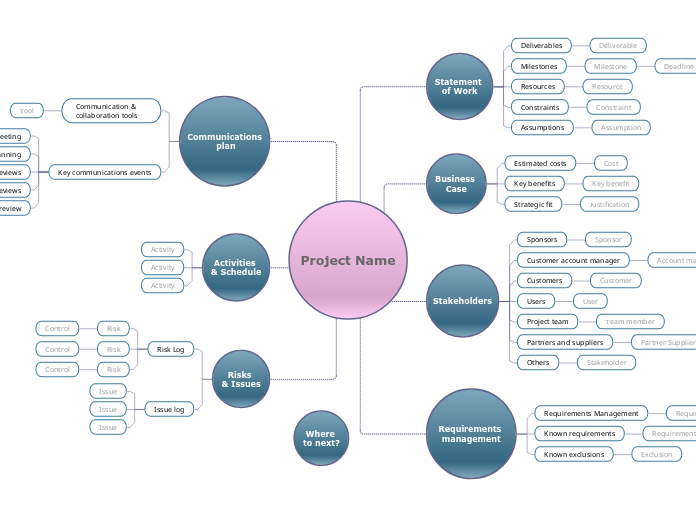
Business project proposal - Whether it's a strategic or an operational project, make a thorough business plan before starting it. Clearly define your statement of work and come up with a good business case: what would be the costs, the benefits, and what is the best approach to consider.
Where to next?
It can then become the basis for detailed planning and scheduling.Project Name
Begin by typing your project name into the Central Topic.Risks & Issues
Issue log
Issue
Risk Log
Risk
Type in a short summary of the action.
Options include:Activities & Schedule
Activity
Examples include:Communications plan
Key communications events
Project review
The project review meeting takes place once the project has been closed, and examines the processes that led to both success and failure in the project.
Add a description of the meeting goals in the Notes panelQuality reviews
If you have specific quality criteria to meet or have a quality regime in your organization, you may need to conduct periodic reviews to ensure that the project could pass an audit at any time.
Add a description of the meeting goals in the Notes panelRisk and issue reviews
You should periodically review project risks and issues, to ensure that new risks are not emerging and that issues are not being left unaddressed.
Add a description of the meeting goals in the Notes panelStage planning
If your project is large, or if you are using an Agile methodology, you may need regular planning meetings to schedule the project in stages.
Add a description of the meeting goals in the Notes panelKick-off meeting
The meeting ensures that the project team and key stakeholders all have the same goals, know what the main elements of the plan are, what the processes and rules are, and what part they will play.
Add a description of the meeting goals in the Notes panelCommunication & collaboration tools
Tool
Examples include:Requirements management
Known exclusions
Exclusion
Examples are:Known requirements
Requirement
Prioritize them with an icon:Requirements Management
Requirements management technique
Techniques might include:Stakeholders
Others
Stakeholder
Think about people who:Partners and suppliers
Partner/Supplier
Project team
Team member
For example:Users
User
Customers
Customer
These might include people who:Customer account manager
Account manager
Sponsors
Sponsor
Business Case
Strategic fit
Justification
Key benefits
Key benefit
Examples include:Estimated costs
Cost
For example:Statement of Work
Assumptions
Assumption
Examples include:Constraints
Constraint
For example:Resources
Resource
For example:Milestones
Milestone
For example:Deliverables
Deliverable
For example:为什么使用 Mindomo 思维导图模板?
模板具有各种功能: