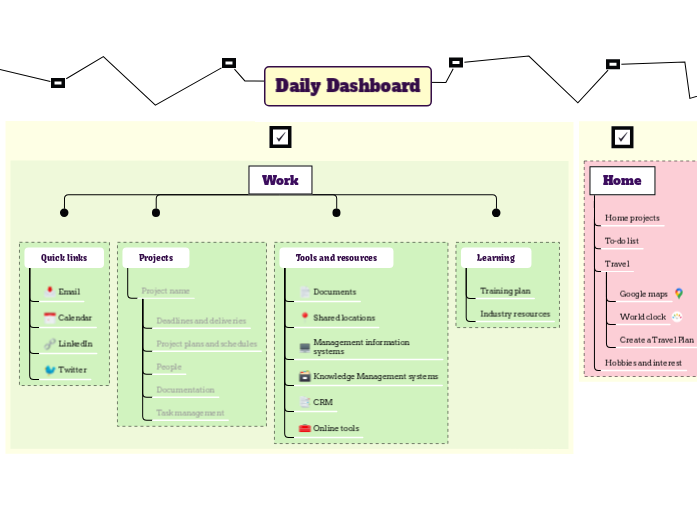
Your Daily Dashboard map connects you to the resources and information that you need every day, and helps you to keep track of work, home and personal projects. Enhance your daily productivity with the Daily Dashboard template. This template divides your tasks into four key categories: My Checklist, Home, Work, and Personal. Start by filling in each category with your specific tasks for the day. Use the 'My Checklist' section for general to-dos, 'Home' for household chores, 'Work' for professional tasks, and 'Personal' for personal goals. This structured approach helps you stay organized and ensures a well-rounded and efficient day. Your Daily Dashboard map helps you to find the resources and information that you need every day. Add links to useful resources for your goals and for your personal development plans. Create a personal development plan and link to it. Keep your long term and medium term goals in view, to help you prioritise. Long term Medium term Add links to useful resources for home projects, hobbies and travel. Fill in our Autobiography template then link it here. Create a Travel Plan Try our Travel Plan template World clock Create your personal world clock Google maps Quick access to Google maps Try our GTD template Learning Create a professional training plan and link to it. You can also add useful links to industry resources that help with your work. Industry resources You can also add useful links to industry resources that help with your work. Training plan Try our template or create your own from scratch. Tools and resources Add links to or information about frequently used resources such as: Online tools CRM Knowledge Management systems Management information systems Shared locations Documents Add link Projects Add links and information for important projects. Press Insert or click the button below to add a new project here. Project name Type in your project name, and add essential information about it and links to important documents. Task management Add link to your task management for your project. Documentation Add key documents needed for the project People Add information about key stakeholders in your project Project plans and schedules Add project plans and schedules Deadlines and deliveries Add key dates and milestones Quick links Add links to the tools that you use the most often. Twitter Add a link to your Twitter account LinkedIn Add a link to your LinkedIn account Calendar Add a link to your calendar Email Add a link to your email Create a Checklists map, and link it here Add your tasks. Le mappe mentali aiutano a fare brainstorming, a stabilire relazioni tra i concetti, a organizzare e generare idee. Tuttavia, i modelli di mappe concettuali e mentali vuote offrono un modo più semplice per iniziare, in quanto sono strutture che contengono informazioni su un argomento specifico con istruzioni guida. In sostanza, i modelli di mappe mentali garantiscono la struttura che combina tutti gli elementi di un argomento specifico e servono come punto di partenza per la vostra mappa mentale personale. Sono una risorsa che fornisce una soluzione pratica per creare una mappa mentale su un particolare argomento, sia per il lavoro che per l'istruzione. Mindomo offre modelli di mappe mentali intelligenti che consentono di lavorare e pensare senza sforzo. È possibile scegliere tra una varietà di modelli di mappe concettuali dagli account aziendali o educativi di Mindomo, oppure creare i propri modelli di mappe mentali da zero. Qualsiasi mappa mentale può essere trasformata in un modello di mappa concettuale aggiungendo ulteriori note guida a uno dei suoi argomenti.Daily To Do List Template
Informazioni su questo modello
Daily Dashboard Template
Daily Dashboard
Read more about how to design and use your Daily Dashboard map in the Mindomo blog.Personal
Personal development
OR
use our template to improve yourself.Goals
Create your own Goal Setting mind map.Home
Hobbies and interest
Travel
OR
Create your own from scratch.To-do list
OR
create your own from scratch.Home projects
Work
You can also use our Project map
You can also try out our templates to get things done and to plan out your week.
Add link
Press Insert or TAB key to add other links.My checklists
OR
use our Checklist template.
OR
create a checklist here.tasks
Perché utilizzare un modello di mappa concettuale Mindomo?
Un modello ha diverse funzionalità:
-
Prodotti
-
Uso
- Usi generali
- Mappe concettuali per l'educazione
- Mappe concettuali per le Aziende
- Mappe concettuali per la Crescita Personale
- Tecnologia Assistiva
- Collaborazione di team
- Brief di campagna per marketer
- Workshop di scoperta del cliente per consulenti
- Percorsi di onboarding per HR e L&D
- Gestione della conoscenza
- Matrice delle competenze del team
- Libreria dei progetti
- Ruoli
- Marketer
- HR e L&D
- Consulenti
- Gestione dei progetti
- Pianificazione delle campagne marketing
- Rollout della formazione dei dipendenti
- Ambito di lavoro
- Organizzazione delle idee
- Alberi dei problemi
- Analisi dei bisogni formativi
- Vantaggi della Mappa Concettuale
-
Soluzioni
- Guide
- Creare presentazioni con le mappe concettuali
- Come imparare con le mappe concettuali
- Pianificare e organizzare con le mappe concettuali
- Come dare priorità ai compiti con le mappe concettuali
- Prendere appunti con le mappe concettuali
- Storie reali dei clienti
- Scalare contenuti formativi per 11.000 medici
- Flusso di lavoro di team: dalla prova a indispensabile in due mesi
- 10 anni senza slide: ripensare le lezioni di architettura
- Leggi tutte le storie
-
Risorse
- Le basi
- Cos'è una mappa mentale?
- Top 29 Esempi di Mappe Mentali
- Programmi per fare Mappe Concettuali
- Creatore di Diagrammi di Gantt
- Guide e Supporto
- Video tutorial
- Centro assistenza
- Forum
- Esempi e modelli
- Come fare una mappa concettuale?
- Modello di Mappa Mentale
- Esempi di Mappe Concettuali
- Programma per Diagrammi di Gantt
- Pagine funzionalità
- Istruzione
- Compiti per insegnanti
- Lavoro e Personale
- Desktop
- Il blog di Mindomo
- Prezzi
- Accedi
- Registrati
- Dashboard
Vantaggi della Mappa Concettuale
Perché il pensiero visivo rende più facile ricordare e pianificare.
Le basi
Guide e Supporto
Esempi e modelli
Pagine funzionalità
 Blog
Il blog di Mindomo
Guide, esempi e ricerche sul pensiero visivo.
Sfoglia tutti gli articoli
Blog
Il blog di Mindomo
Guide, esempi e ricerche sul pensiero visivo.
Sfoglia tutti gli articoli