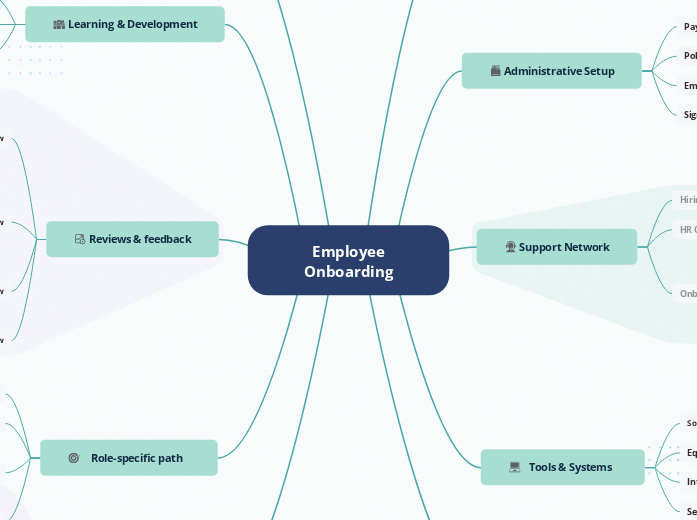
A ready-to-use mind map for planning and managing the full employee onboarding journey in one shared workspace. The template organizes everything from pre-boarding and company introductions to admin setup, tools, training, support contacts, reviews, role-specific tasks, team integration, and growth planning. HR teams, managers, buddies, and new hires can use it to keep responsibilities clear, track progress, centralize resources, and make sure nothing gets missed from offer acceptance to full ramp-up. This employee onboarding template helps HR teams, managers, and team leads organize the full onboarding journey in one clear structure. It covers essential areas such as pre-boarding, company introduction, administrative setup, tools and systems, team integration, support network, role-specific responsibilities, learning and development, reviews, and long-term growth. Use this template to prepare new hires before their first day, guide them through company policies and tools, assign training tasks, introduce key contacts, and plan 30/60/90-day reviews. It helps ensure that every new employee receives the information, support, and structure they need to become productive and confident in their role. Use this shared onboarding workspace to plan, run, and improve the entire new-hire journey. Keep documents, tasks, training, contacts, check-ins, and review milestones connected in one visual map. Establish a foundation for ongoing performance, continuous learning, career development, and long-term engagement. Add resources and habits that support ongoing learning. List opportunities that can help the employee grow after onboarding. Outline possible development paths and future responsibilities. Clarify responsibilities, expectations, goals, and performance standards associated with the role. Give a short summary of the role, team context, and main objectives. Give the new hire a first meaningful project or assignment to help them apply what they are learning. Set a realistic deadline for the first project or milestone. Summarize the goal, context, expectations, and deliverables for the first project. Explain what good performance looks like in the first weeks and months. Clarify the main duties and ownership areas of the role. Track onboarding progress through regular reviews, feedback discussions, and milestone evaluations. Confirm the new hire is ready to work more independently, discuss performance and development, and capture improvements for the next onboarding journey. A space to discuss achievements, expectations, feedback, and future development goals as the employee moves beyond onboarding. Review progress on role-specific work, team collaboration, and ownership. Adjust goals if the role, workload, or priorities have changed. Reviews how the new hire is working with teammates, joining meetings, communicating, and becoming part of the team’s daily workflow. Tracks how the new hire is progressing on their first assignments, including what has been completed, what is still in progress, and where support may be needed. Check whether the new hire understands the role, has completed core training, and knows where to find support. Focus on clarity, confidence, and early blockers. Keeps required training, learning modules, certifications, or internal courses visible and easy to review. Tracks how the new hire is building role knowledge, learning internal processes, and becoming more comfortable with their responsibilities. Used to capture early feedback after the new hire’s first few days. The manager, HR, or buddy can note what went well, any questions or blockers, and the new hire’s first impressions of the role and team. A place for the new hire to share how the role, team, tools, and onboarding experience feel after the first few days. Used to collect anything the new hire is unsure about or anything preventing them from moving forward, such as missing access, unclear expectations, or unanswered questions. A space to note positive moments from the first week, such as smooth setup, helpful meetings, completed tasks, or early wins. Deliver training, learning opportunities, and development resources that support employee growth and role readiness. Capture learning opportunities that can support the employee after the basic onboarding period. Add training that helps the new hire succeed in their specific role. Share diagram with learning and development professionals, trainers, and managers to coordinate required training programs, monitor completion, and provide learning resources. Prepare everything before the employee's first day to ensure a smooth and welcoming start. Confirm the official start date with HR, the manager, IT, and the new hire. Use notes to capture key information, schedules, and preparation details that help ensure a smooth and organized first day. Collect and organize the documents the new hire must review, complete, or sign before starting. Help employees build relationships, understand team dynamics, and connect with key stakeholders. Explain how the team works together day to day. List the people the new hire will work with most often. Plan how the new hire becomes part of the team through introductions, stakeholders, culture, and communication habits. Provide access to the software, equipment, and internal resources needed for daily work and collaboration. Add required security, privacy, or data protection training. Add links to the employee handbook, knowledge base, company intranet, or onboarding portal for quick access. Track device setup, workspace preparation, and equipment delivery. Share this diagram with IT administrators and system owners to manage account creation, software provisioning, and access permissions for new employees. Connect employees with the people who can guide, support, and assist them throughout the onboarding process. A peer contact who helps the new hire settle into the team, understand informal workflows, and ask day-to-day questions more comfortably. A reference point for key team members, departments, roles, and contacts the new hire may need during onboarding. A place to schedule or link to regular buddy check-ins, intro calls, or onboarding support meetings. A quick place to add the buddy’s email address or a direct contact link. The HR representative who supports the new hire with onboarding steps, paperwork, policies, benefits, and general employee questions. The manager responsible for the new hire’s role-specific ramp-up, priorities, expectations, and early performance guidance. Complete essential HR processes, compliance requirements, employee records, and benefits-related activities. Track signed contracts, NDAs, policy acknowledgments, and other required agreements. Create or update the new hire’s official employee profile and HR records. Export this topic and related resources as a PDF or document for easy distribution to new employees. Keep HR, payroll, compliance, benefits, and employee records organized in one place. Introduce new hires to the organization's mission, values, culture, policies, and overall structure. Introduce the departments the new hire should know about. Give brief context about the company’s background and important milestones. Show how teams, departments, and reporting lines fit together. Add important policies, rules, and expectations that the new hire should know. Help the new hire understand the company’s purpose, structure, history, policies, and key departments. Every Mindomo template opens with its structure already in place: descriptive topics, guiding notes attached to the branches where people usually get stuck, and a default shape that new topics inherit. Edit it in the browser, switch it to a concept map, outline or Gantt chart without redrawing anything, and export it in more than twenty formats. See how mind map templates work, or browse the full gallery by category.Employee onboarding template
About this template
Employee onboarding template
Employee Onboarding
Share the map with HR, the manager, buddy, and other collaborators.Growth & next steps
Continuous Learning
Growth Opportunities
Career Development
Role-specific path
Role overview
First project
Add a project brief, due date, owner, and related links.Due date
Project brief
Attach the brief or add it as a note.Performance Expectations
Use this as a reference during reviews and feedback.Job Responsibilities
Reviews & feedback
90-Day Review
Performance discussion
60-Day Review
Team collaboration
First project progress
30-Day Review
Training progress
Ramp & learn
First Week Review
First impressions
Questions or blockers
What went well?
Learning & Development
Development Opportunities
Add links to resources or create follow-up tasks for later review.Role-Specific Training
Mandatory Training
Pre-boarding
Add documents, first-day agenda, start-date confirmation, welcome email, and equipment preparation tasks.Start date confirmed
First-Day Schedule
Employment Documents
Team Integration
Team Culture
Suggestions: Meeting habits, communication style, decision-making norms, team rituals.Key Stakeholders
Team Introductions
Tools & Systems
Security training
Internal Resources
Equipment Setup
Software Access
Support Network
Onboarding Buddy
Team Directory
Meeting
Email
HR Contact
Hiring Manager
Administrative Setup
Signed agreements
Employee Records
Policies & Compliance
Payroll & Benefits
Company introduction
Key departments
Company history
Organizational Structure
Policies & Guidelines
Remote work policy, communication guidelines, security policy, leave policy, and code of conduct.Mission & Values
Why use a Mindomo mind map template?
-
Products
-
Uses
- General Uses
- Mind Maps for Education
- Mind Maps for Business
- Mind Maps for Personal Development
- Assistive Technology
- Team Collaboration
- Campaign briefs for marketers
- Client discovery workshops for consultants
- Onboarding journeys for HR & L&D
- Knowledge Management
- Team Skills Matrix
- Engagement Library
- Roles
- Marketers
- HR & L&D
- Consultants
- Project Management
- Marketing campaign planning
- Employee training rollouts
- Scope of Work
- Idea Organization
- Issue Trees
- Training Needs Analysis
- Mind Mapping Benefits
-
Solutions
- Guides
- Make Presentations with Mind Maps
- How to Learn with Mind Maps
- Plan and Organize with Mind Maps
- Prioritize Tasks with Mind Maps
- Take Notes with Mind Maps
- Real Customer Stories
- Scaling educational content for 11,000 doctors
- Team workflow: from trial to indispensable in two months
- 10 years without slides: rethinking architecture lectures
- Read all stories
-
Resources
- Learn the basics
- What is a Mind Map?
- How to Mind Map?
- What is a Concept Map?
- Benefits of Mind Mapping
- Guides & Support
- Video tutorials
- Help center
- Forum
- Examples & templates
- Top 29 Mind Map Examples
- Concept Map Templates
- How to Make a Gantt Chart
- Mindomo's Efficiency in Education
- Feature pages
- Education
- Teacher Assignments
- Work & Personal
- Desktop
- The Mindomo blog
- Pricing
- Log In
- Sign Up
- Dashboard
Mind Mapping Benefits
Why visual thinking makes recall and planning easier.
Learn the basics
Guides & Support
Examples & templates
Feature pages
 Blog
The Mindomo blog
Guides, examples and research on visual thinking.
Browse all articles
Blog
The Mindomo blog
Guides, examples and research on visual thinking.
Browse all articles