Checklists are a powerful way to save time and get consistent results when completing complicated tasks. This template helps you categorize your to-dos into personal, work, and other sections for better organization. Simply fill in each category with your tasks and prioritize them according to your needs. Whether you’re managing daily simple tasks, work assignments, or other things you need to do, this checklist ensures you stay organized and focused on what matters most. This mind map contains some example checklists that you can modify or delete. Create your own checklists and add a link to them. Create or attach checklist Create or attach checklist. tasks Add tasks. You can copy this topic to create a new category of checklists. Review a project Use this checklist to review the status of a project and decide on corrective actions. Review Risks Review Issues Review resources Review budget Review schedule Evaluate a quotation Use this checklist to help evaluate a quotation received from a supplier. Reputation Warranty Availability Pricing Requirements Set priorities Use this checklist to help with task prioritisation. Neither important nor urgent Identify tasks that you will defer and may never do. Urgent Identify tasks that are 'urgent' as defined by someone else, but do not contribute to longer term goals. Important Identify tasks that contribute to long term goals, but are not time-sensitive. Important and urgent Identify which tasks are both important (contribute towards long term goals) and time-sensitive. You can copy this topic to create a new category of checklists. Prepare for an online meeting Turn on Focus Assist Spare mouse battery Shut down other apps Check sound and camera Set a backdrop Either tidy up your office, or arrange a green screen and electronic backdrop. Close windows & doors Minimise external noise. Set phones to silent Set mobile and desk phones to silent. Check the meeting link Materials circulated beforehand Monthly plan Review Daily Dashboard Review your Daily Dashboard map to make sure it is helping you to manage your workload effectively. Administrative updates Set training objectives Schedule meetings and reviews Review appointments and deadlines Weekly plan Empty inbox Set 3 major objectives Daily plan Add here your to-dos for the day! task subtask Top 3 actions for today Review appointments Review starred emails Update time sheets Mindmaps helfen beim Brainstorming, zeigen Beziehungen zwischen Konzepten, organisieren und generieren Ideen. Mindmap-Vorlagen bieten einen einfacheren Einstieg, da sie Rahmenbedingungen enthalten, die Informationen und Anleitung zu einem spezifischen Thema bieten. Sie liefern eine Struktur, die alle Elemente eines Themas verbindet und dienen als Ausgangspunkt für Ihre persönliche Mindmap, sowohl für geschäftliche als auch pädagogische Zwecke. Mindomo bietet intelligente Mindmap-Vorlagen, die Ihnen müheloses Arbeiten und Denken ermöglichen. Sie können aus einer Vielzahl von Mindmap-Vorlagen aus Mindomos geschäftlichen oder Bildungsangeboten wählen oder eigene Vorlagen erstellen. Jede Mindmap kann durch Hinzufügen von Anleitungshinweisen in eine Mindmap-Vorlage umgewandelt werden.Checklist Template
This template helps you to create your own map of checklists.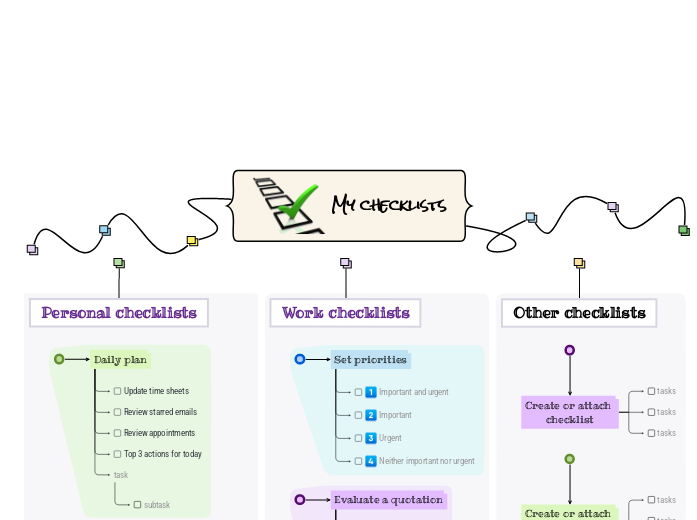
Über diese Vorlage
Stay on top of your tasks with the My Checklist template.
My checklists
You can add new checklists OR add new steps to the existing ones.
Read more about how to use checklists in the Mindomo blog.Other checklists
To add a new checklist, press the Insert or TAB key or create a checklist on the spot.Work checklists
To add a new checklist to 'Work checklists', press the Insert key.
To add a new step to Set priorities, press Insert or TAB key.Personal checklists
To add a new checklist to 'Personal checklists', press the Insert or TAB key.
To add a new step to 'Prepare for an
online meeting', press Insert or click the button below.
Press Enter to add another step to 'Prepare for an
online meeting'.
Press Enter to add another step to 'Prepare for an
online meeting'.
Press Enter to add another step to 'Prepare for an
online meeting'.
Press Enter to add another step to 'Prepare for an
online meeting'.
Press Enter to add another step to 'Prepare for an
online meeting'.
Press Enter to add another step to 'Prepare for an
online meeting'.
Press Enter to add another step to 'Prepare for an
online meeting'.
To add a new step to 'Monthly plan', press Insert or Tab key.
Press Enter to add another task.
Press Enter to add another task.
Press Enter to add another task.
Press Enter to add another task.
Press Enter to add another task.
To add a new step to 'Weekly plan', press Insert or Tab key.
Press Enter to add another step to 'Weekly plan'.
Press Enter to add another step to 'Weekly plan'.
Press Enter to add another step to 'Weekly plan'.
To add a new step to 'Daily plan', press Insert or Tab key.
Add notes
Add hyperlink
Press Enter to add another step to 'Daily plan'.
Add notes
Add hyperlink
Press Enter to add another step to 'Daily plan'.
Add notes
Add hyperlink
Press Enter to add another step to 'Daily plan'.
Add notes
Add hyperlink
Press Enter to add another task to 'Daily plan'.Warum eine Mindomo-Mindmap-Vorlage verwenden?
Eine Vorlage bietet verschiedene Funktionen:
-
Produkte
-
Anwendungen
- Allgemeine Anwendungen
- Mindmaps für Bildung
- Mindmaps für Unternehmen
- Mindmaps für die persönliche Entwicklung
- Assistive Technologie
- Teamzusammenarbeit
- Kampagnenbriefings für Marketingfachleute
- Workshops zur Kundenermittlung für Berater
- Onboarding-Prozesse für HR und L&D
- Wissensmanagement
- Team-Kompetenzmatrix
- Projektbibliothek
- Rollen
- Marketingfachleute
- HR und L&D
- Berater
- Projektmanagement
- Marketing-Kampagnenplanung
- Rollout von Mitarbeiterschulungen
- Leistungsumfang
- Ideenorganisation
- Problembäume
- Trainingsbedarfsanalyse
- Mindmapping Vorteile
-
Lösungen
- Anleitungen
- Präsentationen mit Mindmaps erstellen
- Wie man mit Mindmaps lernt
- Planen und Organisieren mit Mindmaps
- Aufgaben mit Mindmaps priorisieren
- Wie kann man mit Mindmaps Notizen machen?
- Echte Kundengeschichten
- Bildungsinhalte für 11.000 Ärzte skalieren
- Team-Workflow: vom Test zur unverzichtbaren Lösung in zwei Monaten
- 10 Jahre ohne Folien: Architekturvorlesungen neu gedacht
- Alle Erfolgsgeschichten lesen
-
Ressourcen
- Grundlagen
- Was ist eine Mindmap?
- Wie macht man eine Mindmap?
- Mindmapping als assistive Technologie
- Was ist eine Concept Map?
- Anleitungen & Support
- Videoanleitungen
- Hilfezentrum
- Forum
- Beispiele & Vorlagen
- Die 29 besten Mindmap-Beispiele
- Mindomo für Microsoft Teams
- Plane Projekte mit einem Gantt-Diagramm-Maker
- Die Effizienz von Mindomo im Bildungsbereich
- Funktionsseiten
- Bildung
- Aufgaben für Lehrer
- Arbeit & Persönlich
- Desktop
- Der Mindomo-Blog
- Preise
- Anmelden
- Registrieren
- Dashboard
Mindmapping Vorteile
Warum visuelles Denken Erinnern und Planen erleichtert.
Grundlagen
Anleitungen & Support
Beispiele & Vorlagen
Funktionsseiten
 Blog
Der Mindomo-Blog
Anleitungen, Beispiele und Forschung zum visuellen Denken.
Alle Artikel ansehen
Blog
Der Mindomo-Blog
Anleitungen, Beispiele und Forschung zum visuellen Denken.
Alle Artikel ansehen