A clean marketing campaign planning mind map template for organizing campaign details, channels, milestones, team responsibilities, risks, approvals, and post-launch review. It helps teams plan launches, track dependencies, manage blockers, and keep campaign execution aligned from kickoff to retrospective. This template helps you plan your marketing campaigns. It provides a structured framework for defining campaign objectives,tasks, deadlines, and responsibilities, distribution channels. By using this template, you can improve team alignment, streamline collaboration, and ensure every campaign is executed with clarity, consistency, and measurable results. Add a title to your campaign plan. The campaign isn't done at launch. Fill this during the retrospective. Fill this during the retrospective. 📅 The team meeting where you figure out what worked. Calendar it before launch, not after. One person owns pulling the numbers together. 📅 Usually day 7, day 14, day 30. The live state of the campaign. If the brief changes, log it here. Plans drift quietly; this is the place to make drift visible. Open questions waiting for an answer. What's stopping work right now? One line each. Who's unblocking it? Tasks likely to slip. Name them now, not when they actually slip. The points where work stops until someone signs off. Select cadence: The last yes before launch. Usually the campaign lead's manager or marketing leadership. If your team is part of a larger org, the brand team often has a sign-off. Required for regulated claims, financial figures, healthcare, anything customer-facing in a regulated category. The internal review before assets go to legal or production. Make sure you share this diagram with your team and collaborators. Leadership and cross-functional partners who need to see the plan but won't edit it. The people who sign off, not the people who do the work. Keep this list short. Same as agencies. Guest editor access. External agencies. Add as guest editors. The people on payroll. Add them with full edit access. The handful of dates everything else moves around. Write the dependencies that span channels. Usually, 2 to 4 weeks after launch. Put it on the calendar now, not later. 🎯 Public launch date. The one date that shouldn't move. The most-missed dependency in regulated industries. Often, a hidden dependency for paid and email. Mark it. The day creative assets are locked. The day planning ends, and execution begins. Select your channel mix: Add status Select task status: Use this for the context the owner needs. Add notes and keep it short, link out resources, documents, images if needed. Add task Add tasks related to this channel. Add date Add the deadline. 🧑🏻 Who delivers this task? One person, even if a team supports them. Add link to the Campaign Brief document. Select current status: Add the date the campaign goes live to the audience. Add the start date of the planning and the deadline. Type the name of the person who owns delivery, not strategy. A gondolattérképek segítenek az ötletelésben, a fogalmak közötti kapcsolatok kialakításában, a rendszerezésben és az ötletek generálásában. A gondolattérkép-sablonok azonban könnyebb utat kínálnak a kezdéshez, mivel ezek olyan keretek, amelyek egy adott témával kapcsolatos információkat tartalmaznak, irányadó utasításokkal. Lényegében a gondolattérkép minták biztosítják azt a struktúrát, amely egy adott téma összes elemét egyesíti, és kiindulópontként szolgál az Ön személyes gondolattérképjéhez. Forrást jelentenek arra, hogy praktikus megoldást nyújtsanak egy adott témával kapcsolatos gondolattérkép létrehozásához, akár üzleti, akár oktatási céllal. A Mindomo intelligens gondolattérkép-sablonokat kínál, amelyek lehetővé teszik, hogy könnyedén működjön és gondolkodjon. Választhat a Mindomo üzleti vagy oktatási fiókjaiból, vagy létrehozhatja saját gondolattérkép sablonjait a semmiből. Bármilyen gondolattérkép átalakítható gondolattérkép-sablon térképpé, ha az egyik témakörhöz további irányadó jegyzeteket ad hozzá.Marketing Campaign Plan Template
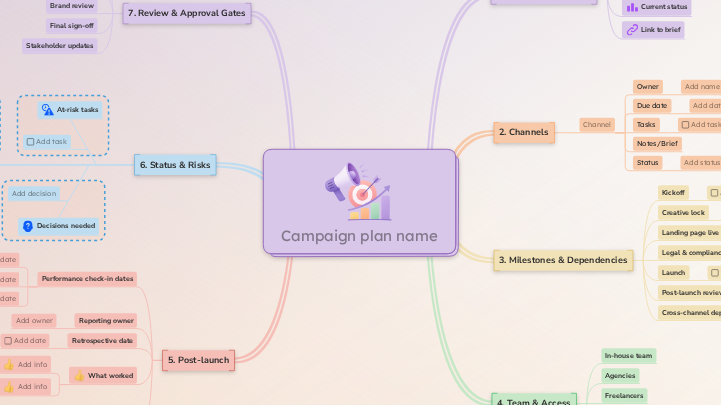
Erről a sablonról
Marketing Campaign Plan Template
Campaign plan name
💡 Name it the same way your team will refer to it across tools/calendars.
Don't forget to:Post-launch
This branch closes it out properly, so the next campaign starts ahead.What didn't
Add each element that did not work as planned. Keep it short.What worked
Add info
Add each successful element. Keep it short.Retrospective date
💡 You can also add it as a deadline (you can also receive notifications if you schedule it here):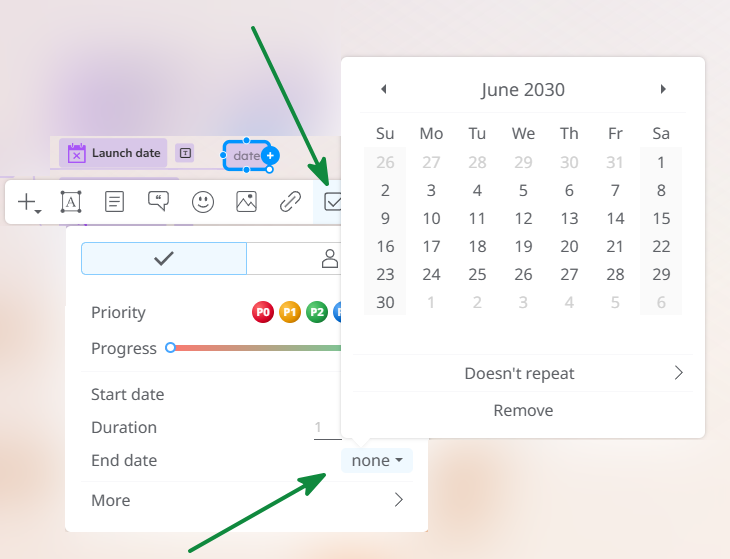
Reporting owner
Add owner
Performance check-in dates
Add them now so reporting doesn't slip.
💡 You can also add it as a deadline (you can also receive notifications if you schedule it here):Status & Risks
Update this branch each week.
If a task slips, surface it here before it surfaces at launch.Scope changes
Add change
Decisions needed
Add decision
💡Assign this to the person who needs to decide.Active blockers
Add blocker
At-risk tasks
Review & Approval Gates
Map these now so they don't catch you by surprise in week three.Stakeholder updates
Final sign-off
Add:Brand review
Add:Legal & compliance review
Add:Creative review
Add:Team & Access
Stakeholders (view-only)
Approvers
Freelancers
Agencies
In-house team
Milestones & Dependencies
Add cross-channel dependencies here so they're visible to everyone, rather than buried in one channel's tasks.Cross-channel dependencies
⭐ Examples: Post-launch review
💡 You can also add it as a deadline (you can also receive notifications if you schedule it here):Launch
💡 You can also add it as a deadline (you can also receive notifications if you schedule it here):Legal & compliance review complete
💡 You can also add it as a deadline (you can also receive notifications if you schedule it here):Landing page live
💡 You can also add it as a deadline (you can also receive notifications if you schedule it here):Creative lock
Anything not done by this date moves out of scope or pushes launch.
💡 You can also add it as a deadline (you can also receive notifications if you schedule it here):Kickoff
💡 You can also add it as a deadline (you can also receive notifications if you schedule it here):Channels
Click each one you'll use. Each channel is a branch. Tasks live under channels, with owners and dates.Channel
Status
Notes/Brief
Optional: attach the brief with guidelines for the assets/content for this channel in case you need to add more details.
Select 'Diagram' and then select the brief. You can create it and add it later.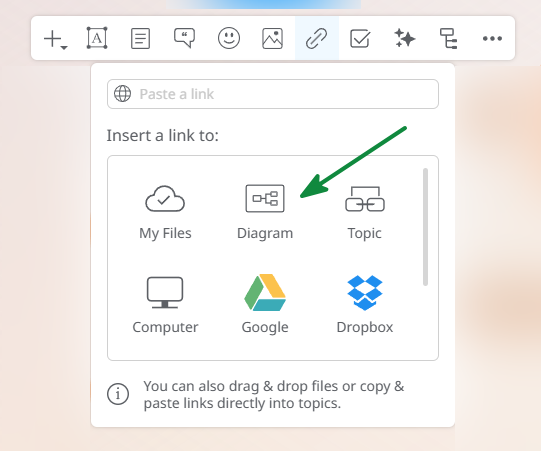
Keep them connected, but keep them separate.Tasks
You can assign tasks, set deadlines, and track progress for each task.Due date
When the task needs to be done, not when it could be done.
💡Then, you can also add it as a deadline (you can also receive notifications if you schedule it here):Owner
Campaign Overview
Link to brief
Select 'Diagram' and then select the brief. You can create it and add it later.
Keep them connected, but keep them separate.Current status
Launch date
date
💡Then, you can also add it as a deadline (you can also receive notifications if you schedule it here):Start date
start date ➡️ end date
❗When work begins, not when the campaign goes live.Campaign lead
Add name
Miért érdemes Mindomo gondolattérkép mintát használni?
Egy sablon különböző funkciókkal rendelkezik:
-
Termékek
-
Felhasználás
- Általános felhasználás
- Gondolattérképek az Oktatásban
- Gondolattérképek az Üzleti Életben
- Gondolattérképek a Személyes Életben
- Segítő Technológia
- Csapatmunka
- Kampánybriefek marketingszakembereknek
- Ügyfélfeltáró workshopok tanácsadóknak
- Onboarding folyamatok HR- és L&D-csapatoknak
- Tudásmenedzsment
- Csapat kompetenciamátrix
- Projektkönyvtár
- Szerepek
- Marketingszakemberek
- HR és L&D
- Tanácsadók
- Projektmenedzsment
- Marketingkampány-tervezés
- Munkavállalói képzések bevezetése
- Munkaterjedelem
- Ötletszervezés
- Problémafák
- Képzési igényfelmérés
- Az Gondolattérkép Készítés Előnyei
-
Megoldások
- Útmutatók
- Prezentációk készítése gondolattérképekkel
- Hogyan tanuljunk gondolattérképekkel
- Tervezés és rendszerezés gondolattérképekkel
- Hogyan priorizáljuk a feladatokat gondolattérképekkel
- Jegyzetelés gondolattérképekkel
- Valódi ügyféltörténetek
- Oktatási tartalom skálázása 11 000 orvos számára
- Csapatmunka: két hónap alatt a próbáról a nélkülözhetetlenig
- 10 év diák nélkül: az építészeti előadások újragondolása
- Összes történet elolvasása
-
Erőforrások
- Alapok
- Mi az az Gondolattérkép?
- Hogyan készítsünk Gondolattérképet?
- Útmutatók és Támogatás
- Videós útmutatók
- Súgóközpont
- Fórum
- Példák és sablonok
- A 29 Legjobb Gondolattérkép Példa
- Mi az a Fogalomtérkép?
- Funkcióoldalak
- Oktatás
- Tanári feladatok
- Munka és Személyes
- Asztali
- A Mindomo blog
- Árazás
- Bejelentkezés
- Regisztráció
- Irányítópult
Az Gondolattérkép Készítés Előnyei
Miért könnyíti a vizuális gondolkodás a felidézést és a tervezést.
Útmutatók és Támogatás
Példák és sablonok
Funkcióoldalak
 Blog
A Mindomo blog
Útmutatók, példák és kutatások a vizuális gondolkodásról.
Összes cikk böngészése
Blog
A Mindomo blog
Útmutatók, példák és kutatások a vizuális gondolkodásról.
Összes cikk böngészése