This engagement delivery template helps teams plan, coordinate, and manage the successful delivery of client engagements from kickoff through completion. It brings together objectives, scope, deliverables, milestones, responsibilities, timelines, dependencies, risks, and communication activities in one visual workspace. Use this template to align stakeholders, clarify ownership, track progress, manage expectations, and keep key deliverables on schedule. It supports consulting projects, professional services engagements, client implementations, and other structured delivery processes where clear coordination and visibility are essential. Use this map to organize an engagement into clear workstreams and a shared operating cadence. Complete each lane to identify the owner, expected deliverable and timing, key dependencies, and current status. The map gives the team a single view of who is responsible for what, how workstreams connect, and how decisions and escalations are managed. Open these companion templates to define scope and structure client discovery. Enter the core meeting rhythm, escalation route, and location of the decision log. Record where engagement decisions are documented, such as a shared file, workspace, or linked decision log. Describe how issues are escalated, including the sequence of contacts, decision owners, and expected response path. Enter how often the steering committee meets and, where useful, note the usual day, timing, or triggering conditions. Enter the regular day and time for the engagement team’s weekly stand-up, including the time zone where relevant. Use this lane to identify the production lead, final deliverable and timing, dependencies, and current status. Record the current status of Workstream 5, such as on track, at risk, blocked, or complete, and add a brief note if clarification is needed. List the inputs, decisions, access, or upstream activities that must be completed before Workstream 5 can progress. Describe the key output for Workstream 5 — Deliverable Production and state when it is due or expected to be completed. Enter the person accountable for Workstream 5 — Deliverable Production. Use a clear name and, where useful, include their role. Use this lane to capture the solution-design lead, intended output and deadline, dependencies, and current status. Record the current status of Workstream 4, such as on track, at risk, blocked, or complete, and add a brief note if clarification is needed. List the inputs, decisions, access, or upstream activities that must be completed before Workstream 4 can progress. Describe the key output for Workstream 4 — Solution Design and state when it is due or expected to be completed. Enter the person accountable for Workstream 4 — Solution Design. Use a clear name and, where useful, include their role. Use this lane to define the analysis lead, model output and due date, upstream dependencies, and current status. Record the current status of Workstream 3, such as on track, at risk, blocked, or complete, and add a brief note if clarification is needed. List the inputs, decisions, access, or upstream activities that must be completed before Workstream 3 can progress. Describe the key output for Workstream 3 — Analysis & Modelling and state when it is due or expected to be completed. Enter the person accountable for Workstream 3 — Analysis & Modelling. Use a clear name and, where useful, include their role. Use this lane to record the interview lead, expected output and timing, dependencies, and current status. Record the current status of Workstream 2, such as on track, at risk, blocked, or complete, and add a brief note if clarification is needed. List the inputs, decisions, access, or upstream activities that must be completed before Workstream 2 can progress. Describe the key output for Workstream 2 — Client Interviews and state when it is due or expected to be completed. Enter the person accountable for Workstream 2 — Client Interviews. Use a clear name and, where useful, include their role. Use this lane to capture diagnostic data ownership, deliverable timing, dependencies, and current status. Record the current status of Workstream 1, such as on track, at risk, blocked, or complete, and add a brief note if clarification is needed. List the inputs, decisions, access, or upstream activities that must be completed before Workstream 1 can progress. Describe the key output for Workstream 1 — Diagnostic & Data and state when it is due or expected to be completed. Enter the person accountable for Workstream 1 — Diagnostic & Data. Use a clear name and, where useful, include their role. Mindmappen helpen je brainstormen, relaties leggen tussen concepten, organiseren en ideeën genereren. Lege mindmapsjablonen bieden echter een eenvoudigere manier om aan de slag te gaan, omdat het kaders zijn die informatie bevatten over een specifiek onderwerp met begeleidende instructies. In essentie zorgen mindmapsjablonen voor de structuur die alle elementen van een specifiek onderwerp combineert en als startpunt dient voor je persoonlijke mindmap. Ze zijn een hulpmiddel om een praktische oplossing te bieden voor het maken van een mindmap over een bepaald onderwerp, zowel voor het bedrijfsleven als voor het onderwijs. Mindomo brengt je slimme mindmap templates waarmee je moeiteloos kunt functioneren en denken. Je kunt kiezen uit verschillende mind map templates van Mindomo's zakelijke of educatieve accounts, of je kunt je eigen mind map templates maken. Elke mindmap kan getransformeerd worden in een mindmap template map door extra notities toe te voegen aan één van de onderwerpen.Engagement Delivery Template
Client engagements often involve several parallel workstreams, multiple owners, interdependent deliverables, and recurring governance activities.
This mind map helps teams structure an engagement by workstream, clarify ownership and deadlines, track dependencies and status, and define the meeting cadence, escalation path, and decision-making process.
Keywords: consulting engagement, project management, workstreams, team ownership, deliverables, dependencies, status tracking, stakeholder interviews, data analysis, solution design, governance, engagement cadence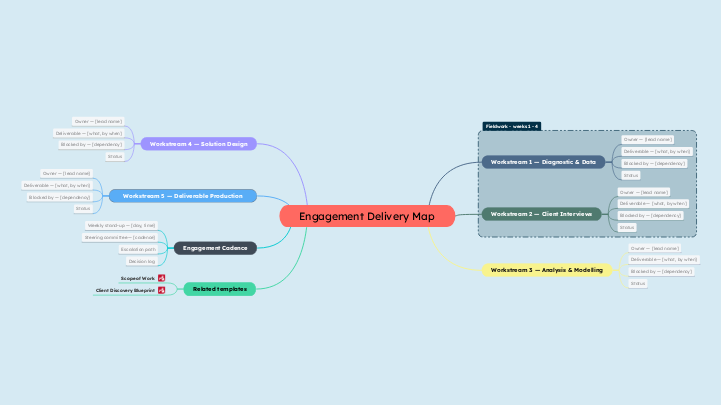
Engagement delivery template
Engagement Delivery Map
Related templates
Client Discovery Blueprint
Scope of Work
Engagement Cadence
Decision log
Escalation path
Steering committee — [cadence]
Weekly stand-up — [day, time]
Workstream 5 — Deliverable Production
Workstream 4 — Solution Design
Workstream 3 — Analysis & Modelling
Workstream 2 — Client Interviews
Workstream 1 — Diagnostic & Data
Status
Blocked by — [dependency]
Deliverable — [what, by when]
Owner — [lead name]
Waarom een Mindomo mindmap template gebruiken?
Een sjabloon heeft verschillende functionaliteiten:
-
Producten
-
Toepassingen
- Algemene toepassingen
- Mindmaps voor Onderwijs
- Mindmaps voor Bedrijven
- Mindmaps voor Persoonlijke Ontwikkeling
- Ondersteunende Technologie
- Teamsamenwerking
- Campagnebriefs voor marketeers
- Workshops voor klantverkenning voor consultants
- Onboardingtrajecten voor HR en L&D
- Kennismanagement
- Teamvaardighedenmatrix
- Opdrachtenbibliotheek
- Rollen
- Marketeers
- HR en L&D
- Projectmanagement
- Marketingcampagneplanning
- Uitrol van medewerkerstrainingen
- Werkomvang
- Ideeënorganisatie
- Probleembomen
- Opleidingsbehoefteanalyse
- Voordelen van Mindmappen
-
Oplossingen
- Gidsen
- Maak presentaties met mindmaps
- Leer met mindmaps
- Plan en organiseer met mindmaps
- Hoe prioriteer je taken met mindmaps
- Hoe maak je notities met mindmaps
- Echte klantverhalen
- Educatieve content opschalen voor 11.000 artsen
- Teamworkflow: van proef naar onmisbaar in twee maanden
- 10 jaar zonder slides: architectuurcolleges heroverwogen
- Alle verhalen lezen
-
Hulpbronnen
- De basis
- Wat is een Mindmap?
- Hoe maak je een Mindmap?
- Wat is een Conceptmap?
- Mindmap ideeën voor studenten
- Handleidingen & Support
- Videohandleidingen
- Helpcentrum
- Forum
- Voorbeelden en sjablonen
- Mindmap ideeën
- Ondersteunende Technologie Tool
- Top 29 Mindmap Voorbeelden
- Functiepagina's
- Onderwijs
- Opdrachten voor docenten
- Werk & Persoonlijk
- Desktop
- De Mindomo-blog
- Prijzen
- Inloggen
- Aanmelden
- Dashboard
Voordelen van Mindmappen
Waarom visueel denken onthouden en plannen makkelijker maakt.
De basis
Handleidingen & Support
Voorbeelden en sjablonen
Functiepagina's
 Blog
De Mindomo-blog
Gidsen, voorbeelden en onderzoek over visueel denken.
Alle artikelen bekijken
Blog
De Mindomo-blog
Gidsen, voorbeelden en onderzoek over visueel denken.
Alle artikelen bekijken