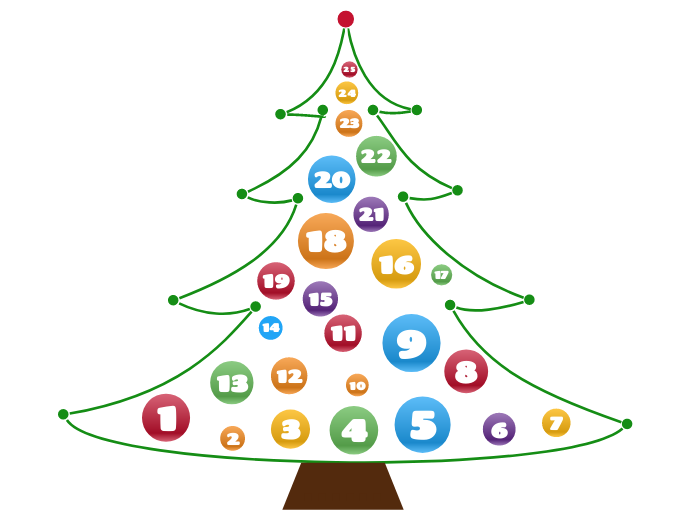
The Advent Calendar is a diagram that contains a surprise element for each day of December (until Christmas). In other words, you can add a total of 25 elements that are ready to be unveiled every day. You can add anything you want, starting from personal development videos, editing tools, movie ideas, places to visit, food recipes, grateful thoughts, or even daily small goals for the following year. Put your imagination to work and create your own advent calendar for your dear ones! Create a festive and interactive experience with the Advent Calendar Template. This unique diagram allows you to add 25 elements, each designed to be revealed daily throughout December leading up to Christmas. Whether you want to include personal development videos, editing tools, movie suggestions, travel ideas, food recipes, or daily affirmations, this template offers endless possibilities. Simply customize each day with a surprise element that will delight and inspire. Share your advent calendar with loved ones and let the countdown to Christmas be filled with creativity, joy, and meaningful moments. Perfect for adding a personal touch to the holiday season! 5 6 7 8 9 10 11 12 13 14 15 16 17 18 19 20 21 22 23 24 25 The Advent Calendar is a diagram that contains a surprise element for each day of December (until Christmas). In other words, you can add a total of 25 elements that are ready to be unveiled every day. You can add anything you want, starting from personal development videos, editing tools, movie ideas, places to visit, food recipes, grateful thoughts, or even daily small goals for the following year. Put your imagination to work and create your own advent calendar for your dear ones! Os mapas mentais ajudam você a fazer brainstorming, estabelecer relações entre conceitos, organizar e gerar ideias. No entanto, os modelos de mapas mentais oferecem uma maneira mais fácil de começar, pois são estruturas que contêm informações sobre um assunto específico com instruções de orientação. Em essência, os modelos de mapas mentais garantem a estrutura que combina todos os elementos de um assunto específico e servem como ponto de partida para o seu mapa mental pessoal. Eles são um recurso para fornecer uma solução prática para criar um mapa mental sobre um determinado tema, seja para negócios ou educação. Mindomo traz modelos de mapas mentais inteligentes que permitem que você funcione e pense sem esforço. Você pode escolher entre uma variedade de modelos de mapas mentais das contas comerciais ou educacionais da Mindomo, ou pode criar seus próprios modelos de mapas mentais do zero. Qualquer mapa mental pode ser transformado em um modelo de mapa mental adicionando mais notas de orientação a um de seus tópicos.Advent Calendar Template
Sobre este modelo
Advent Calendar Template
1
Add the surprise element for the first day. Choose one of the following options:2
Add the surprise element for the second day. Choose one of the following options:3
Add the surprise element for the third day. Choose one of the following options:4
Add the surprise element for the fourth day. Choose one of the following options:
Add the surprise element for the fifth day. Choose one of the following options:
Add the surprise element for the sixth day. Choose one of the following options:
Add the surprise element for the seventh day. Choose one of the following options:
Add the surprise element for the eighth day. Choose one of the following options:
Add the surprise element for the ninth day. Choose one of the following options:
Add the surprise element for the tenth day. Choose one of the following options:
Add the surprise element for the eleventh day. Choose one of the following options:
Add the surprise element for the twelfth day. Choose one of the following options:
Add the surprise element for the thirteenth day. Choose one of the following options:
Add the surprise element for the fourteenth day. Choose one of the following options:
Add the surprise element for the fifteenth day. Choose one of the following options:
Add the surprise element for the sixteenth day. Choose one of the following options:
Add the surprise element for the seventeenth day. Choose one of the following options:
Add the surprise element for the eighteenth day. Choose one of the following options:
Add the surprise element for the nineteenth day. Choose one of the following options:
Add the surprise element for the twentieth day. Choose one of the following options:
Add the surprise element for the twenty-first day. Choose one of the following options:
Add the surprise element for the twenty-second day. Choose one of the following options:
Add the surprise element for the twenty-third day. Choose one of the following options:
Add the surprise element for the twenty-fourth day. Choose one of the following options:
Add the surprise element for the twenty-fifth day. Choose one of the following options:......
.
Por que usar um modelo de mapa mental Mindomo?
Um modelo possui várias funcionalidades:
-
Produtos
-
Usos
- Usos gerais
- Mapas Mentais para Educação
- Mapas Mentais para Empresas
- Mapas Mentais para Desenvolvimento Pessoal
- Tecnologia Assistiva
- Colaboração em equipe
- Briefs de campanha para profissionais de marketing
- Workshops de descoberta do cliente para consultores
- Jornadas de onboarding para RH e L&D
- Gestão do conhecimento
- Matriz de competências da equipe
- Biblioteca de projetos
- Funções
- Profissionais de marketing
- RH e L&D
- Consultores
- Gestão de projetos
- Planeamento de campanhas de marketing
- Implementação de treinamentos para funcionários
- Âmbito do trabalho
- Organização de ideias
- Árvores de problemas
- Análise de necessidades de formação
- Benefícios do Mapeamento Mental
-
Soluções
- Guias
- Criar apresentações com mapas mentais
- Como aprender com mapas mentais
- Planejar e organizar com mapas mentais
- Como priorizar tarefas com mapas mentais
- Como fazer anotações com mapas mentais
- Histórias reais de clientes
- Escalar conteúdo educacional para 11.000 médicos
- Fluxo de trabalho em equipe: do teste ao indispensável em dois meses
- 10 anos sem slides: repensar as aulas de arquitetura
- Ler todas as histórias
-
Recursos
- Aprenda o básico
- O que é um Mapa Mental?
- Como Fazer um Mapa Mental?
- O que é um Mapa Conceptual?
- Guias e Suporte
- Tutoriais em vídeo
- Centro de ajuda
- Fórum
- Exemplos e modelos
- Ideias de Mapas Mentais Criativos
- 29 Exemplos Principais de Mapas Mentais
- Páginas de funcionalidades
- Educação
- Tarefas para professores
- Trabalho & Pessoal
- Desktop
- O blogue Mindomo
- Preços
- Entrar
- Inscreva-se
- Painel de controle
Gestão do conhecimento
Benefícios do Mapeamento Mental
Porque o pensamento visual facilita recordar e planear.
Aprenda o básico
Guias e Suporte
Exemplos e modelos
Páginas de funcionalidades
 Blogue
O blogue Mindomo
Guias, exemplos e investigação sobre pensamento visual.
Ver todos os artigos
Blogue
O blogue Mindomo
Guias, exemplos e investigação sobre pensamento visual.
Ver todos os artigos