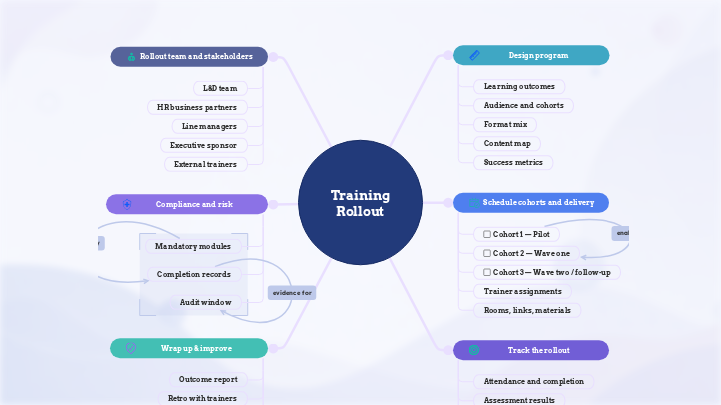
Use this template to plan and manage an employee training rollout from start to finish. Map stakeholders, define learning outcomes, organize cohorts, schedule delivery, assign trainers, track compliance requirements, and monitor completion progress in one clear structure. It helps L&D, HR, and training teams keep every phase connected, from program design and risk management to rollout tracking and post-training improvement. Plan and manage every stage of an employee training rollout using this employee training rollout plan template. This template helps HR, L&D, and project teams organize stakeholders, training cohorts, delivery schedules, compliance requirements, and completion milestones in one clear structure. Start by mapping the rollout team and key stakeholders, including the L&D team, HR business partners, line managers, executive sponsors, and external trainers. Define the training program by adding learning outcomes, audience groups, cohort details, content plans, delivery formats, and success metrics. Use the schedule section to plan cohorts, assign trainers, organize rooms, links, and materials, and keep delivery dependencies visible as the rollout progresses. Track attendance, completion, assessment results, feedback, and midpoint checkpoints to understand whether the training rollout is on schedule and where adjustments are needed. Complete the template by documenting compliance records, preparing outcome reports, reviewing lessons learned with trainers, and planning follow-up actions for future training improvements. Helps plan, schedule, track, and close an employee training rollout in one shared workspace. Reports outcomes, reviews what worked, captures lessons learned, and prepares the structure for the next training rollout. Formally closes the rollout. This topic supports approvals, archived evidence, and reuse of the same structure for the next training cycle. Reviews the rollout with the people who delivered the training. This helps capture lessons learned and improve the next rollout. Summarizes what happened during the rollout. This topic helps HR or L&D report completion results, assessment outcomes, and resolved risks. Tracks mandatory modules, completion evidence, audit deadlines, and compliance-related risks, so the rollout stays documented and defensible. Defines the deadline, evidence, and reporting needed for audit or compliance review. This gives the rollout a clear documentation and accountability structure. Completion records Lists training items employees must complete because of policy, compliance, or company requirements. This makes the risk-sensitive parts of the rollout visible. Clarifies who owns, supports, approves, and contributes to the training rollout. Outside trainers, consultants, or subject-matter experts who help deliver or review parts of the program. This topic is useful for showing how guest editors can contribute updates without owning the full map. The senior stakeholder who supports the rollout and gives it business priority. This topic helps show that the training is not only an L&D activity, but part of a wider organizational initiative. The managers responsible for supporting employees during and after the training. This topic is useful because managers often confirm attendance, reinforce behavior change, and check whether the training is applied on the job. Connects the rollout to HR policy, compliance, and department needs. This makes the template feel more realistic for HR and L&D teams. Identifies the internal team responsible for designing and managing the training program. This clarifies who owns the content and who coordinates the rollout. Monitors attendance, completion, assessment results, feedback, and delays while the rollout is active, so issues can be spotted and addressed early. Reviews the rollout while it is still in progress. This helps HR or L&D catch delays, trainer conflicts, or module issues before they affect the full program. Session feedback Shows whether participants passed the required checks or still need follow-up. This connects training completion to readiness, certification, or compliance. Tracks who attended and who completed the training. This makes the map feel like a live rollout workspace, not just a static planning document. Organizes rollout waves, trainer assignments, session logistics, materials, and dependencies, so each cohort can move through the program in the right order. Rooms, links, materials Clarifies who is responsible for delivering, backing up, or reviewing the training. This reduces rollout risk if a trainer is unavailable or a subject-matter expert needs to approve content. A later rollout group. This supports phased execution, where different teams complete the training at different times based on availability, priority, or certification needs. The first larger rollout group after the pilot. This shows how the program moves from planning into execution with a defined audience, trainer, and session setup. The first test group in the rollout. A pilot helps validate the training structure, timing, materials, and feedback process before the program is expanded. Defines the training goals, audiences, formats, content, and success measures before delivery starts. Defines how the rollout will be measured. This helps HR and L&D track whether the training was completed, understood, and useful for employee readiness. Organizes the modules and materials that need to be prepared before rollout. It helps the team see what content is ready, what depends on other content, and what supports certification. Shows how the training will be delivered. This is useful when the rollout combines live sessions, self-paced learning, and manager-led follow-up. Groups participants by role, team, region, or rollout wave. This helps HR and L&D plan training delivery around real employee groups instead of treating everyone as one audience. Defines what employees should know, do, or demonstrate after the training. In this template, it helps connect the program to real business outcomes before the rollout begins. Every Mindomo template opens with its structure already in place: descriptive topics, guiding notes attached to the branches where people usually get stuck, and a default shape that new topics inherit. Edit it in the browser, switch it to a concept map, outline or Gantt chart without redrawing anything, and export it in more than twenty formats. See how mind map templates work, or browse the full gallery by category.Employee Training Rollout Plan
About this template
Employee training rollout plan
Training Rollout
Click any subtopic to reveal suggested next steps and expand the map with more detailed rollout actions.Wrap up & improve
Program sign-off
Share for approval
Download final mapManager 90-day check-in
Retro with trainers
Outcome report
Compliance and risk
Audit window
Completion records
Proof that the required training was completed. This topic helps HR or L&D keep evidence for audits, manager follow-up, and internal reporting.
Link completion evidenceMandatory modules
Rollout team and stakeholders
External trainers
Invite external trainersExecutive sponsor
Line managers
HR business partners
L&D team
Track the rollout
Midpoint checkpoint
Session feedback
Captures input from trainers and learners while the rollout is still active. This topic helps the team collect trainer observations, learner comments, and content issues directly on the map.
Add feedback notesAssessment results
Attendance and completion
Schedule cohorts and delivery
Rooms, links, materials
Collects the practical resources needed to run each session. Use this topic to add meeting links, slide decks, exercises, attendance sheets, or shared material folders.
Add session linkTrainer assignments
Cohort 3 — Wave two / follow-up
Cohort 2 — Wave one
Cohort 1 — Pilot
Design program
Success metrics
Content map
Format mix
Audience and cohorts
Learning outcomes
Why use a Mindomo mind map template?
-
Products
-
Uses
- General Uses
- Mind Maps for Education
- Mind Maps for Business
- Mind Maps for Personal Development
- Assistive Technology
- Team Collaboration
- Campaign briefs for marketers
- Client discovery workshops for consultants
- Onboarding journeys for HR & L&D
- Knowledge Management
- Team Skills Matrix
- Engagement Library
- Roles
- Marketers
- HR & L&D
- Consultants
- Project Management
- Marketing campaign planning
- Employee training rollouts
- Scope of Work
- Idea Organization
- Issue Trees
- Training Needs Analysis
- Mind Mapping Benefits
-
Solutions
- Guides
- Make Presentations with Mind Maps
- How to Learn with Mind Maps
- Plan and Organize with Mind Maps
- Prioritize Tasks with Mind Maps
- Take Notes with Mind Maps
- Real Customer Stories
- Scaling educational content for 11,000 doctors
- Team workflow: from trial to indispensable in two months
- 10 years without slides: rethinking architecture lectures
- Read all stories
-
Resources
- Learn the basics
- What is a Mind Map?
- How to Mind Map?
- What is a Concept Map?
- Benefits of Mind Mapping
- Guides & Support
- Video tutorials
- Help center
- Forum
- Examples & templates
- Top 29 Mind Map Examples
- Concept Map Templates
- Plan projects with a Gantt Chart Maker
- Mindomo's Efficiency in Education
- Feature pages
- Education
- Teacher Assignments
- Work & Personal
- Desktop
- The Mindomo blog
- Pricing
- Log In
- Sign Up
- Dashboard
Mind Mapping Benefits
Why visual thinking makes recall and planning easier.
Learn the basics
Guides & Support
Examples & templates
Feature pages
 Blog
The Mindomo blog
Guides, examples and research on visual thinking.
Browse all articles
Blog
The Mindomo blog
Guides, examples and research on visual thinking.
Browse all articles