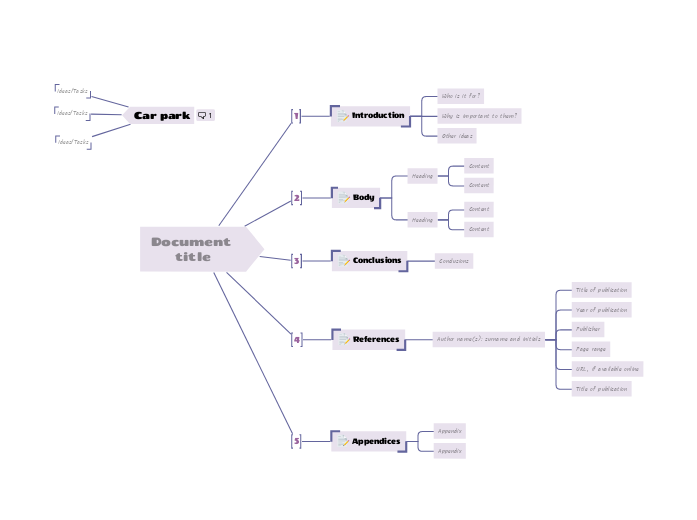
This template provides a ready-made outline, allowing you to focus on content rather than format. Simply fill in the designated sections with your customized information, and you'll have a well-organized document in no time. Ideal for reports, proposals, essays, and more, this template helps ensure consistency and clarity in your writing. You can export it in Word document when you're done. Use this 'Car park' floating topic to capture unsorted ideas and tasks during the development of your document. Is excluded from export because it has no "memo" icon. Remember to filter your map by the memo icon before exporting. Type in the title for your document into the Central Topic. Appendices avoid putting large amounts of detail in the body of your document, where the reader may lose track of your logic and start speed reading forwards to the next interesting part. If you rely on external sources, you should reference them so that others can follow up. URL, if available online Page range Publisher Year of publication Title of publication The conclusions bring together the important findings or recommendations from your document. The body of your document will depend on the type of document. The important characteristics are: Content The introduction to your document explains who it is for, and why it is important to them. 마인드맵은 브레인스토밍, 개념 간의 관계 파악, 아이디어 정리와 발상에 도움이 됩니다. 마인드맵 템플릿에는 특정 주제에 관한 정보와 작성 요령이 미리 담겨 있어 더 쉽게 시작할 수 있습니다. 주제에 필요한 요소를 모두 갖춘 구조가 준비되어 있으므로 나만의 마인드맵을 만드는 출발점으로 활용할 수 있습니다. 비즈니스든 교육이든, 특정 주제로 마인드맵을 만들 때 유용한 실용적인 자료입니다. Mindomo는 편리한 스마트 마인드맵 템플릿을 제공합니다. Mindomo 비즈니스 계정이나 교육용 계정에서 제공하는 마인드맵 템플릿 중에서 고를 수 있고, 처음부터 나만의 템플릿을 만들 수도 있습니다. 어떤 마인드맵이든 토픽에 가이드 노트를 추가하기만 하면 템플릿으로 바꿀 수 있습니다.이 템플릿 정보
How to create a word document
Car park
Ideas for content can be moved into the main map to further develop them.
To hide the Car Park topic from your exported document, click the 'Search...' button and filter the map by the 'memo' icon before exporting.Ideas/Tasks
Document title
The title should reflect the subject and the purpose of the document.
Read more guidance and tips on using Mindomo to create documents.5
Appendices
Typical subjects for appendices include:Appendix
4
References
There are many standards for referencing publications. A typical format is:Author name(s): surname and initials
3
Conclusions
Tip: write the conclusions second, after writing the summary.
Some readers might read just the executive summary and the conclusions, without reading the main body. Conclusions can be longer than the executive summary, as you should mention the important reasons behind your findings or recommendations.2
Body
Heading
1
Introduction
If you assume that your readers need some specific knowledge to be able to read and use the document, mention it here.Other ideas
Why is important to them?
Who is it for?
Mindomo 마인드맵 템플릿을 사용해야 하는 이유
템플릿에는 다음과 같은 기능이 있습니다.
-
제품
- 만들기
- AI 마인드맵 생성기
- 아웃라인 프로그램
- 간트 차트 프로그램
- Mindomo 시작하기
- Mindomo 다운로드
- 브라우저 확장 프로그램
- 새로운 기능
- 마인드맵 템플릿
- 모든 기능 비교
-
활용
-
솔루션
-
리소스
- 기초 배우기
- 마인드맵이란?
- 마인드맵 그리는 법
- 가이드 및 지원
- 동영상 튜토리얼
- 고객센터
- 포럼
- 예시 및 템플릿
- 마인드맵 예시 29선
- 개념도란?
- 기능 소개
- 교육
- 교사용 과제 기능
- 업무 및 개인
- 데스크톱
- Mindomo 블로그
- 요금제
- 로그인
- 가입하기
- 대시보드
지식 관리
직무
마인드맵의 장점
시각적 사고가 기억과 계획을 쉽게 만드는 이유