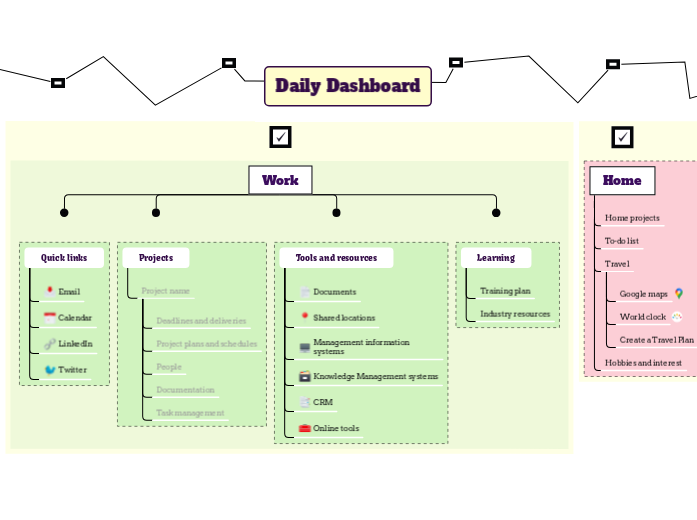
Enhance your daily productivity with the Daily Dashboard template. This template divides your tasks into four key categories: My Checklist, Home, Work, and Personal. Start by filling in each category with your specific tasks for the day. Use the 'My Checklist' section for general to-dos, 'Home' for household chores, 'Work' for professional tasks, and 'Personal' for personal goals. This structured approach helps you stay organized and ensures a well-rounded and efficient day. Your Daily Dashboard map helps you to find the resources and information that you need every day. Add links to useful resources for your goals and for your personal development plans. Create a personal development plan and link to it. Keep your long term and medium term goals in view, to help you prioritise. Long term Medium term Add links to useful resources for home projects, hobbies and travel. Fill in our Autobiography template then link it here. Create a Travel Plan Try our Travel Plan template World clock Create your personal world clock Google maps Quick access to Google maps Try our GTD template Learning Create a professional training plan and link to it. You can also add useful links to industry resources that help with your work. Industry resources You can also add useful links to industry resources that help with your work. Training plan Try our template or create your own from scratch. Tools and resources Add links to or information about frequently used resources such as: Online tools CRM Knowledge Management systems Management information systems Shared locations Documents Add link Projects Add links and information for important projects. Press Insert or click the button below to add a new project here. Project name Type in your project name, and add essential information about it and links to important documents. Task management Add link to your task management for your project. Documentation Add key documents needed for the project People Add information about key stakeholders in your project Project plans and schedules Add project plans and schedules Deadlines and deliveries Add key dates and milestones Quick links Add links to the tools that you use the most often. Twitter Add a link to your Twitter account LinkedIn Add a link to your LinkedIn account Calendar Add a link to your calendar Email Add a link to your email Create a Checklists map, and link it here Add your tasks. 思维导图可以帮助你集思广益,建立概念之间的关系,组织和产生想法。 然而,思维导图模板提供了一种更容易上手的方法,因为它们是包含特定主题信息和指导说明的框架。从本质上讲,思维导图模板确保了将特定主题的所有元素结合在一起的结构,并可作为个人思维导图的起点。思维导图模板是一种资源,可为创建特定主题的思维导图提供实用的解决方案,无论是用于商业还是教育。 Mindomo 为你带来智能思维导图模板,让你毫不费力地运作和思考。 您可以从Mindomo的商业或教育账户中选择各种思维导图模板,也可以从头开始创建自己的思维导图模板。任何思维导图都可以转化为思维导图模板,只需在其中一个主题上添加进一步的指导说明即可。关于此模板
Daily Dashboard Template
Daily Dashboard
Read more about how to design and use your Daily Dashboard map in the Mindomo blog.Personal
Personal development
OR
use our template to improve yourself.Goals
Create your own Goal Setting mind map.Home
Hobbies and interest
Travel
OR
Create your own from scratch.To-do list
OR
create your own from scratch.Home projects
Work
You can also use our Project map
You can also try out our templates to get things done and to plan out your week.
Add link
Press Insert or TAB key to add other links.My checklists
OR
use our Checklist template.
OR
create a checklist here.tasks
为什么使用 Mindomo 思维导图模板?
模板具有各种功能: