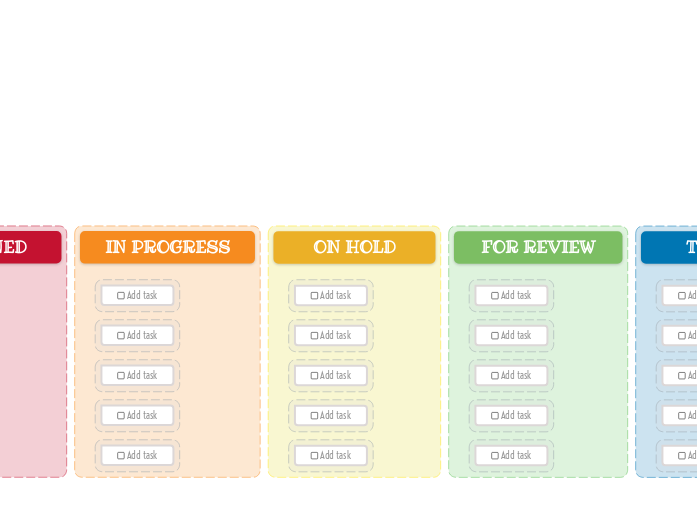
The Kanban Board helps you manage your workload easily. Add new tasks, then drag and drop them to the suitable category depending on their progress. This template allows you to visually organize your tasks into three key stages: New Task, Assigned, In Progress, On Hold, For Review, Testing, and Done. Simply fill in each column with tasks corresponding to their current status. As you complete tasks, move them across the board to track your progress. Ideal for both personal and team projects, this Kanban Board helps you maintain focus, prioritize tasks, and enhance productivity. Add your task here. Mielikarttojen avulla voit ideoida, luoda käsitteiden välisiä suhteita, organisoida ja tuottaa ideoita. Mielikarttamallit tarjoavat kuitenkin helpomman tavan päästä alkuun, sillä ne ovat kehyksiä, jotka sisältävät tietoa tietystä aiheesta ja ohjaavia ohjeita. Pohjimmiltaan mindmap-mallit varmistavat rakenteen, jossa yhdistyvät kaikki tietyn aiheen elementit ja joka toimii lähtökohtana henkilökohtaiselle mindmapillesi. Ne ovat resurssi, joka tarjoaa käytännöllisen ratkaisun miellekartan luomiseen tietystä aiheesta, joko liike-elämää tai koulutusta varten. Mindomo tuo sinulle älykkäitä miellekarttamalleja, joiden avulla voit toimia ja ajatella vaivattomasti. Voit valita Mindomon yritys- tai koulutustileiltä erilaisia miellekarttamalleja, tai voit luoda omia miellekarttamalleja tyhjästä. Mikä tahansa mind map voidaan muuttaa mind map -mallin kartaksi lisäämällä johonkin sen aiheeseen lisää ohjaavia muistiinpanoja.Kanban Board Template (Bright)
Tietoja tästä mallista
Why use the Kanban board (light) template?
Idea board
DONE
Drag and drop your tasks from the previous column here when you are done.
You can create more columns with additional steps and customize them for your needs.TESTING
Drag and drop your tasks from the previous column here when they are ready to be tested.FOR REVIEW
Drag and drop your tasks from the previous column here when they are ready for a review.ON HOLD
Drag and drop your tasks from the previous column here if the assigned person stopped working on these tasks.IN PROGRESS
Drag and drop your tasks from the previous column here when someone started to work on them.ASSIGNED
NEW TASKS
Your tasks have a predefined path in this kanban board, that starts with the initial stage of creating them.
Each column represents the present stage of their progress.Add task
Miksi käyttää Mindomo mind map -mallia?
Mallilla on erilaisia toimintoja:
-
Tuotteet
-
Käyttötarkoitukset
- Yleiset käyttötarkoitukset
- Miellekartat koulutukseen
- Miellekartat liiketoimintaan
- Miellekartat henkilökohtaiseen kehitykseen
- Apuvälineteknologia
- Tiimiyhteistyö
- Kampanjabriefit markkinoijille
- Asiakastarpeiden kartoitustyöpajat konsulteille
- Perehdytyspolut HR:lle ja L&D:lle
- Tietämyksenhallinta
- Tiimin osaamismatriisi
- Projektikirjasto
- Roolit
- Markkinoijat
- HR ja L&D
- Konsultit
- Projektinhallinta
- Markkinointikampanjan suunnittelu
- Henkilöstökoulutuksen käyttöönotto
- Työn laajuus
- Ideoiden organisointi
- Ongelmapuut
- Koulutustarveanalyysi
- Miellekarttojen hyödyt
-
Ratkaisut
- Oppaat
- Tee esityksiä miellekartoilla
- Opi miellekartoilla
- Suunnittele ja järjestä miellekartoilla
- Kuinka priorisoida tehtäviä miellekartoilla
- Kuinka tehdä muistiinpanoja miellekartoilla
- Aitoja asiakastarinoita
- Koulutussisällön skaalaaminen 11 000 lääkärille
- Tiimityöskentely: kokeilusta välttämättömäksi kahdessa kuukaudessa
- 10 vuotta ilman dioja: arkkitehtuuriluentojen uudelleenajattelu
- Lue kaikki tarinat
-
Resurssit
- Perusteet
- Mikä on miellekartta?
- Kuinka tehdä miellekartta?
- Mikä on käsitekartta?
- Miellekarttaideoita opiskeluun
- Oppaat ja Tuki
- Video-oppaat
- Ohjekeskus
- Foorumi
- Esimerkit ja mallit
- 100 Miellekarttaideoita
- Miellekartat apuvälineteknologiana
- 29 parasta miellekarttaesimerkkiä
- Ominaisuussivut
- Koulutus
- Opettajan tehtävät
- Työ & Henkilökohtainen
- Työpöytä
- Mindomo-blogi
- Hinnoittelu
- Kirjaudu sisään
- Rekisteröidy
- Hallintapaneeli
Yleiset käyttötarkoitukset
Miellekarttojen hyödyt
Miksi visuaalinen ajattelu helpottaa muistamista ja suunnittelua.
Perusteet
Oppaat ja Tuki
Esimerkit ja mallit
Ominaisuussivut
 Blogi
Mindomo-blogi
Oppaita, esimerkkejä ja tutkimusta visuaalisesta ajattelusta.
Selaa kaikkia artikkeleita
Blogi
Mindomo-blogi
Oppaita, esimerkkejä ja tutkimusta visuaalisesta ajattelusta.
Selaa kaikkia artikkeleita