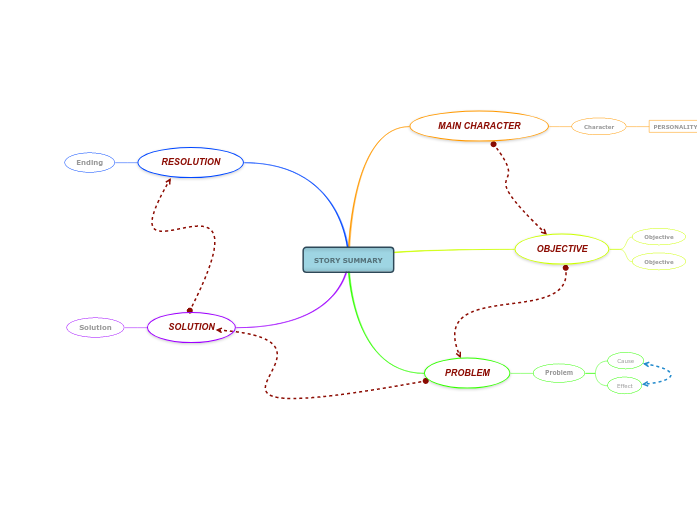
With this story summary template, you can establish the main aspects of a story and discuss the main character traits, objectives, problems, effects, and solutions to those problems from the story. Type in the name of the story or historical event you are planning to summarize. A solution is found for the problem or challenge. What was the solution to the problem? Type it in. Resolution is the part of the story's plot where the main problem is resolved or worked out. And then what happened? This is the But moment in the story or event, when one or several issues arise, messing up the character's plans. What is the conflict or problem that has occurred? Type it in. What's the impact of this issue upon the action of events? Type it in. What led to this issue? Type it in. This is the Wanted component in the story and it refers to what your character planned on doing in this story or event. What are the character's plans? Type them in. It can be a person, an animal, a monster, a figure, an item, and it is the centerpiece of the entire story. Trait What are the traits that best describe the main character? Type them in. 마인드맵은 브레인스토밍, 개념 간의 관계 파악, 아이디어 정리와 발상에 도움이 됩니다. 마인드맵 템플릿에는 특정 주제에 관한 정보와 작성 요령이 미리 담겨 있어 더 쉽게 시작할 수 있습니다. 주제에 필요한 요소를 모두 갖춘 구조가 준비되어 있으므로 나만의 마인드맵을 만드는 출발점으로 활용할 수 있습니다. 비즈니스든 교육이든, 특정 주제로 마인드맵을 만들 때 유용한 실용적인 자료입니다. Mindomo는 편리한 스마트 마인드맵 템플릿을 제공합니다. Mindomo 비즈니스 계정이나 교육용 계정에서 제공하는 마인드맵 템플릿 중에서 고를 수 있고, 처음부터 나만의 템플릿을 만들 수도 있습니다. 어떤 마인드맵이든 토픽에 가이드 노트를 추가하기만 하면 템플릿으로 바꿀 수 있습니다.이 템플릿 정보
Story summary template
STORY SUMMARY
SOLUTION
Solution
RESOLUTION
Ending
What is the ending of the story or event? Type it in.PROBLEM
Problem
Effect
Cause
OBJECTIVE
Objective
MAIN CHARACTER
Who is the main character in the story? Type in his/her name.Character
PERSONALITY TRAITS
Mindomo 마인드맵 템플릿을 사용해야 하는 이유
템플릿에는 다음과 같은 기능이 있습니다.
-
제품
- 만들기
- AI 마인드맵 생성기
- 아웃라인 프로그램
- 간트 차트 프로그램
- Mindomo 시작하기
- Mindomo 다운로드
- 브라우저 확장 프로그램
- 새로운 기능
- 마인드맵 템플릿
- 모든 기능 비교
-
활용
-
솔루션
-
리소스
- 기초 배우기
- 마인드맵이란?
- 마인드맵 그리는 법
- 가이드 및 지원
- 동영상 튜토리얼
- 고객센터
- 포럼
- 예시 및 템플릿
- 마인드맵 예시 29선
- 개념도란?
- 기능 소개
- 교육
- 교사용 과제 기능
- 업무 및 개인
- 데스크톱
- Mindomo 블로그
- 요금제
- 로그인
- 가입하기
- 대시보드
지식 관리
직무
마인드맵의 장점
시각적 사고가 기억과 계획을 쉽게 만드는 이유