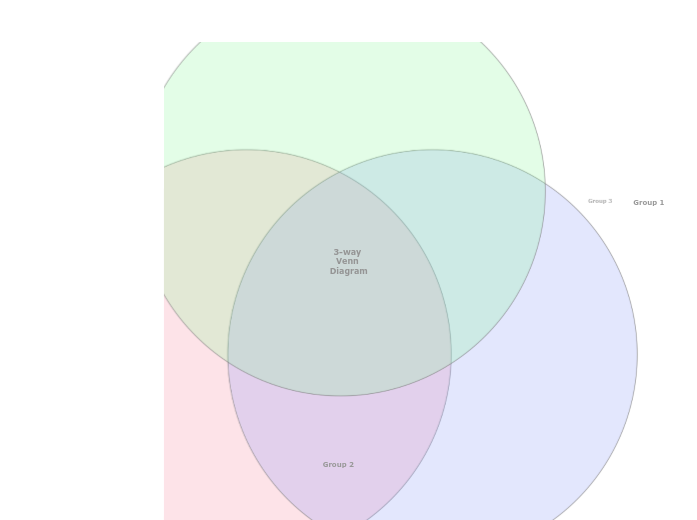
A three-way Venn Diagram helps to understand the similarities and differences between items, by showing their membership of three groups. Explore the relationships between three different sets of data using the 3-Way Venn Diagram template. This template features three intersecting circles that allow you to compare and analyze data across multiple dimensions. Start by filling in each circle with your data sets and use the overlapping areas to identify commonalities and differences. This diagram helps you visualize how the sets interact, making it ideal for data analysis, problem-solving, and strategic planning. Perfect for presentations, reports, and collaborative projects, this template provides a clear and comprehensive view of complex relationships. Type in the name of the third group and press Enter. Type in the name of the second group and press Enter. Type in the name of the first group and press Enter. A Venn Diagram compares items by assigning them to groups. An item can belong to: The item counts (and not the areas of the circles and their overlap) indicate the population of each group or the overlap between groups. Mindmaps helpen je bij brainstormen, het leggen van verbanden tussen concepten, organiseren en ideeën bedenken. Met een mindmapsjabloon ga je nog makkelijker aan de slag: het is een kader met informatie over een specifiek onderwerp en begeleidende instructies. Een sjabloon geeft je dus de structuur die alle elementen van een onderwerp samenbrengt, en dient als startpunt voor je eigen mindmap. Zo maak je op een praktische manier een mindmap over een bepaald onderwerp, zowel in het bedrijfsleven als in het onderwijs. Mindomo biedt slimme mindmapsjablonen waarmee je moeiteloos kunt werken en denken. Je kunt kiezen uit verschillende mindmapsjablonen van de zakelijke of educatieve accounts van Mindomo, of je eigen mindmapsjablonen maken. Elke mindmap kun je omzetten in een sjabloon door extra notities toe te voegen aan een van de onderwerpen.Create a Venn Diagram
Over dit sjabloon
3 Way Venn Diagram template
Group 3
Double-click in the background to add items to this group, or in the overlaps between the groups.Group 2
Double-click in the background to add items to this group, or in the overlaps between the groups.Group 1
Double-click in the background to add items to this group, or in the overlaps between the groups.3-way Venn Diagram
Waarom een mindmapsjabloon van Mindomo gebruiken?
Een sjabloon biedt verschillende functies:
-
Producten
-
Toepassingen
- Algemene toepassingen
- Mindmaps voor het onderwijs
- Mindmaps voor bedrijven
- Mindmaps voor persoonlijke ontwikkeling
- Ondersteunende technologie
- Teamsamenwerking
- Campagnebriefs voor marketeers
- Verkenningsworkshops met klanten voor consultants
- Onboardingtrajecten voor HR en L&D
- Kennismanagement
- Vaardighedenmatrix voor teams
- Opdrachtenbibliotheek
- Rollen
- Marketeers
- HR en L&D
- Consultants
- Projectmanagement
- Planning van marketingcampagnes
- Uitrol van medewerkerstrainingen
- Werkomschrijving
- Ideeën ordenen
- Probleembomen
- Analyse van opleidingsbehoeften
- Voordelen van mindmappen
-
Oplossingen
- Handleidingen
- Presentaties maken met mindmaps
- Leren met mindmaps
- Plannen en organiseren met mindmaps
- Taken prioriteren met mindmaps
- Notities maken met mindmaps
- Klantverhalen uit de praktijk
- Educatieve content opschalen voor 11.000 artsen
- Teamworkflow: van proefperiode naar onmisbaar in twee maanden
- 10 jaar zonder slides: architectuurcolleges opnieuw bedacht
- Alle verhalen lezen
-
Hulpbronnen
- De basis
- Wat is een mindmap?
- Hoe maak je een mindmap?
- Wat is een conceptmap?
- Mindmapideeën voor studenten
- Handleidingen en support
- Videohandleidingen
- Helpcentrum
- Forum
- Voorbeelden en sjablonen
- Mindmapideeën
- Tool voor ondersteunende technologie
- Top 29 mindmapvoorbeelden
- Functiepagina's
- Onderwijs
- Opdrachten voor docenten
- Werk en privé
- Desktop
- De Mindomo-blog
- Prijzen
- Inloggen
- Aanmelden
- Dashboard
Voordelen van mindmappen
Waarom visueel denken onthouden en plannen makkelijker maakt.
De basis
Handleidingen en support
Voorbeelden en sjablonen
Functiepagina's
 Blog
De Mindomo-blog
Gidsen, voorbeelden en onderzoek over visueel denken.
Alle artikelen bekijken