Checklists are a powerful way to save time and get consistent results when completing complicated tasks. This template helps you categorize your to-dos into personal, work, and other sections for better organization. Simply fill in each category with your tasks and prioritize them according to your needs. Whether you’re managing daily simple tasks, work assignments, or other things you need to do, this checklist ensures you stay organized and focused on what matters most. This mind map contains some example checklists that you can modify or delete. Create your own checklists and add a link to them. Create or attach checklist Create or attach checklist. tasks Add tasks. You can copy this topic to create a new category of checklists. Review a project Use this checklist to review the status of a project and decide on corrective actions. Review Risks Review Issues Review resources Review budget Review schedule Evaluate a quotation Use this checklist to help evaluate a quotation received from a supplier. Reputation Warranty Availability Pricing Requirements Set priorities Use this checklist to help with task prioritisation. Neither important nor urgent Identify tasks that you will defer and may never do. Urgent Identify tasks that are 'urgent' as defined by someone else, but do not contribute to longer term goals. Important Identify tasks that contribute to long term goals, but are not time-sensitive. Important and urgent Identify which tasks are both important (contribute towards long term goals) and time-sensitive. You can copy this topic to create a new category of checklists. Prepare for an online meeting Turn on Focus Assist Spare mouse battery Shut down other apps Check sound and camera Set a backdrop Either tidy up your office, or arrange a green screen and electronic backdrop. Close windows & doors Minimise external noise. Set phones to silent Set mobile and desk phones to silent. Check the meeting link Materials circulated beforehand Monthly plan Review Daily Dashboard Review your Daily Dashboard map to make sure it is helping you to manage your workload effectively. Administrative updates Set training objectives Schedule meetings and reviews Review appointments and deadlines Weekly plan Empty inbox Set 3 major objectives Daily plan Add here your to-dos for the day! task subtask Top 3 actions for today Review appointments Review starred emails Update time sheets Os mapas mentais ajudam você a fazer brainstorming, estabelecer relações entre conceitos, organizar e gerar ideias. No entanto, os modelos de mapas mentais oferecem uma maneira mais fácil de começar, pois são estruturas que contêm informações sobre um assunto específico com instruções de orientação. Em essência, os modelos de mapas mentais garantem a estrutura que combina todos os elementos de um assunto específico e servem como ponto de partida para o seu mapa mental pessoal. Eles são um recurso para fornecer uma solução prática para criar um mapa mental sobre um determinado tema, seja para negócios ou educação. Mindomo traz modelos de mapas mentais inteligentes que permitem que você funcione e pense sem esforço. Você pode escolher entre uma variedade de modelos de mapas mentais das contas comerciais ou educacionais da Mindomo, ou pode criar seus próprios modelos de mapas mentais do zero. Qualquer mapa mental pode ser transformado em um modelo de mapa mental adicionando mais notas de orientação a um de seus tópicos.Checklist Template
This template helps you to create your own map of checklists.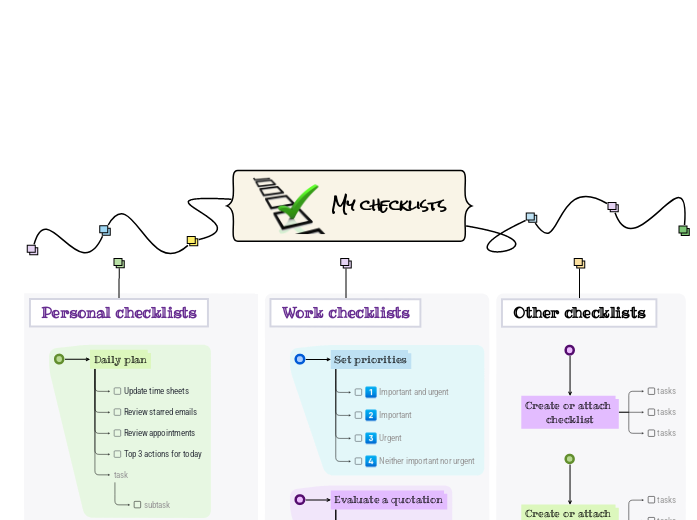
Sobre este modelo
Stay on top of your tasks with the My Checklist template.
My checklists
You can add new checklists OR add new steps to the existing ones.
Read more about how to use checklists in the Mindomo blog.Other checklists
To add a new checklist, press the Insert or TAB key or create a checklist on the spot.Work checklists
To add a new checklist to 'Work checklists', press the Insert key.
To add a new step to Set priorities, press Insert or TAB key.Personal checklists
To add a new checklist to 'Personal checklists', press the Insert or TAB key.
To add a new step to 'Prepare for an
online meeting', press Insert or click the button below.
Press Enter to add another step to 'Prepare for an
online meeting'.
Press Enter to add another step to 'Prepare for an
online meeting'.
Press Enter to add another step to 'Prepare for an
online meeting'.
Press Enter to add another step to 'Prepare for an
online meeting'.
Press Enter to add another step to 'Prepare for an
online meeting'.
Press Enter to add another step to 'Prepare for an
online meeting'.
Press Enter to add another step to 'Prepare for an
online meeting'.
To add a new step to 'Monthly plan', press Insert or Tab key.
Press Enter to add another task.
Press Enter to add another task.
Press Enter to add another task.
Press Enter to add another task.
Press Enter to add another task.
To add a new step to 'Weekly plan', press Insert or Tab key.
Press Enter to add another step to 'Weekly plan'.
Press Enter to add another step to 'Weekly plan'.
Press Enter to add another step to 'Weekly plan'.
To add a new step to 'Daily plan', press Insert or Tab key.
Add notes
Add hyperlink
Press Enter to add another step to 'Daily plan'.
Add notes
Add hyperlink
Press Enter to add another step to 'Daily plan'.
Add notes
Add hyperlink
Press Enter to add another step to 'Daily plan'.
Add notes
Add hyperlink
Press Enter to add another task to 'Daily plan'.Por que usar um modelo de mapa mental Mindomo?
Um modelo possui várias funcionalidades:
-
Produtos
-
Usos
- Usos gerais
- Mapas Mentais para Educação
- Mapas Mentais para Empresas
- Mapas Mentais para Desenvolvimento Pessoal
- Tecnologia Assistiva
- Colaboração em equipe
- Briefs de campanha para profissionais de marketing
- Workshops de descoberta do cliente para consultores
- Jornadas de onboarding para RH e L&D
- Gestão do conhecimento
- Matriz de competências da equipe
- Biblioteca de projetos
- Funções
- Profissionais de marketing
- RH e L&D
- Consultores
- Gestão de projetos
- Planeamento de campanhas de marketing
- Implementação de treinamentos para funcionários
- Âmbito do trabalho
- Organização de ideias
- Árvores de problemas
- Análise de necessidades de formação
- Benefícios do Mapeamento Mental
-
Soluções
- Guias
- Criar apresentações com mapas mentais
- Como aprender com mapas mentais
- Planejar e organizar com mapas mentais
- Como priorizar tarefas com mapas mentais
- Como fazer anotações com mapas mentais
- Histórias reais de clientes
- Escalar conteúdo educacional para 11.000 médicos
- Fluxo de trabalho em equipe: do teste ao indispensável em dois meses
- 10 anos sem slides: repensar as aulas de arquitetura
- Ler todas as histórias
-
Recursos
- Aprenda o básico
- O que é um Mapa Mental?
- Como Fazer um Mapa Mental?
- O que é um Mapa Conceptual?
- Guias e Suporte
- Tutoriais em vídeo
- Centro de ajuda
- Fórum
- Exemplos e modelos
- Ideias de Mapas Mentais Criativos
- 29 Exemplos Principais de Mapas Mentais
- Páginas de funcionalidades
- Educação
- Tarefas para professores
- Trabalho & Pessoal
- Desktop
- O blogue Mindomo
- Preços
- Entrar
- Inscreva-se
- Painel de controle
Gestão do conhecimento
Benefícios do Mapeamento Mental
Porque o pensamento visual facilita recordar e planear.
Aprenda o básico
Guias e Suporte
Exemplos e modelos
Páginas de funcionalidades
 Blogue
O blogue Mindomo
Guias, exemplos e investigação sobre pensamento visual.
Ver todos os artigos
Blogue
O blogue Mindomo
Guias, exemplos e investigação sobre pensamento visual.
Ver todos os artigos