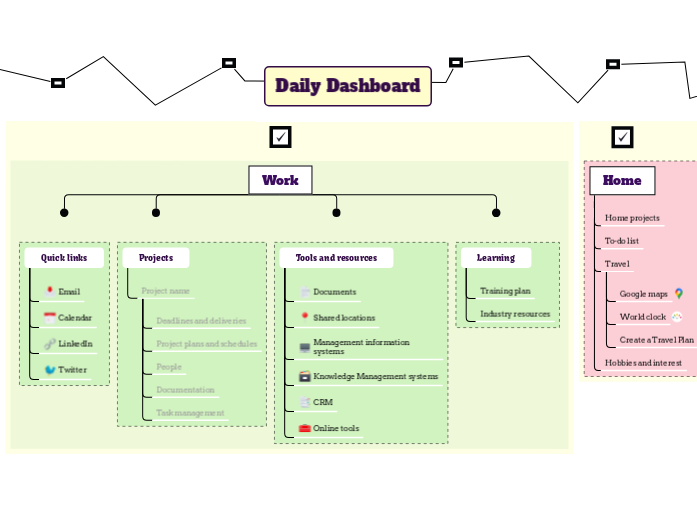
Your Daily Dashboard map connects you to the resources and information that you need every day, and helps you to keep track of work, home and personal projects. Enhance your daily productivity with the Daily Dashboard template. This template divides your tasks into four key categories: My Checklist, Home, Work, and Personal. Start by filling in each category with your specific tasks for the day. Use the 'My Checklist' section for general to-dos, 'Home' for household chores, 'Work' for professional tasks, and 'Personal' for personal goals. This structured approach helps you stay organized and ensures a well-rounded and efficient day. Your Daily Dashboard map helps you to find the resources and information that you need every day. Add links to useful resources for your goals and for your personal development plans. Create a personal development plan and link to it. Keep your long term and medium term goals in view, to help you prioritise. Long term Medium term Add links to useful resources for home projects, hobbies and travel. Fill in our Autobiography template then link it here. Create a Travel Plan Try our Travel Plan template World clock Create your personal world clock Google maps Quick access to Google maps Try our GTD template Learning Create a professional training plan and link to it. You can also add useful links to industry resources that help with your work. Industry resources You can also add useful links to industry resources that help with your work. Training plan Try our template or create your own from scratch. Tools and resources Add links to or information about frequently used resources such as: Online tools CRM Knowledge Management systems Management information systems Shared locations Documents Add link Projects Add links and information for important projects. Press Insert or click the button below to add a new project here. Project name Type in your project name, and add essential information about it and links to important documents. Task management Add link to your task management for your project. Documentation Add key documents needed for the project People Add information about key stakeholders in your project Project plans and schedules Add project plans and schedules Deadlines and deliveries Add key dates and milestones Quick links Add links to the tools that you use the most often. Twitter Add a link to your Twitter account LinkedIn Add a link to your LinkedIn account Calendar Add a link to your calendar Email Add a link to your email Create a Checklists map, and link it here Add your tasks. Mind maps hjælper dig med at brainstorme, etablere relationer mellem begreber, organisere og generere ideer. Mind map-skabeloner er dog en nemmere måde at komme i gang på, da de er rammer, der indeholder information om et specifikt emne med vejledende instruktioner. I bund og grund sikrer mind map-skabeloner den struktur, der kombinerer alle elementerne i et specifikt emne og fungerer som udgangspunkt for dit personlige mind map. De er en ressource, der giver en praktisk løsning til at lave et mind map om et bestemt emne, enten til erhverv eller uddannelse. Mindomo giver dig smarte mind map-skabeloner, der gør det muligt for dig at fungere og tænke ubesværet. Du kan vælge mellem en række mind map-skabeloner fra Mindomos erhvervs- eller uddannelseskonti, eller du kan lave dine egne mind map-skabeloner fra bunden. Ethvert mind map kan omdannes til et mind map-skabelon-map ved at tilføje yderligere vejledende noter til et af emnerne.Daily To Do List Template
Om denne skabelon
Daily Dashboard Template
Daily Dashboard
Read more about how to design and use your Daily Dashboard map in the Mindomo blog.Personal
Personal development
OR
use our template to improve yourself.Goals
Create your own Goal Setting mind map.Home
Hobbies and interest
Travel
OR
Create your own from scratch.To-do list
OR
create your own from scratch.Home projects
Work
You can also use our Project map
You can also try out our templates to get things done and to plan out your week.
Add link
Press Insert or TAB key to add other links.My checklists
OR
use our Checklist template.
OR
create a checklist here.tasks
Hvorfor bruge en Mindomo mind map-skabelon?
En skabelon har forskellige funktioner:
-
Produkter
-
Anvendelser
- Generelle anvendelser
- Mind Maps til Uddannelse
- Mind Maps til Forretning
- Mind Maps til Personlig Udvikling
- Hjælpemiddelteknologi
- Teamsamarbejde
- Kampagnebriefs til marketingfolk
- Workshops om kundeafdækning for konsulenter
- Onboardingforløb for HR og L&D
- Videnstyring
- Team-kompetencematrix
- Projektbibliotek
- Roller
- Marketingfolk
- HR og L&D
- Konsulenter
- Projektledelse
- Planlægning af marketingkampagner
- Udrulning af medarbejderuddannelse
- Arbejdsomfang
- Idéorganisering
- Problemtræer
- Uddannelsesbehovsanalyse
- Fordele ved Mind Mapping
-
Løsninger
- Guider
- Lav præsentationer med mind maps
- Lær med mind maps
- Planlæg og organiser med mind maps
- Prioritér opgaver med mind maps
- Tag noter med mind maps
- Ægte kundehistorier
- Skalering af uddannelsesindhold til 11.000 læger
- Teamworkflow: fra prøve til uundværlig på to måneder
- 10 år uden slides: genoverveje arkitekturforelæsninger
- Læs alle historier
-
Ressourcer
- Lær det grundlæggende
- Hvad er et Mind Map?
- Hvordan laver man et Mind Map?
- Vejledninger & Support
- Videovejledninger
- Hjælpecenter
- Forum
- Eksempler og skabeloner
- Top 29 eksempler på Mind Maps
- Hvad er et Konceptkort?
- Funktionssider
- Uddannelse
- Læreropgaver
- Arbejde & Personligt
- Desktop
- Mindomo-bloggen
- Priser
- Log ind
- Tilmeld
- Dashboard
Fordele ved Mind Mapping
Hvorfor visuel tænkning gør det lettere at huske og planlægge.
Lær det grundlæggende
Vejledninger & Support
Eksempler og skabeloner
Funktionssider
 Blog
Mindomo-bloggen
Guides, eksempler og forskning om visuel tænkning.
Se alle artikler
Blog
Mindomo-bloggen
Guides, eksempler og forskning om visuel tænkning.
Se alle artikler