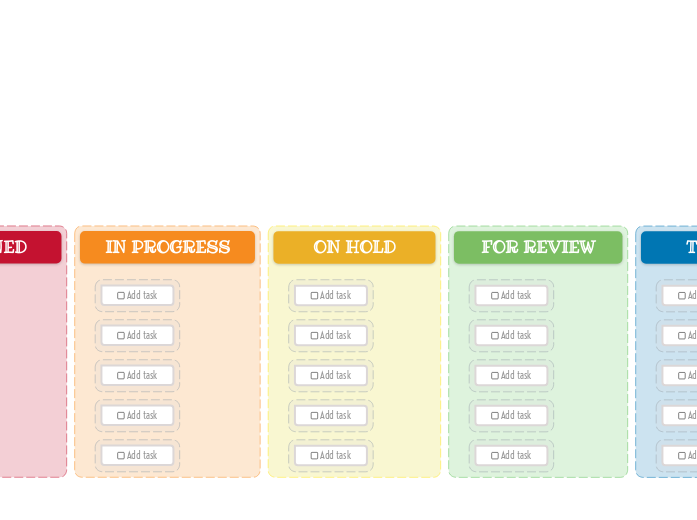
The Kanban Board helps you manage your workload easily. Add new tasks, then drag and drop them to the suitable category depending on their progress. This template allows you to visually organize your tasks into three key stages: New Task, Assigned, In Progress, On Hold, For Review, Testing, and Done. Simply fill in each column with tasks corresponding to their current status. As you complete tasks, move them across the board to track your progress. Ideal for both personal and team projects, this Kanban Board helps you maintain focus, prioritize tasks, and enhance productivity. Add your task here. Mindmaps hjælper dig med at brainstorme, skabe sammenhænge mellem begreber og organisere og generere ideer. Mindmap-skabeloner gør det dog nemmere at komme i gang, fordi de er rammer med information om et bestemt emne og vejledende instruktioner. Mindmap-skabeloner giver dig grundlæggende den struktur, der samler alle elementerne i et bestemt emne, og fungerer som udgangspunkt for dit eget mindmap. De er en praktisk ressource, når du skal lave et mindmap om et bestemt emne, uanset om det er til arbejde eller uddannelse. Mindomo giver dig smarte mindmap-skabeloner, så du kan arbejde og tænke ubesværet. Du kan vælge mellem en række mindmap-skabeloner fra Mindomos erhvervs- og uddannelseskonti, eller du kan lave dine egne mindmap-skabeloner fra bunden. Ethvert mindmap kan gøres til en mindmap-skabelon ved at tilføje vejledende noter til et af emnerne.Kanban Board Template (Bright)
Om denne skabelon
Why use the Kanban board (light) template?
Idea board
DONE
Drag and drop your tasks from the previous column here when you are done.
You can create more columns with additional steps and customize them for your needs.TESTING
Drag and drop your tasks from the previous column here when they are ready to be tested.FOR REVIEW
Drag and drop your tasks from the previous column here when they are ready for a review.ON HOLD
Drag and drop your tasks from the previous column here if the assigned person stopped working on these tasks.IN PROGRESS
Drag and drop your tasks from the previous column here when someone started to work on them.ASSIGNED
NEW TASKS
Your tasks have a predefined path in this kanban board, that starts with the initial stage of creating them.
Each column represents the present stage of their progress.Add task
Hvorfor bruge en mindmap-skabelon fra Mindomo?
En skabelon har forskellige funktioner:
-
Produkter
-
Anvendelser
- Generelle anvendelser
- Mindmaps til uddannelse
- Mindmaps til erhvervslivet
- Mindmaps til personlig udvikling
- Hjælpemiddelteknologi
- Teamsamarbejde
- Kampagnebriefs til marketingfolk
- Workshops om kundeafdækning for konsulenter
- Onboardingforløb for HR og L&D
- Videnstyring
- Kompetencematrix for teamet
- Projektbibliotek
- Roller
- Marketingfolk
- HR og L&D
- Konsulenter
- Projektledelse
- Planlægning af marketingkampagner
- Udrulning af medarbejderuddannelse
- Arbejdsbeskrivelse
- Idéorganisering
- Problemtræer
- Uddannelsesbehovsanalyse
- Fordele ved mindmapping
-
Løsninger
- Guider
- Lav præsentationer med mindmaps
- Lær med mindmaps
- Planlæg og organiser med mindmaps
- Prioritér opgaver med mindmaps
- Tag noter med mindmaps
- Ægte kundehistorier
- Skalering af uddannelsesindhold til 11.000 læger
- Teamworkflow: fra afprøvning til uundværlig på to måneder
- 10 år uden slides: arkitekturforelæsninger gentænkt
- Læs alle historier
-
Ressourcer
- Lær det grundlæggende
- Hvad er et mindmap?
- Hvordan laver man et mindmap?
- Vejledninger og support
- Videovejledninger
- Hjælpecenter
- Forum
- Eksempler og skabeloner
- Top 29 eksempler på mindmaps
- Hvad er et konceptkort?
- Funktionssider
- Uddannelse
- Læreropgaver
- Arbejde og privat
- Desktop
- Mindomo-bloggen
- Priser
- Log ind
- Tilmeld dig
- Dashboard
Fordele ved mindmapping
Hvorfor visuel tænkning gør det lettere at huske og planlægge.
Lær det grundlæggende
Vejledninger og support
Eksempler og skabeloner
Funktionssider
 Blog
Mindomo-bloggen
Guides, eksempler og forskning om visuel tænkning.
Se alle artikler
Blog
Mindomo-bloggen
Guides, eksempler og forskning om visuel tænkning.
Se alle artikler