
Advanced Business Project Template

Interactive map · Advanced Business Project Template
Mind map: Advanced Business Project Template

Advanced Business Project Template

Free with a Mindomo account. Opens your own copy in the editor.

This advanced business project template helps you gather, organize and maintain all the information needed for a small to medium-sized business project.

The map structure is a simple project sequence with a beginning, some iteration, and an end. This model can be applied to both waterfall and Agile projects.

This is an advanced template requiring familiarity with basic Mindomo features.

Free with a Mindomo account. Opens your own copy in the editor.

About this template

Advanced business project template

Effectively manage and organize your business projects using the Advanced Business Project template. This template provides a structured framework to gather and maintain all essential information for small to medium-sized projects.

The map is designed with a clear sequence, including a start, iterative phases, and an end, making it adaptable to both waterfall and Agile project management approaches.

Begin by outlining your project goals, tasks, and milestones, then use the template to track progress and adjust as needed. This advanced template assumes familiarity with basic Mindomo features and helps ensure comprehensive project planning and execution.

What’s inside this template

Advanced Business Project Template: what the map covers

Central topic

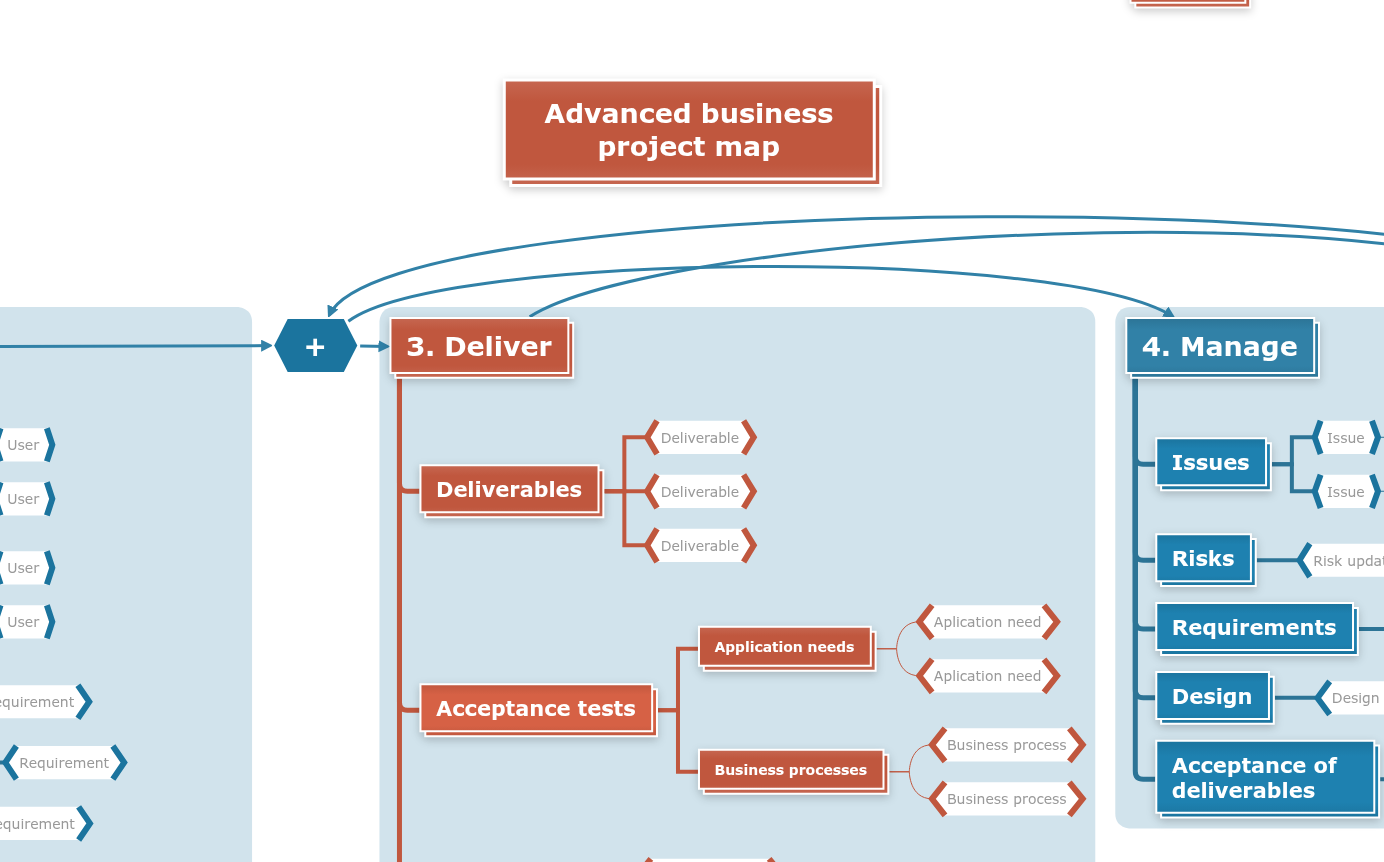
Advanced business project map

This template contains tips and guidance in the Template pop-up dialogue. Instead of following it one step at a time, feel free to click around in the map to read the guidance notes. You can work on the map in any order, although it makes sense to do most stages 1 and before starting delivery. This project map is designed to help you capture all the information you will need to manage a small to medium sized project. If kept up to date, it will provide a project "dashboard" through the lifecycle of the project, and will form an invaluable record that will help you with future projects.

1. Start

3 topics

The basic project flow consists of 6 steps: Starting your project Gathering and organising the basic information for your project. This reference material will be updated through the lifetime of the project. Delivering and managing the project. These two activities take place in parallel, and are repeated for each stage or iteration in the project. Reviewing at each stage or iteration, to make sure that your project processes are working effectively. Closing out the project, and learning from it.

Project vision

What is the vision and strategy for the project? These will engage stakeholders and the project team, not the project plan. It will be important to communicate both the vision and the strategy to the team. A plan is what you will do while you are in control. A strategy is your decision-making framework when you are no longer in control, and external factors or random events take over. Projects always start under control but many of them quickly succumb to "unexpected" events. You need a vision, a strategy that will deliver the vision, and a working plan.

  • Vision — Type in the project vision.

Legal

Ensure that project contracts and purchase orders are in place and are properly reviewed and accepted. Add links to those documents for reference.

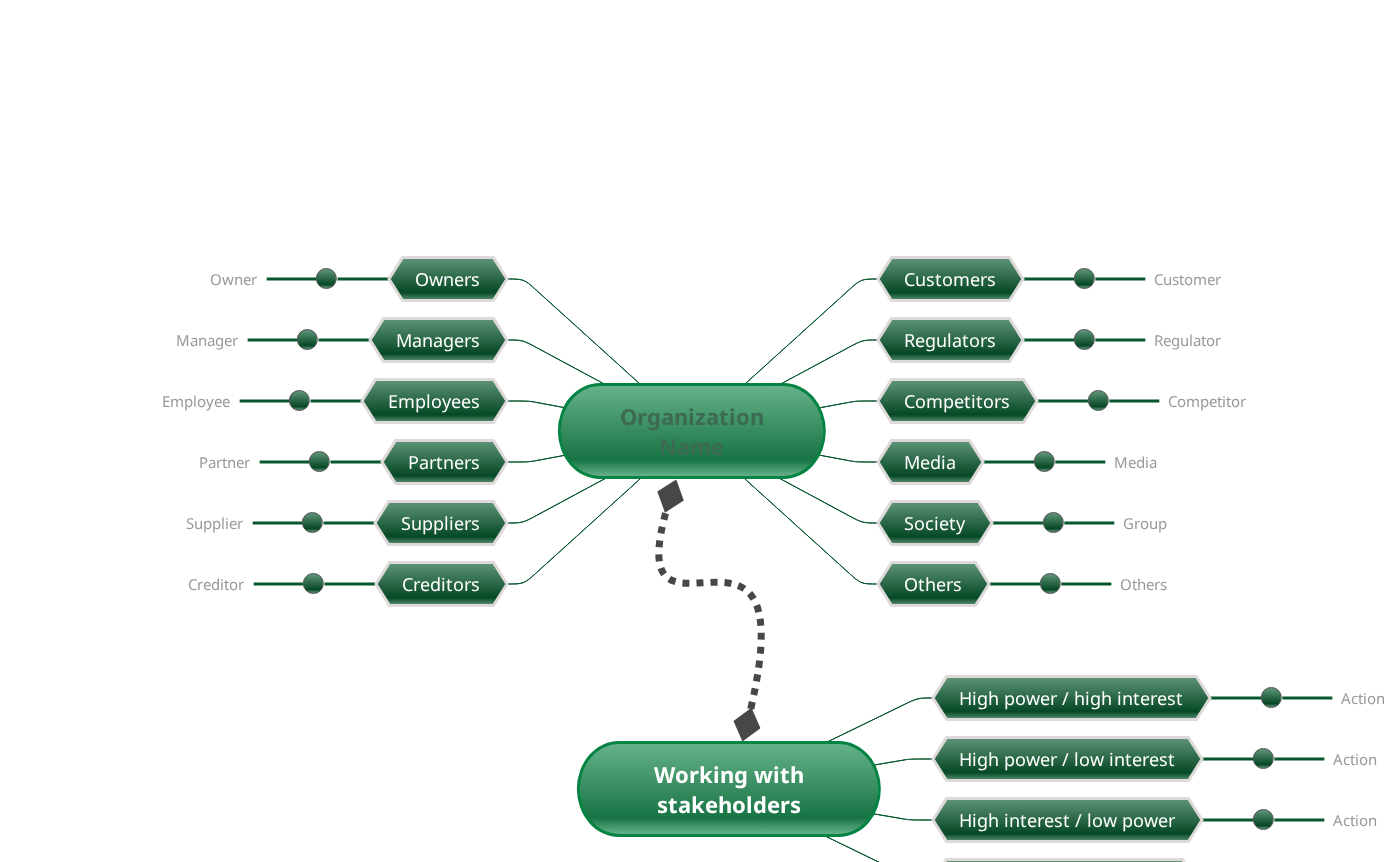
Stakeholders

Identify all the project stakeholders, including: The project sponsor in senior management The client The users Your project team Administrative roles Compliance roles (e.g. legal, quality and security) Internal and external subject specialists Technical support roles Understanding the dynamics and relationships between the stakeholders is the key to anticipating major risks that may lie ahead in your project. Stakeholders with conflicting interests must be kept engaged.

  • Stakeholder — Type in the name and the role of the shakeholder.
2. Prepare

8 topics

Gather and organize the basic information that you will need for your project. Feel free to delete topics that are not relevant.

Dictionary

Create a project dictionary to define technical terms and jargon used in your project. Don't assume that the same terms mean the same things to everyone. This dictionary underpins the requirements and reduces ambiguity.

  • Term — Type in the term.
    • Users: The project dictionary should include descriptions of the users and their primary roles in relation to the project outcome.
    • User: Type in the name of a user.

Requirements

Collect the requirements for the project. Requirements may be expressed as User Stories for the users. Requirements should be labeled as Essential Optional Potential ideas for the future

  • Functional — Requirements describing specific artifacts, features, and functions that the project delivers. These requirements should be measurable and testable.
    • Requirement: Type in the name of a requirement.
  • Non-functional — Non-functional requirements typically include: Compliance with legislation Compliance with policy, e.g. organizational quality and security policies Compliance with applicable third-party standards or protocols Factors that influence performance Factors affecting future expansion or change Strategic outcomes, e.g. new learning, the adoption or development of new technologies, or the development of strategic relationships
    • Requirement: Type in the name of the requirement.
  • Exclusions — For clarity, you may prefer to explicitly state exclusions from the requirements and deliverables.
    • Requirement: Type in the name of the requirement.
  • Deliverables — Prepare a list of deliverables that the client will receive. These deliverables will probably form the basis of project phases or sprints, and may also relate to stage payments. Acceptance of deliverables by the client will be project milestones.
    • Requirement: Type in the name of the requirement.

Design

Prepare a design that will implement the deliverables and essential requirements.

  • Idea — Type in an idea for the design.

Resources

These are the resources that you will need to complete your project.

  • People — Your project team, their capabilities, and availability Subject experts that you may need
    • Team member: Type in your team member's name and role.
    • Expert: Who is your expert?
  • Knowledge and skills — The knowledge and skills that will be needed to complete your project.
    • Knowledge or skill: Type in a skill or knowledge that will be needed to complete the template.
  • Tools and equipment — Tools and equipment that will be needed for your project.
    • Tool: Type in a tool that will be needed for your project.
  • Information — What research and information is necessary for your project?

Process catalogue

Prepare a list of processes or checklists that you will need to run the project.

  • Processes — Add links to or define the processes that you will need to execute your project. Examples include: Handling changes Handling issues Acceptance of deliverables Risk management
  • Checklists — Checklists are useful for routine procedures. If you don't use checklists, consider creating some to ensure consistency and save time. Examples include: Team handover checklist (e.g. Sales to Engineering) Requirements review checklist Document approval checklist Purchasing and invoicing checklists Timesheet approval checklists Quality compliance checklists Security compliance checklists Project review meeting checklist Project reporting checklist
    • Checklist: Type in the checklist name.
    • Task: Type in a task from the checklist.

Risks

Prepare a risk catalog for your project.

  • Risk appetite — Define your "risk appetite" for your project. Risks that are within your risk appetite are those that arise as a normal part of project work, such as issues emerging, delays and design errors. These are normally accepted and dealt with by routine project management processes. By definition, projects are an exercise in risk transfer and risk-taking. Risks beyond your risk appetite are usually single points of failure that can kill the project or even the organization, such as loss of a critical resource, radical changes in requirements, or breakdown of relations with the client. You should be taking steps to reduce the likelihood and impact of these risks to a level where you can accept them.
    • Risk appetite: Define your risk appetite.
  • Risk catalogue — List the risks that are outside your risk appetite, and what you are doing to reduce their likelihood or impact. For completeness, you can also record the risks that are within risk appetite, but no remedial action is required unless your processes fail to deal with them.
    • Outside your risk appetite: Add a risk that is outside your risk appetite.
    • Within your risk appetite: Add a risk that is within your risk appetite.

Plans

  • Communications plan — Plan the communications with stakeholders to ensure that people are kept up to date and informed. Your plan will probably include methods (such as dashboards or intranet sites) and events such as regular meetings. Different stakeholders will require different levels and frequency of information. You can use a RACI grid if you have a complex set of stakeholders.
  • Delivery plan — The plan for producing the project deliverables on schedule. If your project is a waterfall project, you will need to plan through to the end of the project. If your project is an Agile project, you will need to plan the next sprint in detail, while more distant sprints can have some flexibility depending on the outcomes from previous sprints.
    • Project type: What type of project do you plan? A waterfall project An Agile project
  • Financial plan — Plan the project budget and controls.
    • Budget: What is the budget for your project?

Project log

Maintain a log of important decisions made in the project. This can inform changes to your project processes, if you find yourself making decisions that could have been taken earlier with less impact.

  • Decision — Type in an important decision made in the project.

Start delivery and management activities in parallel.

3. Deliver

3 topics

Deliver the next iteration of the project. If this is a waterfall project, the delivery may be split up into stages. If this is an Agile project, the delivery will be split up into sprints, each one refining the requirements.

Deliverables

Prepare deliverables for this iteration, based on the plan and specification. Raise issues that arise during the work.

  • Deliverable — Type in a deliverable.

Acceptance tests

Users, customers, or other authorized entities do this test to determine application/software needs and business processes.

  • Application needs — Find some application needs.
    • Aplication need: Type in an application need.
  • Business processes — Find some business processes.
    • Business process: Type in a business process.

Refactoring

Some of the work in an iteration might be "refactoring", or tidying up previous work as a foundation for future work. You cannot save time by omitting this or allowing technical debt to build up. Leaving it late in the project simply makes the task more complex, or risks the project becoming unmaintainable.

  • Refactoring idea — Type in a refactoring idea.

4. Manage

5 topics

Manage the current iteration (delivery phase or sprint). This activity takes place in parallel to the delivery activities.

Issues

Resolve issues that arise during this delivery iteration that block the project. Maintain the issues log, keeping track of issues that will need to be resolved in the next project iteration. Look for signs of upcoming issues so that they can be addressed before they become critical.

  • Issue — Type in an issue that you have encountered.
    • Priority: Establish the priority to solve this issue: 1. Issue that arise during this delivery iteration and block the project 2. Upcoming issue that can be addressed before it becomes critical 3. Issue that will need to be resolved in the next project iteration

Risks

Review and update the risk register. Consider whether: The likelihood or impact of the risks outside the risk appetite have changed, New significant risks have emerged, or Risks assumed to be within the risk appetite are not adequately controlled by process. Either improve the process or take action to manage the risk.

  • Risk update — Type in a risk register update.

Requirements

Maintain and update the specifications. It is usual for specifications to need clarification at the point at which they are implemented, even though they might have seemed perfectly clear beforehand. It is also common for the client to update and refine specifications.

  • Specification update — Type in a specification update.

Design

Maintain and update the design, if necessary to resolve issues and accommodate changes.

  • Design update — Type in a design update.

Acceptance of deliverables

Ensure that deliverables are formally accepted by the client at the end of this stage or iteration. Your project contract may permit staged invoicing on acceptance of milestones.

  • Acceptance status — Formally accepted Not accepted yet

5. Review

7 topics

Review the latest iteration of the project and make changes.

Process

Make changes to the project processes in response to issues that have arisen.

  • Change — What change would you like to make to the project processes?

Capabilities

Take steps to provide necessary capabilities, e.g. training additional resources.

  • Step — Type in a step to provide necessary capabilities.

Capacities

Take steps to ensure that capacity will meet budget and time constraints.

  • Step — Type in a step to ensure that capacity will meet budget and time constraints.

Technical debt

Review whether technical debt (necessary redesign or refactoring) is building up in your project and what impact this is having. Some technical debt can be tolerated, but if it begins to hamper future work it should be raised as an issue and resolved.

  • Necessary redesign — What should you redesign or refactor?

Update plan

Make necessary changes to the delivery plan in response to issues or changes that have taken place.

  • Delivery change — What changes are necessary for the delivery plan?

Project log

Update the project log with important decisions that affect the project.

  • Important decision — What is an important decision that affect the project?

Reporting

Prepare required reporting for other stakeholders, e.g. a monthly financial status report.

  • Information — What is the information that you would like to report to stakeholders?

6. Close

3 topics

No project lasts forever. Some projects get canceled, some are completed under duress, and some are successful. In all cases, you can learn from the results. "Project post-mortems" are a popular activity but on their own lead to very little learning. Nobody reads through previous project post-mortem reports before their next project. You must feed lessons into changes to process or updates to a knowledge base that is accessible outside the context of your project.

Process learning

What process and checklist changes are needed to pre-empt issues that your project encountered? Looking at your project log, how could unwelcome decisions have been reduced or avoided?

  • Change — Type in what you should have changed.

Knowledge gained

What learning from your project can be transferred to others in your knowledge management system?

  • Idea — Type in an idea for your knowledge management system.

Additional info

Write here additional info related to the closing stage.

Inbox

An Inbox topic is useful for any kind of map. Use it to quickly capture new ideas and information before integrating them into the map. Periodically review the contents of the Inbox and empty it out by either moving topics to the right place in the main map, or discarding them.

How to use it

  1. 1

    Open the template

    Click “Use this template” and sign in with a free account.

  2. 2

    Make it yours

    Replace the topics and fill in the notes.

  3. 3

    Share it

    Share, present or export it, or switch it to an outline or Gantt view.