
Employee Training Rollout Plan

Interactive map · Employee Training Rollout Plan
Mind map: Employee Training Rollout Plan

Employee Training Rollout Plan

Free with a Mindomo account. Opens your own copy in the editor.

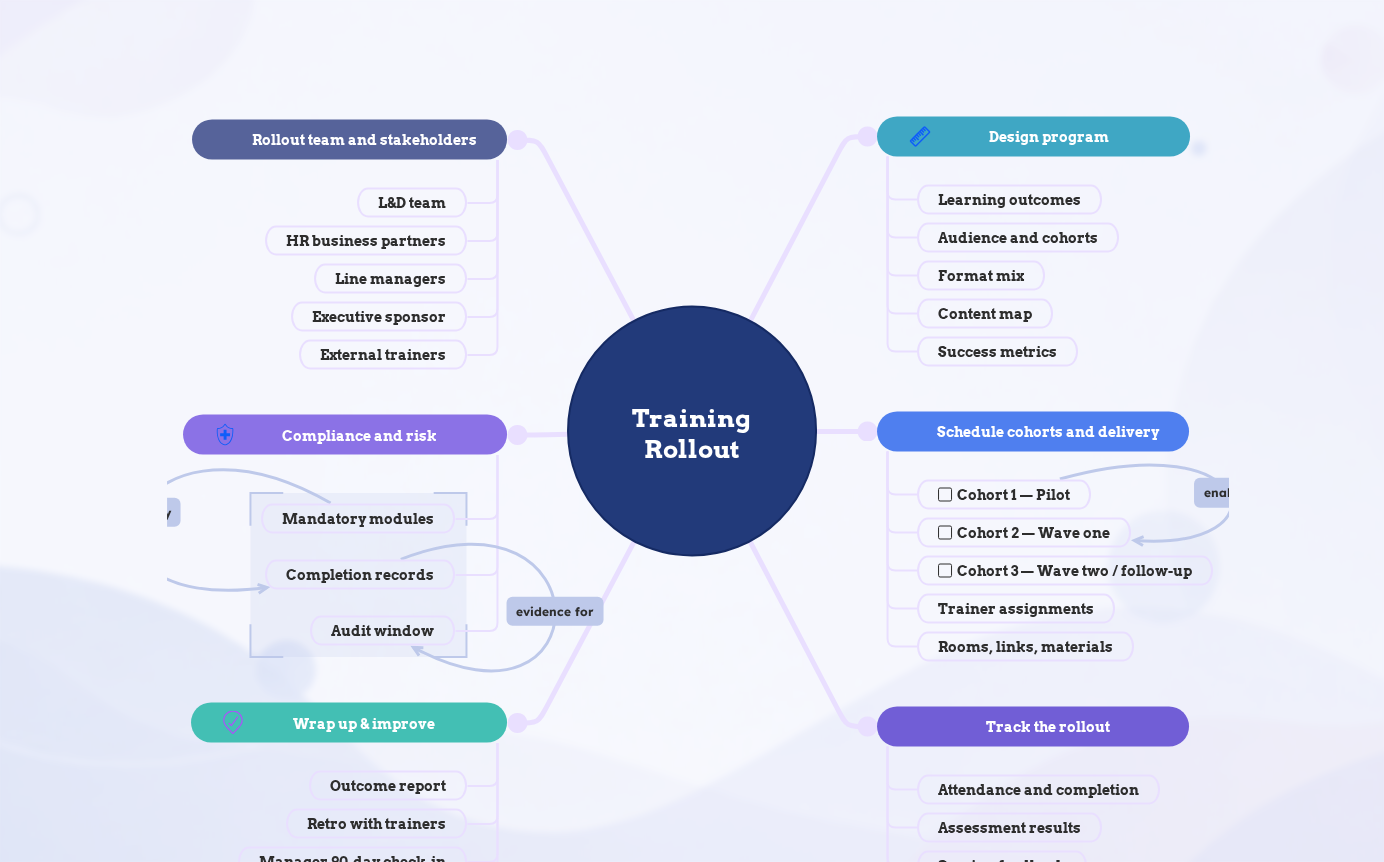
Use this template to plan and manage an employee training rollout from start to finish. Map stakeholders, define learning outcomes, organize cohorts, schedule delivery, assign trainers, track compliance requirements, and monitor completion progress in one clear structure. It helps L&D, HR, and training teams keep every phase connected, from program design and risk management to rollout tracking and post-training improvement.

Free with a Mindomo account. Opens your own copy in the editor.

About this template

Employee training rollout plan

Plan and manage every stage of an employee training rollout using this employee training rollout plan template. This template helps HR, L&D, and project teams organize stakeholders, training cohorts, delivery schedules, compliance requirements, and completion milestones in one clear structure.

Start by mapping the rollout team and key stakeholders, including the L&D team, HR business partners, line managers, executive sponsors, and external trainers.

Define the training program by adding learning outcomes, audience groups, cohort details, content plans, delivery formats, and success metrics.

Use the schedule section to plan cohorts, assign trainers, organize rooms, links, and materials, and keep delivery dependencies visible as the rollout progresses.

Track attendance, completion, assessment results, feedback, and midpoint checkpoints to understand whether the training rollout is on schedule and where adjustments are needed.

Complete the template by documenting compliance records, preparing outcome reports, reviewing lessons learned with trainers, and planning follow-up actions for future training improvements.

What’s inside this template

Employee Training Rollout Plan: what the map covers

Central topic

Helps plan, schedule, track, and close an employee training rollout in one shared workspace. Click any subtopic to reveal suggested next steps and expand the map with more detailed rollout actions.

Design program

5 topics

Defines the training goals, audiences, formats, content, and success measures before delivery starts.

Learning outcomes

Defines what employees should know, do, or demonstrate after the training. In this template, it helps connect the program to real business outcomes before the rollout begins. Role-specific outcomes Required behaviors Success criteria

Audience and cohorts

Groups participants by role, team, region, or rollout wave. This helps HR and L&D plan training delivery around real employee groups instead of treating everyone as one audience. Sales team Customer support New managers Regional groups

Format mix

Shows how the training will be delivered. This is useful when the rollout combines live sessions, self-paced learning, and manager-led follow-up. Live workshops Self-paced modules Manager check-ins

Content map

Organizes the modules and materials that need to be prepared before rollout. It helps the team see what content is ready, what depends on other content, and what supports certification. Foundation module Advanced module Certification prep Reference materials

Success metrics

Defines how the rollout will be measured. This helps HR and L&D track whether the training was completed, understood, and useful for employee readiness. Completion rate Assessment score Manager confirmation Time to readiness
Schedule cohorts and delivery

5 topics

Organizes rollout waves, trainer assignments, session logistics, materials, and dependencies, so each cohort can move through the program in the right order.

Cohort 1 — Pilot

The first test group in the rollout. A pilot helps validate the training structure, timing, materials, and feedback process before the program is expanded. Week 1 kickoff Foundation module Feedback review

Cohort 2 — Wave one

The first larger rollout group after the pilot. This shows how the program moves from planning into execution with a defined audience, trainer, and session setup. Sales group Trainer: Room/link:

Cohort 3 — Wave two / follow-up

A later rollout group. This supports phased execution, where different teams complete the training at different times based on availability, priority, or certification needs. Support group Trainer: Certification date

Trainer assignments

Clarifies who is responsible for delivering, backing up, or reviewing the training. This reduces rollout risk if a trainer is unavailable or a subject-matter expert needs to approve content. Primary trainer Backup trainer SME reviewer

Rooms, links, materials

Rooms, links, materials Collects the practical resources needed to run each session. Use this topic to add meeting links, slide decks, exercises, attendance sheets, or shared material folders. Zoom links Slides Exercises Attendance sheet

Track the rollout

4 topics

Monitors attendance, completion, assessment results, feedback, and delays while the rollout is active, so issues can be spotted and addressed early.

Attendance and completion

Tracks who attended and who completed the training. This makes the map feel like a live rollout workspace, not just a static planning document. Cohort 1: Cohort 2: Missing attendees

Assessment results

Shows whether participants passed the required checks or still need follow-up. This connects training completion to readiness, certification, or compliance. Passed Needs retake Certification pending

Session feedback

Session feedback Captures input from trainers and learners while the rollout is still active. This topic helps the team collect trainer observations, learner comments, and content issues directly on the map. Trainer notes Learner comments Content issues

Midpoint checkpoint

Reviews the rollout while it is still in progress. This helps HR or L&D catch delays, trainer conflicts, or module issues before they affect the full program. Behind schedule Trainer conflict Module 3 delayed

Rollout team and stakeholders

5 topics

Clarifies who owns, supports, approves, and contributes to the training rollout.

L&D team

Identifies the internal team responsible for designing and managing the training program. This clarifies who owns the content and who coordinates the rollout. Program owner Content lead

HR business partners

Connects the rollout to HR policy, compliance, and department needs. This makes the template feel more realistic for HR and L&D teams. Compliance owner Policy reviewer

Line managers

The managers responsible for supporting employees during and after the training. This topic is useful because managers often confirm attendance, reinforce behavior change, and check whether the training is applied on the job. Team confirmation Follow-up check-in Readiness feedback

Executive sponsor

The senior stakeholder who supports the rollout and gives it business priority. This topic helps show that the training is not only an L&D activity, but part of a wider organizational initiative. Business priority Launch approval Final sign-off

External trainers

Outside trainers, consultants, or subject-matter experts who help deliver or review parts of the program. This topic is useful for showing how guest editors can contribute updates without owning the full map. Guest editor Session notes SME review

Compliance and risk

3 topics

Tracks mandatory modules, completion evidence, audit deadlines, and compliance-related risks, so the rollout stays documented and defensible.

Mandatory modules

Lists training items employees must complete because of policy, compliance, or company requirements. This makes the risk-sensitive parts of the rollout visible. Code of conduct Data privacy Security training

Completion records

Completion records Proof that the required training was completed. This topic helps HR or L&D keep evidence for audits, manager follow-up, and internal reporting. LMS export Manager confirmation Signed acknowledgement

Audit window

Defines the deadline, evidence, and reporting needed for audit or compliance review. This gives the rollout a clear documentation and accountability structure. Deadline: Evidence folder Export report

Wrap up & improve

4 topics

Reports outcomes, reviews what worked, captures lessons learned, and prepares the structure for the next training rollout.

Outcome report

Summarizes what happened during the rollout. This topic helps HR or L&D report completion results, assessment outcomes, and resolved risks. Completion summary Assessment results Risks closed

Retro with trainers

Reviews the rollout with the people who delivered the training. This helps capture lessons learned and improve the next rollout. What slipped What to reuse Content gaps

Manager 90-day check-in

Reviews the rollout with the people who delivered the training. This helps capture lessons learned and improve the next rollout. What slipped What to reuse Content gaps

Program sign-off

Formally closes the rollout. This topic supports approvals, archived evidence, and reuse of the same structure for the next training cycle. HR approval L&D approval Export archive

How to use it

  1. 1

    Open the template

    Click “Use this template” and sign in with a free account.

  2. 2

    Make it yours

    Replace the topics and fill in the notes.

  3. 3

    Share it

    Share, present or export it, or switch it to an outline or Gantt view.