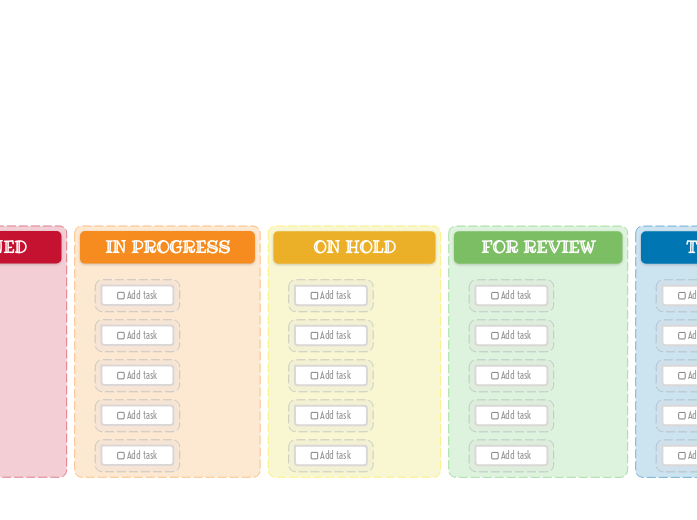
The Kanban Board helps you manage your workload easily. Add new tasks, then drag and drop them to the suitable category depending on their progress. This template allows you to visually organize your tasks into three key stages: New Task, Assigned, In Progress, On Hold, For Review, Testing, and Done. Simply fill in each column with tasks corresponding to their current status. As you complete tasks, move them across the board to track your progress. Ideal for both personal and team projects, this Kanban Board helps you maintain focus, prioritize tasks, and enhance productivity. Add your task here. A gondolattérképek segítenek az ötletelésben, a fogalmak közötti kapcsolatok kialakításában, a rendszerezésben és az ötletek generálásában. A gondolattérkép-sablonok azonban könnyebb utat kínálnak a kezdéshez, mivel ezek olyan keretek, amelyek egy adott témával kapcsolatos információkat tartalmaznak, irányadó utasításokkal. Lényegében a gondolattérkép minták biztosítják azt a struktúrát, amely egy adott téma összes elemét egyesíti, és kiindulópontként szolgál az Ön személyes gondolattérképjéhez. Forrást jelentenek arra, hogy praktikus megoldást nyújtsanak egy adott témával kapcsolatos gondolattérkép létrehozásához, akár üzleti, akár oktatási céllal. A Mindomo intelligens gondolattérkép-sablonokat kínál, amelyek lehetővé teszik, hogy könnyedén működjön és gondolkodjon. Választhat a Mindomo üzleti vagy oktatási fiókjaiból, vagy létrehozhatja saját gondolattérkép sablonjait a semmiből. Bármilyen gondolattérkép átalakítható gondolattérkép-sablon térképpé, ha az egyik témakörhöz további irányadó jegyzeteket ad hozzá.Kanban Board Template (Bright)
Erről a sablonról
Why use the Kanban board (light) template?
Idea board
DONE
Drag and drop your tasks from the previous column here when you are done.
You can create more columns with additional steps and customize them for your needs.TESTING
Drag and drop your tasks from the previous column here when they are ready to be tested.FOR REVIEW
Drag and drop your tasks from the previous column here when they are ready for a review.ON HOLD
Drag and drop your tasks from the previous column here if the assigned person stopped working on these tasks.IN PROGRESS
Drag and drop your tasks from the previous column here when someone started to work on them.ASSIGNED
NEW TASKS
Your tasks have a predefined path in this kanban board, that starts with the initial stage of creating them.
Each column represents the present stage of their progress.Add task
Miért érdemes Mindomo gondolattérkép mintát használni?
Egy sablon különböző funkciókkal rendelkezik:
-
Termékek
-
Felhasználás
- Általános felhasználás
- Gondolattérképek az Oktatásban
- Gondolattérképek az Üzleti Életben
- Gondolattérképek a Személyes Életben
- Segítő Technológia
- Csapatmunka
- Kampánybriefek marketingszakembereknek
- Ügyfélfeltáró workshopok tanácsadóknak
- Onboarding folyamatok HR- és L&D-csapatoknak
- Tudásmenedzsment
- Csapat kompetenciamátrix
- Projektkönyvtár
- Szerepek
- Marketingszakemberek
- HR és L&D
- Tanácsadók
- Projektmenedzsment
- Marketingkampány-tervezés
- Munkavállalói képzések bevezetése
- Munkaterjedelem
- Ötletszervezés
- Problémafák
- Képzési igényfelmérés
- Az Gondolattérkép Készítés Előnyei
-
Megoldások
- Útmutatók
- Prezentációk készítése gondolattérképekkel
- Hogyan tanuljunk gondolattérképekkel
- Tervezés és rendszerezés gondolattérképekkel
- Hogyan priorizáljuk a feladatokat gondolattérképekkel
- Jegyzetelés gondolattérképekkel
- Valódi ügyféltörténetek
- Oktatási tartalom skálázása 11 000 orvos számára
- Csapatmunka: két hónap alatt a próbáról a nélkülözhetetlenig
- 10 év diák nélkül: az építészeti előadások újragondolása
- Összes történet elolvasása
-
Erőforrások
- Alapok
- Mi az az Gondolattérkép?
- Hogyan készítsünk Gondolattérképet?
- Útmutatók és Támogatás
- Videós útmutatók
- Súgóközpont
- Fórum
- Példák és sablonok
- A 29 Legjobb Gondolattérkép Példa
- Mi az a Fogalomtérkép?
- Funkcióoldalak
- Oktatás
- Tanári feladatok
- Munka és Személyes
- Asztali
- A Mindomo blog
- Árazás
- Bejelentkezés
- Regisztráció
- Irányítópult
Az Gondolattérkép Készítés Előnyei
Miért könnyíti a vizuális gondolkodás a felidézést és a tervezést.
Útmutatók és Támogatás
Példák és sablonok
Funkcióoldalak
 Blog
A Mindomo blog
Útmutatók, példák és kutatások a vizuális gondolkodásról.
Összes cikk böngészése
Blog
A Mindomo blog
Útmutatók, példák és kutatások a vizuális gondolkodásról.
Összes cikk böngészése