Client engagements often involve several parallel workstreams, multiple owners, interdependent deliverables, and recurring governance activities. This engagement delivery template helps teams plan, coordinate, and manage the successful delivery of client engagements from kickoff through completion. It brings together objectives, scope, deliverables, milestones, responsibilities, timelines, dependencies, risks, and communication activities in one visual workspace. Use this template to align stakeholders, clarify ownership, track progress, manage expectations, and keep key deliverables on schedule. It supports consulting projects, professional services engagements, client implementations, and other structured delivery processes where clear coordination and visibility are essential. Use this map to organize an engagement into clear workstreams and a shared operating cadence. Complete each lane to identify the owner, expected deliverable and timing, key dependencies, and current status. The map gives the team a single view of who is responsible for what, how workstreams connect, and how decisions and escalations are managed. Open these companion templates to define scope and structure client discovery. Enter the core meeting rhythm, escalation route, and location of the decision log. Record where engagement decisions are documented, such as a shared file, workspace, or linked decision log. Describe how issues are escalated, including the sequence of contacts, decision owners, and expected response path. Enter how often the steering committee meets and, where useful, note the usual day, timing, or triggering conditions. Enter the regular day and time for the engagement team’s weekly stand-up, including the time zone where relevant. Use this lane to identify the production lead, final deliverable and timing, dependencies, and current status. Record the current status of Workstream 5, such as on track, at risk, blocked, or complete, and add a brief note if clarification is needed. List the inputs, decisions, access, or upstream activities that must be completed before Workstream 5 can progress. Describe the key output for Workstream 5 — Deliverable Production and state when it is due or expected to be completed. Enter the person accountable for Workstream 5 — Deliverable Production. Use a clear name and, where useful, include their role. Use this lane to capture the solution-design lead, intended output and deadline, dependencies, and current status. Record the current status of Workstream 4, such as on track, at risk, blocked, or complete, and add a brief note if clarification is needed. List the inputs, decisions, access, or upstream activities that must be completed before Workstream 4 can progress. Describe the key output for Workstream 4 — Solution Design and state when it is due or expected to be completed. Enter the person accountable for Workstream 4 — Solution Design. Use a clear name and, where useful, include their role. Use this lane to define the analysis lead, model output and due date, upstream dependencies, and current status. Record the current status of Workstream 3, such as on track, at risk, blocked, or complete, and add a brief note if clarification is needed. List the inputs, decisions, access, or upstream activities that must be completed before Workstream 3 can progress. Describe the key output for Workstream 3 — Analysis & Modelling and state when it is due or expected to be completed. Enter the person accountable for Workstream 3 — Analysis & Modelling. Use a clear name and, where useful, include their role. Use this lane to record the interview lead, expected output and timing, dependencies, and current status. Record the current status of Workstream 2, such as on track, at risk, blocked, or complete, and add a brief note if clarification is needed. List the inputs, decisions, access, or upstream activities that must be completed before Workstream 2 can progress. Describe the key output for Workstream 2 — Client Interviews and state when it is due or expected to be completed. Enter the person accountable for Workstream 2 — Client Interviews. Use a clear name and, where useful, include their role. Use this lane to capture diagnostic data ownership, deliverable timing, dependencies, and current status. Record the current status of Workstream 1, such as on track, at risk, blocked, or complete, and add a brief note if clarification is needed. List the inputs, decisions, access, or upstream activities that must be completed before Workstream 1 can progress. Describe the key output for Workstream 1 — Diagnostic & Data and state when it is due or expected to be completed. Enter the person accountable for Workstream 1 — Diagnostic & Data. Use a clear name and, where useful, include their role. マインドマップは、ブレインストーミングや概念同士の関係づけ、アイデアの整理・創出に役立ちます。 マインドマップテンプレートには、特定のテーマに関する情報と作成のヒントがあらかじめ組み込まれているため、より簡単に始められます。テーマに必要な要素がそろった構造が用意されているので、自分だけのマインドマップの出発点として使えます。ビジネスでも教育でも、特定のトピックについてマインドマップを作成するときに役立つ実用的なリソースです。 Mindomoでは、便利なスマートマインドマップテンプレートをご用意しています。 マインドマップテンプレートは、Mindomoのビジネスアカウントや教育アカウントで用意されたものから選べるほか、独自のテンプレートを一から作成することもできます。どのマインドマップも、トピックにガイドノートを追加するだけでテンプレートに変換できます。Engagement Delivery Template
This mind map helps teams structure an engagement by workstream, clarify ownership and deadlines, track dependencies and status, and define the meeting cadence, escalation path, and decision-making process.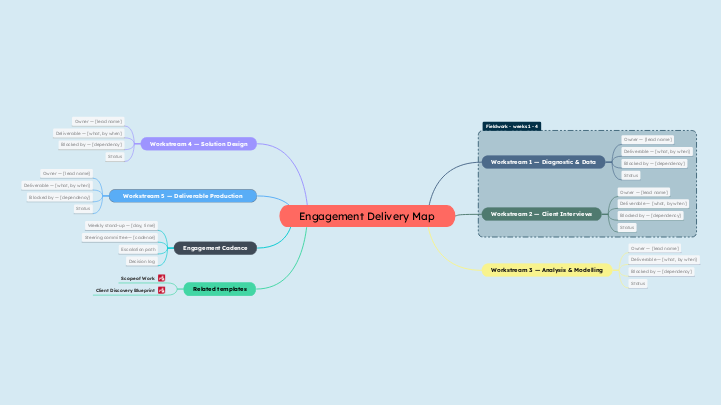
このテンプレートについて
Engagement delivery template
Engagement Delivery Map
Related templates
Client Discovery Blueprint
Scope of Work
Engagement Cadence
Decision log
Escalation path
Steering committee — [cadence]
Weekly stand-up — [day, time]
Workstream 5 — Deliverable Production
Workstream 4 — Solution Design
Workstream 3 — Analysis & Modelling
Workstream 2 — Client Interviews
Workstream 1 — Diagnostic & Data
Status
Blocked by — [dependency]
Deliverable — [what, by when]
Owner — [lead name]
Mindomoのマインドマップテンプレートを使う理由
テンプレートには次のような機能があります:
-
製品
-
用途
-
ソリューション
-
リソース
- 基本を学ぶ
- マインドマップとは?
- マインドマップの作り方
- ガイドとサポート
- ビデオチュートリアル
- ヘルプセンター
- フォーラム
- 作例とテンプレート
- マインドマップの作例29選
- コンセプトマップとは?
- 機能ページ
- 教育
- 教師向け課題機能
- 仕事・個人
- デスクトップ
- Mindomoブログ
- 料金
- ログイン
- 新規登録
- ダッシュボード
ナレッジマネジメント
マインドマップのメリット
視覚的思考が記憶と計画を楽にする理由。