Pricing
Log In Sign Up Dashboard
  • Products
    • Create
    • AI Mind Map Generator
    • Outlining Software
    • Gantt Chart Software
    • Get Mindomo
    • Download Mindomo
    • Browser Extension
    • What's New
    • Mind Map Templates
    • Compare all features
  • Uses
    • General Uses
    • Mind Maps for Education
    • Mind Maps for Business
    • Mind Maps for Personal Development
    • Assistive Technology
    • Team Collaboration
    • Campaign briefs for marketers
    • Client discovery workshops for consultants
    • Onboarding journeys for HR & L&D
    • Knowledge Management
    • Team Skills Matrix
    • Engagement Library
    • Roles
    • Marketers
    • HR & L&D
    • Consultants
    • Project Management
    • Marketing campaign planning
    • Employee training rollouts
    • Scope of Work
    • Idea Organization
    • Issue Trees
    • Training Needs Analysis
    • Mind Mapping Benefits
  • Solutions
    • Guides
    • Make Presentations with Mind Maps
    • How to Learn with Mind Maps
    • Plan and Organize with Mind Maps
    • Prioritize Tasks with Mind Maps
    • Take Notes with Mind Maps
    • Real Customer Stories
    • Scaling educational content for 11,000 doctors
    • Team workflow: from trial to indispensable in two months
    • 10 years without slides: rethinking architecture lectures
    • Read all stories
  • Resources
    • Learn the basics
    • What is a Mind Map?
    • How to Mind Map?
    • What is a Concept Map?
    • Benefits of Mind Mapping
    • Guides & Support
    • Video tutorials
    • Help center
    • Forum
    • Examples & templates
    • Top 30 Mind Map Examples
    • Concept Map Templates
    • How to Make a Gantt Chart
    • Mindomo's Efficiency in Education
    • Feature pages
    • Education
    • Teacher Assignments
    • Work & Personal
    • Desktop
    • The Mindomo blog
  • Pricing
  • Log In
  • Sign Up
  • Dashboard
Create
  • AI Mind Map Generator Turn a prompt or a document into a diagram in seconds.
  • Outlining Software Write a structured outline and see it as a map.
  • Gantt Chart Software Turn topics into tasks and see the whole timeline.
Get Mindomo
  • Download Mindomo Work offline on Windows, macOS and Linux.
  • Browser Extension Save sources, or generate a mind map with AI.
  • What's New New See the latest features and improvements.
Templates Mind Map Templates Start from a map that already works, then make it yours.
Compare all features
General Uses
  • Mind Maps for Education
  • Mind Maps for Business
  • Mind Maps for Personal Development
  • Assistive Technology
Team Collaboration
  • Campaign briefs for marketers
  • Client discovery workshops for consultants
  • Onboarding journeys for HR & L&D
Knowledge Management
  • Team Skills Matrix
  • Engagement Library
Roles
  • Marketers
  • HR & L&D
  • Consultants
Project Management
  • Marketing campaign planning
  • Employee training rollouts
  • Scope of Work
Idea Organization
  • Issue Trees
  • Training Needs Analysis
Mind Mapping Benefits Why visual thinking makes recall and planning easier.
Guides
  • Make Presentations with Mind Maps
  • How to Learn with Mind Maps
  • Plan and Organize with Mind Maps
  • Prioritize Tasks with Mind Maps
  • Take Notes with Mind Maps
Real Customer Stories
  • Healthcare Scaling educational content for 11,000 doctors
  • Teams Team workflow: from trial to indispensable in two months
  • Education 10 years without slides: rethinking architecture lectures
Read all stories
Learn the basics
  • What is a Mind Map?
  • How to Mind Map?
  • What is a Concept Map?
  • Benefits of Mind Mapping
Guides & Support
  • Video tutorials
  • Help center
  • Forum
Examples & templates
  • Top 30 Mind Map Examples
  • Concept Map Templates
  • How to Make a Gantt Chart
  • Mindomo's Efficiency in Education
Feature pages
  • Education
  • Teacher Assignments
  • Work & Personal
  • Desktop
Blog The Mindomo blog Guides, examples and research on visual thinking. Browse all articles
  1. Mind maps
  2. /
  3. Teacher to UX Designer: 12-Month Career Plan
‹ Mind maps

Teacher to UX Designer: 12-Month Career Plan

MT

by Mindomo Team
Updated November 20, 2026

Interactive map · Teacher to UX Designer: 12-Month Career Plan
Mind map: Teacher to UX Designer: 12-Month Career Plan

Teacher to UX Designer: 12-Month Career Plan

Loading the interactive map…

Free with a Mindomo account. The copy is yours to edit.

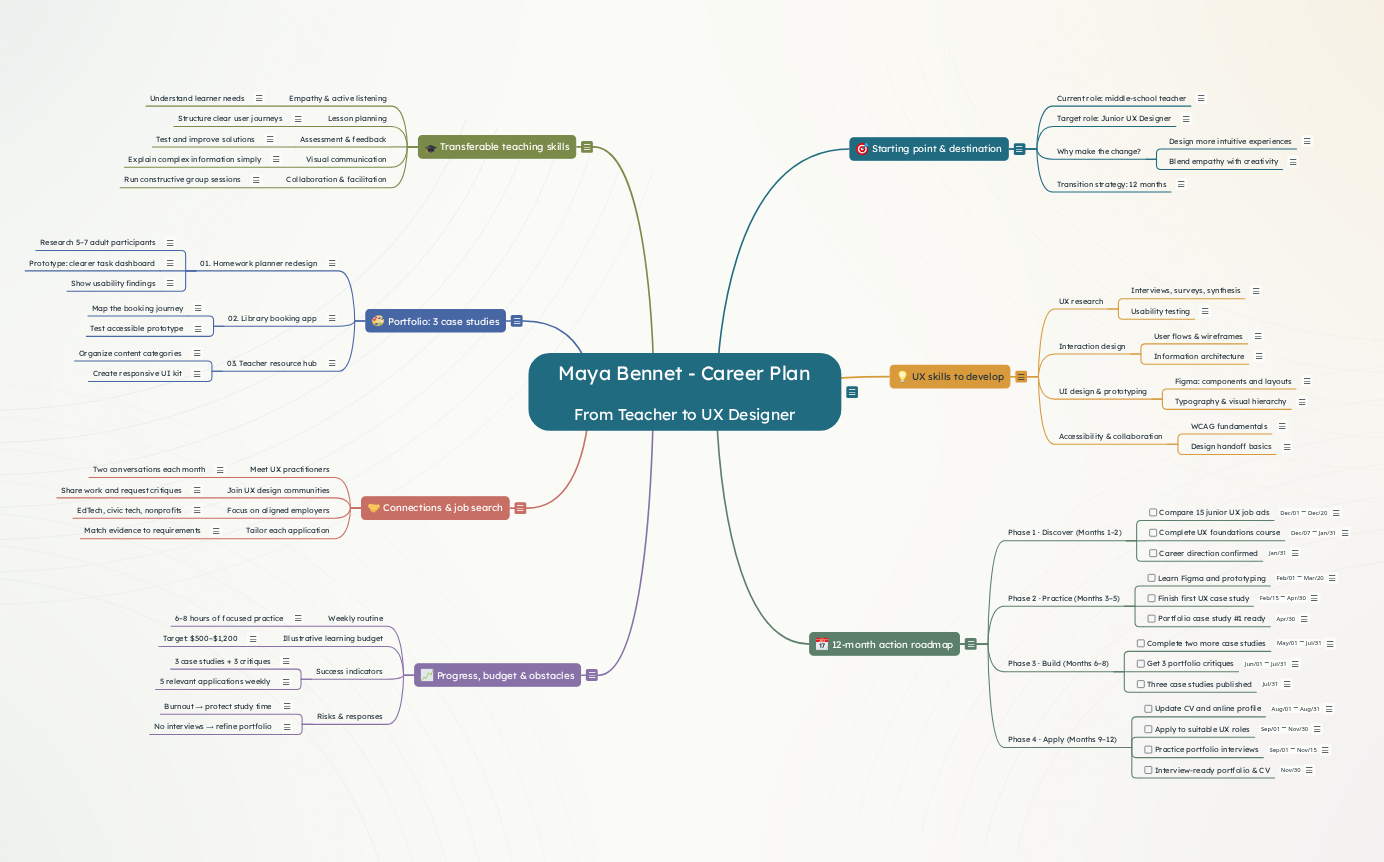
This example maps a teacher’s 12-month transition toward a junior UX designer role. It covers transferable skills, UX learning, portfolio projects, job searching and progress tracking.

  • Mind map
  • 80 topics

Free with a Mindomo account. The copy is yours to edit.

What’s inside this mind map

Teacher to UX Designer: 12-Month Career Plan: the full outline

Key concepts

  • Transferable teaching skills
  • UX skills to develop
  • Portfolio: 3 case studies
  • 12-month action roadmap
  • Connections & job search
  • Progress, budget & obstacles

Central topic

Maya Bennet - Career Plan From Teacher to UX Designer

Example career plan: Maya Bennett, a fictional middle-school teacher with six years of experience, transitions toward a junior UX designer role over 12 months (December 2026–November 2027). Topics show skills, portfolio work, action steps, measurable milestones, and risk management. All experience and dates are illustrative.

Starting point & destinationTransferable teaching skillsUX skills to developPortfolio: 3 case studies12-month action roadmapConnections & job searchProgress, budget & obstacles

Starting point & destination

4 topics

Fictional career-transition profile: Maya Bennett, a middle-school teacher with six years of experience. She plans a gradual shift into UX design while continuing to teach during the transition.

Current role: middle-school teacher

Six years creating learning experiences, supporting students, collecting feedback and collaborating with families.

Target role: Junior UX Designer

Entry-level UX/product design position emphasizing user research, information architecture, interface design and accessible digital experiences.

Why make the change?

  • Design more intuitive experiences — Maya enjoys finding obstacles in how students and colleagues use educational tools.
  • Blend empathy with creativity — She wants to apply observation, problem-solving and visual communication to digital products.

Transition strategy: 12 months

Illustrative plan from December 2026 to November 2027. Maya stays employed while building skills, case studies and industry relationships.

Transferable teaching skills

5 topics

Teaching experience is relevant but does not replace UX practice. These strengths give Maya a starting point for learning product design.

Empathy & active listening

  • Understand learner needs — Conducting one-to-one conversations with students and families parallels listening to users, while UX research requires additional methods.

Lesson planning

  • Structure clear user journeys — Breaking a complex lesson into understandable steps is useful when mapping tasks and navigation.

Assessment & feedback

  • Test and improve solutions — Using feedback to refine instruction resembles iterative design, but UX testing must be conducted systematically.

Visual communication

  • Explain complex information simply — Worksheets, visual aids and classroom presentations provide a foundation for content hierarchy and information design.

Collaboration & facilitation

  • Run constructive group sessions — Collaborating with teachers and parents can translate into stakeholder interviews and workshop facilitation.

UX skills to develop

4 topics

A focused learning plan that prioritizes evidence-based problem-solving before visual polish.

UX research

  • Interviews, surveys, synthesis — Practice asking neutral questions, obtaining informed consent, identifying patterns and stating research limitations.
  • Usability testing — Test prototypes with target participants; document observations rather than relying only on opinions.

Interaction design

  • User flows & wireframes — Map key tasks, edge cases, screen states and the steps users take to complete a goal.
  • Information architecture — Organize labels, navigation and content based on user needs.

UI design & prototyping

  • Figma: components and layouts — Learn reusable components, auto layout, variants, responsive behavior and interactive prototypes.
  • Typography & visual hierarchy — Use readable type, spacing, contrast and consistent visual patterns.

Accessibility & collaboration

  • WCAG fundamentals — Consider keyboard use, meaningful labels, color contrast, focus order and accessible interaction patterns.
  • Design handoff basics — Explain rationale, annotate states and collaborate with developers and product managers.

Portfolio: 3 case studies

3 topics

All projects are clearly labeled self-initiated practice projects, not paid client work. Show the problem, research, iterations, decisions and outcomes honestly.

01. Homework planner redesign

Practice project: simplify how middle-school students find, prioritize and submit assignments. Avoid collecting identifiable student data.

  • Research 5–7 adult participants — Interview adults familiar with homework coordination or use synthetic practice scenarios where appropriate; avoid implying minors were studied.
  • Prototype: clearer task dashboard — Create task-flow sketches, responsive wireframes, high-fidelity screens and a clickable prototype.
  • Show usability findings — Document observed issues and improvements from a small test; do not invent measured success rates.

02. Library booking app

Practice project: improve how patrons reserve study spaces and understand availability.

  • Map the booking journey — Identify search, time selection, confirmation, cancellations and error states.
  • Test accessible prototype — Check keyboard interactions, color contrast, form errors and confirmation messages.

03. Teacher resource hub

Practice project: help teachers locate and share lesson materials efficiently.

  • Organize content categories — Use a simple card sort or structured content audit to test navigation labels.
  • Create responsive UI kit — Design reusable components and both desktop and mobile views.

12-month action roadmap

4 topics

Illustrative dates for December 2026–November 2027. Due dates are real task fields in this example and may be adjusted to the learner's circumstances.

Phase 1 · Discover (Months 1–2)

  • Compare 15 junior UX job ads — Record recurring requirements, portfolios and tool expectations; look for research and product thinking, not just visual design.
  • Complete UX foundations course — Study the design process, ethical research, accessibility and core UX concepts; summarize each unit in a learning log.
  • Career direction confirmed — Write a one-paragraph target-role statement and an attainable weekly study schedule.

Phase 2 · Practice (Months 3–5)

  • Learn Figma and prototyping — Create a small component library, mobile screens and an interactive prototype.
  • Finish first UX case study — Complete the homework-planner practice case study with research, iterations and documented feedback.
  • Portfolio case study #1 ready — Publish one polished case study with honest process evidence and clear scope.

Phase 3 · Build (Months 6–8)

  • Complete two more case studies — Build the library booking and teacher resource hub projects; validate key flows with feedback.
  • Get 3 portfolio critiques — Ask practicing UX designers for constructive feedback and improve the weakest sections.
  • Three case studies published — Portfolio includes three distinct self-initiated projects and a concise personal introduction.

Phase 4 · Apply (Months 9–12)

  • Update CV and online profile — Translate teaching experience into UX-relevant accomplishments without overstating prior design experience.
  • Apply to suitable UX roles — Target junior UX/product design roles and education-tech companies; tailor each application.
  • Practice portfolio interviews — Explain case-study choices, trade-offs, ethical decisions and what would be improved next.
  • Interview-ready portfolio & CV — Complete a portfolio presentation and review application progress; job offer is not assumed.

Connections & job search

4 topics

Create genuine professional relationships and seek evidence-based advice. Networking does not guarantee hiring.

Meet UX practitioners

  • Two conversations each month — Request short informational interviews to understand day-to-day work, entry-level expectations and different team structures.

Join UX design communities

  • Share work and request critiques — Participate in design events, relevant online communities and peer review; give useful feedback in return.

Focus on aligned employers

  • EdTech, civic tech, nonprofits — Teaching experience may be especially relevant to education, accessibility and public-service products; apply more broadly when the role fits.

Tailor each application

  • Match evidence to requirements — Show specific artifacts, decisions and results. Be transparent that the portfolio work is self-initiated.

Progress, budget & obstacles

4 topics

Track measurable outputs and address real barriers to a career change. Progress measures are targets, not guaranteed results.

Weekly routine

  • 6–8 hours of focused practice — Example: three weekday sessions of one hour plus a longer weekend project block. Adjust for workload and rest.

Illustrative learning budget

  • Target: $500–$1,200 — Optional paid courses, portfolio hosting or events; free alternatives are acceptable. Costs vary by location and available tools.

Success indicators

  • 3 case studies + 3 critiques — Measure completed, evidence-backed case studies and external feedback, not just hours studied.
  • 5 relevant applications weekly — Illustrative goal once the portfolio is ready; quality and fit take priority over volume.

Risks & responses

  • Burnout → protect study time — Use a sustainable schedule and reduce scope before sacrificing sleep, work performance or personal responsibilities.
  • No interviews → refine portfolio — Review role fit, seek feedback, revise case studies and CV, and explore adjacent entry routes such as UX research operations or content design.

Make a mind map like this one

Free with a Mindomo account. The copy is yours to edit.

Teacher to UX Designer: 12-Month Career Plan

  • About Mindomo
  • What's New New
  • Customer Stories
  • Blog
  • Pricing
  • Help Center
  • Forum
  • Contact
Products
  • AI Mind Map Generator
  • Concept Map Maker
  • Outlining Software
  • Gantt Chart Software
  • Task Management
  • Mind Map Templates
  • Desktop App
  • Browser Extension
Integrations
  • MCP Server
  • Developer API
  • Microsoft Teams
  • All Integrations
Compare
  • vs MindMeister
  • vs XMind
  • vs MindManager
  • Best Mind Mapping Software
  • Best Gantt Chart Software
Learn
  • What is a Mind Map?
  • What is a Concept Map?
  • How to Mind Map?
  • How to Make a Concept Map?
  • Top 30 Mind Map Examples
  • Concept Map Templates
  • Diagram Templates
  • Mind Map Ideas
  • Mind Map Ideas for Students
Guides
  • Take Notes with Mind Maps
  • Prioritize Tasks with Mind Maps
  • How to Create a Resume?
  • How to Make a Gantt Chart
  • Mind Mapping Benefits
  • Mindomo's Efficiency in Education
  • Assistive Technology

Terms of Use Privacy Policy AI Terms Data Processing Agreement Security Accessibility

Copyright © 2026 Expert Software Applications SRL. All rights reserved.

Str. Ciprian Porumbescu 5A, 300236 Timișoara, Romania · EUID ROONRC.J2002000147358 · VAT ID RO14440290