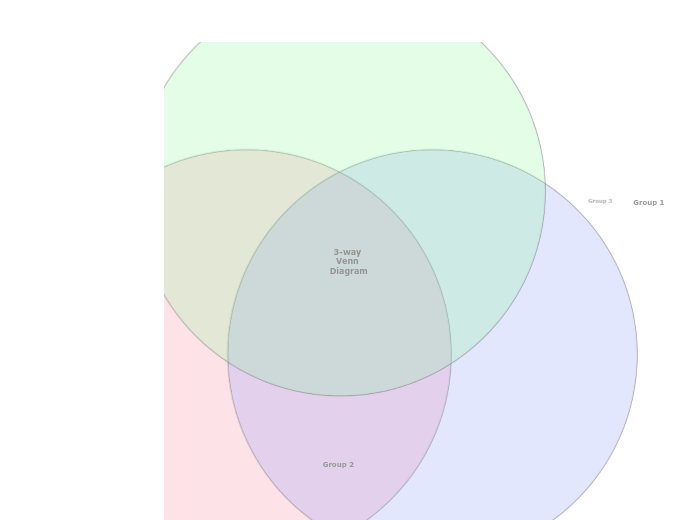
A three-way Venn Diagram helps to understand the similarities and differences between items, by showing their membership of three groups. Explore the relationships between three different sets of data using the 3-Way Venn Diagram template. This template features three intersecting circles that allow you to compare and analyze data across multiple dimensions. Start by filling in each circle with your data sets and use the overlapping areas to identify commonalities and differences. This diagram helps you visualize how the sets interact, making it ideal for data analysis, problem-solving, and strategic planning. Perfect for presentations, reports, and collaborative projects, this template provides a clear and comprehensive view of complex relationships. Type in the name of the third group and press Enter. Type in the name of the second group and press Enter. Type in the name of the first group and press Enter. A Venn Diagram compares items by assigning them to groups. An item can belong to: The item counts (and not the areas of the circles and their overlap) indicate the population of each group or the overlap between groups. Mapy myśli pomagają w burzy mózgów, w dostrzeganiu powiązań między pojęciami oraz w porządkowaniu i generowaniu pomysłów. Szablony map myśli ułatwiają jednak start, bo zawierają gotowy szkielet z informacjami na dany temat i wskazówkami, jak go uzupełnić. Zapewniają strukturę, która łączy wszystkie elementy tematu i służy jako punkt wyjścia dla twojej własnej mapy myśli. To praktyczne rozwiązanie, gdy chcesz szybko stworzyć mapę myśli na konkretny temat – zarówno w biznesie, jak i w edukacji. Mindomo oferuje inteligentne szablony map myśli, dzięki którym praca i myślenie przychodzą bez wysiłku. Możesz wybierać spośród szablonów map myśli dostępnych na kontach biznesowych i edukacyjnych Mindomo albo tworzyć własne szablony od podstaw. Każdą mapę myśli możesz zamienić w szablon, dodając do jej tematów notatki ze wskazówkami.Create a Venn Diagram
O tym szablonie
3 Way Venn Diagram template
Group 3
Double-click in the background to add items to this group, or in the overlaps between the groups.Group 2
Double-click in the background to add items to this group, or in the overlaps between the groups.Group 1
Double-click in the background to add items to this group, or in the overlaps between the groups.3-way Venn Diagram
Dlaczego warto używać szablonów map myśli Mindomo?
Szablony oferują różne funkcje:
-
Produkty
-
Zastosowania
- Zastosowania ogólne
- Mapy myśli dla edukacji
- Mapy myśli dla biznesu
- Mapy myśli dla rozwoju osobistego
- Technologia wspomagająca
- Współpraca zespołowa
- Briefy kampanii dla marketerów
- Warsztaty rozpoznania potrzeb klienta dla konsultantów
- Ścieżki onboardingu dla HR i L&D
- Zarządzanie wiedzą
- Matryca kompetencji zespołu
- Biblioteka projektów
- Role
- Marketerzy
- HR i L&D
- Konsultanci
- Zarządzanie projektami
- Planowanie kampanii marketingowych
- Wdrażanie szkoleń dla pracowników
- Zakres prac
- Organizacja pomysłów
- Drzewa problemów
- Analiza potrzeb szkoleniowych
- Korzyści z mapowania myśli
-
Rozwiązania
- Przewodniki
- Twórz prezentacje z mapami myśli
- Ucz się z mapami myśli
- Planuj i organizuj z mapami myśli
- Ustalaj priorytety zadań z mapami myśli
- Rób notatki z mapami myśli
- Prawdziwe historie klientów
- Skalowanie treści edukacyjnych dla 11 000 lekarzy
- Praca zespołu: od wersji próbnej do niezbędnego narzędzia w dwa miesiące
- 10 lat bez slajdów: nowe podejście do wykładów z architektury
- Przeczytaj wszystkie historie
-
Zasoby
- Podstawy
- Co to jest mapa myśli?
- Jak tworzyć mapy myśli?
- Poradniki i pomoc
- Samouczki wideo
- Centrum pomocy
- Forum
- Przykłady i szablony
- Top 29 przykładów map myśli
- Co to jest mapa pojęć?
- Strony funkcji
- Edukacja
- Zadania dla nauczycieli
- Praca i życie prywatne
- Wersja desktopowa
- Blog Mindomo
- Cennik
- Zaloguj się
- Zarejestruj się
- Panel główny
Zarządzanie wiedzą
Korzyści z mapowania myśli
Dlaczego myślenie wizualne ułatwia zapamiętywanie i planowanie.
Poradniki i pomoc
Przykłady i szablony
Strony funkcji
 Blog
Blog Mindomo
Poradniki, przykłady i badania dotyczące myślenia wizualnego.
Przeglądaj wszystkie artykuły
Blog
Blog Mindomo
Poradniki, przykłady i badania dotyczące myślenia wizualnego.
Przeglądaj wszystkie artykuły