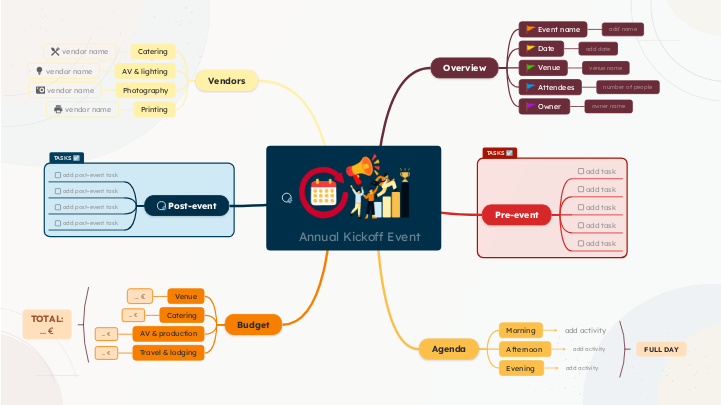
Use this annual kickoff event template to plan the meeting that starts your company's year and gets everyone aligned on the same goals. Organize all the details in one place: Assign tasks and deadlines to each part so your team arrives motivated and ready for the new year. Use this interactive template to plan an Annual Kickoff Event from the first preparations to the final follow-up. Estimate the event budget by category. Enter a planned cost in each placeholder, then revise it as quotes and invoices are confirmed. Use one currency consistently and avoid counting the same expense twice. Consider travel and accommodation for speakers, staff, or attendees when applicable. Include transportation and overnight stays. Enter the travel and lodging budget in euros. Note which participants or expenses this amount covers in Notes. Estimate audio-visual, lighting, recording, staging, and other production expenses. Include only the items relevant to your event. Enter the AV and production budget in euros. Distinguish estimated costs from confirmed supplier quotes in Notes. Estimate food and beverage costs. Consider the number of attendees, meals, breaks, and service charges. Enter the catering budget in euros. You can explain the calculation or attach a quote using Notes. Estimate the cost of the venue. Include hire fees and any required room setup or venue-specific services. Enter the amount budgeted for the venue in euros. If the final cost is not known, use your current estimate and update it after confirmation. Plan what happens after the kickoff. Use these placeholders to capture follow-ups, feedback, outcomes, and tasks that help turn ideas into action. Add a final post-event action that supports accountability or future improvement. Think about commitments, lessons learned, or unfinished arrangements. How will you evaluate the success of the kickoff? Add a follow-up task that helps you collect feedback or assess outcomes. Add a task to capture or share what happened. What decisions, resources, or next steps should attendees receive? Choose a follow-up task that should happen soon after the event. Consider how you'll communicate with participants and what information they need. List the external partners or service providers needed for the event. For each category, enter the provider you selected, then keep relevant contacts, requirements, and agreements together. Identify any printing or physical signage needs, including name badges, handouts, programs, or branded materials. Enter the printing supplier's name, or indicate the internal team handling production. Include delivery and approval details in Notes. Decide whether you need photography or video coverage. Consider which moments to document and how the images will be used after the event. Enter the photographer's or production team's name. Add delivery expectations or a shot list in Notes. Identify who will supply and operate the audio, video, microphones, screens, and lighting. Check what the venue already provides. Enter the AV and lighting supplier's name, or identify the internal team responsible. Add technical requirements in Notes. Who will provide food and refreshments? Consider dietary requirements, attendee numbers, serving times, and whether the venue supplies catering. Enter the name of your catering provider. Add the menu, contact details, and confirmed headcount in Notes. Outline the flow of the event. Add the sessions and activities planned for each part of the day. For every activity, think about its purpose, duration, presenter, and audience participation. Consider how the event should conclude. Is an evening session, networking activity, celebration, or closing discussion appropriate? Enter one evening activity or final session. If the event ends earlier, adapt this section to your closing activities. Choose sessions for the middle of the day. Consider engagement, collaboration, breaks, and how to turn the kickoff's goals into concrete plans. Enter one afternoon activity. Add more topics for additional sessions, and note its timing or facilitator if needed. Plan the beginning of the day. What will help participants understand the goals, get oriented, and feel ready to contribute? Enter one morning activity or session. Include its start time in the topic or add the presenter and duration in Notes. Plan the work that must happen before the event. Replace each placeholder with a concrete task, and add more tasks as needed. Think about deadlines, responsibilities, logistics, and participant communication. Add a final preparation or quality-check task. Think about what could go wrong and how to test or confirm readiness. What content or experience should be ready before the event begins? Enter an action someone can complete and verify. Add a practical pre-event task. Consider venue, equipment, travel, or the materials participants will need. Add another preparation task. Think about who needs to be informed or what must be confirmed in advance. What is the first essential step in preparing your kickoff? Define the basic details before planning activities or contacting suppliers. Think about the purpose of the kickoff, who should attend, when and where it will happen, and who will coordinate it. Identify the person responsible for coordinating the event and making sure the planning tasks move forward. Enter the event owner's name or team. Use Notes to add responsibilities or contact information. Estimate how many people will participate. Consider team members, speakers, guests, and whether attendees will join in person or remotely. Enter the expected number of attendees. Update this figure when registrations are confirmed. Choose a venue suitable for your expected attendance, event format, and equipment needs. Consider accessibility and travel arrangements. Enter the venue name or, for a virtual event, the platform. Add the address or joining information using a link if useful. Decide when the event will take place. Check availability, holidays, travel requirements, and the time needed for preparation. Enter the event date or date range. Include the year, and add the start and end times in Notes if needed. Give your kickoff a clear, memorable name. It should reflect the event's purpose and be easy to recognize in invitations and planning documents. Type the final or working event name here. Keep it short enough to reuse in invitations and the agenda. Every Mindomo template opens with its structure already in place and a default shape that new topics inherit. Templates on a subject add descriptive topics and guiding notes where people usually get stuck; blank layouts leave the content to you. Edit it in the browser, switch it to a concept map, outline or Gantt chart without redrawing anything, and export it in more than twenty formats. See how mind map templates work, or browse the full gallery by category.Annual Kickoff Event Template
About this template
Annual kickoff event template
TOTAL: ... €
FULL DAY
Annual Kickoff Event
Share it with your team to collaborate with them. Start with the event overview, then complete the pre-event tasks, agenda, vendors, post-event activities, and budget.
Replace the grey placeholders with your own information. The suggestions are optional starting points, not a fixed checklist. Add extra topics as needed.
💡Add the event goals and planning notes
💡Attach a planning document or event websiteBudget
Track estimates, confirmed quotes, actual expenses, and a contingency reserveTravel & lodging
AV & production
... €
Post-event
Track decisions, owners, and follow-up deadlinesadd post-event task
Vendors
💡 Record supplier contacts, quotes, and confirmation status
💡 Attach a supplier website or proposalPrinting
Photography
AV & lighting
Catering
vendor name
Agenda
Add a detailed timetable, speakers, and session durationsEvening
Afternoon
Morning
add activity
Pre-event
Add a preparation checklist or important deadlines
💡 Assign tasks, set deadlines, and add priority levels
💡 Assign tasks, set deadlines, and add priority levels
💡 Assign tasks, set deadlines, and add priority levels
💡 Assign tasks, set deadlines, and add priority levelsadd task
Enter one specific task with a clear outcome. Consider what must be decided before other work can begin.
💡 Assign tasks, set deadlines, and add priority levelsOverview
💡 Write the main objectives and expected outcomesOwner
owner name
Attendees
number of people
Venue
venue name
Date
add date
Event name
add name
Why use a Mindomo mind map template?
-
Products
-
Uses
- General Uses
- Mind Maps for Education
- Mind Maps for Business
- Mind Maps for Personal Development
- Assistive Technology
- Team Collaboration
- Campaign briefs for marketers
- Client discovery workshops for consultants
- Onboarding journeys for HR & L&D
- Knowledge Management
- Team Skills Matrix
- Engagement Library
- Roles
- Marketers
- HR & L&D
- Consultants
- Project Management
- Marketing campaign planning
- Employee training rollouts
- Scope of Work
- Idea Organization
- Issue Trees
- Training Needs Analysis
- Mind Mapping Benefits
-
Solutions
- Guides
- Make Presentations with Mind Maps
- How to Learn with Mind Maps
- Plan and Organize with Mind Maps
- Prioritize Tasks with Mind Maps
- Take Notes with Mind Maps
- Real Customer Stories
- Scaling educational content for 11,000 doctors
- Team workflow: from trial to indispensable in two months
- 10 years without slides: rethinking architecture lectures
- Read all stories
-
Resources
- Learn the basics
- What is a Mind Map?
- How to Mind Map?
- What is a Concept Map?
- Benefits of Mind Mapping
- Guides & Support
- Video tutorials
- Help center
- Forum
- Examples & templates
- Top 29 Mind Map Examples
- Concept Map Templates
- How to Make a Gantt Chart
- Mindomo's Efficiency in Education
- Feature pages
- Education
- Teacher Assignments
- Work & Personal
- Desktop
- The Mindomo blog
- Pricing
- Log In
- Sign Up
- Dashboard
Mind Mapping Benefits
Why visual thinking makes recall and planning easier.
Learn the basics
Guides & Support
Examples & templates
Feature pages
 Blog
The Mindomo blog
Guides, examples and research on visual thinking.
Browse all articles