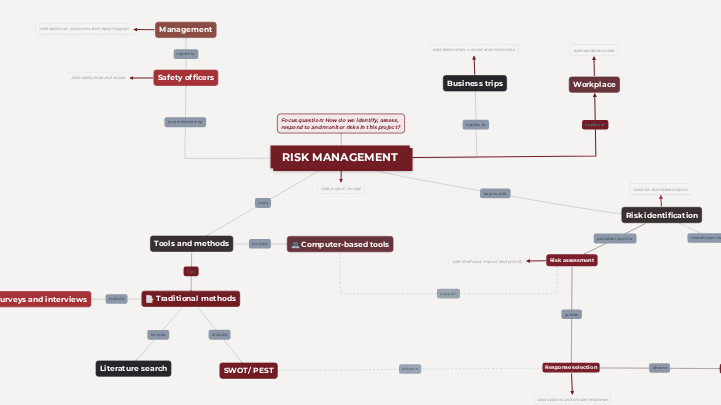
Use this interactive concept map template to organise risk management for a project, activity or organisation. Define the scope, responsibilities, tools and methods, then work through risk identification, assessment, response selection, implementation, and monitoring and review. Complete the placeholders with risks, evidence, actions, owners and review findings, using consistent risk IDs throughout. Follow the labeled links and wiki guidance to connect each risk with its assessment, response and follow-up. This risk management process template helps project managers, safety officers, and teams identify, assess, respond to, and monitor risks in a project, activity, or organization. The concept map defines the scope and responsibilities, covers business trips and workplace contexts, and guides you through a five-step cycle: risk identification, risk assessment, response selection, response implementation, and monitoring and review. Use this template to assign risk IDs, rate likelihood and impact, compare response options, define actions with owners and due dates, and set review indicators. It also brings together tools and methods such as SWOT and PEST analysis, surveys and interviews, literature searches, and computer-based tools, so every risk can be traced from identification to review. Assign each risk an ID. Describe its cause, the uncertain event, and its potential consequences. Identify affected people, assets, or objectives, and record the evidence and existing controls. Enter a risk ID, cause, event, consequences, and existing controls. Use consistent risk IDs where applicable. If this field does not apply, enter Not applicable and explain why. For each risk ID, assess likelihood and impact using a clearly defined scale. Record the rating, rationale, and priority. Apply the same criteria consistently and distinguish current risk from expected risk after further controls. Enter the risk ID, assessment scale, ratings, rationale, and priority. Use consistent risk IDs where applicable. If this field does not apply, enter Not applicable and explain why. For each risk ID, compare possible responses such as avoiding the activity, reducing likelihood or impact, sharing the risk, or accepting it with appropriate approval. Record benefits, costs, feasibility, and the preferred response. Enter the risk ID, response options, and your justified choice. Use consistent risk IDs where applicable. If this field does not apply, enter Not applicable and explain why. Turn each selected response into an action with a responsible owner, due date, required resources, and completion evidence. Link actions to risk IDs and record progress. Add action, owner and due date Enter the risk ID, action, owner, due date, resources, and status. Use consistent risk IDs where applicable. If this field does not apply, enter Not applicable and explain why. Define indicators, review dates, and a review owner for each risk ID. Record whether controls work, reassess remaining risk, and identify triggers for escalation. Feed new or changed risks back into the identification stage. Enter the risk ID, indicator, review date, owner, findings, and next steps. Use consistent risk IDs where applicable. If this field does not apply, enter Not applicable and explain why. Name the software, spreadsheet, risk register, or analysis tool you will use. Specify its purpose, data inputs, and who maintains it. Record this in the Tools and methods findings field. Review relevant reports, procedures, incident records, or research. Record each source, its date or link, and the finding that informs your assessment in the Tools and methods findings field. Identify whom you will consult, the questions you will ask, and the key findings. Include the date and any limitations in the responses. Record this in the Tools and methods findings field. Use SWOT to examine strengths, weaknesses, opportunities, and threats, or PEST to examine political, economic, social, and technological factors. Translate relevant findings into specific risks and record them in the Tools and methods findings field. Choose the methods you will use to identify and assess risks. Explain why each method is suitable and what information it will provide. Record the key findings from every method you use in the findings field below; enter Not applicable with a reason for any method you will not use. Use interviews, document reviews, and structured analysis to gather evidence. Complete the relevant methods below and enter Not applicable with a reason for any method you will not use. Identify who approves the plan, provides resources, and accepts or escalates remaining risks. Specify the reporting plan: format, audience, frequency, and required fields (risk IDs, descriptions, likelihood, impact, controls, owners, actions, due dates, review results). Enter the approving manager, resources, review responsibilities, and the report format, audience and frequency. Use consistent risk IDs where applicable. If this field does not apply, enter Not applicable and explain why. Describe the workplace and activities being assessed. Identify who or what could be affected, existing controls, and any gaps that need further assessment. Describe activities, affected people or assets, risks, and existing controls. Use consistent risk IDs where applicable. If this field does not apply, enter Not applicable and explain why. Describe the purpose, destination, timing, and participants of business travel. Describe the location and operating context, overseas or local: language, infrastructure, environmental conditions, and local procedures. Consider transport, accommodation, communication, and emergency arrangements; record relevant risks and what needs verification. Enter trip details, the location and its conditions, risks, planned precautions, and details to verify. Use consistent risk IDs where applicable. If this field does not apply, enter Not applicable and explain why. Identify the person or role coordinating the risk assessment. Specify responsibilities, contact details where appropriate, and the escalation route. Enter the responsible person or role, duties, and escalation route. Use consistent risk IDs where applicable. If this field does not apply, enter Not applicable and explain why. Define the project, activity, or organization covered by this assessment and its objectives. Complete the context, methods, and responsibilities, then follow the five-step cycle. Use matching risk IDs throughout the cycle so each assessment, action, and review can be traced to its risk. The question this concept map answers. Every concept and link should help answer it. Enter the project or activity, objectives, assessment date, and scope. Use consistent risk IDs where applicable. If this field does not apply, enter Not applicable and explain why. Every Mindomo template opens with its structure already in place: descriptive topics, guiding notes attached to the branches where people usually get stuck, and a default shape that new topics inherit. Edit it in the browser, switch it to a concept map, outline or Gantt chart without redrawing anything, and export it in more than twenty formats. See how mind map templates work, or browse the full gallery by category.Risk Management Process Template
About this template
Risk management process template
Risk identification
Add risk id and description
Risk assessment
Add likelihood, impact and priority
Response selection
Add options and chosen response
Response implementation
Monitoring and review
Add indicators and review findings
Computer-based tools
Literature search
Surveys and interviews
SWOT/ PEST
Tools and methods
Traditional methods
Management
Add approver, resources and reporting plan
Workplace
Add workplace risks
Business trips
Add destination, context and travel risks
Safety officers
Add safety lead and duties
RISK MANAGEMENT
Focus question: How do we identify, assess, respond to and monitor risks in this project?
Add project / scope
Why use a Mindomo mind map template?
-
Products
-
Uses
- General Uses
- Mind Maps for Education
- Mind Maps for Business
- Mind Maps for Personal Development
- Assistive Technology
- Team Collaboration
- Campaign briefs for marketers
- Client discovery workshops for consultants
- Onboarding journeys for HR & L&D
- Knowledge Management
- Team Skills Matrix
- Engagement Library
- Roles
- Marketers
- HR & L&D
- Consultants
- Project Management
- Marketing campaign planning
- Employee training rollouts
- Scope of Work
- Idea Organization
- Issue Trees
- Training Needs Analysis
- Mind Mapping Benefits
-
Solutions
- Guides
- Make Presentations with Mind Maps
- How to Learn with Mind Maps
- Plan and Organize with Mind Maps
- Prioritize Tasks with Mind Maps
- Take Notes with Mind Maps
- Real Customer Stories
- Scaling educational content for 11,000 doctors
- Team workflow: from trial to indispensable in two months
- 10 years without slides: rethinking architecture lectures
- Read all stories
-
Resources
- Learn the basics
- What is a Mind Map?
- How to Mind Map?
- What is a Concept Map?
- Benefits of Mind Mapping
- Guides & Support
- Video tutorials
- Help center
- Forum
- Examples & templates
- Top 29 Mind Map Examples
- Concept Map Templates
- How to Make a Gantt Chart
- Mindomo's Efficiency in Education
- Feature pages
- Education
- Teacher Assignments
- Work & Personal
- Desktop
- The Mindomo blog
- Pricing
- Log In
- Sign Up
- Dashboard
Mind Mapping Benefits
Why visual thinking makes recall and planning easier.
Learn the basics
Guides & Support
Examples & templates
Feature pages
 Blog
The Mindomo blog
Guides, examples and research on visual thinking.
Browse all articles
Blog
The Mindomo blog
Guides, examples and research on visual thinking.
Browse all articles