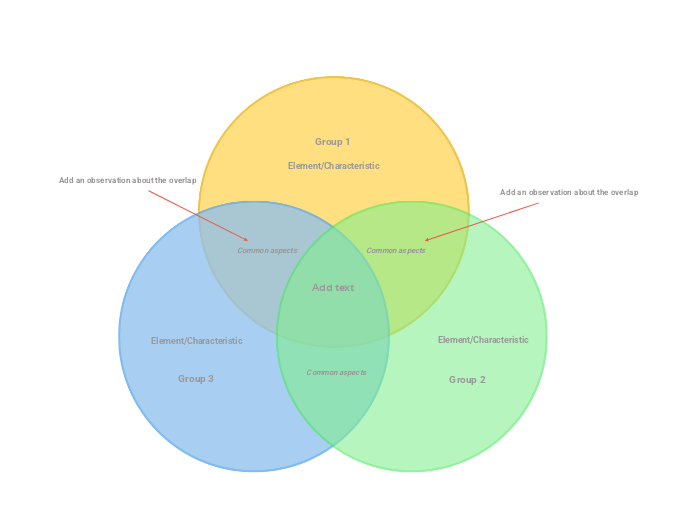
This colorful design using pastel colors is perfect for visually organizing information with ease. The three circles represent three groups of elements/concepts. Type their name, and add the specific characteristics in the zone where is the group name. Then add the common aspects of two circles in the highlighted areas, and in the end, you can add the common aspect of all three groups of elements/concepts. Optional: add an observation about the common aspect. If you don't want to add it, you can delete the topic. Type the first group name. Type the second group name. Type the third group name. Type the element/characteristic you want to add to this group. Type the common aspect between the two groups. A Venn Diagram compares items/concepts by showing the similarities between them in the overlapping areas of the circles. 心智圖能幫助您集思廣益、建立概念之間的關聯,並整理與激發想法。 而心智圖範本讓入門更容易,因為範本是已含特定主題資訊與引導說明的架構。換句話說,範本先替您搭好能涵蓋該主題所有要素的結構,可作為您個人心智圖的起點。無論用於商業或教育,心智圖範本都能為特定主題的心智圖提供實用的解決方案。 Mindomo 提供智慧心智圖範本,讓您輕鬆工作、順暢思考。 您可以從 Mindomo 商業版或教育版帳號中挑選各式心智圖範本,也可以從頭建立自己的範本。只要在主題上加入進一步的引導說明,任何心智圖都能變成心智圖範本。關於此範本
Venn Diagram (pastel three-circle) template
Add an observation about the overlap
Group 1
Then double-click in the circle area to add elements/characteristics in this group only or in the overlapping areas.Group 2
Then double-click in the circle area to add elements/characteristics in this group only or in the overlapping areas.Group 3
Then double-click in the circle area to add elements/characteristics in this group only or in the overlapping areas.Element/Characteristic
Common aspects
Add text
Type the common aspects between the three groups (or you can leave this empty).為什麼要使用 Mindomo 心智圖範本?
範本提供多種功能: