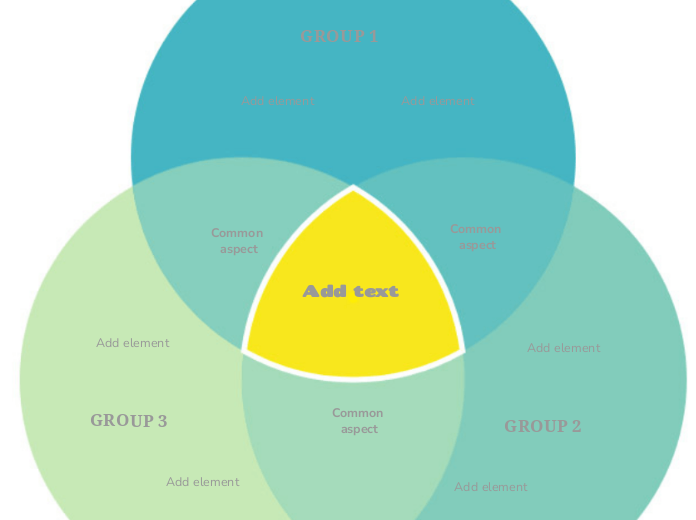
The green three-circle Venn Diagram highlights the differences and similarities between the 3 groups. The three-circle diagram is an incredibly powerful and simple tool to use when you want to compare 3 groups of elements that have one (or more) things in common. It's a great diagram to visually represent these 3 groups, and you can use it for business, school or even personal purposes. Type the third group name. Type the element/characteristic you want to add to this group. Type the common aspect between the two groups. Type the second group name. Type the first group name. This Venn Diagram represents 3 groups highlighting the similarities and differences between them. Mapy myśli pomagają w burzy mózgów, w dostrzeganiu powiązań między pojęciami oraz w porządkowaniu i generowaniu pomysłów. Szablony map myśli ułatwiają jednak start, bo zawierają gotowy szkielet z informacjami na dany temat i wskazówkami, jak go uzupełnić. Zapewniają strukturę, która łączy wszystkie elementy tematu i służy jako punkt wyjścia dla twojej własnej mapy myśli. To praktyczne rozwiązanie, gdy chcesz szybko stworzyć mapę myśli na konkretny temat – zarówno w biznesie, jak i w edukacji. Mindomo oferuje inteligentne szablony map myśli, dzięki którym praca i myślenie przychodzą bez wysiłku. Możesz wybierać spośród szablonów map myśli dostępnych na kontach biznesowych i edukacyjnych Mindomo albo tworzyć własne szablony od podstaw. Każdą mapę myśli możesz zamienić w szablon, dodając do jej tematów notatki ze wskazówkami.Venn Diagram Template
O tym szablonie
Venn Diagram (green three-circle) template
GROUP 3
Then double-click in the circle area to add elements/characteristics in this group only or in the overlapping areas.Add element
Common aspect
GROUP 2
Then double-click in the circle area to add elements/characteristics in this group only or in the overlapping areas.GROUP 1
Then double-click in the circle area to add elements/characteristics in this group only or in the overlapping areas.Add text
Type the common aspects between the three groups (or you can leave this empty).Dlaczego warto używać szablonów map myśli Mindomo?
Szablony oferują różne funkcje:
-
Produkty
-
Zastosowania
- Zastosowania ogólne
- Mapy myśli dla edukacji
- Mapy myśli dla biznesu
- Mapy myśli dla rozwoju osobistego
- Technologia wspomagająca
- Współpraca zespołowa
- Briefy kampanii dla marketerów
- Warsztaty rozpoznania potrzeb klienta dla konsultantów
- Ścieżki onboardingu dla HR i L&D
- Zarządzanie wiedzą
- Matryca kompetencji zespołu
- Biblioteka projektów
- Role
- Marketerzy
- HR i L&D
- Konsultanci
- Zarządzanie projektami
- Planowanie kampanii marketingowych
- Wdrażanie szkoleń dla pracowników
- Zakres prac
- Organizacja pomysłów
- Drzewa problemów
- Analiza potrzeb szkoleniowych
- Korzyści z mapowania myśli
-
Rozwiązania
- Przewodniki
- Twórz prezentacje z mapami myśli
- Ucz się z mapami myśli
- Planuj i organizuj z mapami myśli
- Ustalaj priorytety zadań z mapami myśli
- Rób notatki z mapami myśli
- Prawdziwe historie klientów
- Skalowanie treści edukacyjnych dla 11 000 lekarzy
- Praca zespołu: od wersji próbnej do niezbędnego narzędzia w dwa miesiące
- 10 lat bez slajdów: nowe podejście do wykładów z architektury
- Przeczytaj wszystkie historie
-
Zasoby
- Podstawy
- Co to jest mapa myśli?
- Jak tworzyć mapy myśli?
- Poradniki i pomoc
- Samouczki wideo
- Centrum pomocy
- Forum
- Przykłady i szablony
- Top 29 przykładów map myśli
- Co to jest mapa pojęć?
- Strony funkcji
- Edukacja
- Zadania dla nauczycieli
- Praca i życie prywatne
- Wersja desktopowa
- Blog Mindomo
- Cennik
- Zaloguj się
- Zarejestruj się
- Panel główny
Zarządzanie wiedzą
Korzyści z mapowania myśli
Dlaczego myślenie wizualne ułatwia zapamiętywanie i planowanie.
Poradniki i pomoc
Przykłady i szablony
Strony funkcji
 Blog
Blog Mindomo
Poradniki, przykłady i badania dotyczące myślenia wizualnego.
Przeglądaj wszystkie artykuły
Blog
Blog Mindomo
Poradniki, przykłady i badania dotyczące myślenia wizualnego.
Przeglądaj wszystkie artykuły