
Website Planner Template

Interactive map · Website Planner Template
Mind map: Website Planner Template

Website Planner Template

Free with a Mindomo account. Opens your own copy in the editor.

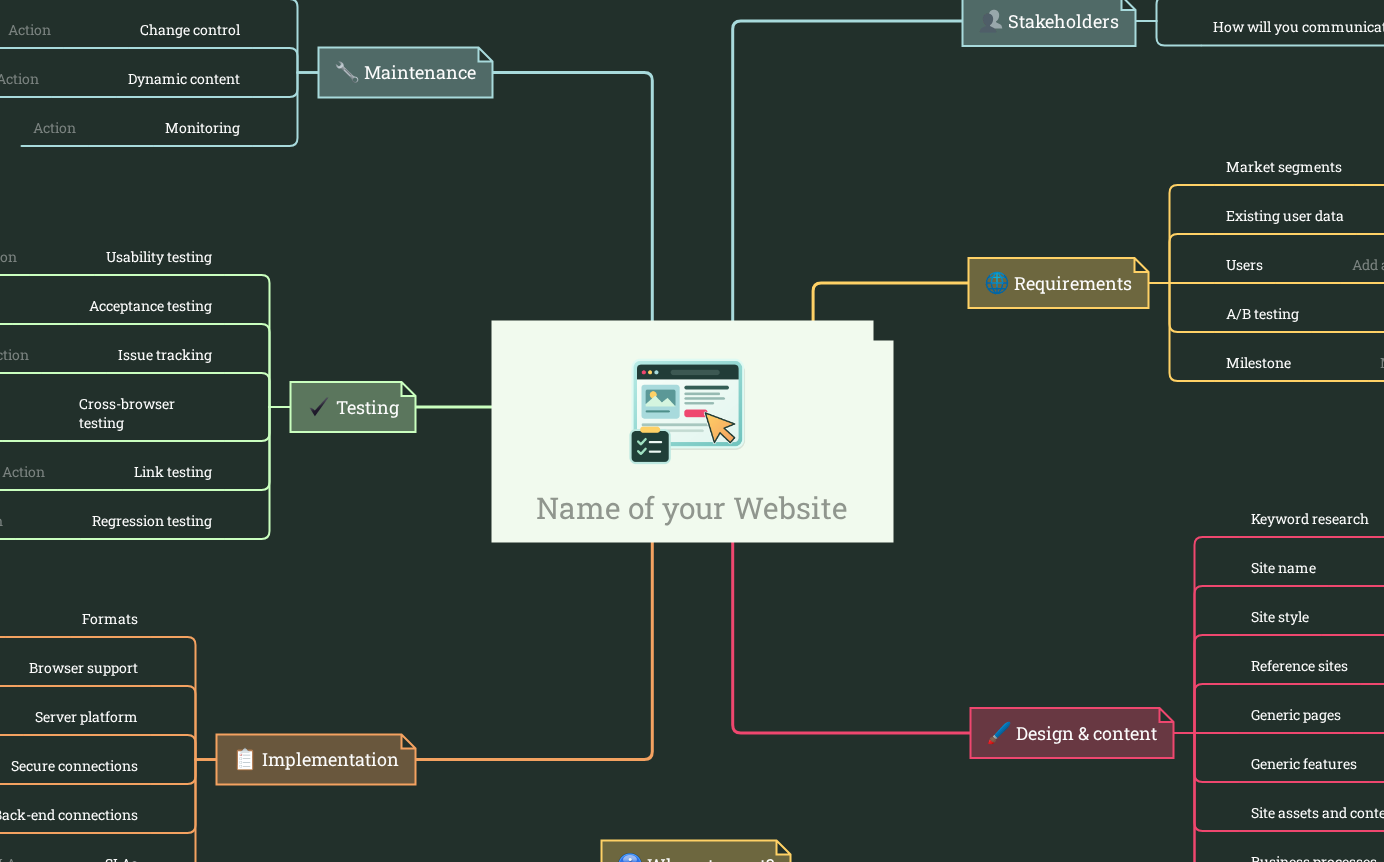
This mind map is a checklist for planning a website. It helps you to identify the objectives for your site and suggests many of the things that you may need to consider. You can make notes about how you will include them in your design.

Free with a Mindomo account. Opens your own copy in the editor.

About this template

Digital marketing is moving quickly so keep up! Learn how to plan a website structure using this mind map.

Brainstorm and find a name that strongly draws consumers and suggests what your business is about. Whether it's the first or the last thing you're doing, the name of your website will represent your brand and it will be the first thing that your customers will notice and remember.

Start with choosing one or multiple stakeholders and assign responsibilities. Then go on by defining your requirements: do a market research analysis and come up with a user segmentation that you will need in order to plan and create the content. Set the essential milestones for your website project and take into account A / B testing, which allows you to avoid unnecessary risks by optimizing your resources for maximum effectiveness and performance.

Once you've done all these steps, it's time to think of design and content. You will need to run keyword research, think of generic pages and features, choose the web site's style and outline the actual content. Include any reference sites that you find inspiring or not and think about how you will implement the business processes.

Implementation of a website is an essential process that needs careful planning, so identify the formats and browsers your site will support, the platforms you want to integrate it with and SLA metrics you will set up with the web site hosting company.

Lastly, pay close attention to your maintenance plan, as having a website well maintained and engaging is important to keep your customers committed and retained.

What’s inside this template

Website Planner Template: what the map covers

Central topic

Name of your Website

Type in the name of your web site and press Enter.

Stakeholders

2 topics

Role

Add a stakeholder role. You can choose from the suggestions or add your own. Approver Client representative User representative Tester Marketer Designer Copywriter Customer services Sales Editor Technology adviser Developer Systems Administrator

  • Who? — Add a responsible person

How will you communicate with stakeholders?

  • Responsible — How will you do the following? Refine and agree the requirements Deliver the collateral and materials Brief designers Obtain comments and feedback Obtain approval for release
Requirements

5 topics

Market segments

  • Market segment — Who are your target users? Add a market segment that reflects specific users.

Existing user data

  • Existing data — If you have existing marketing data about users and their needs, you can identify it or .

Users

  • Add a persona — A persona is a type of user who may visit your site. Think about: Prospective customers or existing customers Users ready to purchase Users with a question or a problem Users familiar with your industry Users unfamiliar with your industry Prospective partners or existing partners Industry pundits, bloggers or the press
    • Add objective: What does or do "Add a persona" be able to do on your web site? What is your call to action for this persona?
    • Reason: Why would "Add a persona" need to "Add objective"? What would motivate them to do this?
    • Reason: Why would "Add objective" need to "Reason"? What would motivate them to do this?
    • Privileges: What privileges does "Add a persona" need to "Add objective"? Do they need: Login credentials? A customer or account number? An order number or reference number? Proof of purchase? Or some other privileges?
    • Privileges: What privileges does "Add objective" need to "Privileges"? Do they need: Login credentials? A customer or account number? An order number or reference number? Proof of purchase? Or some other privileges?
    • Process
    • Step: How will "Add a persona" be able to "Add objective"? What are the steps in the normal (successful) process? How will the user know they have succeeded? You can add multiple topics here.
    • Failure
    • Step: How might "Add a persona" fail to "Add objective"? What could go wrong? You can add multiple topics here.
    • Resolution: How will Step be detected? How can it be resolved? You can add multiple topics here.

A/B testing

Will you use A/B testing? A/B testing tests the effectiveness of marketing techniques rather than the functioning of the technology. You can use it for: Testing colour, wording, graphics and layouts Testing calls to action Testing product positioning and targeting Add some notes about A/B testing for your site.

  • Action — Will you use A/B testing? A/B testing tests the effectiveness of marketing techniques rather than the functioning of the technology. You can use it for: Testing color, wording, graphics, and layouts Testing calls to action Testing product positioning and targeting Add some notes about A/B testing for your site.

Milestone

What are the key milestones for your website project? Add a topic and target date for each milestone. Think about: Setting up the team Agreement on content Agreement on graphic design Appointment of outsourced services Completion of usability testing Official launch Maintenance running smoothly

Design & content

9 topics

Keyword research

What keyword research has been done or needs to be done? What terms are your target audience searching for? Selected keywords will be needed for page names, body text and alt text for images, which will help with search engine optimization. Add some notes about keyword research for your site.

Site name

Add the site name, if chosen. If not, then a site name based on preferred keywords should help with search engine optimisation.

Site style

What website site are you aiming at? How will you brief the designers? What kind of impression do you want to create in the first few seconds? Do you want a casual and friendly site? Do you want a professional, conservative business-to-business site? Do you want a reliable business-to-customer site? about the style for your web site.

Reference sites

Add references to sites that you like or dislike, with reasons.

Generic pages

  • Page — Add as many generic pages as you will need. You can choose from the suggestions or add your own. Blog News and announcements Terms and conditions Distance selling regulations Privacy policy Permission marketing policy About Staff directory Contact details Contact / enquiry form Support Copyrights & trademarks Press Centre Site map FAQs Other

Generic features

  • Feature — You can choose from the suggestions or add your own. Search function Navigation & menus Social media connectors Registration and login User account support Permission marketing Discussion forums Contact forms Quotation systems Real-time chat Autoresponders eCommerce Video or Flash® support Cookie opt-in compliance Storage of cookies Site versioning Approval, publishing & rollback Other

Site assets and content

  • Content — Identify content and assets that you will need for your site. You can choose from the suggestions or add your own. Partners & channels Tutorials Ratings and reviews Case studies Product catalogue Product & service descriptions Brochures & data sheets Specifications Skills & accreditations Testimonials Downloads Images Videos Logos Other

Business processes

What business processes will your web site trigger? Who will do these, and how? Think about: Responding to inquiries Fulfilling orders Providing customer service Providing product support & warranty services Communicating with partners and channels Add some notes about business processes that your web site will link to.

Wire frames

How will you visualize your site structure and design? You could use: Wire-frame software Graphics or block diagrams Hand-drawn sketches Sticky notes Your design should show the flow of typical actions and focus on making these as simple as possible. Add some notes about communicating your site layout and design.

Maintenance

4 topics

Sources of change

Identify the sources of change on your website. Think about: User feedback Marketing campaigns Changes in products and services offered Improvements from analysis of usability feedback Changes incorporate style or logos Changes in your organization that need to be reflected in the web site Add a source of change for your website.

Change control

What will be your process for managing change on your website? Think about: How changes will be identified and logged Who will do them and how often How they will be tested How they will be authorized for release How they will be rolled out without disrupting the user experience Add an action needed to establish change control.

Dynamic content

If your site contains dynamic information such as a blog, a news feed, user forums or regular campaigns, how will these be updated and published? Think about: A publishing schedule Who will do this How it will be staged and checked before publishing How obsolete information will be removed Moderating user forums, cleaning up junk posts and managing users

Monitoring

Your web site will need to be regularly monitored to ensure that problems are detected early. Think about: Monitoring outages and slow response with automated software Monitoring for hacking or security breaches Schedules for a 24x7 response if necessary Add actions to establish monitoring and response for your site.

Testing

6 topics

Usability testing

You will need to test the usability and user stories that the site should deliver. Think about: Having a representative panel of users Organising supervised test situations Preparing test scenarios and instructions Analysing issues and making improvements Analysing site statistics to see how users navigate Analysing feedback from the site to make improvements to the design and navigation Using software to support user testing

Acceptance testing

What are the criteria for accepting the site? How will this testing be carried out? Who will do it? Add some information about acceptance testing.

Issue tracking

When performing tests, or receiving feedback on the technical aspects of the site, how will you collect and track issues? Think about: Capturing screenshots Using mark-up software that lets users add comments to a site Logging issues and their current status Scheduling fixes Logging changes and fixes against a site version or last-update date

Cross-browser testing

You will need to test against your supported browsers, especially after updates. Add some notes about how this will be achieved. Think about: Maintaining your list of supported browsers Notifications of updates, so that you can test new versions Establishing a test platform with browsers installed Cross-browser testing stacks & tools HTML validation services

Link testing

Links tend to go stale over time and need periodic testing. about on you will detect broken links. Options include: Providing a reporting function on your site Manually testing against a schedule Running an automatic link testing tool

Regression testing

You should carry out a basic regression testing after making significant changes to your site or the back-end technology, in case some disruption has occurred. Think about: How you will be notified of changes that should trigger regression testing (e.g. database upgrade, platform upgrade, revisions to the product catalog, changes to e-commerce, etc.) Defining a basic set of regression tests that verify that your site is functioning correctly

Implementation

6 topics

Formats

Add information about the formats your site will need to support. Think about: Accessibility guidelines and requirements (e.g. WCAG guidelines to ensure sites are accessible a range of abilities) Support for low-bandwidth users "Adaptive" layouts for mobile devices Target screen resolutions Content ratings or age verification

Browser support

What browsers will your site need to support? It is difficult to support all browsers as technologies change. Many web sites declare older browser versions as unsupported. Add included or excluded browsers and versions.

Server platform

Web sites can be implemented in a variety of ways. Choose from the suggestions or add your own. Content Management System (CMS) Custom coded Hosted on own servers Hosted on third party servers

Secure connections

A secure server and HTTPS encryption may be needed if you are handling: Payment information Logins and passwords Sensitive information, e.g. financial, health or other personal details about actions you will need to take about using a secure server.

Back-end connections

Include a back-end connection from the suggestions or add your own. CMS database Auto-responder system E-commerce payments Stock control system Permissions-based content

SLAs

Service Level Agreements define the reliability and capacity of service and are usually part of an agreement with a web site hosting company. Are there specific terms that you will require? Think about: Number of concurrent users on the site Storage space required Bandwidth per month Percentage uptime Add an action that you need to take to establish SLA metrics for your site.

Where to next?

Once you have gathered the initial specification for your web site, you can use this map to: Gather more information Develop your plans further Add links to resources and your new site Keep track of tasks and status

How to use it

  1. 1

    Open the template

    Click “Use this template” and sign in with a free account.

  2. 2

    Make it yours

    Replace the topics and fill in the notes.

  3. 3

    Share it

    Share, present or export it, or switch it to an outline or Gantt view.