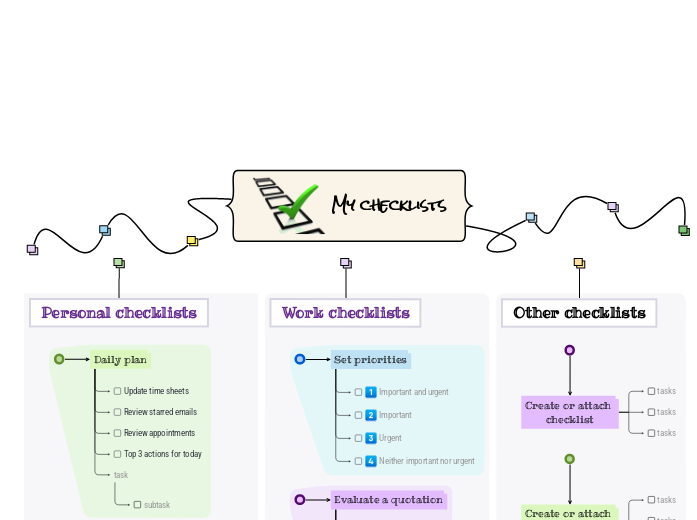
This template helps you categorize your to-dos into personal, work, and other sections for better organization. Simply fill in each category with your tasks and prioritize them according to your needs. Whether you’re managing daily simple tasks, work assignments, or other things you need to do, this checklist ensures you stay organized and focused on what matters most. This mind map contains some example checklists that you can modify or delete. Create your own checklists and add a link to them. Create or attach checklist Create or attach checklist. tasks Add tasks. You can copy this topic to create a new category of checklists. Review a project Use this checklist to review the status of a project and decide on corrective actions. Review Risks Review Issues Review resources Review budget Review schedule Evaluate a quotation Use this checklist to help evaluate a quotation received from a supplier. Reputation Warranty Availability Pricing Requirements Set priorities Use this checklist to help with task prioritisation. Neither important nor urgent Identify tasks that you will defer and may never do. Urgent Identify tasks that are 'urgent' as defined by someone else, but do not contribute to longer term goals. Important Identify tasks that contribute to long term goals, but are not time-sensitive. Important and urgent Identify which tasks are both important (contribute towards long term goals) and time-sensitive. You can copy this topic to create a new category of checklists. Prepare for an online meeting Turn on Focus Assist Spare mouse battery Shut down other apps Check sound and camera Set a backdrop Either tidy up your office, or arrange a green screen and electronic backdrop. Close windows & doors Minimise external noise. Set phones to silent Set mobile and desk phones to silent. Check the meeting link Materials circulated beforehand Monthly plan Review Daily Dashboard Review your Daily Dashboard map to make sure it is helping you to manage your workload effectively. Administrative updates Set training objectives Schedule meetings and reviews Review appointments and deadlines Weekly plan Empty inbox Set 3 major objectives Daily plan Add here your to-dos for the day! task subtask Top 3 actions for today Review appointments Review starred emails Update time sheets 心智圖能幫助您集思廣益、建立概念之間的關聯,並整理與激發想法。 而心智圖範本讓入門更容易,因為範本是已含特定主題資訊與引導說明的架構。換句話說,範本先替您搭好能涵蓋該主題所有要素的結構,可作為您個人心智圖的起點。無論用於商業或教育,心智圖範本都能為特定主題的心智圖提供實用的解決方案。 Mindomo 提供智慧心智圖範本,讓您輕鬆工作、順暢思考。 您可以從 Mindomo 商業版或教育版帳號中挑選各式心智圖範本,也可以從頭建立自己的範本。只要在主題上加入進一步的引導說明,任何心智圖都能變成心智圖範本。關於此範本
Stay on top of your tasks with the My Checklist template.
My checklists
You can add new checklists OR add new steps to the existing ones.
Read more about how to use checklists in the Mindomo blog.Other checklists
To add a new checklist, press the Insert or TAB key or create a checklist on the spot.Work checklists
To add a new checklist to 'Work checklists', press the Insert key.
To add a new step to Set priorities, press Insert or TAB key.Personal checklists
To add a new checklist to 'Personal checklists', press the Insert or TAB key.
To add a new step to 'Prepare for an
online meeting', press Insert or click the button below.
Press Enter to add another step to 'Prepare for an
online meeting'.
Press Enter to add another step to 'Prepare for an
online meeting'.
Press Enter to add another step to 'Prepare for an
online meeting'.
Press Enter to add another step to 'Prepare for an
online meeting'.
Press Enter to add another step to 'Prepare for an
online meeting'.
Press Enter to add another step to 'Prepare for an
online meeting'.
Press Enter to add another step to 'Prepare for an
online meeting'.
To add a new step to 'Monthly plan', press Insert or Tab key.
Press Enter to add another task.
Press Enter to add another task.
Press Enter to add another task.
Press Enter to add another task.
Press Enter to add another task.
To add a new step to 'Weekly plan', press Insert or Tab key.
Press Enter to add another step to 'Weekly plan'.
Press Enter to add another step to 'Weekly plan'.
Press Enter to add another step to 'Weekly plan'.
To add a new step to 'Daily plan', press Insert or Tab key.
Add notes
Add hyperlink
Press Enter to add another step to 'Daily plan'.
Add notes
Add hyperlink
Press Enter to add another step to 'Daily plan'.
Add notes
Add hyperlink
Press Enter to add another step to 'Daily plan'.
Add notes
Add hyperlink
Press Enter to add another task to 'Daily plan'.為什麼要使用 Mindomo 心智圖範本?
範本提供多種功能: