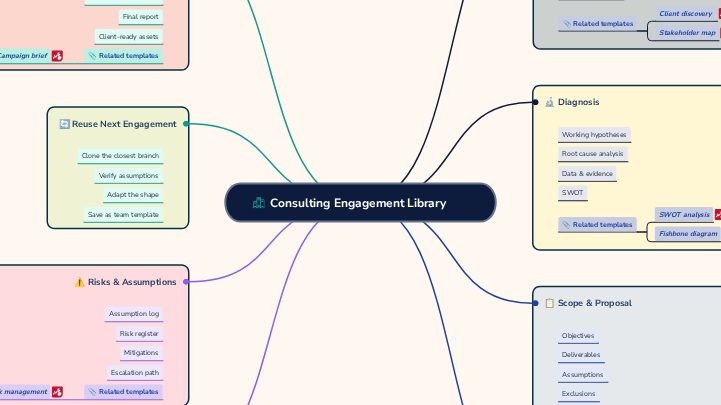
Client engagements often involve several parallel workstreams, multiple owners, interdependent deliverables, and recurring governance activities. This engagement delivery template helps teams plan, coordinate, and manage the successful delivery of client engagements from kickoff through completion. It brings together objectives, scope, deliverables, milestones, responsibilities, timelines, dependencies, risks, and communication activities in one visual workspace. Use this template to align stakeholders, clarify ownership, track progress, manage expectations, and keep key deliverables on schedule. It supports consulting projects, professional services engagements, client implementations, and other structured delivery processes where clear coordination and visibility are essential. Use this map to organize an engagement into clear workstreams and a shared operating cadence. Complete each lane to identify the owner, expected deliverable and timing, key dependencies, and current status. The map gives the team a single view of who is responsible for what, how workstreams connect, and how decisions and escalations are managed. Open these companion templates to define scope and structure client discovery. Enter the core meeting rhythm, escalation route, and location of the decision log. Record where engagement decisions are documented, such as a shared file, workspace, or linked decision log. Describe how issues are escalated, including the sequence of contacts, decision owners, and expected response path. Enter how often the steering committee meets and, where useful, note the usual day, timing, or triggering conditions. Enter the regular day and time for the engagement team’s weekly stand-up, including the time zone where relevant. Use this lane to identify the production lead, final deliverable and timing, dependencies, and current status. Record the current status of Workstream 5, such as on track, at risk, blocked, or complete, and add a brief note if clarification is needed. List the inputs, decisions, access, or upstream activities that must be completed before Workstream 5 can progress. Describe the key output for Workstream 5 — Deliverable Production and state when it is due or expected to be completed. Enter the person accountable for Workstream 5 — Deliverable Production. Use a clear name and, where useful, include their role. Use this lane to capture the solution-design lead, intended output and deadline, dependencies, and current status. Record the current status of Workstream 4, such as on track, at risk, blocked, or complete, and add a brief note if clarification is needed. List the inputs, decisions, access, or upstream activities that must be completed before Workstream 4 can progress. Describe the key output for Workstream 4 — Solution Design and state when it is due or expected to be completed. Enter the person accountable for Workstream 4 — Solution Design. Use a clear name and, where useful, include their role. Use this lane to define the analysis lead, model output and due date, upstream dependencies, and current status. Record the current status of Workstream 3, such as on track, at risk, blocked, or complete, and add a brief note if clarification is needed. List the inputs, decisions, access, or upstream activities that must be completed before Workstream 3 can progress. Describe the key output for Workstream 3 — Analysis & Modelling and state when it is due or expected to be completed. Enter the person accountable for Workstream 3 — Analysis & Modelling. Use a clear name and, where useful, include their role. Use this lane to record the interview lead, expected output and timing, dependencies, and current status. Record the current status of Workstream 2, such as on track, at risk, blocked, or complete, and add a brief note if clarification is needed. List the inputs, decisions, access, or upstream activities that must be completed before Workstream 2 can progress. Describe the key output for Workstream 2 — Client Interviews and state when it is due or expected to be completed. Enter the person accountable for Workstream 2 — Client Interviews. Use a clear name and, where useful, include their role. Use this lane to capture diagnostic data ownership, deliverable timing, dependencies, and current status. Record the current status of Workstream 1, such as on track, at risk, blocked, or complete, and add a brief note if clarification is needed. List the inputs, decisions, access, or upstream activities that must be completed before Workstream 1 can progress. Describe the key output for Workstream 1 — Diagnostic & Data and state when it is due or expected to be completed. Enter the person accountable for Workstream 1 — Diagnostic & Data. Use a clear name and, where useful, include their role. 思维导图可以帮助你集思广益,建立概念之间的关系,组织和产生想法。 然而,思维导图模板提供了一种更容易上手的方法,因为它们是包含特定主题信息和指导说明的框架。从本质上讲,思维导图模板确保了将特定主题的所有元素结合在一起的结构,并可作为个人思维导图的起点。思维导图模板是一种资源,可为创建特定主题的思维导图提供实用的解决方案,无论是用于商业还是教育。 Mindomo 为你带来智能思维导图模板,让你毫不费力地运作和思考。 您可以从Mindomo的商业或教育账户中选择各种思维导图模板,也可以从头开始创建自己的思维导图模板。任何思维导图都可以转化为思维导图模板,只需在其中一个主题上添加进一步的指导说明即可。Engagement Delivery Template
This mind map helps teams structure an engagement by workstream, clarify ownership and deadlines, track dependencies and status, and define the meeting cadence, escalation path, and decision-making process.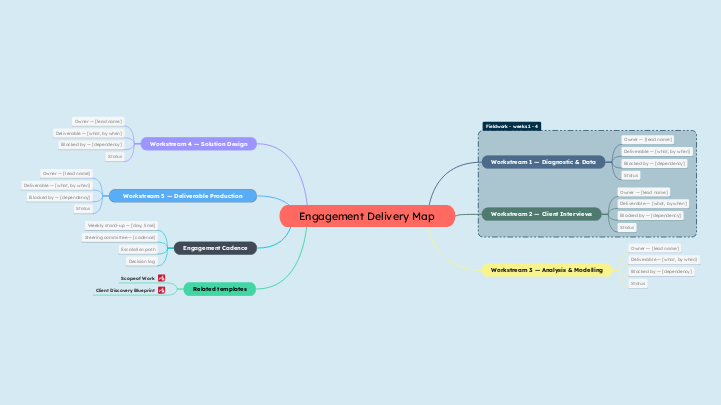
关于此模板
Engagement delivery template
Engagement Delivery Map
Related templates
Client Discovery Blueprint
Scope of Work
Engagement Cadence
Decision log
Escalation path
Steering committee — [cadence]
Weekly stand-up — [day, time]
Workstream 5 — Deliverable Production
Workstream 4 — Solution Design
Workstream 3 — Analysis & Modelling
Workstream 2 — Client Interviews
Workstream 1 — Diagnostic & Data
Status
Blocked by — [dependency]
Deliverable — [what, by when]
Owner — [lead name]
为什么使用 Mindomo 思维导图模板?
模板具有各种功能: