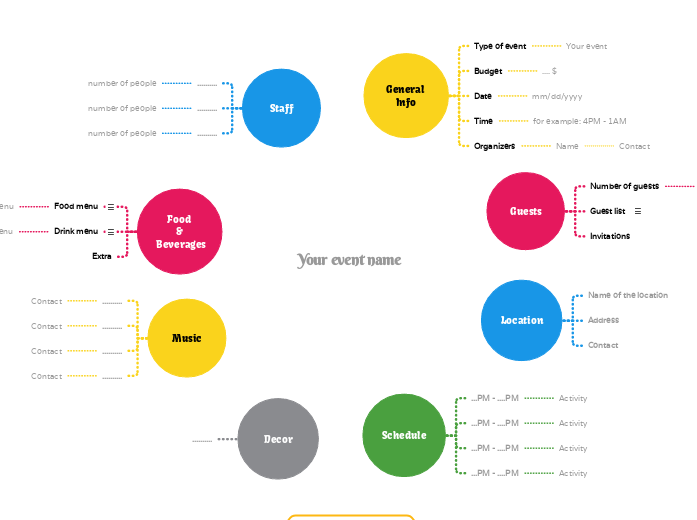
This template helps you organize all aspects of your event by breaking down tasks into manageable steps. Start by filling in key details such as the event date, venue, and guest list. Then, outline tasks like invitations, catering, and decorations, and assign deadlines to ensure everything runs smoothly. Ideal for both personal and professional events, this template guides you through the entire planning process, making sure no detail is overlooked. This last step is optional and it's only for public events. Write your event name To create a unique and pleasant ambient, make sure you have the perfect ornaments. If you have an event where you will have music, think about what you need: Food & Beverages Here you can add extra things you would like to offer at your event, such as: Drink menu Hot drinks Beer Soft drinks Long drinks Cocktails Spirits Wine DRINK MENU Food menu EVENT MENU VEGETARIAN/VEGAN MENU CHILDREN MENU FOOD MENU number of menus Add how many portions of this type you need. Now that you have all the activities set up, you can write down all the necessary employees. Add how many people on this position you need. First of all, think about all the activities that will happen during the event, and then schedule them. Add the timetable. Add the activity. Another important aspect is the location. Add a phone number or email address. Add the address of the location. Add the name of the location. The guests are one of the most important elements of an event. Depending on the type of your event, think about how you would like to invite people: GUEST LIST Now think about specific people you would like to invite. How many guests do you have? Let's start with the general information about the event. Add the people who organize/host this event. Add the name. Contact Add the contact information, such as phone number or email address. Add the time slot, without being specific about the time table. When will this event happen? An important aspect to start with is your total budget. What kind of event do you want to plan? 心智圖能幫助您集思廣益、建立概念之間的關聯,並整理與激發想法。 而心智圖範本讓入門更容易,因為範本是已含特定主題資訊與引導說明的架構。換句話說,範本先替您搭好能涵蓋該主題所有要素的結構,可作為您個人心智圖的起點。無論用於商業或教育,心智圖範本都能為特定主題的心智圖提供實用的解決方案。 Mindomo 提供智慧心智圖範本,讓您輕鬆工作、順暢思考。 您可以從 Mindomo 商業版或教育版帳號中挑選各式心智圖範本,也可以從頭建立自己的範本。只要在主題上加入進一步的引導說明,任何心智圖都能變成心智圖範本。關於此範本
How to plan an event easy
For public events
Your event name
Decor
You can hire a company or do it yourself.
Write here the style or the elements you want to include, for example:Music
Food & Beverages
Extra
Drink menu
Create your drink menu in the notes section
Write the type of menu you chose.Food menu
Type of menu
Create your food menu in the notes section
Don't forget to create a vegetarian/vegan option and special menus for children.
Write the type of menu you chose.
If you want more options, write each of them on separate topics.Staff
For example:..........
number of people
Schedule
Here are some examples:...PM - ....PM
Activity
Location
Think about a place that:Address
Note: you should mention it to your guests too when you invite them.Name of the location
Add their website hereGuests
Invitations
Guest list
Create a guest list in notes:
Add your guest listNumber of guests
Write the total number of people who will participate..... persons
General Info
Organizers
Name
Time
for example: 4PM - 1AM
Date
Add the day or the period (if there are more days).mm/dd/yyyy
Budget
.... $
Type of event
Your event
為什麼要使用 Mindomo 心智圖範本?
範本提供多種功能: