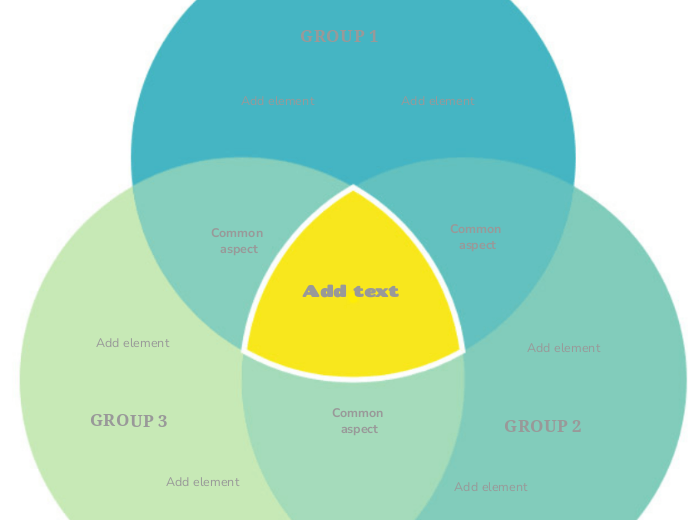
The three-circle diagram is an incredibly powerful and simple tool to use when you want to compare 3 groups of elements that have one (or more) things in common. It's a great diagram to visually represent these 3 groups, and you can use it for business, school or even personal purposes. Type the third group name. Type the element/characteristic you want to add to this group. Type the common aspect between the two groups. Type the second group name. Type the first group name. This Venn Diagram represents 3 groups highlighting the similarities and differences between them. 心智圖能幫助您集思廣益、建立概念之間的關聯,並整理與激發想法。 而心智圖範本讓入門更容易,因為範本是已含特定主題資訊與引導說明的架構。換句話說,範本先替您搭好能涵蓋該主題所有要素的結構,可作為您個人心智圖的起點。無論用於商業或教育,心智圖範本都能為特定主題的心智圖提供實用的解決方案。 Mindomo 提供智慧心智圖範本,讓您輕鬆工作、順暢思考。 您可以從 Mindomo 商業版或教育版帳號中挑選各式心智圖範本,也可以從頭建立自己的範本。只要在主題上加入進一步的引導說明,任何心智圖都能變成心智圖範本。關於此範本
Venn Diagram (green three-circle) template
GROUP 3
Then double-click in the circle area to add elements/characteristics in this group only or in the overlapping areas.Add element
Common aspect
GROUP 2
Then double-click in the circle area to add elements/characteristics in this group only or in the overlapping areas.GROUP 1
Then double-click in the circle area to add elements/characteristics in this group only or in the overlapping areas.Add text
Type the common aspects between the three groups (or you can leave this empty).為什麼要使用 Mindomo 心智圖範本?
範本提供多種功能: