How to master a subject

Interactive map · How to master a subject
Mind map: How to master a subject

How to master a subject

Free with a Mindomo account. Opens your own copy in the editor.

This mind map will help you gather everything you need to know about a certain subject, from course objectives to evaluation criteria, details about projects, lectures, and courses.

Free with a Mindomo account. Opens your own copy in the editor.

About this template

How to master a subject

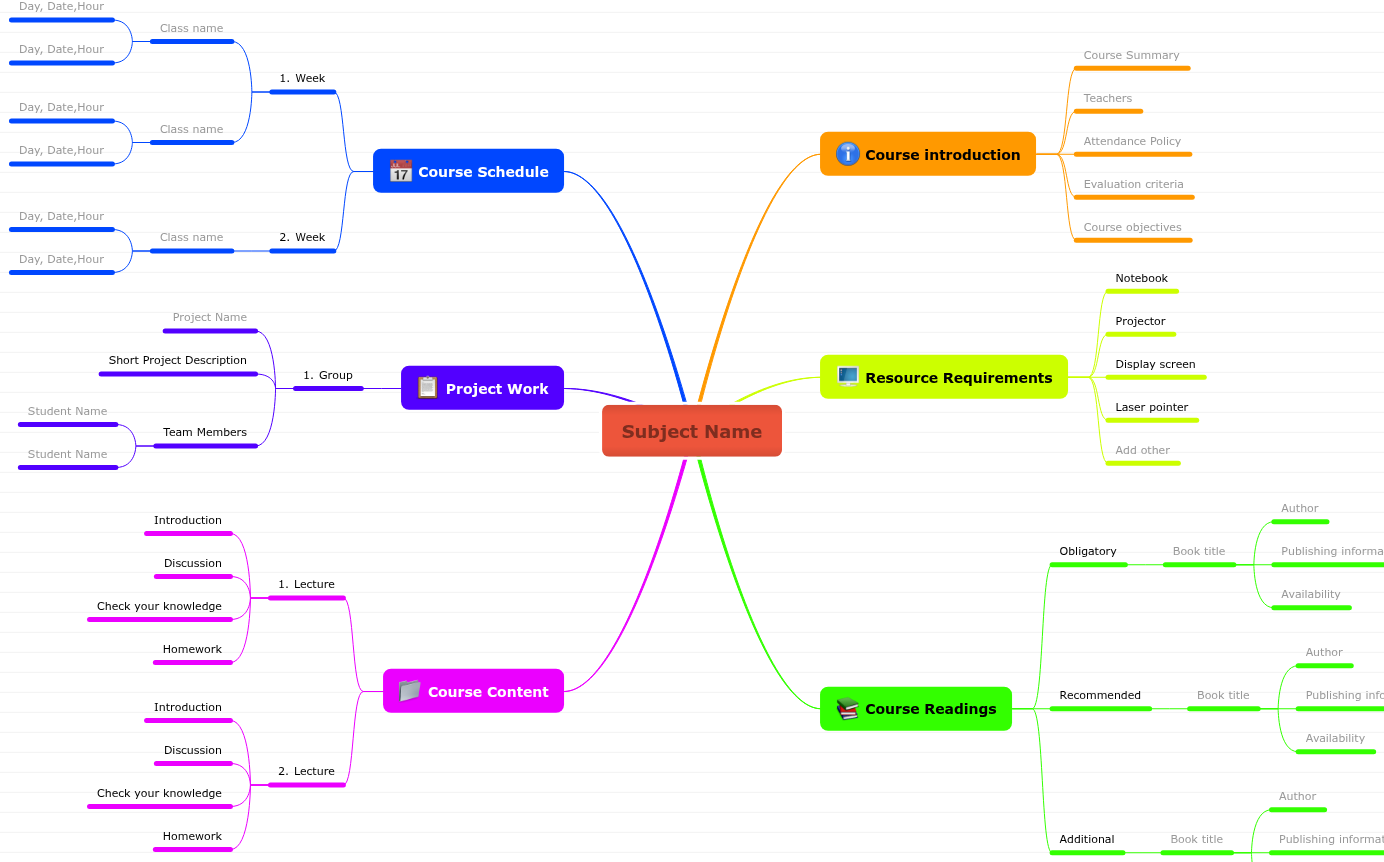
Learn how to master a subject using this mind map template that will help you gather information in one place and prepare for courses and exams. Add in this mind map details about the course introduction, resource requirements, books that you need to read, course content, project work, and course schedule.

What’s inside this template

How to master a subject: what the map covers

Central topic

Subject Name

Type in the name of your subject.

Course introduction

5 topics

Type in all the info you would like to know about this subject. If there is something you don't know yet, no problem! You can fill in the blanks along the way.

Course Summary

Add details about your course.

Teachers

Type in the name of your teachers and teacher assistants, plus any details you should know about them.

Attendance Policy

Write down the attendance policy, to avoid confusion throughout the year.

Evaluation criteria

Add details about your teachers' evaluation criteria. This way you will know the aspects you need to focus on.

Course objectives

Did your teacher present the objectives of this course? Write them down and add anything else that might help you reach these objectives.
Resource Requirements

5 topics

Review your resource requirements and tick off the devices you will need as well as their availability. Add others, if necessary.

Notebook

Select as needed: available unavailable

Projector

Select as needed: available unavailable

Display screen

Select as needed: available unavailable

Laser pointer

Select as needed: available unavailable

Add other

Add other resources: available unavailable

Course Readings

3 topics

Add key information about the books you've read. If you feel it's necessary, you can add a small summary of your readings in the Notes section.

Obligatory

  • Book title
    • Author: Name the author.
    • Publishing information: Add the publishing information.
    • Availability: Add details about where you can get it from. For e.g.: library, bookstore, audiobook, etc.

Recommended

  • Book title
    • Author: Name the author.
    • Publishing information: Add the publishing information.
    • Availability: Add details about where you can get it from. For e.g.: library, bookstore, audiobook, etc.

Additional

  • Book title
    • Author: Name the author.
    • Publishing information: Add the publishing information.
    • Availability: Add details about where you can get it from. For e.g.: library, bookstore, audiobook, etc.

Course Schedule

1 topic

Schedule your course ahead. Knowing all the information will make everything easier.

Week

Add the class information for each week.

  • Class name — Add class name.
    • Day, Date,Hour: Add additional information about this class.

Project Work

1 topic

Add here all the details about your projects.

Group

  • Project Name — Add the project name.
  • Short Project Description
  • Team Members — Add the team members.

Course Content

1 topic

Add detailed notes about each lecture, so that when the time comes to prepare for exams, you will have an easier and quicker overview.

Lecture

  • Introduction
  • Discussion — Write down if there are things you would like to discuss or clarify with your teacher or colleagues in relation to this topic.
  • Check your knowledge — Add a list of questions to help you recap your lecture.
  • Homework — Add a short description of your homework and any details you need in order to understand and complete the task.

How to use it

  1. 1

    Open the template

    Click “Use this template” and sign in with a free account.

  2. 2

    Make it yours

    Replace the topics and fill in the notes.

  3. 3

    Share it

    Share, present or export it, or switch it to an outline or Gantt view.