A clean marketing campaign planning mind map template for organizing campaign details, channels, milestones, team responsibilities, risks, approvals, and post-launch review. It helps teams plan launches, track dependencies, manage blockers, and keep campaign execution aligned from kickoff to retrospective. This template helps you plan your marketing campaigns. It provides a structured framework for defining campaign objectives,tasks, deadlines, and responsibilities, distribution channels. By using this template, you can improve team alignment, streamline collaboration, and ensure every campaign is executed with clarity, consistency, and measurable results. Add a title to your campaign plan. The campaign isn't done at launch. Fill this during the retrospective. Fill this during the retrospective. 📅 The team meeting where you figure out what worked. Calendar it before launch, not after. One person owns pulling the numbers together. 📅 Usually day 7, day 14, day 30. The live state of the campaign. If the brief changes, log it here. Plans drift quietly; this is the place to make drift visible. Open questions waiting for an answer. What's stopping work right now? One line each. Who's unblocking it? Tasks likely to slip. Name them now, not when they actually slip. The points where work stops until someone signs off. Select cadence: The last yes before launch. Usually the campaign lead's manager or marketing leadership. If your team is part of a larger org, the brand team often has a sign-off. Required for regulated claims, financial figures, healthcare, anything customer-facing in a regulated category. The internal review before assets go to legal or production. Make sure you share this diagram with your team and collaborators. Leadership and cross-functional partners who need to see the plan but won't edit it. The people who sign off, not the people who do the work. Keep this list short. Same as agencies. Guest editor access. External agencies. Add as guest editors. The people on payroll. Add them with full edit access. The handful of dates everything else moves around. Write the dependencies that span channels. Usually, 2 to 4 weeks after launch. Put it on the calendar now, not later. 🎯 Public launch date. The one date that shouldn't move. The most-missed dependency in regulated industries. Often, a hidden dependency for paid and email. Mark it. The day creative assets are locked. The day planning ends, and execution begins. Select your channel mix: Add status Select task status: Use this for the context the owner needs. Add notes and keep it short, link out resources, documents, images if needed. Add task Add tasks related to this channel. Add date Add the deadline. 🧑🏻 Who delivers this task? One person, even if a team supports them. Add link to the Campaign Brief document. Select current status: Add the date the campaign goes live to the audience. Add the start date of the planning and the deadline. Type the name of the person who owns delivery, not strategy. Every Mindomo template opens with its structure already in place: descriptive topics, guiding notes attached to the branches where people usually get stuck, and a default shape that new topics inherit. Edit it in the browser, switch it to a concept map, outline or Gantt chart without redrawing anything, and export it in more than twenty formats. See how mind map templates work, or browse the full gallery by category.Marketing Campaign Plan Template
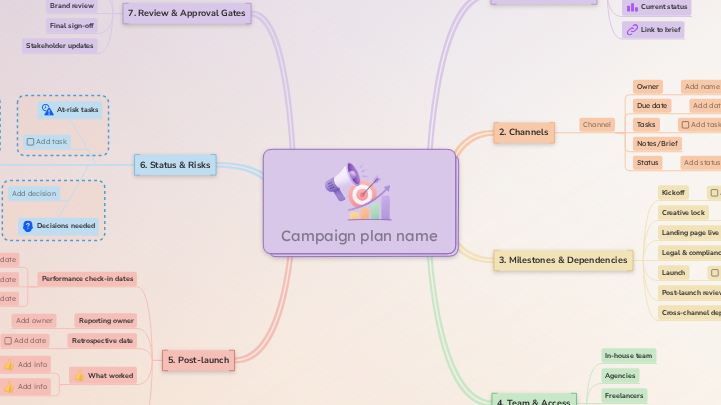
About this template
Marketing Campaign Plan Template
Campaign plan name
💡 Name it the same way your team will refer to it across tools/calendars.
Don't forget to:Post-launch
This branch closes it out properly, so the next campaign starts ahead.What didn't
Add each element that did not work as planned. Keep it short.What worked
Add info
Add each successful element. Keep it short.Retrospective date
💡 You can also add it as a deadline (you can also receive notifications if you schedule it here):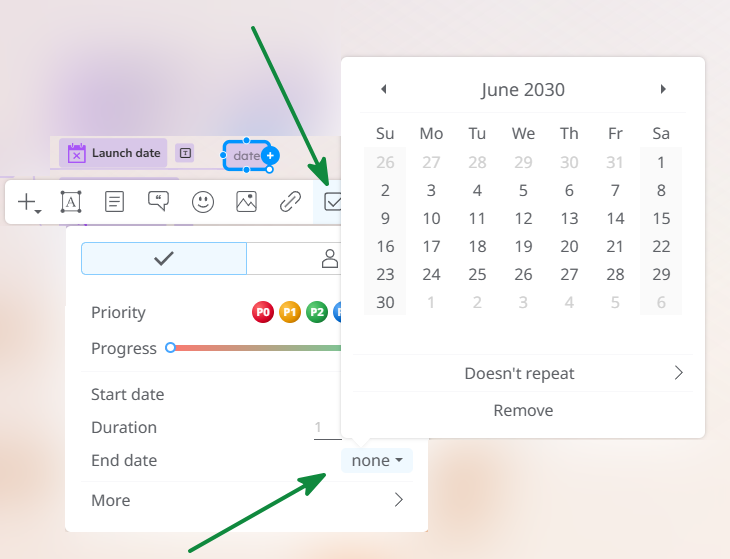
Reporting owner
Add owner
Performance check-in dates
Add them now so reporting doesn't slip.
💡 You can also add it as a deadline (you can also receive notifications if you schedule it here):Status & Risks
Update this branch each week.
If a task slips, surface it here before it surfaces at launch.Scope changes
Add change
Decisions needed
Add decision
💡Assign this to the person who needs to decide.Active blockers
Add blocker
At-risk tasks
Review & Approval Gates
Map these now so they don't catch you by surprise in week three.Stakeholder updates
Final sign-off
Add:Brand review
Add:Legal & compliance review
Add:Creative review
Add:Team & Access
Stakeholders (view-only)
Approvers
Freelancers
Agencies
In-house team
Milestones & Dependencies
Add cross-channel dependencies here so they're visible to everyone, rather than buried in one channel's tasks.Cross-channel dependencies
⭐ Examples: Post-launch review
💡 You can also add it as a deadline (you can also receive notifications if you schedule it here):Launch
💡 You can also add it as a deadline (you can also receive notifications if you schedule it here):Legal & compliance review complete
💡 You can also add it as a deadline (you can also receive notifications if you schedule it here):Landing page live
💡 You can also add it as a deadline (you can also receive notifications if you schedule it here):Creative lock
Anything not done by this date moves out of scope or pushes launch.
💡 You can also add it as a deadline (you can also receive notifications if you schedule it here):Kickoff
💡 You can also add it as a deadline (you can also receive notifications if you schedule it here):Channels
Click each one you'll use. Each channel is a branch. Tasks live under channels, with owners and dates.Channel
Status
Notes/Brief
Optional: attach the brief with guidelines for the assets/content for this channel in case you need to add more details.
Select 'Diagram' and then select the brief. You can create it and add it later.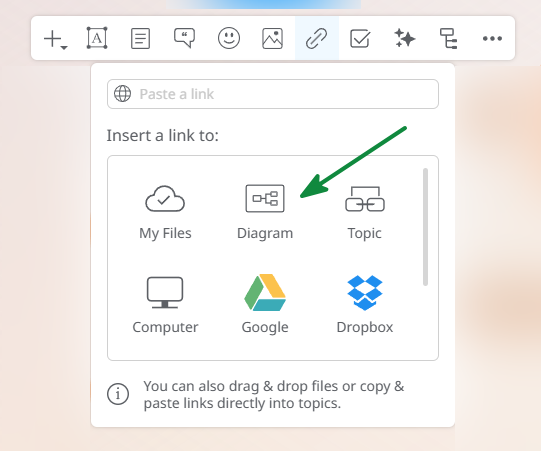
Keep them connected, but keep them separate.Tasks
You can assign tasks, set deadlines, and track progress for each task.Due date
When the task needs to be done, not when it could be done.
💡Then, you can also add it as a deadline (you can also receive notifications if you schedule it here):Owner
Campaign Overview
Link to brief
Select 'Diagram' and then select the brief. You can create it and add it later.
Keep them connected, but keep them separate.Current status
Launch date
date
💡Then, you can also add it as a deadline (you can also receive notifications if you schedule it here):Start date
start date ➡️ end date
❗When work begins, not when the campaign goes live.Campaign lead
Add name
Why use a Mindomo mind map template?
-
Products
-
Uses
- General Uses
- Mind Maps for Education
- Mind Maps for Business
- Mind Maps for Personal Development
- Assistive Technology
- Team Collaboration
- Campaign briefs for marketers
- Client discovery workshops for consultants
- Onboarding journeys for HR & L&D
- Knowledge Management
- Team Skills Matrix
- Engagement Library
- Roles
- Marketers
- HR & L&D
- Consultants
- Project Management
- Marketing campaign planning
- Employee training rollouts
- Scope of Work
- Idea Organization
- Issue Trees
- Training Needs Analysis
- Mind Mapping Benefits
-
Solutions
- Guides
- Make Presentations with Mind Maps
- How to Learn with Mind Maps
- Plan and Organize with Mind Maps
- Prioritize Tasks with Mind Maps
- Take Notes with Mind Maps
- Real Customer Stories
- Scaling educational content for 11,000 doctors
- Team workflow: from trial to indispensable in two months
- 10 years without slides: rethinking architecture lectures
- Read all stories
-
Resources
- Learn the basics
- What is a Mind Map?
- How to Mind Map?
- What is a Concept Map?
- Benefits of Mind Mapping
- Guides & Support
- Video tutorials
- Help center
- Forum
- Examples & templates
- Top 29 Mind Map Examples
- Concept Map Templates
- Plan projects with a Gantt Chart Maker
- Mindomo's Efficiency in Education
- Feature pages
- Education
- Teacher Assignments
- Work & Personal
- Desktop
- The Mindomo blog
- Pricing
- Log In
- Sign Up
- Dashboard
Mind Mapping Benefits
Why visual thinking makes recall and planning easier.
Learn the basics
Guides & Support
Examples & templates
Feature pages
 Blog
The Mindomo blog
Guides, examples and research on visual thinking.
Browse all articles
Blog
The Mindomo blog
Guides, examples and research on visual thinking.
Browse all articles